Assetto Corsa PC Mods General DiscussionPC 

  • Thread starter Thread starter daan
  • 154,886 comments
  • 48,752,879 views
I see a lot of presettings from the CM Video, neckFX and CSP. Just a matter of click on that file and you get redirected to the CM website and the presetting will be installed or saved.
Like to know is how to publish my CM presets, so others can easily test my CSP/Video settings.

note: clicking “share” does nothing.
 
Hi gents, how to modify KPI and caster:
View attachment 1426898
keep in mind the front caster is always negative (except on supermarket trolleys)
just play with the '2' point of the upper WB or/and the '2' point of the lower WB to set the CASTER. -6/-7 is an average value.
Points 1 and 3 of the upper WB have a lower position than the point 2, while points 1 and 3 of the lower WB have a upper position than the point 2, upper WB is always shorter than the Lower WB, all that combined with a good KPI makes the wheel when charged keeps a greater negative CAMBER
View attachment 1426900
to set the KPI (in this case with DWB) just play with the '2' points of the upper and lower WB. Always to keep a negative CAMBER, the KPI must be positive. 13 is an average value.
Have fun, Mike
Many thanks! I really appreciate your explanation.

Edit: I have successfully set the caster to 6.843 while maintaining the trail at -1.54. However the KPI still 0.000. Can you let me know what's wrong?
 
Last edited:
:lol:Sometimes when I follow mod updates, many things surprise me.For example, these👉View attachment 1426892
it's obvious, isn't it, or am I wrong?I have been observing these "protrusions" of the insides since the very first release.I see the same thing with the extension file.👉View attachment 1426894View attachment 1426895it seems that those who do this don't really understand it:lol:

I agree with this ugly 3d issue, I don't understand some people want to improve some small things with this big modeling (or converting I think) issue next to ...
And we have the same with rollbar, when you look inside the car through the rear side window, there are missing 3d on the Roll bar (there is not complete pipes)
 
hi gents,
For those who are interested I have prepared a compressed file of the files that I modified in the data folder. Make a backup of your files with the same name and drop mine in your data folder. Remove '.txt' extract and proceed as described. Done. the steering wheel is now well calibrated, the front wheels are no longer in contact with the fenders while turning. Have fun, its a very good mod.
Screenshot_f302_audi_a4q_stw_ks_nurburgring_6-1-125-16-26-47.jpg
 

Attachments

Last edited:
I have successfully set the caster to 6.843 while maintaining the trail at -1.54. However the KPI still 0.000. Can you let me know what's wrong?
Have a look on the second pic of my previous post, you have only two attach points with a number, 2 red and 2 yellow, just drag the 2 red to the left till you get 13~ for the KPI in the right window. that's done.
Have fun, Mike.
 
Last edited:
Some Tracks have a "Loading ai spline" text, this can takes several minutes to load, if i delete the ai and data folder it says "asynchronus loading" and again "Loading ai spline".

I don't understand why some Tracks have/use this, Kunos doesn't use it either, it's so annoying that I have to immediately delete all routes that use this AI spline, because of long loading times.

How can i get rid of the AI spline forever?


And has anyone a rainx_fx for H22 La Pampa?
 
question, i wanna combine some tracks together so i can have less tracks in the main track folder but after copying everything to the new folder i get a message with "layout "xy" is missing for track "z", how can i fix that?
 
question, i wanna combine some tracks together so i can have less tracks in the main track folder but after copying everything to the new folder i get a message with "layout "xy" is missing for track "z", how can i fix that?
You must create the correct folder architecture in the main directory.
1738861030712.png
1738861132039.png
and don't forget about models.ini
1738861225085.png
all screenshots as an example
 

I want hide 1WALL7_3_SUB1
It's a big mesh, you will hide it on allmost half the track... To solve the bump, you have to hide also the pillars, mesh 1WALL7_3_SUB4
 
Last edited:
Some Tracks have a "Loading ai spline" text, this can takes several minutes to load, if i delete the ai and data folder it says "asynchronus loading" and again "Loading ai spline".

I don't understand why some Tracks have/use this, Kunos doesn't use it either, it's so annoying that I have to immediately delete all routes that use this AI spline, because of long loading times.

How can i get rid of the AI spline forever?


And has anyone a rainx_fx for H22 La Pampa?
I've noticed this 'loading AI spline' delay too, it seems to be another bad thing that came with one of the latest CSP updates. Funnily enough, it seems a lot worse the first time you load a track. After that it's a lot quicker. Maybe some file is being created the first time? IDK, but it's bloody annoying. Tracks previously used to load perfectly well and almost instantly prior to this.
 
I see a lot of presettings from the CM Video, neckFX and CSP. Just a matter of click on that file and you get redirected to the CM website and the presetting will be installed or saved.
Like to know is how to publish my CM presets, so others can easily test my CSP/Video settings.

note: clicking “share” does nothing.
Clicking SHARE LINK FOR... at the bottom should get you this:

Screenshot 2025-02-06 130106.png
Screenshot 2025-02-06 130118.png
Screenshot 2025-02-06 130126.png


If it doesnt, could it be because you only have the free version of Content Manager?
Otherwise I cant see why it wouldnt work :confused:
 
... The danger with acting impatient and entitled (even in jest and especially with free mods) is that the modder might feel underappreciated, which might make them think twice about bothering next time, or at the very least keeping updates private...
I think that the regular forum members who frequent this thread are somehow getting to "know" each other, and we should know how to distinguish between those who participate willingly and those who like to strain the atmosphere...

Likewise, when an artist exposes his work to the general public, he is also exposed to receiving opinions, demands, etc of all kinds. It would also be desirable for us to be able to distinguish between constructive criticism and those who only criticize for the sake of criticizing... who should not be given the slightest attention.

Luckily I think there aren't here many toxic people of that kind... 😉

(DISCLAIMER: This opinion is highly personal and subjective and as such, subject to any type of criticism. Although if the criticism is negative, I won't pay any damn attention to it.)

Peace, Love and lots of Fun, pals.
 
Last edited:
Clicking SHARE LINK FOR... at the bottom should get you this:

View attachment 1426971View attachment 1426972View attachment 1426973

If it doesnt, could it be because you only have the free version of Content Manager?
Otherwise I cant see why it wouldnt work :confused:
I just wanting to write: all the links are going in my case directly to "Content Manger" --> "sharing" Strangely I do not have the last two CM message popping up, while I do have the payed version.
 
can someone maybe tell me for which hidden valley track this skin is?
 
If the few of us would also have time for just a few laps with the brand new physics data I gently proposed for MY Fairlady asking for feedback, for which NO ONE HERE answered, That would be great.

Just Saying Come On GIF by A Little Late With Lilly Singh


What, vexed ? Me ? Nooo
there was SO MANY great stuff that came up last month i am barely done with the new WSC and GTC packs. I can't wait to try the Fairlady, and i'll let you know how much i loved it.

So, the version on GTplanet has the data.acd already updated or should i try the car first, then look for the physics update on this thread and install it, and then give you a feedback?
 
can someone maybe tell me for which hidden valley track this skin is?
 
there was SO MANY great stuff that came up last month i am barely done with the new WSC and GTC packs. I can't wait to try the Fairlady, and i'll let you know how much i loved it.

So, the version on GTplanet has the data.acd already updated or should i try the car first, then look for the physics update on this thread and install it, and then give you a feedback?
That was just a silly joke after 3 (more?) pages full of upgrades toward one single car, no need for any excuse pal :lol:

But yeah, I'm still gathering feedbacks from here and there on the new bodged physics, no changes yet in the released download on RD. So : download on RD is old (bad!) physics and the data file I gave is the new (good?) physics, still in beta.
Shouldn't be long, tho. Probably this week-end.
 
That was just a silly joke after 3 (more?) pages full of upgrades toward one single car, no need for any excuse pal :lol:

But yeah, I'm still gathering feedbacks from here and there on the new bodged physics, no changes yet in the released download on RD. So : download on RD is old (bad!) physics and the data file I gave is the new (good?) physics, still in beta.
Shouldn't be long, tho. Probably this week-end.
Ok i see why some complained about the car's behavior under heavy breaking. Personnally i'm gonna love it once i figure how to maintain the back a little straight.

So, i tried getting the data.acd. I opened it, saved it as an .acd file, and it crashes the car loading.

Think of me as a true autistic, not on the border of the spectrum, but at the center, overlapping every circles ever discovered, and tell me how to install the data.acd properly please
 
Last edited:
Ok i see why some complained about the car's behavior under heavy breaking. Personnally i'm gonna love it once i figure how to maintain the back a little straight.

So, i tried getting the data.acd. I opened it, saved it as an .acd file, and it crashes the car loading.

Think of me as a true autistic, not on the border of the spectrum, but at the center, overlapping every circles ever discovered, and tell me how to install the data.acd properly please
I'll PM you
 
question, i wanna combine some tracks together so i can have less tracks in the main track folder but after copying everything to the new folder i get a message with "layout "xy" is missing for track "z", how can i fix that?
This is something that I've done as well. For example, I wanted the Bugatti track to be part of the Le Mans / Circuit de la Sarte track.
Recently, I wanted to add the fantastic update to Zandvoort by RacingSounds to the Kunos Zandvoort folder. But also I wanted CM to combine my mileage for both tracks and keep my laptimes.

I will try to explain as precise as I can.
(English is not my native language.. And I might have had a few beers... Forgive my poor language, bitte)

The RacingSounds track is a good example, because it already has the track in it's own layout folder.

Take Imola, it has no layouts:
1738877218023.png


Brands Hatch has two layouts:
1738877247624.png

You see the difference, yes?

First, close ContentManager!

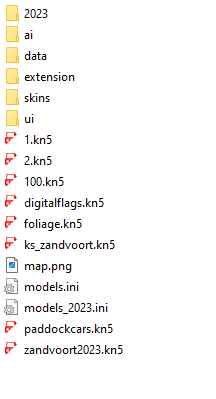
Now, the RacingSounds folder structure looks like this:
1738877323343.png

Notice the subfolder '2023' (=layout). Also, in the 'ui' subfolder, there is a sub-subfolder '2023'. And, the 'models_2023.ini' file. You see the pattern?

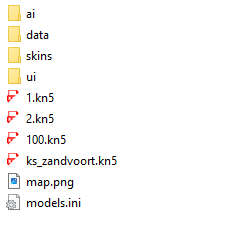
The standard Kunos Zandvoort track looks like this:
1738877377519.png

This one has no layout folders (yet!)
Notice the "ai" & "data" subfolders.

Now copy all the files from the RacingSounds Zandvoort to the Kunos Zandvoort folder, and when it asks to merge the 'ui' folder, say yes. Your combined folder will look like this:
1738877533576.png

One models.ini for the Kunos track
One models_2023.ini for the new layout within the Kunos track, but is it secretly the RacingSounds track. 2 in 1. It's fantastic!

Now, if you've not driven the track yet, or don't care about anything else, open ContentManager and have fun.


If you want to complicate things, continue reading:

In your '%appdata%\Local\AcTools Content Manager\Progress\' folder you'll find a file 'Progress (Sessions).data', open this with a notepad of your choice. CTRL+H for 'zandvoort2023/2023' and replace all with 'ks_zandvoort/2023'. Save & close.

Attached you'll find a fantastic (old) tool called Find & Replace. (change 'fnr.txt' to 'fnr.exe'). There might be better, newer alternatives, but this one works for me!
1738877883565.png

Couple of things. Where it says 'USER', put your Windows username.
We want to look for the individual sessions files in '%appdata%\Local\AcTools Content Manager\Progress\Sessions'
Put a filemask of '*.json', like above example. (In this folder there's only .json files but, if you use this program to look through you entire AC installation it will take a long, long time)
Put 'zandvoort2023' in the Find box.
Hit 'Find only'.

It will, magicly find all sessions for this track! It's very nice!

In a session file you'll find exactly 3 reference's to the 'old' track folder. ("track":"zandvoort2023-2023", CONFIG_TRACK=2023 & "TrackId\":\"zandvoort2023/2023\")

Change these to:
"track":"ks_zandvoort-2023"
CONFIG_TRACK=2023
"TrackId\":\"ks_zandvoort/2023\"

See the pattern?

Now if you save this file, your session will be saved with the current time. It messes up your Result tab in CM, Bad!
You might want to use a tool that can change a filedate. So before saving the .json, copy the original filedate, then and only then save the file. And then put the filedate back with your tool of choice. (May I suggest this tool by Nirsoft, it's also very old, hehe)

And here it is the mileage is correctly shown in CM:
1738943434733.png


We are not there yet. You might want to keep your laptimes. Now this is a bit more riskfull. Have I mentioned ContentManager should not be active. (I have warned you!!!)

* ALSO, IF YOU USE ANYTHING THAT STORES AND/OR VALIDATES LAPTIMES, THIS WILL FAIL *

In your '%userProfile%\Assetto Corsa' folder is a file called 'personalbest.ini'. Open this with a notepad of your choice. CTRL+H for 'ZANDVOORT2023-2023' and replace all with 'KS_ZANDVOORT-2023'. Save.

In ContentManager > Settings > Content Manager > Lap Times you should untick anything but 'Own CM Storage' & 'New CM Storage'.
(If you do not do this, I can not guarantee good results. I'm sorry. I have found a way for Sidekick, but I don't use other tools that save laptimes. Ask me for more information about Sidekick, if applicable.)

Now open ContentManager. And go to results > stats. Click Recalculate.
Then go to your new combined track and be enjoy!


NOTE: There is just the matter of track extensions which I need to investigate further. You can put an extension folder in a layout folder and it works for the layout, but I don't know how to keep the main extensions from interfering with the layout. If you understand what I mean...

NOTE NOTE: This information might be useful for different purposes. I hope you can see the pattern(s) and use it to your advantage.
For example, some track might come with only layout. But... it's not how you want it shown in CM, so you take the 'ai' & 'data' folder and put it in the parent folder, take the layout from it's subfolder in 'ui' and drop the contents there. Now CM will not show a single layout. It took me some time, but my OCD is happy now!
 

Attachments

  • fnr.txt
    fnr.txt
    180.9 KB · Views: 19
  • 1738876370698.png
    1738876370698.png
    3.1 KB · Views: 14
  • 1738875882256.png
    1738875882256.png
    1.9 KB · Views: 28
  • 1738875712936.png
    1738875712936.png
    2 KB · Views: 17
Last edited:
If the few of us would also have time for just a few laps with the brand new physics data I gently proposed for MY Fairlady asking for feedback, for which NO ONE HERE answered, That would be great.

Just Saying Come On GIF by A Little Late With Lilly Singh


What, vexed ? Me ? Nooo
First sorry for my broken English and, thank you for this superb car !

The new data makes the car easier, less wild, with more understeer It's more classic, less funny, but probably realistic?

I like the behavior of the roadster in comparison, a little tricky but more lively.

For me a compromise between the two would be perfect, a car that must be driven but that remains predictable, alive which slips a little, and which makes you feel the contact of the narrow tyres on the track, without suddenly stalling as before

merci :)
 
First sorry for my broken English and, thank you for this superb car !

The new data makes the car easier, less wild, with more understeer It's more classic, less funny, but probably realistic?

I like the behavior of the roadster in comparison, a little tricky but more lively.

For me a compromise between the two would be perfect, a car that must be driven but that remains predictable, alive which slips a little, and which makes you feel the contact of the narrow tyres on the track, without suddenly stalling as before

merci :)
Thanks a lot!

PM for the baguette version if you prefer mate, the banner under the username is a hint :)
 
Sharing a mod? Host it on GTPlanet Downloads. Free, public hosting for files up to 10GB in size.

Latest Posts

Back