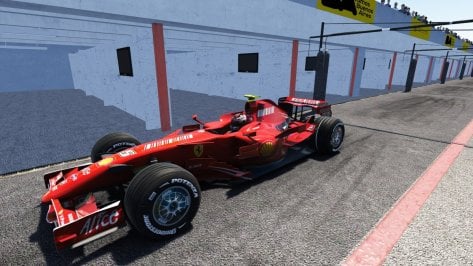
there are no tyre sounds , and model seems like it's from a 80s game...


Odd, I never had this issue (also triple screen setup)For those of you that use triple monitors how do I get the apps to stay where I put them? I've made the pin red but if I exit the game a comeback in they are all piled in one corner.
Thanks



Are these for Fuzo's or WSC's mod?


For those of you that use triple monitors how do I get the apps to stay where I put them? I've made the pin red but if I exit the game a comeback in they are all piled in one corner...
I don't usually have problems either, but it has happened to me a couple of times where everything has been misconfigured and the apps have gone wherever they want... I don't know the reason, but I think it has always happened when installing a possibly fault mod or app...Odd, I never had this issue (also triple screen setup)
Afaik they always stay where you placed and 'locked' them.

I wonder if it has something to do with how one originally configures the triple screen setup. It's been 3 years since I did mine so I can't recall the ins and outs but I eventually settled on using an app called DisplayMagician, and have seldom had a problem since then.I don't usually have problems either, but it has happened to me a couple of times where everything has been misconfigured and the apps have gone wherever they want... I don't know the reason, but I think it has always happened when installing a possibly fault mod or app...

fixed in the latest CSP dev versions...Popping up, as in radioactive swamp? I've been looking everywhere for a way to bring this mess back to its original dark green value. The only way seems to be bringing any form of ambient light in pure to a lower level, or adding more ambient occlusion.
@racinjoe013 have been doing an amazing job to bring the values back to a perfect level in his tracks edits but lately CSP has gone over the edge and it looks overbright again. @ClimaxF1 has done, again, some edits to overcome the new brightness as well, but i can see it's back to overexposed values as well in its edits (just tried Mugello to be sure, and it's not that bad, but it was PERFECT when it came out).
It's still very tricky. I guess there's some grassfx shader or material value value we could bring down thru an extension.ini file, but it could be nice to have a little control over it directly from CM.
Here's the config basics : https://github-wiki-see.page/m/ac-custom-shaders-patch/acc-extension-config/wiki/Tracks-–-Grass-FX
Personal opinion, we have to find a way to get the tracks to look good automatically. I've been trying to play Sergio Loro's old tracks lately with CSP 0.2.7 and they look terrible for some reason. I had to edit very specific values in the ppfilters to bring them back to a decent graphic level, but i remember playing them a few months ago and they looked pretty good.
My guess is either Pure or CSP has added plenty of shaders, glare options, lighting FX and playing old tracks with no CSP updates has become a lottery. Even new versions of super neutral ppfilters, the ones you can trust, like Natural Mod or Pure, cannot render them to their past glory. And it has been mentionned here multiple times, that it's a nightmare as well for creators and modders, as with each new iteration comes new challenges to overcome, edit and add for mods to work properly.
(i'm actually trying rn to make a vid on Sergio Loro's Watkin Glens 60s, with racinjoe's edits, and none of the 30 ppfilters i have, past and new, manage to render it properly. It's a nightmare.)
Edit : it's omething since csp 0.2.5 and beyond. Reversing to 0.2.4, everything looks absolutly glorious.


This reminds me why I never drive touge tracks...Hello!
Can anyone tell me what this is and how to solve it?
View attachment 1431200
This appears on some sections of the track


You are a wizard, truely revive tracks.Almost done. I just need to work out some issues with the shadows (or lack thereof) on the bushes that I somehow messed up and cut some of the yellow tint. It's just a different look for an already great track. Maybe you like, maybe you don't.
Before:
View attachment 1430979
After:
View attachment 1430980


View attachment 1431038
Today on overtake, a skin modder with his gigantic knowledge of physics wanted to tell everyone that I stole the physics from theraceproject.
I'm busted guys..... I Admit it, with 4 years in here I actually stole the physics from a patreon modder who have been here for a year. It's not like I have the resources to do it myself, or actually copy the physics from a better source.....
(The suspension geometry hasn't changed actually since the first version of the 2008 mod that was released in july 2023, meaning if it's the same, then it's theraceproject who copied me. And it honestly doesn't matter because the geometry comes from kunos)
View attachment 1431045
View attachment 1431046
For a stolen car^^WE've reach new height!!
I present you the PAID UPDATE!!
View attachment 1431227View attachment 1431228

A very nice update, thank you for this in the first place, but there's a little mistake for the Ferrari.Ok, windows is fixed, motivation is back. I'm going to roll updates one by one. Starting with the very very very old 2007 mod
2.0 version brings you :
-Shaders, to make it up to standard
-Fixed mclaren leds not being alpha test
-Updated Ao on some cars
-Using the tyres from the 2008 mod to have better look
-2K textures for cars so that they don't look low resolution.
-blurred rims and glowing brakes
Download HERE
thank so much man ,don't let you down by stupid people ,you're making a superb job,walk this way my friend ...Ac community loves your mods.Ok, windows is fixed, motivation is back. I'm going to roll updates one by one. Starting with the very very very old 2007 mod
2.0 version brings you :
-Shaders, to make it up to standard
-Fixed mclaren leds not being alpha test
-Updated Ao on some cars
-Using the tyres from the 2008 mod to have better look
-2K textures for cars so that they don't look low resolution.
-blurred rims and glowing brakes
Download HERE
No my motivation isn't tied to people opinion, it's mostly related to thisthank so much man ,don't let you down by stupid people ,you're making a superb job,walk this way my friend ...Ac community loves your mods.
Are you sure? checking the files the skin file in that folder is indeed malboro, and has the same name than in "Massa marlboro early"A very nice update, thank you for this in the first place, but there's a little mistake for the Ferrari.
The skin "Kimi Raikkonen Marlboro - Early" doesn't have Marlboro on the car..." is there a way to fix that?
I can't read correctly sorry, that caused my mistake... In fact this error exists but not with the early season model, it is the Raikkonen Marlboro skin for the late season one, that does not show the Marlboro logos but lemme check if this is just an error with the showroomAre you sure? checking the files the skin file in that folder is indeed malboro, and has the same name than in "Massa marlboro early"
that's not early though, it has the cockpit fin. Does massa early work?I can't read correctly sorry, that caused my mistake... In fact this error exists but not with the early season model, it is the Raikkonen Marlboro skin for the late season one, that does not show the Marlboro logos but lemme check if this is just an error with the showroom
Edit: no it is not, below is a picture of the skin in the game
I said, that I read the wrong folder accidentally, it is the late season, not the early one, I got it fixed, the files of the skin do have a "T" where it is not supposed to be (wrong naming), example: I renamed "Ferrari_T05.dds" to "Ferrari_05.dds" and that fixed it, same with the other two files where I removed that "T".that's not early though, it has the cockpit fin. Does massa early work?
yeah i edited the comment, will push the hotfixI said, that I read the wrong folder accidentally, it is the late season, not the early one, I got it fixed, the files of the skin do have a "T" where it is not supposed to be (wrong naming), example: I renamed "Ferrari_T05.dds" to "Ferrari_05.dds" and that fixed it, same with the other two files where I removed that "T".