Assetto Corsa PC Mods General DiscussionPC 

  • Thread starter Thread starter daan
  • 154,785 comments
  • 48,701,579 views
Good evening.
Here is the link to two more cars.

1977-COPERSUCAR FD04 + F5 ( 6 versions )

1977-BRABHAM BT45B


This time from 1977:

  • Copersucar FD04 ( 3 versions )
  • Copersucar F5 ( 3 versions )
  • Brabham BT45B

I hope to be able to upload tomorrow:

1977 - Tyrrell P34 ( 4 versions )
1978 - Shadow DN8 ( 3 versions DN9 ):

Textures to be finished:
1977 - March 771
1977 - Ferrari 312T2
1977 - McLaren M26 (slightly different from the 1978 version)

In progress:
1977/1978 - Arrows/Williams/Surtees
The physics of the 1977/1978 cars are similar to the Lotus 78 (by legion) and Lotus 79 (by rss) There would be no reason to deviate from this.

If possible:
1968 - Brabham Bt26 (3 versions - see prints)
1968 - McLaren M7A (5 versions - see prints)
1968 - Lotus 49B (4 versions - see prints)
1968 - Matra MS10 (6 versions - see prints)
1968 - Ferrari 312 (download the version by Legion)
1968 - Honda RA301 (download the version by Emil_1988)

For now, we'll be missing:
BRM and Cooper Then, with these models, make the 1969 versions Physics of the cars (all based on the Matra MS10 by Legion)

IMPORTANT
Always remembering that these cars are not 100% perfect because I don't know how to convert them completely (only partially). Then, with the help of other colleagues (MrHunt, Aleroy, marneus_boss) in improving the textures (the car's appearance will improve).
Hi
When will the McLaren M7A be available? Or where can I download it? Beautiful cars!
 
Hello everyone, I'm trying to play around with the "Track Decoration" mod. It's not complicated, but I can't generate the KN5. It doesn't work. I'm using CSP 0.2.8, the latest version of the mod. Does anyone have a solution?
Thanks.
 

info/pic in the overview tab

1 skin made 9 converted
 
Last edited:

Hello everyone, I'm trying to play around with the "Track Decoration" mod. It's not complicated, but I can't generate the KN5. It doesn't work. I'm using CSP 0.2.8, the latest version of the mod. Does anyone have a solution?
Thanks.
Make sure you have the newest version
When you generate a kn5 it will be in "assettocorsa\apps\lua\TrackDecoration\dataSections"

This might also help
 
Last edited:
Hi guys,

although this is my first post here, I've been following this thread for more than two years. So, I'd like to take this opportunity to first say THANK YOU to all of you. I like Assetto Corsa more than any other game before, and that's largely thanks to this amazing community!

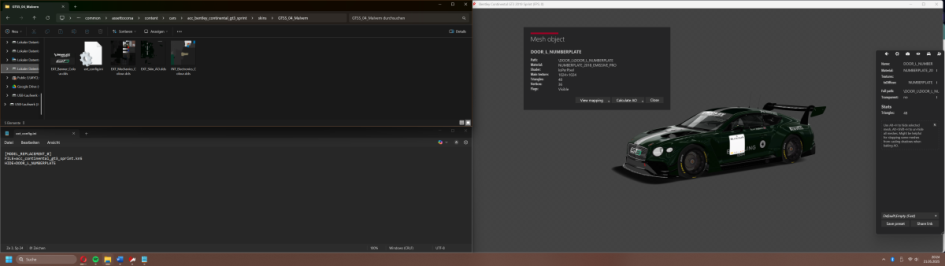
The existing mods have motivated me to take my first steps in modding. I've started creating some simple car skins, and so far, it's working well. Now I‘m trying to delete the numberplates and found out I can do it via ext_config.ini, for example with the following command lines:
[MODEL_REPLACEMENT_0]
FILE=acc_continental_gt3_sprint.kn5
HIDE=DOOR_L_NUMBERPLATE

But I can’t get it to it work and can‘t figure out what I‘m doing wrong (from experience it’s a very stupid mistake, but I don’t get it). Can anyone help me? I tried using CSP 0.2.8 and 0.2.10. Thanks in advance!
 

Attachments

  • Bild_2025-05-21_204412377.png
    Bild_2025-05-21_204412377.png
    31 KB · Views: 16
Hello everyone, I'm trying to play around with the "Track Decoration" mod. It's not complicated, but I can't generate the KN5. It doesn't work. I'm using CSP 0.2.8, the latest version of the mod. Does anyone have a solution?
Thanks.
I'm having the same issue (csp 2.8 or 2.9), says "kn5 not generated" or something like that. Opening the kn5join.exe didnt work either as that was "auto closing" itself after opening without me able to add any commands. I commented on the app page w/a "fix" that worked for me - https://www.overtake.gg/threads/trackdecoration.283775/post-3845447
What did work was opening command prompt, dropping the kn5join.exe in, then dropping the .ini in, then adding -x. That spit out a kn5 file fine.

Then I followed the steps @RMi_wood posted, worked like a charm :cheers: . Would be nice to get it all working in game, but this at least gets you able to create the kn5 file and take full advantage of the app (which is awesome).
 
Last edited:
I wanted to ask if, in your opinion, it is possible to switch from a "normally off" state to a "normally on" state, so that the light bar turns on automatically and immediately, without the need for a command? The command would turn it off.

 
Last edited:
Hello everyone, I'm trying to play around with the "Track Decoration" mod. It's not complicated, but I can't generate the KN5. It doesn't work. I'm using CSP 0.2.8, the latest version of the mod. Does anyone have a solution?
Thanks.
You don't HAVE to create the kn5, you can just click on AUTOLOAD and whatever you add will be there next time you load track providing the app is installed. To create a kn5 can be done and the instructions on here are spot on, but in case you just wanted to plop stuff down and see it in game, just click AUTOLOAD.
 
You don't HAVE to create the kn5, you can just click on AUTOLOAD and whatever you add will be there next time you load track providing the app is installed. To create a kn5 can be done and the instructions on here are spot on, but in case you just wanted to plop stuff down and see it in game, just click AUTOLOAD.
I actually think it works, thank you. However, is there a way to move other than with the f7 key?
 
Hi guys,

although this is my first post here, I've been following this thread for more than two years. So, I'd like to take this opportunity to first say THANK YOU to all of you. I like Assetto Corsa more than any other game before, and that's largely thanks to this amazing community!

The existing mods have motivated me to take my first steps in modding. I've started creating some simple car skins, and so far, it's working well. Now I‘m trying to delete the numberplates and found out I can do it via ext_config.ini, for example with the following command lines:
[MODEL_REPLACEMENT_0]
FILE=acc_continental_gt3_sprint.kn5
HIDE=DOOR_L_NUMBERPLATE

But I can’t get it to it work and can‘t figure out what I‘m doing wrong (from experience it’s a very stupid mistake, but I don’t get it). Can anyone help me? I tried using CSP 0.2.8 and 0.2.10. Thanks in advance!

Hello there!

Have you tested in it game? In the main CM Showroom, the CSP extension config doesn't get changed but it will show either in game or in the other 'Showroom' button in CM.

If you're using CM to export AO (the 'shadows' map to bake) then you can also hide things in the CM Showroom you don't want to be on the AO; to do this press ALT+H when any object is selected (only in CM Showroom).

Hope that makes sense!
 
I wanted to ask if, in your opinion, it is possible to switch from a "normally off" state to a "normally on" state, so that the light bar turns on automatically and immediately, without the need for a command? The command would turn it off.

that´s a good question.
If you need help with another blinking, just tell me :D

and of course you could combine it with this one

Screenshot_as_bmw_m4_competition_g82_m_lm_white_ground_22-4-125-9-8-29.jpg
 
Last edited:
Hello there!

Have you tested in it game? In the main CM Showroom, the CSP extension config doesn't get changed but it will show either in game or in the other 'Showroom' button in CM.

If you're using CM to export AO (the 'shadows' map to bake) then you can also hide things in the CM Showroom you don't want to be on the AO; to do this press ALT+H when any object is selected (only in CM Showroom).

Hope that makes sense!
It does, thank you very much! The numberplates still appear in both showrooms, so I didn't try ingame, but there it works fine :-)
 
I still have a question for the "track decoration" mod if for example we have a circuit with several layouts, do we have to do it for each layout or will the objects also be there in all the layouts
 
I still have a question for the "track decoration" mod if for example we have a circuit with several layouts, do we have to do it for each layout or will the objects also be there in all the layouts
Yes, per layout will be needed if you use "autoload"

note: the app is not really intended to be used via autoload, which is intended to easily resume editing
You should be generating kn5 to add to the specific models.ini or appending to models.ini as described here in item #1
 
Last edited:
Yes, per layout will be needed if you use "autoload"

note: the app is not really intended to be used via autoload, which is intended to easily resume editing
You should be generating kn5 to add to the specific models.ini or appending to models.ini as described here in item #1
yes ok but I still can't generate the kn5, can you explain to me why it won't work by only doing autoload?
 
yes ok but I still can't generate the kn5, can you explain to me why it won't work by only doing autoload?
1. kn5 generation
a. be sure AcTools.dll and kn5join.exe is in the \apps\lua\TrackDecoration\kn5Join\ folder
b. click save
c. click make kn5
d. check the folder \apps\lua\TrackDecoration\dataSections for the generated kn5

2. autoload "should" work. But might have a bug, try pressing "reload"
 
Hey guys, can anybody explain why I am having a not working issue with a ffb script online.
I have been trying the Alternative FFB:Extended1.4 and I am very impressed with the detail.
However, I race online and it refuses to work on the server, I have run out of ideas. I have even tried duplicate wheelbase and csp settings from someone who has no issue with no luck whatsoever.
My wheelbase is a Fanatec csl dd 8nm and is all updated
Will be grateful to any input with this one

Alternative ffb did you change any setting ?
 
Yes, per layout will be needed if you use "autoload"

note: the app is not really intended to be used via autoload, which is intended to easily resume editing
You should be generating kn5 to add to the specific models.ini or appending to models.ini as described here in item #1
Actually I intended to use only the "Autoload" checkbox.
To make a kn5 from the ini - that came later...
Will check why for some people the kn5 will not be genereated...
 
Anyone know how to get Nuzzi's mechanical failures mod to work properly? I've installed it according to the instructions, but the button to enable it isn't appearing.
 
Circuit d'Ajaccio.png

Circuit d'Ajaccio (00) - Replay Cams

Another track for the M3 SPEC - this car really enjoys this layout.... hence the reason for creating & sharing these close-up action cams.

Just so you know (JSUK), (a) ran 32 cars with minimal low-end FPS, (b) liveries have been kept to x2560 uncompressed resolution - which takes approx. between 20-25MB (keeping it MB-light does the trick nicely).

The livery-workflow silently continues in the background, with a couple of new arrival liveries...

rowe_99_1.png


rowe_99_2.png

hp_93_1.png


DOWNLOAD-CAMS


As for Jerez I`ve made several improvements (runoffs colour correction, starting lights, 2nd GP FIM layout, full AI package, rework of chicane kerbs, etc.). Waiting for Fenryr availability to issue new version. If you don`t mind will add your replay cams to the package. Love this track.
Improvements you say??? Can't wait to see them. Good to know cams may be included (credits-of-course), or not. Let me know if there are any issues & will revise cams.
Has anyone ever had the issue where the car and track thumbnails in CM turned into vertical rectangles? I'd like to get back to the horizontal versions.
View attachment 1452142
CM and its' operating (witchcraft) methods... Try the following fix, as shown in the image below...

portrait-2-lanscape__CM-Drive__fix.png

...
[MODEL_REPLACEMENT_0]
FILE=acc_continental_gt3_sprint.kn5
HIDE=DOOR_L_NUMBERPLATE

But I can’t get it to it work and can‘t figure out what I‘m doing wrong (from experience it’s a very stupid mistake, but I don’t get it). Can anyone help me? I tried using CSP 0.2.8 and 0.2.10. Thanks in advance!
You may already know this... is to include the additional LOD KN5-files - as some mod-items may also appear on lods B-C & D.

Did CSP 0.2.10-preview break CSP render previews? It did for me, rolling back to 0.2.9-preview fixes it.
Confirmed! broken... back to 2.9

final-render-preview__broken.png
 
Last edited:
1. kn5 generation
a. be sure AcTools.dll and kn5join.exe is in the \apps\lua\TrackDecoration\kn5Join\ folder
b. click save
c. click make kn5
d. check the folder \apps\lua\TrackDecoration\dataSections for the generated kn5

2. autoload "should" work. But might have a bug, try pressing "reload"
Yes, I have all these files., I don't know why it doesn't work, if I ever wait for an update, thank you.
 
Last edited:
Sharing a mod? Host it on GTPlanet Downloads. Free, public hosting for files up to 10GB in size.
Back