- 4,376

- Ottawa
Do we have that car in AC?


I'm afraid notView attachment 1469616
Do we have that car in AC?


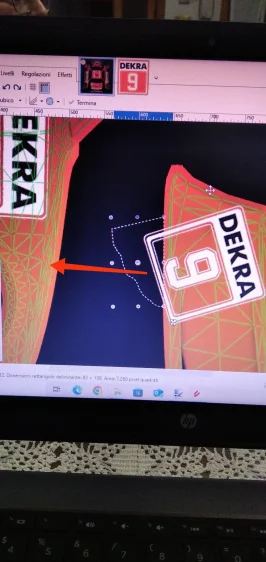
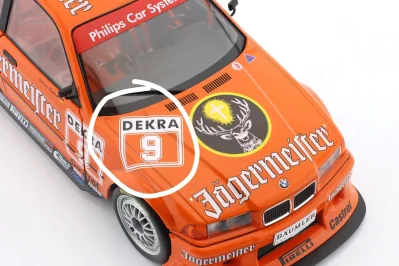
Open the car in CM, open Photoshop, take the bottom bit of the decal that's sticking out of the paintable area and play with the position / size on the left side of the fenderHi, I want to move the selected corner to the left, on the car's fender, while maintaining the perfect alignment of the sides, as shown in the image on the right. I can't seem to figure it out. Can someone explain how? Thanks a lot.


You'll need to export the wireframe from custom showroom to help line things up, but there really isn't a trick... it's just familiarity with the template mixed with trial and error. Try to line it up, save the *.dds, check custom showroom to see how it's lined up and make adjustments until it's lined up. I've been doing skins since the late 90's and even did professional design work for die-casts and actual racecars... every template has its quirks, you just have to work around them.Hi, I want to move the selected corner to the left, on the car's fender, while maintaining the perfect alignment of the sides, as shown in the image on the right. I can't seem to figure it out. Can someone explain how? Thanks a lot.

Hit the carat next to "Update Previews" on CM, uncheck the "Halo" button on the options on the side, and then hit the Box+ stack to update all of the previews at onceHi, is there any fix for the halo disappearing when generating previews for RSS Formula Supreme 25?View attachment 1469433
Thanks a lot, but I use Paint.net...Open the car in CM, open Photoshop, take the bottom bit of the decal that's sticking out of the paintable area and play with the position / size on the left side of the fender
Thank you so much, I have tried several times but I still can't get the result...You'll need to export the wireframe from custom showroom to help line things up, but there really isn't a trick... it's just familiarity with the template mixed with trial and error. Try to line it up, save the *.dds, check custom showroom to see how it's lined up and make adjustments until it's lined up. I've been doing skins since the late 90's and even did professional design work for die-casts and actual racecars... every template has its quirks, you just have to work around them.
Edit: I missed it, but it looks like you have the wireframe already so ignore the first part lol


How curious! I have a couple of friends who also play with VR headsets and on some occasion they told me the same exact thing: the oppressive feeling of cramped confines those LMP cars give...... how downright awesome these bastards are in VR with their claustrophobic little cockpits...


It really depends what value you place on immersion.How curious! I have a couple of friends who also play with VR headsets and on some occasion they told me the same exact thing: the oppressive feeling of cramped confines those LMP cars give...
These comments make me want to try switching to the Dark Side of VR, but as a faithful ally of the Three Monitors' Cause, I must resist the temptation... 😬
Just from eyeballing the screenshot you posted, you may want to try rotating the fender portion of the decal slightly because if you simply slide that section of the decal over to the fender it will likely look warped. I would rotate it clockwise slightly because you want it to line up to the panel and the other portion of decal, not just the decal itself. It's also dependent on how well the mod maker mapped the skin itself, there's a chance it won't ever line up perfectly. It's rare, but I've run into it a bit, especially with AC mods.Thanks a lot, but I use Paint.net...
Thank you so much, I have tried several times but I still can't get the result...


It's z-fighting due to the two 3D models overlapping. Sent it do Tomsim see if he can fix it.unfortunatly v1.1 still also has this flicker... anyone got a fix?


One divorce away from VR, one divorce away from VR, it's my mantra.My shifter is back on its home planet being repaired so I've been forced to use paddles this week, which made me drive a whole bunch of LMPs for the first time in a long time. I'd forgotten just how downright awesome these bastards are in VR with their claustrophobic little cockpits. A huge grid of them on the main perimeter route at St Croix is ridiculous fun.
True, it's frustrating, for me it's also the first time...but maybe I understood how to do itJust from eyeballing the screenshot you posted, you may want to try rotating the fender portion of the decal slightly because if you simply slide that section of the decal over to the fender it will likely look warped. I would rotate it clockwise slightly because you want it to line up to the panel and the other portion of decal, not just the decal itself. It's also dependent on how well the mod maker mapped the skin itself, there's a chance it won't ever line up perfectly. It's rare, but I've run into it a bit, especially with AC mods.
To be completely fair, what you're attempting is essentially one of the most time consuming/frustrating aspects of creating skins.
One divorce away from VR, one divorce away from VR, it's my mantra.
The good ones are very good ones, even going back to revenga/vendetta and the older VRCs is pure thrill.
The Tomsim's are quite intense too, bored of Spa? Grab the AMR-One and have fun.
Oh, do you guys mind if I put a little innocent teaser right here?
View attachment 1469645
Thanks a lot, but I use Paint.net...
Thank you so much, I have tried several times but I still can't get the result...

On my list, right behind "comfort" and "laziness"... 😅It really depends what value you place on immersion.


Thanks, that workedHit the carat next to "Update Previews" on CM, uncheck the "Halo" button on the options on the side, and then hit the Box+ stack to update all of the previews at once
View attachment 1469626



After some deep research I've found, that Broadcast Hud (1.0.1) by CMRT caused this errors - rendering 2D trees though 3D ones. Also cause numerous Z-figthing on 2D ones. Maybe something else is also wrong, but I've not found anything else on top.Is there new bug or setup checkboxed by default with latest CSP?
Seems that 2D trees goes though 3D ones, by MoriSan for example. Even those tracks, that works previously - they rendering both.

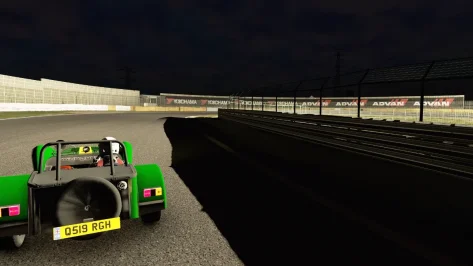
So it does not happen with „default“ weather style selected in weatherFX settings?Hello, would be anyone kind enough to fix the weird shadows at night in ddm_gts_tsukuba? There's like big black patches of shadows in some sections of the track. I'm using the latest version of Pure LCS.


Don't forget the fragile fraction of us that gets immediate motion sickness and hours long headaches! I love VR, every 3 minutes of it😂It really depends what value you place on immersion.


Hi, thank you very much. 🙏Hey if u need help I can look at it
I've done it countless times - is it for JK's awesome BMW ?

Its also happens with default weather. See this screenshot, this weird shadow its just at the exit of the pitstop.So it does not happen with „default“ weather style selected in weatherFX settings?


I currently do some more AI lines again, if anyone has a request for a track with bad AI that they want to have fixed or needs help with their own track don't hesitate and mention them in thread or send the requests directly to me!
I didn't have the time to do all requests of last time, if you send me the same tracks again I might be able to do them this time.


Just wanted to know. Its just if someone says I have/use Pure explicitly that it sounds that Pure causes it.Its also happens with default weather. See this screenshot, this weird shadow its just at the exit of the pitstop.
God it worked. I had many issues doing this in the past cause CM couldn't find the kn5 files, even with redirecting things, and this is the first perfectly simple explanation that ever works on this track.Dundrod has only one layout.
You have to:
- create a folder named "alt_ai" under "\tracks\dundrod_1955"
- copy "map.png" file, "data" folder and "ai" folder inside of "\tracks\dundrod_1955\alt_ai"
- create another "alt_ai" folder under "\tracks\dundrod_1955\ui"
- copy the files under "\tracks\dundrod_1955\ui" inside \tracks\dundrod_1955\ui\alt_ai" folder
- copy models.ini and rename the copy to "models_alt_ai.ini"
Obviously you can change "alt_ai" with everything you like more