Assetto Corsa PC Mods General DiscussionPC 

  • Thread starter Thread starter daan
  • 150,456 comments
  • 45,759,388 views
Pilbeam MP93 JPX LMP2 2005 for Assetto Corsa

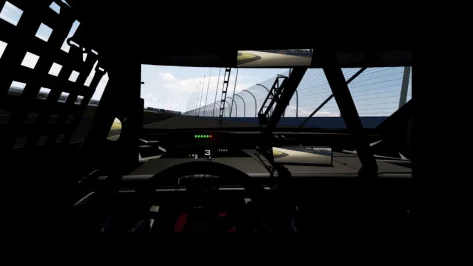
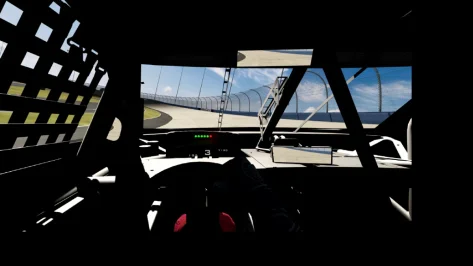
Here is the Pilbeam MP93 JPX for Assetto Corsa powered by a 3.4 liter V6 by JPX.

download: https://www.mediafire.com/file/a8yd939hjz17xtp/RMS_Pilbeam_MP93_JPX.7z/file

Credits

Team:RMS

Model improvements: Kamil Cader, Peugeot905,Fullnoise

Physics: Peugeot905, Fullnoise, Kamil Cader

Sound: RMS

Other Lemans Prototypes: https://www.mediafire.com/folder/7g6488jsyt2ux/Lemans_Prototype_Near_Finalized

Screenshots by AndyGTR

View attachment 1320138
View attachment 1320139
View attachment 1320140
View attachment 1320141
Hey that model looks familiar????? Is that my unreleased GTR2 model?
 
I would like to find a track map app that is the complete track. Similar to what AMS2 uses. Right now I've got just the section map in the upper center but it's really not that good for tracks I'm unfamiliar with as I'm only seeing a small section at the time. My upper right part of the HUD is clean and I would like to put that track map there.
 
I would like to find a track map app that is the complete track. Similar to what AMS2 uses. Right now I've got just the section map in the upper center but it's really not that good for tracks I'm unfamiliar with as I'm only seeing a small section at the time. My upper right part of the HUD is clean and I would like to put that track map there.
I use CMRT and like it.
You can put the HUD elements where ever you like.
 

Attachments

  • cmrt-essential-hud-for-assetto-corsa-csp-v0-2-2-v0-oza1botk691d1.webp
    cmrt-essential-hud-for-assetto-corsa-csp-v0-2-2-v0-oza1botk691d1.webp
    107.9 KB · Views: 6
Last edited:
I would like to find a track map app that is the complete track. Similar to what AMS2 uses. Right now I've got just the section map in the upper center but it's really not that good for tracks I'm unfamiliar with as I'm only seeing a small section at the time. My upper right part of the HUD is clean and I would like to put that track map there.
There is also MapDisplay which is quite clean and minimal, like CMRT you can position it wherever you want
mapdusplay.webp


@24H or others,

Any thoughts why Arch's/Siim Annuck's C6 would do the following on the driver door? Only in the preview and does not seem to be in the CM showroom.

I checked on Overtake.gg and he noted that:
Somewhere along the way, the shaders were ****ed up, probably due to having params not compatible with latest CSP rendering. There's a lot of small mistakes in some older mods we've made, but I won't ruin them for you. Siim is too busy to update the cars anymore, so it is what it is.

Any means to fix by those who have an understanding on how to correct?
 

Attachments

  • preview.webp
    preview.webp
    67.7 KB · Views: 4
There is also MapDisplay which is quite clean and minimal, like CMRT you can position it wherever you want
View attachment 1486743

There is also Comfy Map with clickable teleport/spawn points

 
@24H or others,

Any thoughts why Arch's/Siim Annuck's C6 would do the following on the driver door? Only in the preview and does not seem to be in the CM showroom.

I checked on Overtake.gg and he noted that:
Somewhere along the way, the shaders were ****ed up, probably due to having params not compatible with latest CSP rendering. There's a lot of small mistakes in some older mods we've made, but I won't ruin them for you. Siim is too busy to update the cars anymore, so it is what it is.

Any means to fix by those who have an understanding on how to correct?
to be honest I dont have the car....going with the MaidCafe mod....but if you send me a link I can have a look in the evening
 
Last edited:
What do you use? Pure static or dynamic weather controller and which weather do you use if you test this.
Did you already have a look in the Pure Planner settings - Weather presets. In the weather where you have this problem with setting rain, what are the settings there?
I'll get the rest of the settings when I'm next by my computer but I know the weather system that caused it and it was the "Windy" setting. I have checked the humidity and probability of rain etc, I've even manually brought those values down to zero, yet I race and everything freezes for 3-5 seconds and then a single rain drop falls on the windscreen and the race carries on - with a sizeable amount of water on track. I'll get all my settings for you later today.

It if helps I'm a vr user.
 
Last edited:
Hello everyone,
For a few weeks now, I've been having a problem when racing against the AI: in 80% of cases, the yellow flag comes out in the first lap and all cars are limited to a maximum speed of 130 km/h. Even though no car is out, the yellow flag remains and it's no longer possible to race. I didn't have this problem before. Is there a setting where I can disable this?
 
I'll get the rest of the settings when I'm next by my computer but I know the weather system that caused it and it was the "Windy" setting. I have checked the humidity and probability of rain etc, I've even manually brought those values down to zero, yet I race and everything freezes for 3-5 seconds and then a single rain drop falls on the windscreen and the race carries on - with a sizeable amount of water on track. I'll get all my settings for you later today.

It if helps I'm a vr user.
I strongly believe that all of the 'dry' weathers (so not including the obviously and deliberately wet ones) should have NO chance of precipitation at all until the awful rain performance issues are resolved, and until normal tyres are able to drive with some semblance of reality on slightly damp roads.
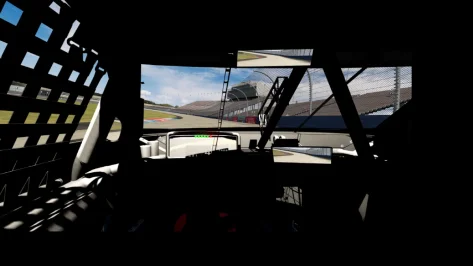
There's nothing more frustrating than being immersed in a long and exciting race then have that telltale half-second screen freeze, the framerate tanking and cars skidding off everywhere like Bambi on ice because a couple of tiny raindrops hit the windscreen.
@Peter Boese - how about it? I've raised this before (along with randomised wind direction as standard) but don't think I got an answer.
We should be able to pick any dry weather without the risk of it randomly ruining our race at any point.
 
Last edited:
Hello everyone,
For a few weeks now, I've been having a problem when racing against the AI: in 80% of cases, the yellow flag comes out in the first lap and all cars are limited to a maximum speed of 130 km/h. Even though no car is out, the yellow flag remains and it's no longer possible to race. I didn't have this problem before. Is there a setting where I can disable this?
CSP version?

All tracks impacted?

Did you try reloading the ai Spline via AI SPline Editor (just hit save) and see if that fixes it?
 
Last edited:
Need some help guys.

question 1.

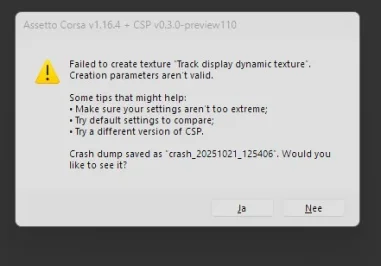
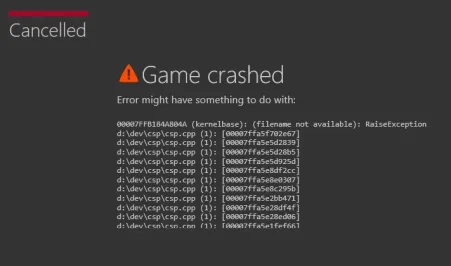
Whats up with those errors?

how can i solve them?

track barcelona both kunos and fnr versions, pyyer 2025 f1 ext, vrc alpha 2025 csp 03.0 preview 110 and the latest pure with hotfix 3.01

question 2.

how is it possible that a car with no wiper animation has working whipers and others dont?
 

Attachments

  • Schermafbeelding 2025-10-21 145433.webp
    Schermafbeelding 2025-10-21 145433.webp
    13.5 KB · Views: 7
  • Schermafbeelding 2025-10-21 145453.webp
    Schermafbeelding 2025-10-21 145453.webp
    26.1 KB · Views: 4
Last edited:
Most excellent Toyota GR Corolla SARD GT1 from Jugee8

View attachment 1486487


It has a terrible shifting animation though, so replace it with this one which is a proper fit (as usual, remove the .txt extension and put it in the car's 'animations' folder)
Thank you for the recommendation, this is not a car I would have typically downloaded. It is a very nice mod in all aspects.
Thank you for the shifting animation and congratulation for this animation to be perfect, as good as any. Was it luck or are you really getting good at it. If you are getting very good, maybe a tutorial would be nice as this such an important immersion feature for VR driver.
Well done.
 
Thank you for the recommendation, this is not a car I would have typically downloaded. It is a very nice mod in all aspects.
Thank you for the shifting animation and congratulation for this animation to be perfect, as good as any. Was it luck or are you really getting good at it. If you are getting very good, maybe a tutorial would be nice as this such an important immersion feature for VR driver.
Well done.
Lots of trial and error, some educated guesswork, and a lorra lorra luck.
 
CSP version?

All tracks impacted?

Did you try reloading the ai Spline via AI SPline Editor (just hit save) and see if that fixes it?
With CSP 2.11

Yes this problem happens with different cars and tracks.

Where do I find this AI-Spline editor?
 
Last edited:
With CSP 2.11

Yes this problem happens with different cars and tracks.

Where do I find this AI-Spline editor?


Capture d'écran 2025-10-21 161453.webp


type "ai spline editor" in the searchbar. Open it, type "save" next to fast_lane.ai. See if it fixes your issue, but if it's everywhere, i'm afraid it's a more complicated one.

On the aggressivity level, anything above 50 can end in crashes on touchy fastlanes and with some cars. I would start with regular values, such as 25%, and see if things improve.


Unrelated : i'm still on my AI journey, for those who give a damn about it😅


I found APIs that triggered my eyebrows :

  • physics.setAIAggression(carIndex, aggression) - aggression level, no issue here
  • physics.setAICaution(carIndex, caution) - distance from next car
  • physics.setAIBrakeMistake(carIndex, time)
  • physics.setAITractionMistake(carIndex, time, severity)
  • physics.setAIStopCounter(carIndex, time) - safety for incidents on track.
The AICaution is worth a try to integrate thru my app, i could force a value and see if AI cars race closer to eachother, if it just overides the colliderbox, stuffs like that. Maybe it's worth it for some class, maybe it doesn't work in an exploitable way, maybe it's called by the engine depending on situation, it's worth a try.


Now the Brake and traction mistake bother me a little. It's immersive, sure, but it probably makes for a mess on closed circuits. And i've seen my AI cars locking the brakes a lot with vintage cars, it always ends up ruining the race for the cars behind if there are walls or close borders in the mistake zone.

I'm wondering how it works : it's a time value, where mistakes are called for 0.1, 1, 1.5 seconds etc... Is this called at the start of the game? Depending on AI Level? If set to 0, is it completely canceled? That could be cool to edit the value @ 0.1 second and only see some minor braking mistakes. I'm gonna try that first. I hope it's not a random value randomly called accross the track. If it is, then its control is gonna be a little more touchy : import the BRAKEHINTS, update the value each time a car enters a BRAKEHINT zone. Nothing too complicated or costly, but without monitoring, hard to tell.

Anyway, i integrated the BRAKEHINT and the Brakemistake in the AIWhisperer App. The old version works wonders, so just keep it if you're not having issues, but if you're having AI cars locking up randomly on tracks and want to see if my app can solve it, DM me, i have the updated version.

Maybe it's not triggered at all in the game and is just here for AI scripts, but that would explain the AI braking mistakes i've seen ingame. I believe it's correlated to AI Level as well.


If you guys have more info or any idea what to do with this, let me know.

Other funny treasure : the AI Caution. So, basically, reduces the distance that triggers safe driving for AI. Not really reliable, as they ram eachother if set to 0, but might be highly valuable on zones where HINT>1.1, where you need them to overtake at all costs rather than quietly stand behind.
 
Last edited:
What might be causing the AI to pit, complete the stop and then reach the end of the pitlane and then dissapear and immediately retire? I've had this issue crop up on a few tracks now and its beginning to bug me.
 
What might be causing the AI to pit, complete the stop and then reach the end of the pitlane and then dissapear and immediately retire? I've had this issue crop up on a few tracks now and its beginning to bug me.

Have you watched the replay? Are you sure they don't fatally crash? This started to happen on some pitlanes with new CSP's / CM updates.

Replay can tell you a lot. Choose the cockpit / TV view of the problem car and see what happens.
 
Last edited:
Has anyone had an issue with the latest pure and csp not recognising the pure script and the screen been almost black? But manually you can enable it ingame in the purepp only for it to reset again upon exiting game ?
 
Sharing a mod? Host it on GTPlanet Downloads. Free, public hosting for files up to 10GB in size.
Back