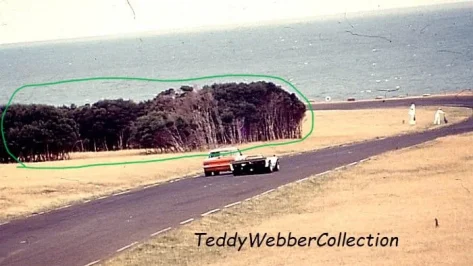
Check this website and see if there's anything that can work for youHi Guys Im building a 1960 Phillip Island Track and I Need a Tree/Shrub like this but cant find anywhere would any of you guys be able to help me please

 meye.dk


Yeah i get that, but i'm used to it so i like to bide my time with stuff, i'll be upgrading my gaming PC after Christmas so it'll have windows installed as standard anyway. Just don't see the point in updating my current one yet based on that.Why are people so afraid of W11 lmao.
It ain't the boogeyman - I've bought this laptop with W11 on it and had zero problems with it. Nor did my previous computer when I switched from 10 to 11 (the screen dying has nothing to do with switching OS anyways, not when you drop it whilst in a hurry... lol)


Re E34 M5, here you have a corrected plate.dds, since "Edition" was mis-spelled. Start with that one. ;=)btw fyi, we already have more ideas for this beauty🤫

I spent many hours yesterday testing, swapping between 0.2.11 and 0.3.0 and found a performance drop too due to cpu spikes.I lose 25fps with those settings, and the image quality is objectively worse too.
(RTX 4080, i9-13900k, Reverb G2 with Oasis drivers, OpenXR Toolkit)
Edit: FFS, despite selecting 'apply' and NOT 'apply and save' or 'save', these settings are now my defaults, even after restarting CM.
Back to 0.2.11 for me where performance is better, nav screens can be disabled, exhaust flames work, start lights work etc etc.
As always, it's been emotional.


 f3classictracks.sellfy.store
What do you use? Pure static or dynamic weather controller and which weather do you use if you test this.I cant remember who said it on here recently when talking to Peter about Pure and having one single drop of rain temporarily tank their FPS and performance - i can now vouch i have experienced this too. And it was on a "dry" setting, so there is definitely something going on with Pure in certain circumstances. Im happy to share the weather file...if it helps get to the bottom of the issue.


 : a 1:33 per lap is sufficient to keep just behind him and watch what's happening when he's overlapping.
@Apocalypse211 Hi there, have you ever considered to look deeper into the SDD 1996 F1 season cars? Are they based on GP4 models? I miss these season along with a proper 1995 car set in AC.


Since my new pc build last spring with win11 and a fresh AC install, I can say no problems at all.Why are people so afraid of W11 lmao.
It ain't the boogeyman - I've bought this laptop with W11 on it and had zero problems with it. Nor did my previous computer when I switched from 10 to 11 (the screen dying has nothing to do with switching OS anyways, not when you drop it whilst in a hurry... lol)


I'm not a fan of the UI, The fact that i need to pres "view more options" when right clicking to get old UI i find rather annoying and the fact that most if not all settings seems to be tied to an app that i need to download on their microsoft store thing annoys me to no end.Why are people so afraid of W11 lmao.
It ain't the boogeyman - I've bought this laptop with W11 on it and had zero problems with it. Nor did my previous computer when I switched from 10 to 11 (the screen dying has nothing to do with switching OS anyways, not when you drop it whilst in a hurry... lol)
... The fact that i need to pres "view more options" when right clicking to get old UI i find rather annoying...


W11Debloat and the Chris Titus Utility pretty much have everything you need between them to make W11 function like previous windows versions, adjust settings and remove default apps you don't use, and remove a lot of the telemetry and spying. I've had really good luck with these.Heh!, I thought the same thing after updating... but there's always a computer nerd with too much free time somewhere in the world who finds a solution to these problems... Search your favorite browser for "How to enable the classic context menu in Windows 11".
To be a permanent change, you must fiddle with the Windows registry, which is quite scary for the uninitiated like me... In fact, when I ran the command I used, the computer froze and I had to shut it down by holding down the physical power button. But after the restart, everything was back to normal, with its glorious old context menu actived.
Thanks, I'll take a look! 👍W11Debloat and the Chris Titus Utility pretty much have everything you need between them to make W11 function like previous windows versions, adjust settings and remove default apps you don't use, and remove a lot of the telemetry and spying. I've had really good luck with these.
Hey that model looks familiar????? Is that my unreleased GTR2 model?Pilbeam MP93 JPX LMP2 2005 for Assetto Corsa
Here is the Pilbeam MP93 JPX for Assetto Corsa powered by a 3.4 liter V6 by JPX.
download: https://www.mediafire.com/file/a8yd939hjz17xtp/RMS_Pilbeam_MP93_JPX.7z/file
Credits
Team:RMS
Model improvements: Kamil Cader, Peugeot905,Fullnoise
Physics: Peugeot905, Fullnoise, Kamil Cader
Sound: RMS
Other Lemans Prototypes: https://www.mediafire.com/folder/7g6488jsyt2ux/Lemans_Prototype_Near_Finalized
Screenshots by AndyGTR
View attachment 1320138
View attachment 1320139
View attachment 1320140
View attachment 1320141


I use CMRT and like it.I would like to find a track map app that is the complete track. Similar to what AMS2 uses. Right now I've got just the section map in the upper center but it's really not that good for tracks I'm unfamiliar with as I'm only seeing a small section at the time. My upper right part of the HUD is clean and I would like to put that track map there.

There is also MapDisplay which is quite clean and minimal, like CMRT you can position it wherever you wantI would like to find a track map app that is the complete track. Similar to what AMS2 uses. Right now I've got just the section map in the upper center but it's really not that good for tracks I'm unfamiliar with as I'm only seeing a small section at the time. My upper right part of the HUD is clean and I would like to put that track map there.
 www.overtake.gg


There is also Comfy Map with clickable teleport/spawn pointsThere is also MapDisplay which is quite clean and minimal, like CMRT you can position it wherever you want
View attachment 1486743
Track Map Display (Extended)
This app started as an extension to https://www.racedepartment.com/downloads/track-map-display.3508/ by Neys (who kindly gave me permission to publish my changes). In version 4.0 it was completely rebuild in Lua. Not actively maintained, feel...
www.overtake.gg


to be honest I dont have the car....going with the MaidCafe mod....but if you send me a link I can have a look in the evening@24H or others,
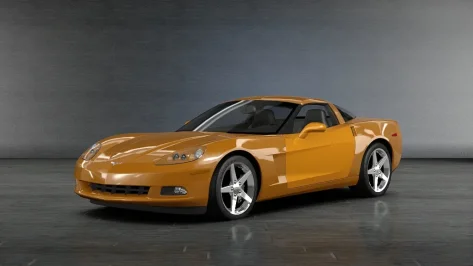
Any thoughts why Arch's/Siim Annuck's C6 would do the following on the driver door? Only in the preview and does not seem to be in the CM showroom.
I checked on Overtake.gg and he noted that:
Somewhere along the way, the shaders were ****ed up, probably due to having params not compatible with latest CSP rendering. There's a lot of small mistakes in some older mods we've made, but I won't ruin them for you. Siim is too busy to update the cars anymore, so it is what it is.
Any means to fix by those who have an understanding on how to correct?
I'll get the rest of the settings when I'm next by my computer but I know the weather system that caused it and it was the "Windy" setting. I have checked the humidity and probability of rain etc, I've even manually brought those values down to zero, yet I race and everything freezes for 3-5 seconds and then a single rain drop falls on the windscreen and the race carries on - with a sizeable amount of water on track. I'll get all my settings for you later today.What do you use? Pure static or dynamic weather controller and which weather do you use if you test this.
Did you already have a look in the Pure Planner settings - Weather presets. In the weather where you have this problem with setting rain, what are the settings there?