Assetto Corsa PC Mods General DiscussionPC 

  • Thread starter Thread starter daan
  • 158,808 comments
  • 52,566,115 views
Hey guys, quick question for the Content Manager screenshot wizards in here.

I'm trying to find a specific Custom Showroom (and its config) to use for my car previews, but I'm completely striking out. I've tried guessing the keywords to search for it online, but I just can't seem to find the download link anywhere.

I've attached two pictures of what it looks like below. Does anyone happen to recognize this showroom or know where I can download it?

preview.webp


preview.webp


Any help or links would be massively appreciated
 
No loads as normal for me, I am on CSP 0.2.11 No Pure or such

Yes

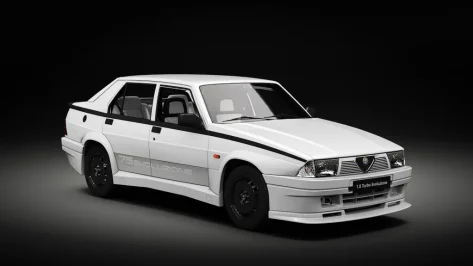
Thanks for this. Great car, looking forward to the new physics. I did a couple of tweaks if you want to test them. Might mainly be good for VR users or if you drive pancake in first person with the driver visible.

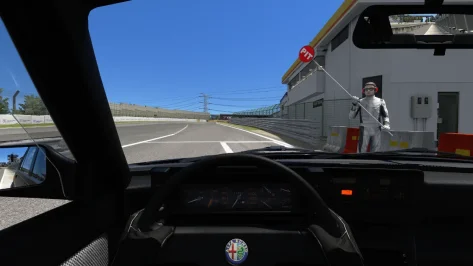
1. Attached is a new shift animation (no more exaggerated loop, and closer to the gearknob) and driver rescale/reposition to get his hands on the steering wheel rim when turning. Remove the .txt extensions and place in the 'animations' folder.
Disclaimer: Kunos driver postures don't like high t-bar steering wheel designs like the one in this Alfa, so the thumbs clip through this a little. But it's a necessary compromise to get the hands on the rim when turning, which is much more important (in VR, anyway).
Important: change LOCK to =320 in data/driver3d.ini to also synch the hands better with the rim rotation.

2. There's a lot of daylight leakage around mesh seams on the dashboard, door cards and A-pillars, so add this to the config to fix that:
Code:
;stop sun ingress around cockpit mesh seams, into footwells etc
[SHADER_REPLACEMENT_...]
ACTIVE = 1
MATERIALS = EXT_PLASTIC_BLACK, EXT_BODY;external bodywork, trim, pillars, dashboard etc
CULL_MODE = DOUBLESIDED
CAST_SHADOWS = 1
DOUBLE_FACE_SHADOW_BIASED = 1

One more observation: for me (latest CSP, latest Pure LCS, Pure PPF) the dashboard instrument emissive glow seems overly bright. is anyone else getting this?
This is in daylight - at night of course, it's even brighter:

View attachment 1532216

Anyway, hope that helps. Feel free to ignore.
For me it's okay, not overblown like this, but the needles are hard to see unless it's a very specific time of day. Tested with newest CSP and Pure, Pure Linear ppf.
 
are the car's listed not already in AC? like done to the absolute death.............or am i missing something? i probably am..........
From what I know, there isn't a high quality version of the 308 TCR in AC, same goes for the Civic. I do understand that the NSX GT3 and Huracan have already been converted to AC.

1777125452226.webp

I've also did a poll in deploys server before I posted the poll in this thread.
 
DETHLESS had done a fix and update for Alfa Romeo 4C which included that file. Unfortunately is not available anymore on RaceDepartment (but I have a backup 😁)

And this was the description:

  • Recreated wiper animation cause old one was laggy and jittery & added wiper trace config
  • Reworked gauge texture. Removed all noise, recreated some parts cause the quality was overall low
  • Added second screen to main gauge. It comes with a working Gmeter.
Accent colors switch from red to yellow like irl.
The animation is binded to tc level 3/3 and turned off tc. (Picture 5)
  • Fixed hole in right gauge mesh + remapped it (Picture 2)
  • Water & oil temperature bars on main gauge are also working now
  • Added display to center console. (Picture 3)
It shows a simple digital clock.
The plastic surround it is now glossy like irl
- Added a second screen to center console. (Picture 4)
It works as boot screen and appears only on start for some seconds
  • Remapped license plate light mesh & added light config for them (They were just black before)
  • Added main & trip odometer
  • Added warning lights via texture & customemissivemult. 16 warning lights for:
-ABS off
-TC off
-TC in action
-Airbag
-Passenger airbag
-Seatbelt
-Headlights
-Highbeam
-Handbrake
-Indicators for left and right turn signal
-Speedlimiter (active in pit)
-Frost warning (ambient temp. below 3 degree)
-Low tyre pressure
-Open driver door (if you open it with csp debug app and automatically triggered at every game start)
-Oil pressure
  • Added internal glass to rear glass (engine cover, picture 1)
  • Added shaking exhaust & exhaust smoke
  • Added pbr materials to aluminium, plastic, carpet, leather, glass & carbon
  • Binnacle and part of center console are now in carbon
  • Added missing LEDs to center console. 2 of them are binded to custom inputs:
-Red LED for enabled rear fog light
-Red LED for locked doors (turns off if you open the driver door with the csp debug app)
  • Added turn signals to rear, front and sides with custom glows
  • Added lights to interior decals with working hazard decal & gear Indicators on center console (R, N & gear 1 light up white if triggered)
  • Added more csp features like brakediscfx, wobbly wipers, deforming hood, emergency brake lights etc.
  • Fixed turbo bar. 1 bar wasn't working and always visible
  • Added arrow next to gear digit on main gauge which work as "gear up" indicator
  • Added rear fog light (mesh + glow, binded to extra key A)
  • Some shader adjustments and other minor things

INSTALLATION:
1. Move files from the zip to your assetto corsa root folder and replace if asked.
You can still use the car online!

Known bugs:
Clock on center screen doesn't work sometimes
Highbeam indicator is overexposed increase your FOV to fix it)

In case you are facing very bright interior parts, try to rename the vao patch located in assettocorsa>extension>vao-patches-cars from "ks_alfa_romeo_4c.vao-patch"
to
"ks_alfa_romeo_4c.1vao-patch".
is there a way how we can combine deathless´s config with the gran turismo config or has someone already mangaed a way to do just that?
 
is there a way how we can combine deathless´s config with the gran turismo config or has someone already mangaed a way to do just that?
Apparently the configuration I started with is the deathless one and not the one downloaded via cm, then mine is the updated version of deathless config (it's basically the config you're looking for) :D

Tbh I didn't even remember having this config, I thought it was something downloaded automatically via cm
 
Last edited:
Hey guys, quick question for the Content Manager screenshot wizards in here.

I'm trying to find a specific Custom Showroom (and its config) to use for my car previews, but I'm completely striking out. I've tried guessing the keywords to search for it online, but I just can't seem to find the download link anywhere.

I've attached two pictures of what it looks like below. Does anyone happen to recognize this showroom or know where I can download it?

View attachment 1532373

View attachment 1532374

Any help or links would be massively appreciated
The first one is TAV Moderna.

You can use the preset from @24H:


24H
Release of the CSP preview settings 01-2026

for me the settings work the best with 0.3.0-preview140

Preset: https://acstuff.club/s/loda
Showroom: https://www.mediafire.com/file/ot02bbw1z0dsitu/tav_moderna.7z/file

Please do a backup if you already have the TAV Moderna showroom
Extract to your assetto corsa showroom folder: Steam\steamapps\common\assettocorsa\content\showroom

View attachment 1509849View attachment 1509850View attachment 1509851View attachment 1509852
The second one, IDK. I would guess it´s an alternative one made by opperslang.

 
Last edited:
From what I know, there isn't a high quality version of the 308 TCR in AC, same goes for the Civic. I do understand that the NSX GT3 and Huracan have already been converted to AC.

View attachment 1532384
I've also did a poll in deploys server before I posted the poll in this thread.
That's fair enough i see what your saying. Alway good to remove a low quality mod and replace with something much better.
 
The first one is TAV Moderna.

You can use the preset from @24H:


The second one, IDK. I would guess it´s an alternative one made by opperslang.

Thanks! i'll try it later
 
Nice. But what is "Syncmaster version"? Are these for SD 1988 cars?
It is this version here at Overtake, from syncmaster, related to MAK-Corp (IIRC if you read the first post of the discussion thread): https://www.overtake.gg/downloads/1988-mclaren-mp4-4.8999/

Old mod but I found it better to drive than the VRC .

Using the sound of the VRC version with Syncmaster car & physics, makes it the best of both worlds for me.

You can find a list of skins for Syncmaster version available at Overtake there: https://steamcommunity.com/groups/biss424/discussions/0/405694115201268198/

That gives you
  • Lotus ( Piquet + Nakajima)
  • Tyrrell ( Palmer + Bailey)
  • Williams (Mansell + Patrese)
  • Mclaren ( Prost + Senna)
  • Ligier (Arnoux + Johansson)
  • Ferrari (Alboreto + Berger)

And now the Benetton & March here at GTP ,
  • Benetton (Nannini + Boutsen)
  • Leyton House / March (Gugelmin + Capelli)

Still missing the Rial and the Minardi that scored points in 1988 season IIRC.
 
Yep, that was the first thing I tried, but emissives are still as bright as in the image I posted. Weird.
I've noticed some cars (not all) now have very bright rev LEDs, brake lights etc, when they were normal before recent CSP/Pure updates. Anyone else?
I also get a lot of cars with overly bright dash lights with the latest CSP/Pure and Pure ppfilter. I adjusted csp_lights_displays, I think it was, in Pure Config, to fix it. So it seems to have surfaced with one of the later CSP or Pure versions.
 
Maybe those lights were made much brighter in the cars config to force more glare. Now with the fixed sun speculars the glare was changed in the standard pure ppfilter.

Could be that those lights are too strong anyway in comparison to world lights. But there must be a decent difference to much brighter world lights.

Would be interesting to see the difference of standard Kunos cars configs and the configs where this problem appears…
 
Last edited:
Hello all,

I need your vote for what is gonna be my first conversion in AC.

https://strawpoll.com/LVyK20o9OZ0
Both GT cars are completely pointless to port, Unless you are planning on making configs, extensions, addons like different aero specs for each of them. RSS already have made those in good quality and they have already been ported by 40 billion leagues with varying quality.


The TCR cars however is the most interesting ones cause we have not a single decent quality version of those.
 
It is this version here at Overtake, from syncmaster, related to MAK-Corp (IIRC if you read the first post of the discussion thread): https://www.overtake.gg/downloads/1988-mclaren-mp4-4.8999/

Old mod but I found it better to drive than the VRC .

Using the sound of the VRC version with Syncmaster car & physics, makes it the best of both worlds for me.

You can find a list of skins for Syncmaster version available at Overtake there: https://steamcommunity.com/groups/biss424/discussions/0/405694115201268198/

That gives you
  • Lotus ( Piquet + Nakajima)
  • Tyrrell ( Palmer + Bailey)
  • Williams (Mansell + Patrese)
  • Mclaren ( Prost + Senna)
  • Ligier (Arnoux + Johansson)
  • Ferrari (Alboreto + Berger)

And now the Benetton & March here at GTP ,
  • Benetton (Nannini + Boutsen)
  • Leyton House / March (Gugelmin + Capelli)

Still missing the Rial and the Minardi that scored points in 1988 season IIRC.
Hello @ancient_3 .
I never tried this mod. What do you mean by "I found it better to drive than the VRC"?

I have driven VRC cars. For sure, they are challenging, you must be careful with throttle and brakes.
And it is better to avoid kerbs, but as it was for real cars.
Do you change setups when you're playing or use the defaults one? It changes a lot the handling of a car.

Edit: Ok, I've dowloaded it and let the AI drive. It looks like AI is easier to configure with these cars than with VRC, which makes this mode intersting for races against AI, as some races couldn't be run against AI using VRC.
 
Last edited:
AI Spline Editor app: Do I need to do something specific in Content Manager to make it appear in app search/app list? I've heard people talking about it and I'd love to check it out but I don't seem to have in available nor can I find a way to enable it. Nothing on google etc either.

CSP version 0.2.11
 
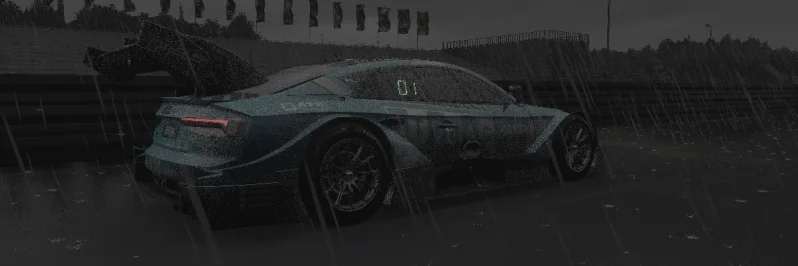
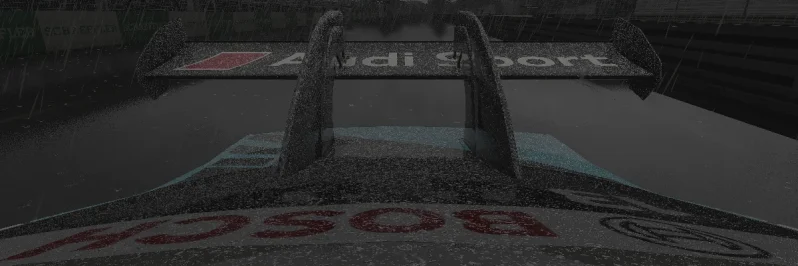
Could anyone help me with this annoying effect on the car when I set the rain?
 

Attachments

  • Screenshot_f302_audi_rs5_dtm_2020_norisring_25-3-126-22-34-53.webp
    Screenshot_f302_audi_rs5_dtm_2020_norisring_25-3-126-22-34-53.webp
    66.4 KB · Views: 11
  • Screenshot_f302_audi_rs5_dtm_2020_norisring_25-3-126-22-34-38.webp
    Screenshot_f302_audi_rs5_dtm_2020_norisring_25-3-126-22-34-38.webp
    92.1 KB · Views: 8
AI Spline Editor app: Do I need to do something specific in Content Manager to make it appear in app search/app list? I've heard people talking about it and I'd love to check it out but I don't seem to have in available nor can I find a way to enable it. Nothing on google etc either.

CSP version 0.2.11
Have you checked the "App shelf" in the apps toolbar, when you're in the pits or driving?
1777148676503.webp


1777148708447.webp
 
I also get a lot of cars with overly bright dash lights with the latest CSP/Pure and Pure ppfilter. I adjusted csp_lights_displays, I think it was, in Pure Config, to fix it. So it seems to have surfaced with one of the later CSP or Pure versions.
Thanks, this seemed to be it.
A good example is the red gear digital number LED on the RSS 360 Modena. With the csp_lights.displays at the Pure default 1.0, the gear indicator is now pretty much unreadable, just a big red glow. It has to be lowered to about 0.2 to make the digit readable.
This is definitely something introduced in a recent CSP (or Pure?) update, the default 1.0 used to be perfectly readable on this car before.
The problem with globally lowering csp_lights.displays is that cars that AREN'T affected (and many - maybe most - are not) will now have much dimmer LEDs. We're treating the symptom, not the cause.
@Peter Boese is this something you need to have a dialogue with Ilja about? Something's not right at root level.
 
Thanks for this. Great car, looking forward to the new physics. I did a couple of tweaks if you want to test them. Might mainly be good for VR users or if you drive pancake in first person with the driver visible.

1. Attached is a new shift animation (no more exaggerated loop, and closer to the gearknob) and driver rescale/reposition to get his hands on the steering wheel rim when turning. Remove the .txt extensions and place in the 'animations' folder.
Disclaimer: Kunos driver postures don't like high t-bar steering wheel designs like the one in this Alfa, so the thumbs clip through this a little. But it's a necessary compromise to get the hands on the rim when turning, which is much more important (in VR, anyway).
Important: change LOCK to =320 in data/driver3d.ini to also synch the hands better with the rim rotation.

2. There's a lot of daylight leakage around mesh seams on the dashboard, door cards and A-pillars, so add this to the config to fix that:
Code:
;stop sun ingress around cockpit mesh seams, into footwells etc
[SHADER_REPLACEMENT_...]
ACTIVE = 1
MATERIALS = EXT_PLASTIC_BLACK, EXT_BODY;external bodywork, trim, pillars, dashboard etc
CULL_MODE = DOUBLESIDED
CAST_SHADOWS = 1
DOUBLE_FACE_SHADOW_BIASED = 1

One more observation: for me (latest CSP, latest Pure LCS, Pure PPF) the dashboard instrument emissive glow seems overly bright. is anyone else getting this?
This is in daylight - at night of course, it's even brighter:

View attachment 1532216

Anyway, hope that helps. Feel free to ignore.
hm no problem here using the lcs config

20260426-000917-rmi_ds_garage_living-kp_alfa_romeo_75_turbo_evo.webp
 
Thanks, this seemed to be it.
A good example is the red gear digital number LED on the RSS 360 Modena. With the csp_lights.displays at the Pure default 1.0, the gear indicator is now pretty much unreadable, just a big red glow. It has to be lowered to about 0.2 to make the digit readable.
This is definitely something introduced in a recent CSP (or Pure?) update, the default 1.0 used to be perfectly readable on this car before.
The problem with globally lowering csp_lights.displays is that cars that AREN'T affected (and many - maybe most - are not) will now have much dimmer LEDs. We're treating the symptom, not the cause.
@Peter Boese is this something you need to have a dialogue with Ilja about? Something's not right at root level.
can quickly second this, using latest Pure LCS and latest CSPs, the brightness of the LEDs and screens is all over the place on a per-car basis, much more so than pre 0.2.11.

VRC, RSS, Kunos, URD, and many more authors, dozens of examples I can list if need be - I almost always have to change the CSP lights_displays value in Pure Config when changing cars, because the dashboard and rev lights are either ridiculously bright or invisibly dim.
 
Thanks, this seemed to be it.
A good example is the red gear digital number LED on the RSS 360 Modena. With the csp_lights.displays at the Pure default 1.0, the gear indicator is now pretty much unreadable, just a big red glow. It has to be lowered to about 0.2 to make the digit readable.
This is definitely something introduced in a recent CSP (or Pure?) update, the default 1.0 used to be perfectly readable on this car before.
The problem with globally lowering csp_lights.displays is that cars that AREN'T affected (and many - maybe most - are not) will now have much dimmer LEDs. We're treating the symptom, not the cause.
@Peter Boese is this something you need to have a dialogue with Ilja about? Something's not right at root level.
I tried, this it it at day:
1777177094653.webp

at night:
1777177125020.webp


Seems the brightness of it is defined pretty high. But anyway, if you are using the "pure" standard ppfilter with Pure LCS, the easier solution would be this:
Reduce the "photorealistic" slider in Pure PP app. The overall Glare is linked to that slider for easy control of the wanted look:
1777177281763.webp

1777177300627.webp


The number/display seems to have brake light like brightness, but it is actually only Glare which bothers you.
 
I tried, this it it at day:
View attachment 1532552
at night:
View attachment 1532553

Seems the brightness of it is defined pretty high. But anyway, if you are using the "pure" standard ppfilter with Pure LCS, the easier solution would be this:
Reduce the "photorealistic" slider in Pure PP app. The overall Glare is linked to that slider for easy control of the wanted look:
View attachment 1532554
View attachment 1532555

The number/display seems to have brake light like brightness, but it is actually only Glare which bothers you.
Weird, that's nothing like what I'm seeing with default settings.
 
Thanks for that, man! 3 ACE cars within one week. Do you see a possibility to convert also the Golf I and VIII?

Appreciate your hard work!

Thank you.
View attachment 1532110
Thanks, maybe Golf I, I'll see if I find the time.
Thanks for this. Great car, looking forward to the new physics. I did a couple of tweaks if you want to test them. Might mainly be good for VR users or if you drive pancake in first person with the driver visible.

1. Attached is a new shift animation (no more exaggerated loop, and closer to the gearknob) and driver rescale/reposition to get his hands on the steering wheel rim when turning. Remove the .txt extensions and place in the 'animations' folder.
Disclaimer: Kunos driver postures don't like high t-bar steering wheel designs like the one in this Alfa, so the thumbs clip through this a little. But it's a necessary compromise to get the hands on the rim when turning, which is much more important (in VR, anyway).
Important: change LOCK to =320 in data/driver3d.ini to also synch the hands better with the rim rotation.

2. There's a lot of daylight leakage around mesh seams on the dashboard, door cards and A-pillars, so add this to the config to fix that:
Code:
;stop sun ingress around cockpit mesh seams, into footwells etc
[SHADER_REPLACEMENT_...]
ACTIVE = 1
MATERIALS = EXT_PLASTIC_BLACK, EXT_BODY;external bodywork, trim, pillars, dashboard etc
CULL_MODE = DOUBLESIDED
CAST_SHADOWS = 1
DOUBLE_FACE_SHADOW_BIASED = 1

One more observation: for me (latest CSP, latest Pure LCS, Pure PPF) the dashboard instrument emissive glow seems overly bright. is anyone else getting this?
This is in daylight - at night of course, it's even brighter:

View attachment 1532216

Anyway, hope that helps. Feel free to ignore.
No loads as normal for me, I am on CSP 0.2.11 No Pure or such

Yes
Thanks, for fixes. I must admit that I used some driver and just reposition and scale so animations are not perfect.

And for lighting there is second ext_config file with values for LCS in extension folder, just rename it.

This is the problem that some users use gamma and some use LCS. This is where the discrepancy comes from. Both techniques uses light source differently I guess.

I had that in mind so I include two ext_configs.
 
Last edited:
So
Civic Type R TCR (FM8) - 16 Votes
308 TCR (FM8) - 15 Votes
Huracan GT3 EVO (ACC) - 6 Votes
Supra GT500 (PMR) - 1 Vote
2012 Camaro ZL1 (FM7 probs reusing models from FM4 tbh) - 1 Vote
BMW 435d - 1 Vote
Acura NSX GT3 / GT3 EVO - No Votes

And before you said oh its not fair, it is fair. I did the poll in deploys server before I started one on GT Planet.
 
Maybe those lights were made much brighter in the cars config to force more glare. Now with the fixed sun speculars the glare was changed in the standard pure ppfilter.

Could be that those lights are too strong anyway in comparison to world lights. But there must be a decent difference to much brighter world lights.

Would be interesting to see the difference of standard Kunos cars configs and the configs where this problem appears…
Just to be clear, the example I gave you on your Discord is a standard Kunos car.

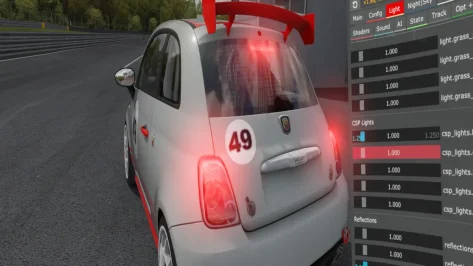
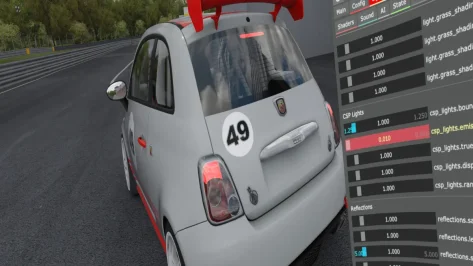
Problem with CSP Lights Emmisive - using CSP 0.3.x I have to set emmisive to 0.01 as default setting at 1 is super-duper emmisive. I have uninstalled csp and Pure, reinstalled and still the same. I hit Reset to Defaults in Pure before taking the images. When I revert back to CSP 0.2.12 the lights are behaving normally.

Image 1 is default settings in Pure - Image 2 is with CSP Light Emmisive reduced to 1%

using PureVR PP Filter and VR headset
 

Attachments

  • 1.webp
    1.webp
    84.5 KB · Views: 12
  • 2.webp
    2.webp
    88.6 KB · Views: 9
Last edited:
Sharing a mod? Host it on GTPlanet Downloads. Free, public hosting for files up to 10GB in size.
Back