- 2,561

- Helsinki
Say it isnt soSo long and thanks for all the fish

Say it isnt soSo long and thanks for all the fish


So turns out my physics issues were because after I swapped your stuff over, the base setup was messed up cause it saved values from the previous physics, so I reset the setup to default, and it looks like it just works as intended. I mean, I just let the ai drive a lap in each car to verify, and the times were basically the same, and I didn't notice any odd behavior so, looks like it works. I want to figure out all the inis that don't physics such as lods, lights, etc, so I can copy the newer ones back over since they may have updates on the newer car, I just don't know where I would find a resource explaining that.No problem, You do it. But I must warn, that this is common misconception among moders. That's why there is so many ill driven mods. It's never just copy paste work, even if You paste RSS physics, of something. It's easier because You can spare research phase, as it was already done.
Copy paste in this case will be more or less decent only if new model is based on old one and have same meshes names, and same 3d coordinates.


I would like to help, but i can not fit it all in one post, i try what i can.So turns out my physics issues were because after I swapped your stuff over, the base setup was messed up cause it saved values from the previous physics, so I reset the setup to default, and it looks like it just works as intended. I mean, I just let the ai drive a lap in each car to verify, and the times were basically the same, and I didn't notice any odd behavior so, looks like it works. I want to figure out all the inis that don't physics such as lods, lights, etc, so I can copy the newer ones back over since they may have updates on the newer car, I just don't know where I would find a resource explaining that.




The old Nürburgring track has a wrong altitude. It is placed 1500m below the sea level!Hello, guys!
Can someone help me solve that "thing" with the clouds? CSP version 0.3.0-preview445




You should be able to do this yourself by creating an ext_config.ini in a folder called extension, find out what shader (and shader values) are used for the other panels, and then tweak the shader for the doors to match. More info here.Hi all. Does anyone know how to fix the doors on the Corvette C6 Coupe by Some1 from race department? https://www.overtake.gg/downloads/corvette-c6.24208/
I asked him about the doors not rendering properly awhile back: His reply - Somewhere along the way, the shaders were ****ed up, probably due to having params not compatible with latest CSP rendering. There's a lot of small mistakes in some older mods we've made, but I won't ruin them for you. Siim is too busy to update the cars anymore, so it is what it is.
Anyone willing to see if they can correct the shaders on the doors? Both doors. It looks ugly in both previews and driving. Thank you.
View attachment 1551301
Okay cool, those are the ones that I was pretty sure about but it's nice having somebody competent confirm it, thank you!I would like to help, but i can not fit it all in one post, i try what i can.
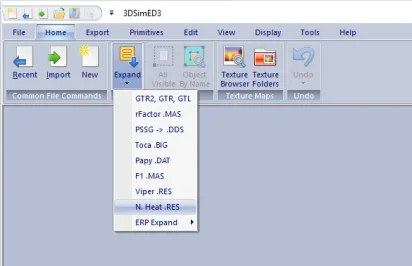
So selected files from picture are model specific and correspond with meshes names. Other are physics based and correspond to mesh 3d coordinates.
Actually, looking at the car, the door has the same shader and values as the rest of the bodywork. The difference appears to be that the door has been places inside COCKPIT_HR in the model structure, which I'm guessing creates the difference in rendering. Probably needs fixing in Blender or kseditor, and doesn't look to be fixable via ext_config 🤷♂️You should be able to do this yourself by creating an ext_config.ini in a folder called extension, find out what shader (and shader values) are used for the other panels, and then tweak the shader for the doors to match. More info here.
The crude way to inspect shader values is to open the 'Objects Inspector' app in a session, and then alt-click on the panel/object/mesh you want to learn about and read the values there.
Thanks for sharing this one, and the older Grid model. Really appreciated. Also thanks for the liveries to StoffelWaffle and maximeerkat185.06 MB file on MEGA
mega.nz
Version 1.01
-------------------
-fixed right front disc
-fixed interior brightness
-fixed interior rear banner
-new Skin by maximeerkat ( 24h Nuerburgring 42,43)
-new Skin by VicKinG ( ALMS 2001)
I hope I haven't forgotten anything.
I've had this issue with I think Porsche 356 from racedepartment, if I remember well, I've used something like this in ext.config:Actually, looking at the car, the door has the same shader and values as the rest of the bodywork. The difference appears to be that the door has been places inside COCKPIT_HR in the model structure, which I'm guessing creates the difference in rendering. Probably needs fixing in Blender or kseditor, and doesn't look to be fixable via ext_config 🤷♂️
Man, these renders look amazing, the cockpit, the SMP livery, different aero, everything. I was always bugged that VRC did freaking ByKolles but never this car, which was my favorite among the privateer LMP1s. I thought it was never gonna happen until you showed us the first screenshots a couple months back. Good luck, I hope you get it over the line sometimes in the futureNot really an update for BR1, just want to share SMP and carbon liveries i made. Didn't had as much time as i wanted to work on it in the past two weeks. I'll leave the last 2019 Gulf DragonSpeed livery for later, for now I'll focus only on getting the car into the game. HD images https://flic.kr/s/aHBqjCVq13


What is double sided fix that actk mentioned? Glass, rear lights?185.06 MB file on MEGA
Version 1.01
-------------------
-fixed right front disc
-fixed interior brightness
-fixed interior rear banner
-new Skin by maximeerkat ( 24h Nuerburgring 42,43)
-new Skin by VicKinG ( ALMS 2001)
I hope I haven't forgotten anything.
View attachment 1551148
DELETE THE OLD CAR
Looks promising, though (as is often the case with apps that try to be an all-in-one solution) there are still some loose ends...I saw this on overtake.gg, think it looks better than a lot of the default trees...
idkWhat is double sided fix that actk mentioned? Glass, rear lights?
Sure, they're broken...Can't see any leaves.
You should be able to do this yourself by creating an ext_config.ini in a folder called extension, find out what shader (and shader values) are used for the other panels, and then tweak the shader for the doors to match. More info here.
The crude way to inspect shader values is to open the 'Objects Inspector' app in a session, and then alt-click on the panel/object/mesh you want to learn about and read the values there.
Yeah, I know nothing about modding or how to use various scripts for CM. I only know how to install, delete, and drive a car. All of the above is way over my head. Thank you all for providing some means to fix, but I may just have to bin the car.Thanks for sharing this one, and the older Grid model. Really appreciated. Also thanks for the liveries to StoffelWaffle and maximeerkat
I've had this issue with I think Porsche 356 from racedepartment, if I remember well, I've used something like this in ext.config:
[NODE_ADJUSTMENT_...]
IS_ACTIVE = 1
NODES = left door node name, right door node name (check the mesh names in showroom)
MOVE_TO = something like a main body node name (again, check the exact names in showroom)
It's basically the code we use when we want to move something to cockpit_hr, but just the other way around. Hopefully it can help you, the only problem when you do this is that inner parts of the doors will start to reflect the track depending on their shader values
Man, these renders look amazing, the cockpit, the SMP livery, different aero, everything. I was always bugged that VRC did freaking ByKolles but never this car, which was my favorite among the privateer LMP1s. I thought it was never gonna happen until you showed us the first screenshots a couple months back. Good luck, I hope you get it over the line sometimes in the future

Not the C6 Coupé, but there is a C6 Z06 available made by maidcafe.Hi all. Does anyone know how to fix the doors on the Corvette C6 Coupe by Some1 from race department? https://www.overtake.gg/downloads/corvette-c6.24208/
I asked him about the doors not rendering properly awhile back: His reply - Somewhere along the way, the shaders were ****ed up, probably due to having params not compatible with latest CSP rendering. There's a lot of small mistakes in some older mods we've made, but I won't ruin them for you. Siim is too busy to update the cars anymore, so it is what it is.
Anyone willing to see if they can correct the shaders on the doors? Both doors. It looks ugly in both previews and driving. Thank you.
View attachment 1551301
 boosty.to
boosty.to
boosty.to


It looks good but it didn't stay for more than a few minutes.I saw this on overtake.gg, think it looks better than a lot of the default trees without taking the performance hit of 3D trees.
https://www.overtake.gg/downloads/2d-trees-enhancment-visual.85459/
Its the rear window banner which does not show from jk OG version, pretty sure that is what this french geezer means..........however he says it is fixed with a ext_config but it is more than that it is 3d aswell...........

 acstuff.club
I agree, it definitely still needs some work. It seemed fine on Nords just hotlapping, but I noticed a bit of a performance drop of around 20-30 fps during replays with my 5080. I also think the trees are maybe a bit too dark right now. Disabled it for now, but one to keep an eye on.It looks good but it didn't stay for more than a few minutes.
I was seeing regular cpu spikes every second and when I took it to Nords at the top of the hill after Aremberg under the Chinese bridge my 5090 went from 50% to 90% GPU usage.


I would suggest to use the file swap functionality in CM MODs section. As reading some comments it can make AC corrupted. While using this swap tool, you can always switch back.I saw this on overtake.gg, think it looks better than a lot of the default trees without taking the performance hit of 3D trees.
https://www.overtake.gg/downloads/2d-trees-enhancment-visual.85459/