Assetto Corsa PC Mods General DiscussionPC 

  • Thread starter Thread starter daan
  • 156,339 comments
  • 50,465,335 views
Thats the ones! i never knew it said "MODULE FUR ANTIEBSTECHIK" on them though.......how did you find this?


The skins are not showing.......when i click number 42 or 43 i get number 10 in the showroom.......

without even inspecting, the number 42 and 43 skins that i done are more accurate plus the plates are in the correct place.

not saying you done these but i'm just saying what i see with my own eyes. the colouring alone is more accurate on my skin let alone anything else.

infact it does not matter what i click on the skins you supplied i get the same number 10 in the showroom....eveytime....even on track

Also thankyou for your work i am pleased to see most of the skins for this car

car on track for reference:

the people can and will make up there own mind...........

View attachment 1551020View attachment 1551021
I just went along with the GRID Legends and GTR2 skins but you're right, it actually ain't worth ****, as with everything I've done now that I think about it. It's all pointless.

Feel free to remake those for the PMR car because I don't wanna do stuff nor play AC anymore, ultimately it's time lost that I'll never get back and with the dwindling number of creators and modders...

So long and thanks for all the fish :)
 
Last edited:
Circuit de Avignon v1.0

Screenshot_bmw_m3_gt2_circuit_de_avignon_17-6-126-20-43-13.webp

Semi fictional street circuit in Avignon, France.
Conversion from rFactor.

-CSP recommended
-30 pit/start
-AI, cam

Credits & Thanks;
Original rFactor Track by Rodrrico
-Thank you for giving me permission

AC Converted by shin956
Building objects from morsel (track by carTOON (barcika))
Crowds texture by Kniker97
marshall and some textures by kunos

Enjoy.
 
No problem, You do it. But I must warn, that this is common misconception among moders. That's why there is so many ill driven mods. It's never just copy paste work, even if You paste RSS physics, of something. It's easier because You can spare research phase, as it was already done.
Copy paste in this case will be more or less decent only if new model is based on old one and have same meshes names, and same 3d coordinates.
So turns out my physics issues were because after I swapped your stuff over, the base setup was messed up cause it saved values from the previous physics, so I reset the setup to default, and it looks like it just works as intended. I mean, I just let the ai drive a lap in each car to verify, and the times were basically the same, and I didn't notice any odd behavior so, looks like it works. I want to figure out all the inis that don't physics such as lods, lights, etc, so I can copy the newer ones back over since they may have updates on the newer car, I just don't know where I would find a resource explaining that.
 
So turns out my physics issues were because after I swapped your stuff over, the base setup was messed up cause it saved values from the previous physics, so I reset the setup to default, and it looks like it just works as intended. I mean, I just let the ai drive a lap in each car to verify, and the times were basically the same, and I didn't notice any odd behavior so, looks like it works. I want to figure out all the inis that don't physics such as lods, lights, etc, so I can copy the newer ones back over since they may have updates on the newer car, I just don't know where I would find a resource explaining that.
I would like to help, but i can not fit it all in one post, i try what i can.
So selected files from picture are model specific and correspond with meshes names. Other are physics based and correspond to mesh 3d coordinates.
Screenshot 2026-07-17 183219.webp
 
Last edited:
Hi all. Does anyone know how to fix the doors on the Corvette C6 Coupe by Some1 from race department? https://www.overtake.gg/downloads/corvette-c6.24208/

I asked him about the doors not rendering properly awhile back: His reply - Somewhere along the way, the shaders were ****ed up, probably due to having params not compatible with latest CSP rendering. There's a lot of small mistakes in some older mods we've made, but I won't ruin them for you. Siim is too busy to update the cars anymore, so it is what it is.

Anyone willing to see if they can correct the shaders on the doors? Both doors. It looks ugly in both previews and driving. Thank you.
preview.webp
 
Hi all. Does anyone know how to fix the doors on the Corvette C6 Coupe by Some1 from race department? https://www.overtake.gg/downloads/corvette-c6.24208/

I asked him about the doors not rendering properly awhile back: His reply - Somewhere along the way, the shaders were ****ed up, probably due to having params not compatible with latest CSP rendering. There's a lot of small mistakes in some older mods we've made, but I won't ruin them for you. Siim is too busy to update the cars anymore, so it is what it is.

Anyone willing to see if they can correct the shaders on the doors? Both doors. It looks ugly in both previews and driving. Thank you.
View attachment 1551301
You should be able to do this yourself by creating an ext_config.ini in a folder called extension, find out what shader (and shader values) are used for the other panels, and then tweak the shader for the doors to match. More info here.

The crude way to inspect shader values is to open the 'Objects Inspector' app in a session, and then alt-click on the panel/object/mesh you want to learn about and read the values there.
 
I would like to help, but i can not fit it all in one post, i try what i can.
So selected files from picture are model specific and correspond with meshes names. Other are physics based and correspond to mesh 3d coordinates.
Okay cool, those are the ones that I was pretty sure about but it's nice having somebody competent confirm it, thank you!
 
You should be able to do this yourself by creating an ext_config.ini in a folder called extension, find out what shader (and shader values) are used for the other panels, and then tweak the shader for the doors to match. More info here.

The crude way to inspect shader values is to open the 'Objects Inspector' app in a session, and then alt-click on the panel/object/mesh you want to learn about and read the values there.
Actually, looking at the car, the door has the same shader and values as the rest of the bodywork. The difference appears to be that the door has been places inside COCKPIT_HR in the model structure, which I'm guessing creates the difference in rendering. Probably needs fixing in Blender or kseditor, and doesn't look to be fixable via ext_config 🤷‍♂️
 

Version 1.01
-------------------
-fixed right front disc
-fixed interior brightness
-fixed interior rear banner

-new Skin by maximeerkat ( 24h Nuerburgring 42,43)
-new Skin by VicKinG ( ALMS 2001)

I hope I haven't forgotten anything.:D
Thanks for sharing this one, and the older Grid model. Really appreciated. Also thanks for the liveries to StoffelWaffle and maximeerkat

Actually, looking at the car, the door has the same shader and values as the rest of the bodywork. The difference appears to be that the door has been places inside COCKPIT_HR in the model structure, which I'm guessing creates the difference in rendering. Probably needs fixing in Blender or kseditor, and doesn't look to be fixable via ext_config 🤷‍♂️
I've had this issue with I think Porsche 356 from racedepartment, if I remember well, I've used something like this in ext.config:
[NODE_ADJUSTMENT_...]
IS_ACTIVE = 1
NODES = left door node name, right door node name (check the mesh names in showroom)
MOVE_TO = something like a main body node name (again, check the exact names in showroom)

It's basically the code we use when we want to move something to cockpit_hr, but just the other way around. Hopefully it can help you, the only problem when you do this is that inner parts of the doors will start to reflect the track depending on their shader values

Not really an update for BR1, just want to share SMP and carbon liveries i made. Didn't had as much time as i wanted to work on it in the past two weeks. I'll leave the last 2019 Gulf DragonSpeed livery for later, for now I'll focus only on getting the car into the game. HD images https://flic.kr/s/aHBqjCVq13
Man, these renders look amazing, the cockpit, the SMP livery, different aero, everything. I was always bugged that VRC did freaking ByKolles but never this car, which was my favorite among the privateer LMP1s. I thought it was never gonna happen until you showed us the first screenshots a couple months back. Good luck, I hope you get it over the line sometimes in the future
 
Nissan Skyline GT-R R32 Calsonic Racing Team JTCC Skin Pack
main.webp

  1. Nissan Skyline GT-R R32 Calsonic Racing Team JTCC 1989 Development Car
  2. Nissan Skyline GT-R R32 Calsonic Racing Team JTCC 1990 Overall Champion
  3. Nissan Skyline GT-R R32 Calsonic Racing Team JTCC 1991 Overall 2nd Place
  4. Nissan Skyline GT-R R32 Calsonic Racing Team JTCC 1992 Overall 4th Place
  5. Nissan Skyline GT-R R32 Calsonic Racing Team JTCC 1993 Overall Champion
  6. Nissan Skyline GT-R R32 Calsonic Racing Team JTCC 1993 Alt. Overall Champion
Download skin pack and info GTPlanet
or
Patreaon
 
You should be able to do this yourself by creating an ext_config.ini in a folder called extension, find out what shader (and shader values) are used for the other panels, and then tweak the shader for the doors to match. More info here.

The crude way to inspect shader values is to open the 'Objects Inspector' app in a session, and then alt-click on the panel/object/mesh you want to learn about and read the values there.

Thanks for sharing this one, and the older Grid model. Really appreciated. Also thanks for the liveries to StoffelWaffle and maximeerkat


I've had this issue with I think Porsche 356 from racedepartment, if I remember well, I've used something like this in ext.config:
[NODE_ADJUSTMENT_...]
IS_ACTIVE = 1
NODES = left door node name, right door node name (check the mesh names in showroom)
MOVE_TO = something like a main body node name (again, check the exact names in showroom)

It's basically the code we use when we want to move something to cockpit_hr, but just the other way around. Hopefully it can help you, the only problem when you do this is that inner parts of the doors will start to reflect the track depending on their shader values


Man, these renders look amazing, the cockpit, the SMP livery, different aero, everything. I was always bugged that VRC did freaking ByKolles but never this car, which was my favorite among the privateer LMP1s. I thought it was never gonna happen until you showed us the first screenshots a couple months back. Good luck, I hope you get it over the line sometimes in the future
Yeah, I know nothing about modding or how to use various scripts for CM. I only know how to install, delete, and drive a car. All of the above is way over my head. Thank you all for providing some means to fix, but I may just have to bin the car.
 
Hi all. Does anyone know how to fix the doors on the Corvette C6 Coupe by Some1 from race department? https://www.overtake.gg/downloads/corvette-c6.24208/

I asked him about the doors not rendering properly awhile back: His reply - Somewhere along the way, the shaders were ****ed up, probably due to having params not compatible with latest CSP rendering. There's a lot of small mistakes in some older mods we've made, but I won't ruin them for you. Siim is too busy to update the cars anymore, so it is what it is.

Anyone willing to see if they can correct the shaders on the doors? Both doors. It looks ugly in both previews and driving. Thank you.
View attachment 1551301
Not the C6 Coupé, but there is a C6 Z06 available made by maidcafe.


1784385487141.webp
 
Last edited:
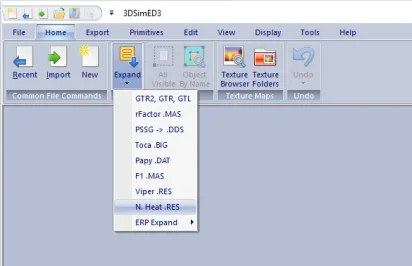
Hi all, i am trying to convert a car for AC, it's a CAR.file i was told to try 3dsimed and expand like in the photo but then i get a message saying too many objects in resource file, is there any other way to convert the CAR.file? using a nother converter? i don't know? any help will be good thanks.
 

Attachments

  • Screenshot_tru.webp
    Screenshot_tru.webp
    7 KB · Views: 1
  • 1762626203887.webp
    1762626203887.webp
    17.4 KB · Views: 1
I saw this on overtake.gg, think it looks better than a lot of the default trees without taking the performance hit of 3D trees.

https://www.overtake.gg/downloads/2d-trees-enhancment-visual.85459/
It looks good but it didn't stay for more than a few minutes.
I was seeing regular cpu spikes every second and when I took it to Nords at the top of the hill after Aremberg under the Chinese bridge my 5090 went from 50% to 90% GPU usage.

Instead I decided to get Marbles working better at Nords but hit the 16bit limit in the app that caps the number of piece of rubber.
Undetered I decided to clone 9 versions of the app and have them all run at the same time.
Using the less intensive 3d versions that look absolutley fine at speed I can have 10000 per instance giving a total of 90000 pieces of rubber. Suffice to say 90000 is too many so I tried 4 clones giving 40000 pieces and that looks great.
I have it so that after 3 laps with a field of 20 cars all the pieces are created.
The best bit about it though is I have 4 different sizes and 4 different volume levels.
marbles.webp
1stpass.webp
1 lap
2ndpass.webp
2nd lap
3rdpass.webp
3rd lap

I still need to tinker with the settings a bit to spread them out more but I'm really enjoying playing around with this mod.
All the wonderful work of Alex Mail - https://www.patreon.com/c/alexmail/home?vanity=alexmail
 
Last edited:
Its the rear window banner which does not show from jk OG version, pretty sure that is what this french geezer means..........however he says it is fixed with a ext_config but it is more than that it is 3d aswell...........

jk fixed this anyway.......
 
Last edited:
Sharing a mod? Host it on GTPlanet Downloads. Free, public hosting for files up to 10GB in size.

Latest Posts

Back