
I link to it from OP in post on previous page, this is update version with fix under bridge and spell correctlyis there a download link for the track itself?

My version, last time i tried it have no issue at all with any car. I've tried also with formula one cars lowered as much as possibile, so basically i'm sure everything will works more than fine
Simply because i made it the same day the first version come up online (so i think more than a year ago) then i kept as it is while i'm trying to learn how to make lights working and the other stuff like grass 3D and so on whitout any luck and more importan without time to do it. Tomorrow as soon as i'm at the pc where i have the track i will upload and share here, hope someone will be able to update as needed
EDIT: Download --> https://sharemods.com/hnglcv9wh0z9/FM7_-_Maple_Valley_v1.1_updated_by_CrisT86_for_AC_1.16.3.rar.html


thanksI link to it from OP it in post above, this is update version with fix under bridge


for sure maple deserve attention. ...
Nice job! Big Improvment.


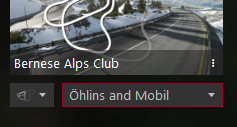
I posted in your support thread but I'm not sure if you've seen it - your latest update seems to use my 'Mobil' skin ui_track_skin.json, so it effectively overwrite my Mobil skin by showing up as 'Mobil' and not it's correct name 'Snow'. I think you might need to update the upload again.I update Bernese alps a moment ago on RD, now the tree are more dark, it do not change a lot on my screen but I hope it will change something for you.
And, now all the trees got snow, I would not have done it if you had not pushed me, thanks for the advice, it's better like that.
yes i confirm this bug, my skin show as mobli too.I posted in your support thread but I'm not sure if you've seen it - your latest update seems to use my 'Mobil' skin ui_track_skin.json, so it effectively overwrite my Mobil skin by showing up as 'Mobil' and not it's correct name 'Snow'. I think you might need to update the upload again.
i dont have this isuee, but just click the "red" text and tell CM to fix it.when i extract the folder to /tracks, i get this


Hi Ema,
looks nice and neat. Nice job, some odds here and there, but nothing hard to fix. 👍
Overall it have imo to much reflective materials. I don´t know if it´s the actual CSP, but on my side the fences at pits cast full shadows.
Nevertheless, I jumped in and made a new quick´n´dirty config. It´s not finished yet nor finetuned. Hope you don´t feel like I hijacked your project, just want to help a bit.
Most things could be transferred back to material settings in kn5 file, but I didn´t wanted to edit it without permission.
If you want/need more help, just send me a PM.
View attachment 896160
Extract zip into track folder and hopefully enjoy.


Hi!
I hope you guys don't mind me dropping in with a quick question...
I unpacked the data.acd file of a car (toyota_yaris_2010 by Assettoland), in order to change the gearing from stick to paddles, so that my girlfriend can drive it more easily - which makes no sense since that's her actual car in real life, so she CAN drive it!
View attachment 896354 ...
The thing is I ended up with a mess of junk characters on every ini file! I tried both CM and QuickBMS and neither can come up with an usable file.
Am I missing something?
TIA
You need to unpack the data before you rename the folder.


Hi!
I hope you guys don't mind me dropping in with a quick question...
I unpacked the data.acd file of a car (toyota_yaris_2010 by Assettoland), in order to change the gearing from stick to paddles, so that my girlfriend can drive it more easily - which makes no sense since that's her actual car in real life, so she CAN drive it!
View attachment 896354 ...
The thing is I ended up with a mess of junk characters on every ini file! I tried both CM and QuickBMS and neither can come up with an usable file.
Am I missing something?
TIA
Oh, sorry I didn´t made the track, just the config file so that it looks imo a bit better. I´m in contact with @Ema and changed my config a bit (less reflections on many materials like tarmac, etc.) and a new surfaces.ini but some things have to be changed in kn5 file (renaming of objects etc.) so they match each other and function as intended.If I´m allowed to make a comment on this track...It´s a whole universe better than the one I have (whose the author/creator I don´t know) but I´m getting FPS drops all across the track. Does it still lack optimization since it´s in development?
Also I had problems installing the track because the folder name is the same as the Valencia Street Circuit. Can it be renamed? I´m asking this because I tried changing the folder name and the game just crashed...
Thanks...it´s a very good job
[MODEL_0]
FILE=valencia.kn5
POSITION=0,0,0
ROTATION=0,0,0

to

[MODEL_0]
FILE=valencia_rt.kn5
POSITION=0,0,0
ROTATION=0,0,0

It's 2020 and there are still car and track combos where the AI pits every three laps. Did someone ever find a way to stop the AI from making pitstops?
Check the data folder in each affected track. If there is no "ideal_line" present, then copy the "fast_lane" file from the AI folder into the data folder and rename it "ideal_line"
Not sure if this breaks the AI for endurance races though, but it does prevent them from pitting every three laps.


hello, yes , Viper is completed.Woow, always wanted one of these. Is the viper complete? I may have missed it
not sure. why do you need template?Will it have template?


Because I wanna make an itasha for itnot sure. why do you need template?


Thank you!
Hi BrainsBush, first of all thank you!
Stratos hadn't power assisted steering so I made it a bit heavy to simulate that, but not so heavy on my side (I have a T300RS). So I guess it has to do with your DD1 wheel!

Nicely done! As Oliver Twist would say "More please."The Lexus LFA GT1 is a neat little mod, but god the stock liveries were atrocious so a made a coupla if anyones interested :
Team ZENT Cerumo :

Test livery :

These aren't 100% perfect nor true to the renders I've seen online but they're alright (I hope).
https://we.tl/t-my5wtUt4MX
Fantastic! I'm adding and airdam and possibly more to the model so I hope that doesn't screw-up your ability to work on the skins. Here's where I'm at so far. Still a long way to go.I'd be more than happy to do some skins for you. Send me any reference images of skins you want I'll see what I can do for you
EDIT: Awesome. This car comes with a decent set of templates so hopefully I can do some decent skins for it.
Fantastic! I'm adding and airdam and possibly more to the model so I hope that doesn't screw-up your ability to work on the skins. Here's where I'm at so far. Still a long way to go.
View attachment 896418

Basic question I guess...can anyone tell me how to get CM and AC to recognize a new KN5 model name? I'm modding an existing car and want to rename the kn5 as well but it won't open in CM or AC when I use the new kn5 file name...
Cool. I'm planning to change the material/texture on the rear spoiler so it's body paint as well.Loving that front end, looks much better than the stock version. Glad to see you got rid of the oil cooler and the hole in the hood/bonnet as well
I'm sure it'll be fine to skin with your changes but just so you know the skin template doesn't include the rear spoiler which is a pain as most of the liveries I've found the spoiler is painted. I'm not sure if someone else can step in and help me find where it is hidden but in the meantime I'll just keep adding some paint to blank areas until I find it!!
The car folder name? Yes.Does the kn5 match the folder name?