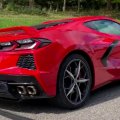


Try with a different showroomI have a problem with content manager. When I try to calculate AO, CM crashes. Newer had this before. Could have something to do with my graphic card (rx 6600xt), as I found a couple of people having this problem with this specific card. Has anybody experienced this and more important, found a fix?

Will try.Try with a different showroom


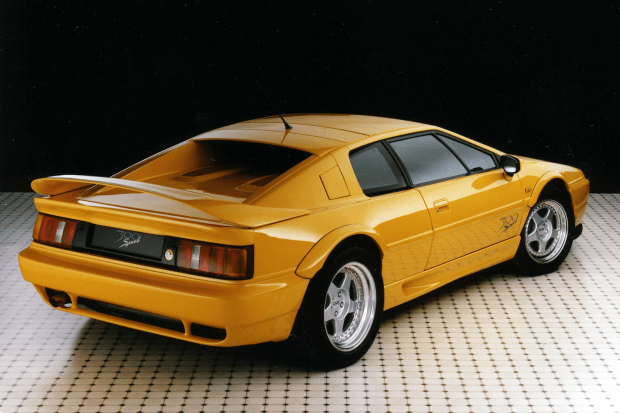
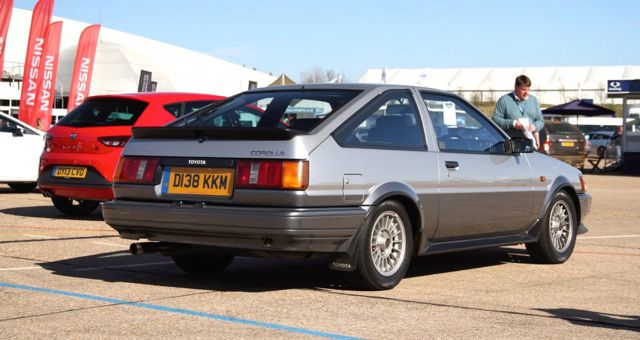
Love stuff like this.Here's a few more raided parts bin supercars for ya. The Aston Martin Virage had the rear lights from a VW Scirocco, the DBS had mirrors from a Volvo V70. Oh and the Noble M12 had the rear lights from a Mk1 Mondeo, the list goes on lol.
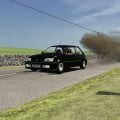


hi, you have to change the attributes above the folders, then it worksHi all,
I try to install the VRC Super Tourers without success, I install as usual but there is still an error in the CM which file should we install the normal or the csp? I do not understand anything !!!!! I have tried everything and nothing works...
VRC can't make times even more complicated?
View attachment 1221236
View attachment 1221237
Is this the PedroBR (I think hes called) one? I read the Patreon- it is. Shockingly badly done car.FERRARI TESTAROSSA - 1984
The original TESTAROSSA, not the later versions "512 TR" or "F512 M"
View attachment 1221315
Enjoy!


With services.msc shortcut in the Run window (Win + R) you can disable Windows Update service. I know it stops w10 updates so it's not 100% recommendable but it can stop the "optional but inavoidable" update to w11 (I hope hehe)You can't disable auto updates in 11. You can only pause them for up to a week. As I only use my PC for sim racing, I don't leave it on any other time, so all in all, I find it's just easier to let Microsoft have its way.
EDIT: I know you're a PC-man, so you're probably just shaking your head at me. 😖🤪
It seems there are ways to disable it via the 'Local Group Policy Editor', but I'm not sure I'll bother. I'll just go back to my nice Mac Studio instead and put up with the occasional Windows-induced headaches which only happen when I use my sim setup and have to endure the evil that is Windows. 🥹


unfortunatly nothing from them is scratch made.. all stolen assets from Rfactor2 and Iracing..the BMW LMDH V8 is now out for assetto
absolutely awesome cars..love all of them from FSR
Patreon
Patreon is empowering a new generation of creators. Support and engage with artists and creators as they live out their passions!www.patreon.com
Here's another one:TVR Cerebra and Chimera had MK3 Fiesta rear lights but they swapped them to the opposite sides. My personal favourite, always used to say my XR2i had TVR bits 20 odd years ago 😂
View attachment 1221313View attachment 1221314


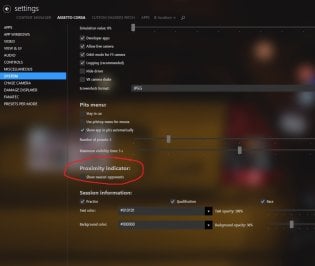
Yikes! For an answer that I knew, you have been faster than me typing...1 settings-assetto corsa-system-show nearest opponents
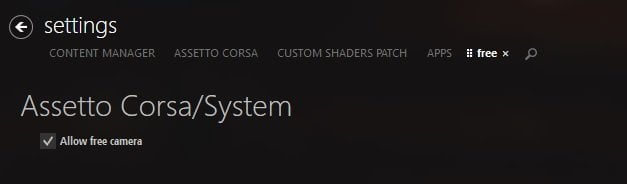
2 settings-assetto corsa-system-allow free camera

Car is from PedroBLR with permission afaik, the car itself is very ok, but misses many little thingsFERRARI TESTAROSSA - 1984
The original TESTAROSSA, not the later versions "512 TR" or "F512 M"
View attachment 1221315
Enjoy!

I feel you mate.Anyone know which CM file has the game's drive location. I'm moving my AC installation to a new drive and want to edit the location CM uses manually. Nevermind. Got it.
EDIT: Turns out, I do need some help here. After moving the AC folder to another drive, Steam decided it wanted to do an integrity check and started downloading files. So now I have a few stock files back I had previously changed and/or some settings have been altered. It was so long ago, I don't remember what they are. So a couple of things right off the bat.
1.) Anyone know the file name of the stupid red arrow that pops up when a car is passing you. I had either disabled that or deleted the texture to get rid of it. Anyone know if it's an option or a file I need to look for.
2.) Used to be from the cockpit, I could hit F7 on the keypad and get a free roaming camera. Can't do that now. Anyone know how to re-enable that ability.
Probably be more questions as I find out things that have been messed with. Thanks for any help...


Have you tried CSP 1.79? Didn't he make a lot of optimizations from 1.60?All out of sudden I'm getting "cpu at 99%" message when driving AC. I always have only 10 cars on the grid. Could it be a recently installed mod causing this? Running CSP 160

Can I use these in conjunction with your other textures/skins? I just had all of your content included for the 34 & 66 layout, but I don't see the winter trees. What might I be doing wrong?Winter grass and trees skin for any of the vintage spa tracks. I.E., my recent versions or the Spa 1966, 1938 or THR versions. Does what my Monza and Nords winter skins do. Removes the leaves from the deciduous trees and browns up the other trees so it can be used as a late fall, early spring skin as well. I separated the grass and trees because I actually like the winter grass as an optional skin to use in the summer. Has a sort of burnt out feel.
Winter track skin
That is how they are supposed to look, but you have to have seasonal adjustments turned on and set a winter date for them to look snow covered. They are not white by default. If you want to use them as a late fall\early spring skin (when the trees have no leaves), you don't want to use a fall date or they will turn orange. If I want to get a fall feel with this skin, I use either Sept 25-30th or March 20-25th. Get similar lighting to late fall but without orange trees.Can I use these in conjunction with your other textures/skins? I just had all of your content included for the 34 & 66 layout, but I don't see the winter trees. What might I be doing wrong?
Edit: unless this is how your winter trees look..?
View attachment 1221364
I always looked at the esprit thinking I've seen those lights before, never relized it was the 86Here's another one:
Okay. After I posted my sample pic, I remembered from your Monza post your reminder about seasonal adjustments, and I moved back about a month or so, and indeed the leafless trees looked darker. The effect is certainly more subtle than the Nords Dead of Winter skin, and Spa happens to have a high ratio of coniferous trees as well.That is how they are supposed to look, but you have to have seasonal adjustments turned on and set a winter date for them to look snow covered. They are not white by default. If you want to use them as a late fall\early spring skin (when the trees have no leaves), you don't want to use a fall date or they will turn orange. If I want to get a fall feel with this skin, I use either Sept 25-30th or March 20-25th. Get similar lighting to late fall but without orange trees.
Also, you need to disable any other skin you might have active and only use the winter skins if you want a winter look with leafless trees.
So, the reason that was mostly a sneak peak, is because for some reason in the couple weeks since I last touched it, the fonts played up. So, fixed that up, and this is where it's at now:View attachment 1221174
Just a little sneak peek of something I'm working on in SimHub to use on AC. Little bit of work to do on some things, but the base is there...
If you run some other graphic-intensive games, you may find the same issue occurs. The temperature your GPU rises to is totally dependant on the load it's handling (vs. how good your cooling fans work), as well as the ambient temperature when you're running it. Sim racing pushes the cards pretty hard.
I've had this very issue in summer myself. When the PC is continually going hot, cool, hot, cool, hot, cool... things plugged into the motherboard can move around from thermal expansion and contraction, then eventually you get an intermittent connection which can shut the PC down.
If you're unsure how to reseat the card, you can find some helpful videos on youtube:
You can use the hardware monitor of the "MSI Afterburner" tool, to control the temperature and usage of GPU and CPU. It works for all graphics cards, not only MSI cards. I use it to optimize my graphics settings for AC and control how demanding a track or car mod is on my system.
Speaking of performance did anyone experienced a performance drop by installing the latest CSP preview 1.80.115? Even though my gpu and cpu are not fully utilized frames don't over 100fps while before I had 120fps solid
@WiisardNic
I also had a black screen all the time. My new graphics card is quite heavy. I then propped up the graphics card. Since then no more problems.
Also an update on this situation:If the PC is turning off completely like they've suggested, it could also be the CPU overheating. Or it could be the power supply deciding it no longer wishes to supply power.
I love computers and how totally reliable they always are.
Words I didn't expect to see on here for $500 thanks!Minkia!The TEMPRA DTM