Assetto Corsa PC Mods General DiscussionPC 

  • Thread starter Thread starter daan
  • 154,858 comments
  • 48,731,092 views
I suppose something is missing in the skin folders ? I get to all white karts...
Only wheel and steer colours appear different.
in cm preview perhaps (not using csp extension)... in game it should be OK (skins are with csp extension).
If u enable the option "use CSP for final previews render " in Settings - Custom Showroom, it'll give you the propper previews.
 
Last edited:
hi shyzsterz , can you manage the bright of the headlights? also in my case only the darche headlights too brights, rest of all cars works fine, i use premier pure ppfilter..is a shame because the car is amazing!

Look into the ext_config.ini file in the car's "extension" folder.

There you can change the illumination multiplier of the headlights. Look into the following line:

";======================== ORIGINAL ===================================
...

[LIGHT_HEADLIGHT_1]
COLOR=1.00, 1.00, 1.00, 50 [Change the '50' to a lower number. I went for 10 to 12 at my settings!]
RANGE=180"


You can also add the "RANGE" line, if you want to adjust how far the headlights should reach.
 
Last edited:
I updated F1 2023 helmets:

- Miami: Verstappen, Leclerc, Sainz, Ocon, Norris, Gasly, Magnussen, Hülkenberg, Tsunoda, Albon.

- Mónaco: Pérez, Leclerc, Norris, Piastri, Bottas, Magnussen, De Vries.

- Spain: Sainz, Gasly, Norris, Piastri.

- Helmet since Azerbaijan: Ocon.

 
in cm preview perhaps (not using csp extension)... in game it should be OK (skins are with csp extension).
If u enable the option "use CSP for final previews render " in Settings - Custom Showroom, it'll give you the propper previews.
Hmm... not every CSP has this option, so it won't work for everybody.
That aside, the CSP version I use does have the option and I tried it, but it did not work. Like I said, some different colours on steering wheel, rims and chassis, but the 'bodywork' is always white with some black/grey parts, option ticked or unticked makes no difference.
In game I get to see the colours that are meant to be (I think):

ingame.png


Same skin in preview/showroom:

preview.png


I can't rule out that it may be something on my side, since e.g. I don't get to see the Mercedes star on the grille of the rss_mercer, option "use CSP for final previews render" on or off...
Imo the 'classic' way to skin is still better and will work for everyone.
 
Tashi's Car Data Reference Center 0.2c (The Munich + Woking Update)

This update was originally intended to add the rest of the BMW data I could gather, but during that time I was contacted in the DMs by someone to find McLaren data as well, so subsequently this update will also feature the Woking-based manufacturer McLaren

General things

  • Updated all BMW M car logos
Specific Data
  • Added BMW 4 Series F3x Basic Documentation (Can't find the Technical Training Manuals so this is the best I could gather from BMW forums)
  • Added BMW 5 Series G30 Technical Training - Complete Vehicle
  • Added BMW 8 Series G14/G16 Technical Training - Complete Vehicle
  • Added BMW M2 F82 Technical Training - Complete Vehicle
  • Added BMW M3 GTS E92 Technical Training - Product Information (In German)
  • Added BMW M3 G80/M4 G82 Technical Training - Complete Vehicle
  • Added BMW Z4 G29 Technical Training - (partially) Complete Vehicle (only contains body, drivetrain, chassis and electronics info)
  • Added BMW X3M F97/X4M F98 Technical Training (Also contains BMW S58 engine documentation)
  • Added BMW X3 G01 Technical Training - Complete Vehicle
  • Added BMW X5M F85/X6M F86 Technical Training - Complete Vehicle
  • Added BMW X7 G07 Technical Training - Complete Vehicle

  • Added manufacturer McLaren
  • Added McLaren MP4-12C Coupe & Spider Repair Manual
  • Added McLaren 570S GT4 Technical Manual

As always, feel free to contact me if you want to submit car data that I don't have into the spreadsheet!
 
Last edited:
Hmm... not every CSP has this option, so it won't work for everybody.
That aside, the CSP version I use does have the option and I tried it, but it did not work. Like I said, some different colours on steering wheel, rims and chassis, but the 'bodywork' is always white with some black/grey parts, option ticked or unticked makes no difference.
In game I get to see the colours that are meant to be (I think):

View attachment 1271855

Same skin in preview/showroom:

View attachment 1271856

I can't rule out that it may be something on my side, since e.g. I don't get to see the Mercedes star on the grille of the rss_mercer, option "use CSP for final previews render" on or off...
Imo the 'classic' way to skin is still better and will work for everyone.
ah yes, I was running without PP , enabling PP and using Peter's latest Pure filter , it looked indeed more like what you were seeing.
So I reworked the skins, to work with PP as well (using 'Pure' filter). Should work both without and with PP now. (although I havent' tested in VR yet)
You can re-download them at same link.

Cheers and thanks for your feedback!
 
Last edited:
This is my first post.
RUF R50 Concept (RUF Supercar Concept)
Release Assetto Corsa my first time MOD (free MOD)

features:
・non encryption
・made collider, LOD_B, C, D
・emissive turnsignal, hazard
・active rear spoiler (over 120km/h)
・wiper animation


which can be edited freely. I'm inexperienced, so I'm still immature as a modder.
I will continue to study MOD making from now on.
Screenshot_dg_ruf_r50_soyo_daikoku_9-6-123-15-42-59.jpg
Screenshot_dg_ruf_r50_californiacoast_9-6-123-17-14-21.jpg
Screenshot_dg_ruf_r50_ks_barcelona_9-6-123-18-48-15.jpg
 
Once more, yet another mod that is very nearly fantastic but is completely ruined by mistakes locked behind encryption.
The LOD switching on the rear window as it changes between LODs A & B is ridiculous, and could easily be fixed if it wasn't hard-locked behind encryption.
So frustrating.
It's like baking a delicious cake then thinking it'd be improved by smearing dog muck all over it.
100% agree, for me i just want to turn abs on...............cant even do that
 
Hi every one !

I have an issue when I start assetto corsa without content manager.
1000003802.jpg

Does anyone know how to solve this issue ?

Thanks 🙏
 
Hi all! Someone can help me, beacouse in some traks (also kuno's tracks) with clear whather I've this problem (also with kuno's ppf), asphalt turn white...thanks!!!
 

Attachments

  • Immagine.png
    Immagine.png
    389.2 KB · Views: 25
ah yes, I was running without PP , enabling PP and using Peter's latest Pure filter , it looked indeed more like what you were seeing.
So I reworked the skins, to work with PP as well (using 'Pure' filter). Should work both without and with PP now. (although I havent' tested in VR yet)
You can re-download them at same link.

Cheers and thanks for your feedback!
Works fine now, previews, showroom and ingame... 💥
 
Look into the ext_config.ini file in the car's "extension" folder.

There you can change the illumination multiplier of the headlights. Look into the following line:

";======================== ORIGINAL ===================================
...

[LIGHT_HEADLIGHT_1]
COLOR=1.00, 1.00, 1.00, 50 [Change the '50' to a lower number. I went for 10 to 12 at my settings!]
RANGE=180"


You can also add the "RANGE" line, if you want to adjust how far the headlights should reach.
thamks for your response John! unfortunately, i do that but nothing change at all..also i tries to unpack data whit CM but in the data folder, the lights.ini are unreadable..i guess because are encripted
 
Hmmm, recently updated Content Manager and I cannot seem to select multiple cars/tracks to edit tags en masse.
Anyone else experiencing that?
 
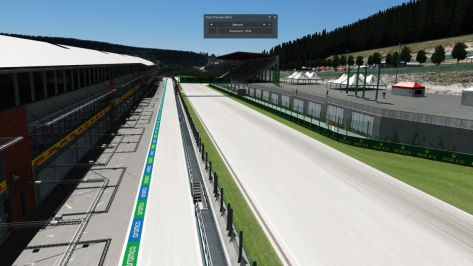
No one asked it, but i worked on it for myself, so why not share it here (be sure to download also the track skin by Daniel Paez on RD)

VRC - Alabama track update by CrisT86

Just download, drag-n-drop and overwrite when asked

  • New EXT_CONFIG featuring RainFX, LightFX, GrassFX, Seasons (i kept few things from the Rusty config)
  • New TV Cams (2 sets, 4 different FOVs)
  • New TV Cams by @DaBaeda

View attachment 1144954View attachment 1144955View attachment 1144956View attachment 1144957View attachment 1144958
this download is just a text document with a load of chinese writing.............or japanese or something to that effect. am i doing something wrong?.
 
This is my first post.
RUF R50 Concept (RUF Supercar Concept)
Release Assetto Corsa my first time MOD (free MOD)

features:
・non encryption
・made collider, LOD_B, C, D
・emissive turnsignal, hazard
・active rear spoiler (over 120km/h)
・wiper animation


which can be edited freely. I'm inexperienced, so I'm still immature as a modder.
I will continue to study MOD making from now on.
View attachment 1271909View attachment 1271910View attachment 1271911
Welcome to GT-Planet
 
It's a RAR-archive. Just remove .txt at the end of the file.
excellent. thanks for the info and the quick reply this is the first time i have come across this.

**i have gone to do this and there is no .txt at the end of the file to delete, when its in my downloads tab in my web browser it says at the end .txt

but when its in my downloads page there is no .txt to remove it just says .rar**
 
Last edited:
Sharing a mod? Host it on GTPlanet Downloads. Free, public hosting for files up to 10GB in size.
Back