

Thanks. But there is a debate between organizers on the obligation or not to register to download. I'll keep you informed.Works!


Can't register in order to downloadHello
I'm a new member. I have been reading the Assetto Corsa forum for quite a long time and find a lot of interesting information there (modding technique, mods). I myself create rally tracks for Assetto Corsa. My tracks are available on RaceDepartment and racingfr.
Here a link to get my Corsican rallye tracks for free :
https://www.racingfr.net/wbb/index.php?board/474-le-forum-de-jcrr/
Three tracks are available :
- Macinaggio (11,7 km)

- Le Lancone (6,5 km)

- Notre Dame de la Serra (three layout : 19 - 27,7 - 28,9 km)

Hello. Its'n't possible : RFRO have exclusivity of sharing this three tracks. (I'm member of this forum from 2010...) My other tracks are on RD with exclusivity too.I'd recommend this:
View attachment 1283670


And this site is one of them...To register or not to download: a final decision will be made very quickly. There are few sites / forums where this is possible without registration....

Yeah I know that one, also got it but unfortunately I am looking for this exact layout of 1980-85, 1979 would also be cool but I am not sure if some will make it even if it would exist in other games.Sergio Loro's Sandevoerde (1970's layout) is very similar. Not exact , but close.



You can lead a horse to water.And this site is one of them...
That bouncing sounds like the bug from the v180p346. Do you use this version?for the Porsche Carrera GT by Adriaan (MNBA Assetto Modding Group) v1.1,
here an extra chameleon skin I made , which also makes it topless/cabrio, easier to take in surroundings
For it to work I had to comment some part in the extension cfg file regarding the paint, affecting all skins - not in a bad way imho).
You can always uncomment it again if you like (but that messes up my skin then).
QUESTION:
This car does land pretty awkward (bounces up in the air ) after the jump at Eiger Nordwand ... anyone a solution for this?
View attachment 1283687
ah , yes I am... ok so a CSP update will fix it later on I guess ... thx!That bouncing sounds like the bug from the v180p346. Do you use this version?

Or just disable that one here and you´re good.For those tracks with that bug like Daytona I use v180p115.


Not jumping do help tho!for the Porsche Carrera GT by Adriaan (MNBA Assetto Modding Group) v1.1,
here an extra chameleon skin I made , which also makes it topless/cabrio, easier to take in surroundings
For it to work I had to comment some part in the extension cfg file regarding the paint, affecting all skins - not in a bad way imho).
You can always uncomment it again if you like (but that messes up my skin then).
QUESTION:
This car does land pretty awkward (bounces up in the air ) after the jump at Eiger Nordwand ... anyone a solution for this?
View attachment 1283687
It did work, yeah! Now I can stay with that version for all tracks, big thanks. It's in General Patch Setting for all that don't want to search.Or just disable that one here and you´re good.
View attachment 1283693


I had the exact same issue with my Version of the Track. I tried to figure out every Billboard and made a Mapping Guide and a small F1 Skin. If anyone is interested, can be downloaded here: GTPlanet DownloadThanks for the heads-up, I completely missed this version.
It's very good, but the lack of mountains is a pretty serious omission. I guess some enterprising soul could easily add the mountain wall from the ACU version..?
There's also some adboard mapping issues.
View attachment 1283150

Yeah, this setting will just toss you in the air for no reason. Sveg Raceway's kerbs become basically unusable, for example.Or just disable that one here and you´re good.
View attachment 1283693


Nice job! Thanks for taking the time to reverse engineer these. It's a great track, I just wonder why SMP mapped the adboards like that?I had the exact same issue with my Version of the Track. I tried to figure out every Billboard and made a Mapping Guide and a small F1 Skin. If anyone is interested, can be downloaded here: GTPlanet Download
View attachment 1283705
Time to forget they ever existed...Hi, Why my Content Manager cannot load encrypted cars anymore?
View attachment 1283702
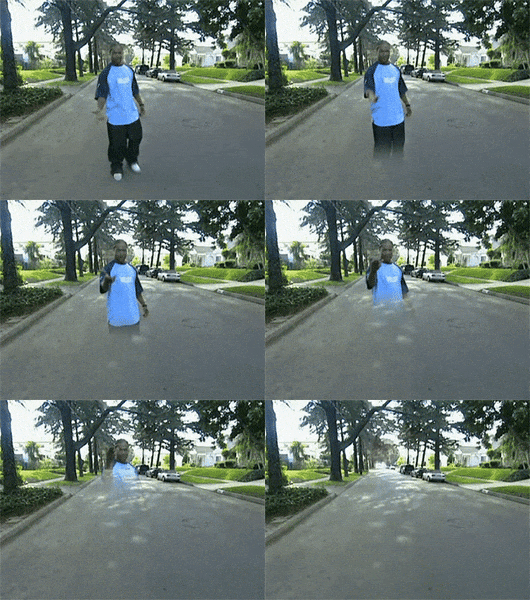

By the way, I take advantage of this message to thanks you. THANKS!Goodwood Circuit Update...


Disable extended physicsHi, Why my Content Manager cannot load encrypted cars anymore?
View attachment 1283702


Hi, maybe is there some mod about the Accord CL7, I saw this 3d model, maybe it was ported to AssettoCorsa?
Link to a mod will be appreciated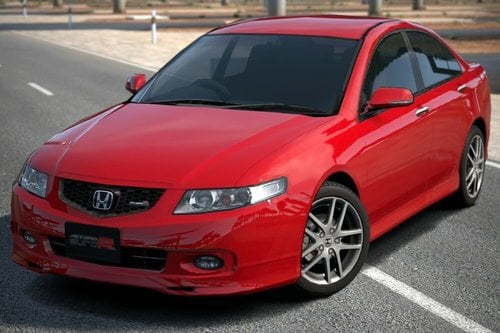
Honda Accord Euro-R '02
Download 3D model of Honda Accord Euro-R 02 from Gran Turismo 6 / Скачать 3D Модель автомобиля Honda Accord Euro-R 02 из игры Gran Turismo 6 ABOUT Thanks daemon1 and fnatz for exporting tools! Description: HQ folder - body and interior models in one file; wheel model; textures RACE folder - body ...gamemodels.ru


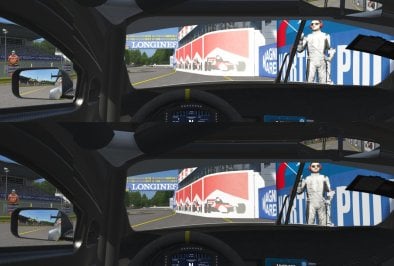
It works good for very steady cockpit cameras. But in VR that could kill your experience if you focus too much on YEBIS AE. Even with some headmovement the exp starts to wooble. In the last years we developed much better methods to calculate exposures. Also, if you just been focused on the windshield, you miss important parts of the influence by the illumination of the cockpit. AND every car has a different shape, the users have different FOVs and the seat position can vary with the cars.Hi all
Today I saw a query posted on a FB site and by chance, I stumbled across the solution yesterday, so I thought I should share my solution as many of you may also not be aware that you can choose the area which a PP filter uses for the auto-exposure metering.
Problem:
Most PP filters, but not all, run "Auto-exposure", which acts much the same as digital cameras always have, where the exposure is adjusted to bring the overall picture back to a pre-set overall luminosity. So in the car with drivers view camera, the shadow areas and black trim of the interior brighten up the overall picture, as the PP filter tries to compensate.
Solution:
Thankfully it's built into the "Post Process Filter" app that you would normally use to switch between to PP filters and make overall Exposure adjustments.
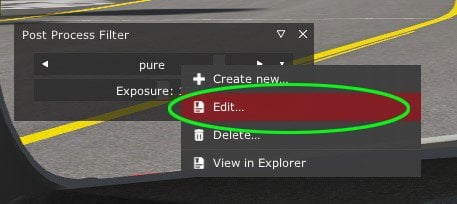
1. Right click on the filter name and select "Edit"
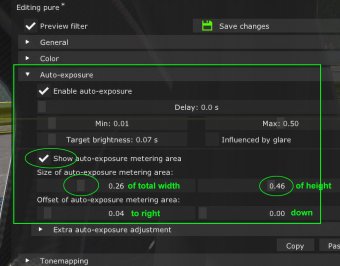
2. Open the "Auto-exposure" section triangle
3. If your PP filter has "Auto-exposure" ticked than the area can be adjusted.
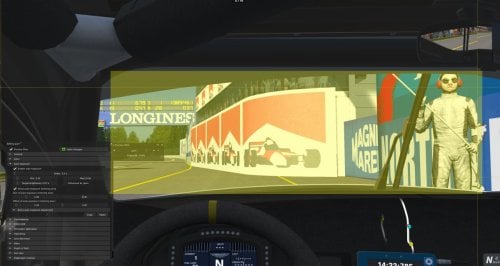
4. Tick "Show auto-exposure metering area" - by default the yellow overlay will be full screen.
5. Use the sliders to adjust the size and position of the yellow area to only include the area you are seeing through the windscreen.
I am unable to adjust the centre point up, only down, which might be a problem for triple screen users only, not sure. Try tweaking the driver's camera viewing angle "Tilt" adjustment, to give you a bit more windscreen and less dashboard.
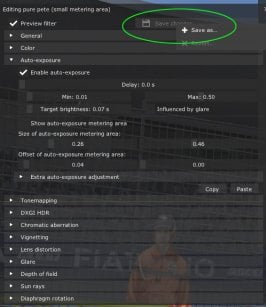
6. Untick "Show auto-exposure metering area" before saving the filter, otherwise the yellow overlay stays on.
7. Right-click the "Save changes" button, to bring up a "Save as" option where you can rename your tweaked PP filter. You can simply save, but i recommend doing a Save As so that you always have an original version of all the PP filters to revert back to.
This PP filter will now focus it's auto exposure on the road and scenery and not be distracted by your dark interior. much the same as your eyes when you glance up to look at the road outside in real life.
Differences are subtle of course, but often the road to perfection is a lot of a small improvements.
Tip 2: Another advantage renaming any of your favourite PP filters with something like your name at the beginning of the title is that your favourites will now all be grouped together in the PP filter app. Helpful if you have a lot of PP filters but only want to cycle between a few of them.