Assetto Corsa PC Mods General DiscussionPC 

  • Thread starter Thread starter daan
  • 157,267 comments
  • 51,146,078 views
Hi everyone,
while waiting for VRC to release the 499P, RSS the Porsche 963 and URD the Cadillac, has anyone tried the SSD Lamborghini? I don't hear good things about SSDs, especially due to their past even if I have 2 excellent mods in my opinion such as F1 2009 and F1 2023. Thanks everyone
apparently for once...

and i hate saying this but: the SSD recently on the hypercars have been....not bad.....and i genuinely mean it, they actually aren't bad a few are dog water but the recent Cadders and SC63 have been....actually okay.
 
apparently for once...

and i hate saying this but: the SSD recently on the hypercars have been....not bad.....and i genuinely mean it, they actually aren't bad a few are dog water but the recent Cadders and SC63 have been....actually okay
I agree, they are certainly improving lately.
 
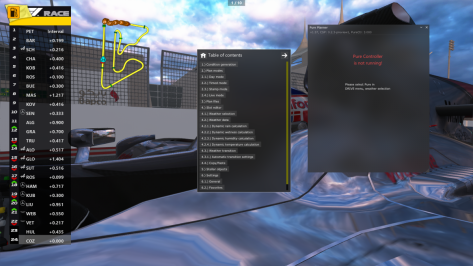
Hi All does anyone know how use pure weather with ac custom championships? Planner says pure not running but it is set up in the 'quick drive' tab

Thanks
 

Attachments

  • Screenshot (966).png
    Screenshot (966).png
    282.1 KB · Views: 23
Hi All does anyone know how use pure weather with ac custom championships? Planner says pure not running but it is set up in the 'quick drive' tab

Thanks
There is a guide included in the Pure download that explains weather for championships, have you checked it out?
 
I'd been looking into getting back into creating some photo mode shots for Assetto Corsa, but I'm at a stand still because I'm starting to get this very odd problem whenever I'm about to take the shot, where the sun light causes this very strange brightness distortion effect that's not present otherwise, making many of my shots otherwise useless. (This also applies to brighter clouds in the sky aswell.)

Anyone know of how I could fix this? It wasn't like this before.

Photo is of how the sun appears when I take the shot.

View attachment 1331862
Weather encryption is coming...next target...the sun :lol::lol:
 
that Audi Etron RS GT is meant as a joke or a middlefinger?
the windows not being transparent is something that can't be done by mistake I think, and the sound of the horn ... :ill:

1708977317490.png

also they made it so the glass can't be switched to transparant (so my guess it is a middle finger then ...)
:irked:
 
that Audi Etron RS GT is meant as a joke or a middlefinger?
the windows not being transparent is something that can't be done by mistake I think, and the sound of the horn ... :ill:

View attachment 1331926
also they made it so the glass can't be switched to transparant (so my guess it is a middle finger then ...)
:irked:
Put this in the ext_config.ini :

[MESH_ADJUSTMENT_...]
MESHES = name_of_the_mesh
IS_ACTIVE = 1
IS_TRANSPARENT = 1

This way it should work :)
 
Last edited:
here is a copy of that TRD DRW12 Gr.C
View attachment 1331503

I fixed the digital instruments in the mean time , but there is still quite some issues , main one sticking out for me is the right side window that is too "milky" ...

Only diff I see between right and left window is this triangle count

View attachment 1331501
View attachment 1331502

IF someone could do a workaround for that window , it would be much more enjoyable...
Wiper don't swipe all the way
 
Hi, thanks for your interest, but it seems like it's not a problem with reshade
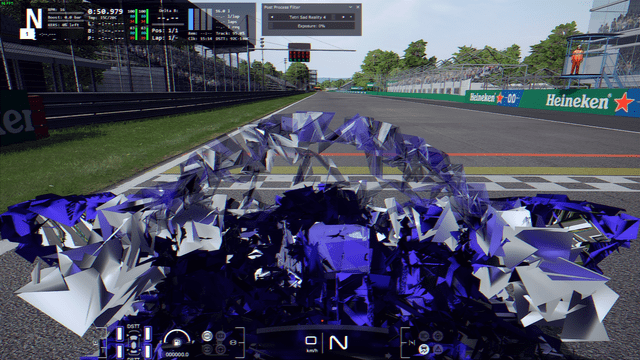
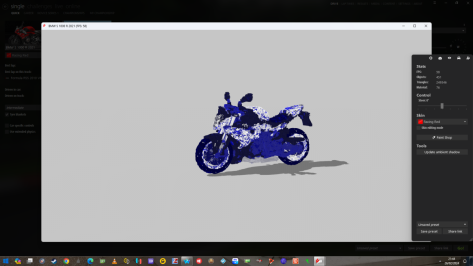
Showroom is different than ingame. Encrypted mods like the one above don´t work in showroom, that´s why you see the blue crystals there. Ingame, I bet you use re-shade, so that´s why you also don´t see it ingame working.
 
This was not the future I asked for...
Well, that sky has all the earmarks of being the result of climate change, telling us that the end is near... It could be, now that global warming is to blame for all the world's ills... 😐

And now seriously; I'm sorry I can't be of much help, although if I had to bet, I would say that it is some incompatibility of the applications that control the appearance of the sky, such as Sol or Pure, if you use them...
 
Last edited:
I presume everyone has seen this British gt skin pack?

just posting incase someone missed it

 
I'm confused. Fixing some stuff I've noticed myself after months, while in the meantime nothing else came up, seems to be a bad thing. Noted.
Comparing me to the Frenchy ... or naming me in the wake of the Frenchy ... Wow, just Wow!
Oh, nothing like that, believe me.
I treasure your stuff and the devotion behind it.
Just had a laugh, some time ago, seeing ACTK struggling with your M1 updates and adding fantasy "fixes".
My mind was delighted with the naughty idea of adding a single pixel to a skin and at the same time adding
a number to the version of the car just to piss him off :lol:

So if I named you in the wake of the nameless...is to celebrate your resilience :cheers:
My humour tends to be oblique at times, and that does not translate well.
 
What I'd like to do is make it so the exhaust "can" on the Bonny Porsche doesn't achieve such nuclear red level (even in the bright sun in Qatar). I messed with the appropriate section (in ext_config.ini while looking at it driving around the track) enough to know that I'm not getting there. About all I could change was how soon it went nuclear. It's now set to off with these Min and Max settings (I figured that much out). It would be enough if it could know it's dark out, and then glow. (I will manually re-instate it for night races)
Anyone here have a handle on this?
_Exhaust-Glow.JPG
 
apparently there's a F1 2016 mod being released pretty soon, by SUZQ ...
watch the trailer here:
from the trailer it looks impressive...

I have no mods with "a:SUZQ" ... and first time I hear of them(or he or she). Is this a first release ever by this SUZQ? (hard to believe) or known by another name?

ps2: the old existing 2016 F1 mod from a couple of years ago, anyone knows who it is from ?
(Formula Pro 2016 by author:?)
View attachment 1331869

I like SuzQ's conversions personally. I have been following him for a good bit. Also, I just tried the RSS F1 2020 car, DAMN is it fun! I can't try the csp verson since mine is out of date apparently. Worth a buy!
 
Last edited:
Looking for some explanations/help regarding Bazza's F2/F3 vintage pack.

Why all the F2 cars of this pack go to the pits after 2 laps? I tried editing AI, engine and other .ini parameters, but the problem persists...

Does anyone has the same problem?
 
Well, that sky has all the earmarks of being the result of climate change, telling us that the end is near... It could be, now that global warming is to blame for all the world's ills... 😐

And now seriously; I'm sorry I can't be of much help, although if I had to bet, I would say that it is some incompatibility of the applications that control the appearance of the sky, such as Sol or Pure, if you use them...
Damn, that's what I was dreading.

As someone who frequently likes to take photos in Assetto, this has been very frustrating.

I've been asking around about this in a bunch of places and have been getting next to no responses.

The only one I did get a response on was to try re-installing Pure and CSP, which didn't fix the issue.

It.. also appears to only happen when using Photo Mode within the replay itself.

If I try to take a picture outside of it, its FINE.

Screenshot_as_mclaren_senna_topgear_26-1-124-18-48-0.png


Unfortunately, outside of replay mode my features are more limited, such as not being able to create motion shots. In the replay, the same shot looks like this;

Screenshot_as_mclaren_senna_topgear_26-1-124-18-48-31.png


I'm at a loss, here. It seems like it should be fixable judging by what I've discovered, but I don't know what the root of the cause is.
 
Where is this at?

Options > General > UI Modules

It's in the instructions for selecting a companion app for the RSS Formula 4 and maybe one of two other things I've downloaded. I don't know it means.
 
Last edited:
Speaking about crashes, I have been stable for the past few days now out of the blue this. Disabling DXGI does not seem to help the issue.
View attachment 1330664
Ok seems I may have gotten to the bottom of these random crashes, that I started to experience from an otherwise stable
setup that has been running for the past year.

Seems it was because I had too little free space on my OS drive. When the game runs its can easily use 5 Gigs or more for cache or swap other temp files etc. When the PC runs out of space the game crashes.

So anyone have similar issues make sure your have plenty of free space on your OS drive.

Wasted so much time looking at other things and did not notice how low the free space was on my OS 🤦‍♂️

Now there no more crashing when doing a races. Use to get frequent crashes at the start of the race. 👍


Second test with new ReShade settings. Set video playback quality to 1080p 😍
 
Last edited:
Damn, that's what I was dreading.

As someone who frequently likes to take photos in Assetto, this has been very frustrating.

I've been asking around about this in a bunch of places and have been getting next to no responses.

The only one I did get a response on was to try re-installing Pure and CSP, which didn't fix the issue.

It.. also appears to only happen when using Photo Mode within the replay itself.

If I try to take a picture outside of it, its FINE.

View attachment 1331981

Unfortunately, outside of replay mode my features are more limited, such as not being able to create motion shots. In the replay, the same shot looks like this;

View attachment 1331982

I'm at a loss, here. It seems like it should be fixable judging by what I've discovered, but I don't know what the root of the cause is.
what you can always try is resetting your CSP settings. Just rename the /Documents/Assetto Corsa/cfg/extension folder to something different. You can restore it later. CM/CSP will create a new one if you start a session. If the problem goes away, its clearly a settings problem.
 
what you can always try is resetting your CSP settings. Just rename the /Documents/Assetto Corsa/cfg/extension folder to something different. You can restore it later. CM/CSP will create a new one if you start a session. If the problem goes away, its clearly a settings problem.
Gave this a go to see what was happening.
There were no issues when everything was set to default.
As soon as I turned Pure back on, the problem returned.
 
Gave this a go to see what was happening.
There were no issues when everything was set to default.
As soon as I turned Pure back on, the problem returned.
Just throwing some things at you to see if you've tried them.
Do you have Pure skies installed..maybe remove those and see what happens. (or reinstall them)
Can you change the PP filter in the photo app and see if that fixes anything.
Also maybe change the lighting angle / time of day etc.
Lots of settings in the photo app to mess about with.

One last thing - Open the Pure Config app while in replay and reset/load/import a PURE script from another ppfilter.
These are all things you may have tried already but as you haven't mentioned what you have done I will suggest to try all these things.
 
Last edited:
Ok seems I may have gotten to the bottom of these random crashes, that I started to experience from an otherwise stable
setup that has been running for the past year.

Seems it was because I had too little free space on my OS drive. When the game runs its can easily use 5 Gigs or more for cache or swap other temp files etc. When the PC runs out of space the game crashes.

So anyone have similar issues make sure your have plenty of free space on your OS drive.

Wasted so much time looking at other things and did not notice how low the free space was on my OS 🤦‍♂️

Now there no more crashing when doing a races. Use to get frequent crashes at the start of the race. 👍


Second test with new ReShade settings. Set video playback quality to 1080p 😍

I'm sorry to give you this news, I have 465Gb free on my main SSD (the one where the OS is installed), but I have AC crashes, so this may be the solution to your problem, but not to everyone's unfortunately, thanks anyway for bringing your experience.
:)
 
I'm sorry to give you this news, I have 465Gb free on my main SSD (the one where the OS is installed), but I have AC crashes, so this may be the solution to your problem, but not to everyone's unfortunately, thanks anyway for bringing your experience.
:)
I'm always having issues with CSP crashes too. For several months or more, I can almost never get a track to load first time. I usually have to quit Content Manager and restart it again for any track to start properly. I've tried everything under the sun to get to the bottom of the problem and nothing seems to work.

Drives me nuts it does! I think I need a dedicated CSP/CM therapist to be permanently on call at this point. 🤪
 
Last edited:
Sharing a mod? Host it on GTPlanet Downloads. Free, public hosting for files up to 10GB in size.
Back