Assetto Corsa PC Mods General DiscussionPC 

  • Thread starter Thread starter daan
  • 154,831 comments
  • 48,719,097 views
what you can always try is resetting your CSP settings. Just rename the /Documents/Assetto Corsa/cfg/extension folder to something different. You can restore it later. CM/CSP will create a new one if you start a session. If the problem goes away, its clearly a settings problem.
Gave this a go to see what was happening.
There were no issues when everything was set to default.
As soon as I turned Pure back on, the problem returned.
 
Gave this a go to see what was happening.
There were no issues when everything was set to default.
As soon as I turned Pure back on, the problem returned.
Just throwing some things at you to see if you've tried them.
Do you have Pure skies installed..maybe remove those and see what happens. (or reinstall them)
Can you change the PP filter in the photo app and see if that fixes anything.
Also maybe change the lighting angle / time of day etc.
Lots of settings in the photo app to mess about with.

One last thing - Open the Pure Config app while in replay and reset/load/import a PURE script from another ppfilter.
These are all things you may have tried already but as you haven't mentioned what you have done I will suggest to try all these things.
 
Last edited:
Ok seems I may have gotten to the bottom of these random crashes, that I started to experience from an otherwise stable
setup that has been running for the past year.

Seems it was because I had too little free space on my OS drive. When the game runs its can easily use 5 Gigs or more for cache or swap other temp files etc. When the PC runs out of space the game crashes.

So anyone have similar issues make sure your have plenty of free space on your OS drive.

Wasted so much time looking at other things and did not notice how low the free space was on my OS 🤦‍♂️

Now there no more crashing when doing a races. Use to get frequent crashes at the start of the race. 👍


Second test with new ReShade settings. Set video playback quality to 1080p 😍

I'm sorry to give you this news, I have 465Gb free on my main SSD (the one where the OS is installed), but I have AC crashes, so this may be the solution to your problem, but not to everyone's unfortunately, thanks anyway for bringing your experience.
:)
 
I'm sorry to give you this news, I have 465Gb free on my main SSD (the one where the OS is installed), but I have AC crashes, so this may be the solution to your problem, but not to everyone's unfortunately, thanks anyway for bringing your experience.
:)
I'm always having issues with CSP crashes too. For several months or more, I can almost never get a track to load first time. I usually have to quit Content Manager and restart it again for any track to start properly. I've tried everything under the sun to get to the bottom of the problem and nothing seems to work.

Drives me nuts it does! I think I need a dedicated CSP/CM therapist to be permanently on call at this point. 🤪
 
Last edited:
I'm sorry to give you this news, I have 465Gb free on my main SSD (the one where the OS is installed), but I have AC crashes, so this may be the solution to your problem, but not to everyone's unfortunately, thanks anyway for bringing your experience.
:)
Sorry should have specified it is not the cause of all crashing but in my case it seems that it was indeed related to low disk space. At least now you can rule that out that has the cause of your problems. ;)
I'm always having issues with CSP crashes. For several months or more, I can almost never get a track to load first time. I usually have to quit Content Manager and restart it again for any track to load. I've tried everything under the sun to get to the bottom of the problem and nothing seems to work.

Drives me nuts it does! I think I need a dedicated CSP/CM therapist to be permanently on call at this point. 🤪

Yes random CM crashes are really annoying, especially if you are in a race. So far not a single crash today. Will let you know if that changes. :lol:
 
Last edited:
Hi Mark. This is the last message I will write regarding this situation. Obviously I don't blame you, ambassador doesn't bring any pain. Without choosing in detail, regardless of TVR's problems, the point lies at the basis of everything: it didn't take into account what I said at all. It's not like if you can't contact me then you feel entitled to do your own thing. I would have had no problem adding his name among those who helped me, but if you have to "disrespect me" (especially after all the effort I put in because I'm not a professional) then keep your update and that's the end of the story. If a few simple words have not been clear, then I think it is useless to get stuck. I repeat, I have nothing against him as a person but the situation bothers me.


I think he was only joking about the many updates, I don't think he told you that you were acting wrongly. At least that's what I understood from reading
Just my 2 cents worth on the AO skins comment. I think you are doing this the right way with an AO map in the shader. In game your car looks perfectly correct with the shadowing. AC has a great 3D environment so it does this anyway and I don't trust the showrooms over what "in game" produces.
 
Just throwing some things at you to see if you've tried them.
Do you have Pure skies installed..maybe remove those and see what happens. (or reinstall them)
Can you change the PP filter in the photo app and see if that fixes anything.
Also maybe change the lighting angle / time of day etc.
Lots of settings in the photo app to mess about with.

One last thing - Open the Pure Config app while in replay and reset/load/import a PURE script from another ppfilter.
These are all things you may have tried already but as you haven't mentioned what you have done I will suggest to try all these things.
Did multiple re-installs of Pure to no avail, unless I'm misinterpreting what you're saying.

The effect only seems to be present whenever the sun or bright clouds are present. The effect is reduced/practically gone when its darker skies.

I tried different PPFilters and the effect seems to change, but doesn't eliminate the problem.

Both of these shots were taken with everything in the Pure Configurator set to default. Full Noon w/ No Clouds.

Default "Pure" filter.
Screenshot_as_mclaren_senna_topgear_27-1-124-3-31-42.png


"Natural Mod" PPFilter (from RaceDepartment)
Screenshot_as_mclaren_senna_topgear_27-1-124-3-32-57.png


The effect is severely reduced in the latter filter, but there's still a glow present which shouldn't be there.

Other filters I tested all fluctuated with this result, some worse than others (a few even as bad as the default filter.)
 
Last edited:
Did multiple re-installs of Pure to no avail, unless I'm misinterpreting what you're saying.

The effect only seems to be present whenever the sun or bright clouds are present. The effect is reduced/practically gone when its darker skies.

I tried different PPFilters and the effect seems to change, but doesn't eliminate the problem.

Both of these shots were taken with everything in the Pure Configurator set to default. Full Noon w/ No Clouds.

Default "Pure" filter.
View attachment 1332025

"Natural Mod" PPFilter (from RaceDepartment)
View attachment 1332026

The effect is severely reduced in the latter filter, but there's still a glow present which shouldn't be there.

Other filters I tested all fluctuated with this result, some worse than others (a few even as bad as the default filter.)
Actually this can happen with wrong uchimura settings:
1709033162122.png


please reset the script settings:
1709033199434.png
 

Attachments

  • 1709032373477.png
    1709032373477.png
    33.2 KB · Views: 19
Last edited:
shi
Phillip Island v1.1
Download(mediafire)

View attachment 1142867
The Phillip Island Grand Prix Circuit is a motor racing circuit located near Ventnor, on Phillip Island, Victoria, Australia. The current circuit was first used in 1956.(Wikipedia)
Conversion from rFactor2.

-CSP recommended
-32 pit/start
-AI, cam

Credits & Thanks;
rFactor2 Original Track by R1CHO.
rFactor2 version updated by Obbzy_XR_.
-Attempts to contact them have gone unanswered. Thank you for his work.

AC Converted by @shi (shin956)
some objects, cam by Terra21 version Phillip Island
AI, some textures by @macko68
logo.png and sections.ini by @Fanapryde
cams, ext_config by @CrisT86
cams by @DaBaeda
some billboard textures by @Skuby
marshall, some textures by kunos
Test and Feedback by @macko68 , @Masscot , @Fanapryde , @KevinK2 , @Skuby

Enjoy.
Converted at the request of my Patreon member @Skuby .
Patreon-only track requests are now being accepted.

;;;;;;;;;;;;;;;;;;;;;;;;;;;;;;;;;;;;;;;;;;;;;;;
v1.01 changelog;
-Added new cams, ext_config by CrisT86.
-Added new cams by DaBaeda.
-Fixed some normals.
-Some billboards have been placed.(The video of the 2021 FANATEC GT WORLD CHALLENGE is referenced.) Some billboard textures by @Skuby
-Unnecessary objects have been deleted.
-Adjusted ext_config.
-Fixed track name and melbourne billboard mapping.
-Other minor fixes.

v1.1 changelog;
-Smoothed corner edges. (Suggestion by Papifix. Thanks.)

Phillip Island v1.1
The link is in the quote.

v1.1 changelog;
-Smoothed corner edges. (Suggestion by @Papifix . Thanks.)
Screenshot_ks_ford_escort_mk1_phillip_island_2013_27-1-124-20-6-26.jpg
 
Just my 2 cents worth on the AO skins comment. I think you are doing this the right way with an AO map in the shader. In game your car looks perfectly correct with the shadowing. AC has a great 3D environment so it does this anyway and I don't trust the showrooms over what "in game" produces.
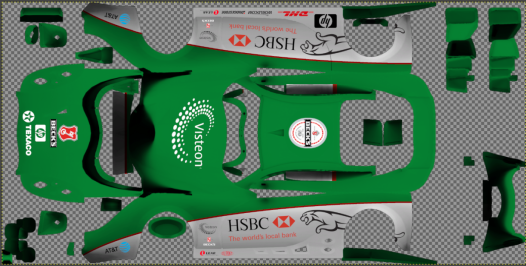
Look, yesterday I spent all my free time transferring the skins onto an AO map and then obtaining the most obvious and already established result: little changes. The showroom and previews have always been misleading, yet I wanted to try. Let's look at the bright side, at least the skins are more presentable now (see picture below and yes, this skin will replace the emerald green one - still wip -). Anyway, I don't know what to tell you my friend, I hope he's happy with the money he makes with modsfire.
 

Attachments

  • 1709040127076.png
    1709040127076.png
    136.1 KB · Views: 21
The car has transparent metal for the sides, in GT6 you can see the effect even though the cockpit view is a simple silhouette.

View attachment 1331734


Thank you so much for this skin pack, that really made my week lol.

Yeah, no offense to ChemFlummi because the work he does is awesome. But was his GT4 project really necessary? I thought the Guerilla cars were good enough for what they were and now here's another talented mod creator wasting their time making alternate versions of cars we already have.

C.F. has had so many other way more interesting projects on the backburner for years now. a Ford GT GT3, a 458 Italia GT3, the Corvette C6.R, but I suppose we need an entire new take on the ACC GT4 port for Assetto Corsa instead when we've already had that for a while now.

I'm sure his GT4 cars will be better than the GUE cars of course, but like man, again another case of a talented modder or mod team spending their time doing duplicate projects instead of working on something that hasn't been done before. I know what mod teams work on isn't democratic but AC is getting old and it'd be nice to see a bit more variety before we finish up here. I'm just so tired of duplicate modern GT cars personally.
I think you missunderstood the fact that Chemflummy gt4 s = guerilla gt4 s ! so no other variant of those cars but an uptade ! Thanks to C.F. helping guerilla to polish even more our gt4's !
 
Actually this can happen with wrong uchimura settings:
View attachment 1332032

please reset the script settings:
View attachment 1332033
Resetted the script settings as shown and set the checks in the attached file as shown, but the end result is still the same.

acs_zMHCYwSe8s.png
acs_FISfAd49rb.png
acs_Kgl5RCWPH2.png


Took a direct screen capture, and switched the track to show that its not a track-specific issue.
 
Last edited:
Look, yesterday I spent all my free time transferring the skins onto an AO map and then obtaining the most obvious and already established result: little changes. The showroom and previews have always been misleading, yet I wanted to try. Let's look at the bright side, at least the skins are more presentable now (see picture below and yes, this skin will replace the emerald green one - still wip -). Anyway, I don't know what to tell you my friend, I hope he's happy with the money he makes with modsfire.
Good work.
I won't be going anywhere near his stolen stuff with second rate updates!
 
Resetted the script settings as shown and set the checks in the attached file as shown, but the end result is still the same.

View attachment 1332068View attachment 1332073View attachment 1332069


Took a direct screen capture, and switched the track to show that its not a track-specific issue.
UPDATE
Finally found the fix!


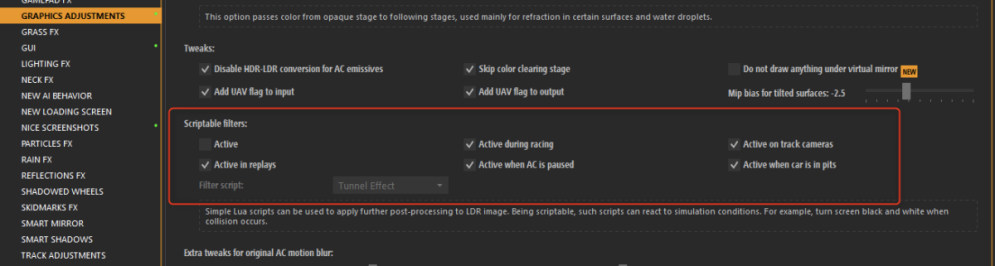
I looked at my "Nice Screenshots" settings in CSP and noticed that it was still using custom values for "HDR fix threshold" and "HDR fix exposure", which contrasts with the new Brightness Boost option. I set those to their defaults of 0..

1709051411883.png


And the final result now looks like this;

Screenshot_as_mclaren_senna_topgear_27-1-124-9-27-25.png


There's a small difference from looking at the sun pre-shot to post-shot, but the difference is rather miniscule that it shouldn't be a problem anymore.

Appreciate all the help, hopefully this'll be useful for anyone else if they run into the same issue that I did.
 
Last edited:
Hi guys,

random question out of nowhere - i have bought the VRC pt_2019 cars long time ago, but never really raced them. Are there any other cars which fitts together with them to build a well BOPed grid ?

I only have the str_lmp1_audi r18_2016 and the str_lmp_porsche_919_hybrid_2017 which could fit in. But ireally didn´t follow those cars in last 2 years ... so i am completly lost where to look after.

TIA :)
 
I'm always having issues with CSP crashes too. For several months or more, I can almost never get a track to load first time. I usually have to quit Content Manager and restart it again for any track to start properly. I've tried everything under the sun to get to the bottom of the problem and nothing seems to work.

Drives me nuts it does! I think I need a dedicated CSP/CM therapist to be permanently on call at this point. 🤪
Same here, I have to restart the sessions several times to make them succeed
 
Damn, that's what I was dreading.

As someone who frequently likes to take photos in Assetto, this has been very frustrating.

I've been asking around about this in a bunch of places and have been getting next to no responses.

The only one I did get a response on was to try re-installing Pure and CSP, which didn't fix the issue.

It.. also appears to only happen when using Photo Mode within the replay itself.

If I try to take a picture outside of it, its FINE.

View attachment 1331981

Unfortunately, outside of replay mode my features are more limited, such as not being able to create motion shots. In the replay, the same shot looks like this;

View attachment 1331982

I'm at a loss, here. It seems like it should be fixable judging by what I've discovered, but I don't know what the root of the cause is.
Edit: just saw you found a fix sorry lol
 
Last edited:
UPDATE
Finally found the fix!


I looked at my "Nice Screenshots" settings in CSP and noticed that it was still using custom values for "HDR fix threshold" and "HDR fix exposure", which contrasts with the new Brightness Boost option. I set those to their defaults of 0..

View attachment 1332101

And the final result now looks like this;

View attachment 1332103

There's a small difference from looking at the sun pre-shot to post-shot, but the difference is rather miniscule that it shouldn't be a problem anymore.

Appreciate all the help, hopefully this'll be useful for anyone else if they run into the same issue that I did.
Do you use Pure's sunblinding shader? It will improve the look of he sun. You have a slider in the PP script...

1709056871673.png

BTW the new "pure" ppfilter (coming with Pure 0.250 friday) will have a new "photorealistic" slider, where you can gain such camera effects.
 
Last edited:

Wondering if someone would like to do me a favor. I've been fooling around with making my own ai line for Nordschleife. I have something that seems to work really well, but i'm a terrible driver so I don't know if it's fast enough. Hoping someone could try it out and PM me any spots that need improvements or car types that struggle so I can try those out.

I've tried many types of cars and so far they all work great except for the occasional mod car that just can't handle some of the turns, but those same cars struggled with the stock ai as well so I don't think it's my line. I'm hoping that the ai doesn't brake as hard in a few of the spots that they struggled with on the stock ai line.

If you want to try it, use the link below. Or if anyone has a good custom ai file, please send me a link for that if you can. I just want something I can race with and don't care if it's not my own. Thanks...

Nords_AI
 
Last edited:
When i read those things i am happy again i am a non-CM user :D
9645835f31b9aacaeb45044559c69a07.gif


Its a very very rare instance that my AC crashes...
The same on my side, but I have to say that I'm very conservative with CM and above all, CSP... Usually I only update to proven versions, I don´t like to experiment, despite not being able to enjoy the latest improvements, for fear of ruining something and not knowing how to return to the point where everything worked more or less well...

Yes, I'm a cautious chicken...

Wondering if someone would like to do me a favor. I've been fooling around with making my own ai line for Nordschleife. I have something that seems to work really well, but i'm a terrible driver so I don't know if it's fast enough. Hoping someone could try it out...

Errr... yes, I'm a cautious chicken again. I can't help in this case either. 😆
 
Last edited:
Has anyone had a problem with CSP New AI Behaviour crashing ? Every time I try and race with it on a couple of seconds after the AI leave the pits it will crash with ai spline might be missing or broken error.
I've tried it on two mod tracks and one Kunos track. Same problem. A bit stumped really and haven't really found a solution googling.
 
Has anyone had a problem with CSP New AI Behaviour crashing ? Every time I try and race with it on a couple of seconds after the AI leave the pits it will crash with ai spline might be missing or broken error.
I've tried it on two mod tracks and one Kunos track. Same problem. A bit stumped really and haven't really found a solution googling.
Are you racing in rain conditions?

Try this in new AI behavior

Clipboard_02-27-2024_01.png
 
I started with rain and then went to dry and still had the same problem. I just let the AI drive around in practice for 5 minutes with those options deselected and it didn't crash. Strange. I'm going to set my wheel up again and see if it works. Also, I don't have a "Cache generated grids" options. Just the payloads one.
 
Last edited:
I'm in the process of creating early F1 turbo era seasons and I want to make them as authentic as possible. That means a lot of retirements. This is a take from my 1982 season. Only SimDream cars are available. They were useless in their default form. Way too slow on races. I removed all their other tires except for QF supersoft and they became very competitive.

I play with Williams 1982 Cosworth / K.Rosberg who won the championship that year with heroic drives- and with consistency and reliability against much faster turbo cars. I made my car turbo-less from data (or gave it much smaller boost) but increased the turbo damage value so it doesn't break.

Renault, Ferrari and Brabham had 1.5 turbos with huge power but they were very unreliable.

Renault/Prost had 8 retirements in 1982
Renault/ Arnoux had 10
Brabham/Patrese had 10
Piquet 11 DNF's / DNQ's
Pironi's and Villeneuve's season we all know how sadly it ended for both
Toleman's Fabi didn't finish even one race that season.

These seasons are not realistic at all if Cosworths have the same power and the turbos won't break. Guess what... now they DO break. But not in every race. This is Imola with a long top speed straight. Half of the cars retired.

My starting grid was 11th and ended up 3rd.

All retirements are ai engine failures.

t6UnKoq.jpg


Now the turbos last well on tracks like Long Beach, Monaco and even Dijon and Caesars Palace. But break on fast tracks like Hockenheim, Kyalami, Monza, Imola, Paul Ricard. Prost/Piquet at ai level 100 and Ferraris at 95'ish are superior on those tracks with the turbo engines. If you want to keep them behind you with the Cosworth, you can't have them close on your tail on the straights. You can fight for the championship with podium / points finishes and still have a chance to win on the street circuits (like Rosberg did with the inferior car).

I've been adjusting the 1982, 1983 and 1984 years for a long time. Looks pretty good.

PS: Look at Renault Turbo Prost's best lap time and compare it my Cosworth best lap time. That was pretty much the genuine difference on Monza, Imola and Hockenheim 1982.
 
Last edited:
I think you missunderstood the fact that Chemflummy gt4 s = guerilla gt4 s ! so no other variant of those cars but an uptade ! Thanks to C.F. helping guerilla to polish even more our gt4's !
Oh, I see. Sorry, I didn't realize he was brought onto your team for the GT4 cars. I thought he was doing them independently from scratch.
 
I have a problem with Reboot Team´s Daytona tri oval v1.3. Race line is wrong at the start-finish line, AI swerves to the left at that point. I tried to remake the race line and the left side line, but AI keeps doing the same. For the record I´m using the AssettoNASCAR cars.
 
I have a problem with Reboot Team´s Daytona tri oval v1.3. Race line is wrong at the start-finish line, AI swerves to the left at that point. I tried to remake the race line and the left side line, but AI keeps doing the same. For the record I´m using the AssettoNASCAR cars.
sounds like sidelines need to be made
 
Last edited:
Sharing a mod? Host it on GTPlanet Downloads. Free, public hosting for files up to 10GB in size.

Latest Posts

Back