Assetto Corsa PC Mods General DiscussionPC 

  • Thread starter Thread starter daan
  • 157,270 comments
  • 51,154,354 views
Could somebody in contact with the Usual Suspects, submit to them the request to adding the reverse layout for Dundrod 1955 please?

 
Yes I did, but it's not a Pure issue for me. It's a CSP issue because it happens with Sol, Pure or the default weather. And your welcome about the tracks. Nice to hear they look ok for someone else. I never know how things will look for others because I can only judge it based on my ppfilter. Look for a new Pacific ai soon. @Thockard made me a new one and I think it's really good.

Thank you. I was racing some Cupra's there this morning and couldn't remember if I made it available. I do so many small track tweaks that I never remember which ones I have made public.

Thanks, but tried it already. No luck. Strangest problem i've ever run across in my gaming years. I even went as far as restoring my copy of the base game with no mods, added CM\CSP and tested with the base CSP settings. Old version works fine, newer versions stutter.
Hm, but does it stutter on a different monitor if you use vsync with the other device then?
I'm just curious.
 
@racinjoe013

It could also be a sound card problem. Try limiting the sound of other cars n csp settings. Also do you have sound set to 512 channels instead of default 256? There are some modern sounds that use up to 100 channels per car, so when there's a lot of cars in your vicinity, it can also cause the game to bottleneck, as to many channels being pushed at once.

Not at the rig at the moment, will look in the afternoon, which file you need to edit.
 
Released : Hyundai Genesis Touringcar (Fictional)
Author:F302
3D Model: Polyphony Digital
Texture Update : F302 (rework)
Skins: F302 (Body Mapping)
3d work:F302
hope u enjoy the Car
ps : send feedback ,bugs ,missing things
tested on CSP 0.2.5-preview1
PP filer _PURELIFEEVO

have fun!

To install, move folders to "...\SteamApps\common\assettocorsa" or simply
drag'n'drop archive to Content Manager.


View attachment 1414532
Very nice car... I think.
It was hard to tell because once I'd worked out the button combo to actually start the car, it then stalled almost immediately because I was facing steeply uphill.
I did have time to notice that there's a lot of light leakage in the footwells, so maybe the dashboard and/or bodywork and/or other things aren't casting shadows properly?

Riddle me this: does anyone else find this new 'guess the start sequence for this particular car' game ever so slightly annoying, especially if there's no info in the UI about it and there isn't even a sound effect for the starter motor?
It wouldn't be so bad if the engine on/ignition button sequence was standardised across all cars in AC, but it seems you need to learn it for each individual car at the modder's whim.
I know it can easily be deactivated in the config and/or data, but that ignores the real question, which is: does it actually add anything to the overall experience or just become something else to remember and another annoying hoop to jump through?

@JK1977 there are also five .psd files in the main car folder, some quite large - if these are for making skins then maybe a subfolder in the 'skins' folder might be a better place?
Edit: brake lights are yellow?
 
Last edited:
@racinjoe013 found my old post. Try this:
OK, made a discovery today, that might help some people. It was driving me crazy since i bought the first URD GTE car (modern one), and was getting me even more crazy with gt4 pack from Guerilla. It also happened on other mod packs here and there, but not so often. And all that even though i had normal stable FPS rate. I kept getting this micro stutters of picture, like frame drops. Sometimes every few seconds, sometimes not so often. I was trying everything, thinking it had something to do with video settings of my PC. I gave up eventually, didn't drive gt4s at all even though i like them a lot, and I was always struggling with GTEs. Couldn't give that up, as Aston Martin GTE 2019 from URD is in my opinion the best car to drive in all sim racing.

Today i was going through settings and opened the audio_engine.ini file. I remembered that it was a thing a while back to change the number of audio channels from 256 to 512. Don't remember why. Had something to do wit ACFan's and Fonsecker mods not working correctly. And i had this setting again on 256. Don't remember putting it back. It must of happened when doing an integrity check after a power outage and my AC wouldn't start. Then i started thinking, both these packs have very loud intensive sounds of cars, i have an ACFan mod on some GTEs....

Anyway to shorten the story, changed the channels from 256 to 512, and no more stuttering of picture in both mod packs. IT WAS THE SOUND!!! THE ENTIRE TIME, IT WAS THE SOUND!!!!

If you have similar problems, the file audio_engine.ini is located in: ...\steam\steamapps\common\assettocorsa\system\cfg

Change the value of max channels to 512. It should then look like this:

[SETTINGS]
ENABLE_AUDIO=1
MAX_CHANNELS=512
UPDATE_INTERVAL=0
ENABLE_PERFORMANCE_SPEW=0
LIVE_UPDATE=0

This doesn't lower your FPS and you won't brake anything in AC by changing this and you can always change it back. The hours I spent fixing this, AAAARRRRGGGGHHHHH!!!! It makes me so mad.
 
found it? Before i go on one of those weird investigations lol

Edit : don't have the courage to go thru all the pics (22.000) but with patience you can pick the 1994 and the Porsche brand. the website is sketchy, be patient.

Photograph is Geoffrey Hewitt. Sadly the sticker's not to be seen in the stands or before the race, i believe it is from Barron industries or Bardon's construction. Barron' were pretty progressive on race issues, meaning i get all the results on how they manage equality for their workers, not much on their racing partnerships.

I alkready picked the year and Porsche brand.


Ffs is it a 911 or a 964? https://bringatrailer.com/listing/1993-porsche-964-carrera-rsr/

It's a 911. It's a 964! It's both ! Jeeeez https://borderreivers.co/portfolio/porsche-964-3-8-rsr/

Should be easier to directly ask Gerald T. Johnson for his pics of the car.

I freaking know this brand, i've seen this logo when i was young.
bit OT on the forum but it can help you out here:

To help you answer the 964 is a 911. the 964 is the type of Porsche like the 930, 993, 996 etc (they're the codes for what porsche they are doing) so 911 Carrera 3.8 uses the 964 as a basis. where 911 GT3 R, RS and RSR is a 996 (before the 997 came along). the 911 name is also on the original 911 before the 930 was developed for the 911.

so yeah during BPR era it was mainly the 964 used in 1994 because the 993 didn't debut until 1995.
 
Lam
Could somebody in contact with the Usual Suspects, submit to them the request to adding the reverse layout for Dundrod 1955 please?
Request noted ;)
 
Hm, but does it stutter on a different monitor if you use vsync with the other device then?
I'm just curious.
1734866140194.png

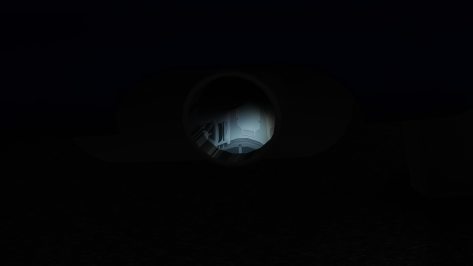
Peter, how can we defeat the black sun and the darkness after that?only weather restart helps.This problem is only in LCS.this happens with any PP filters
 
@racinjoe013

It could also be a sound card problem. Try limiting the sound of other cars n csp settings. Also do you have sound set to 512 channels instead of default 256? There are some modern sounds that use up to 100 channels per car, so when there's a lot of cars in your vicinity, it can also cause the game to bottleneck, as to many channels being pushed at once.

Not at the rig at the moment, will look in the afternoon, which file you need to edit.
That.is.a.top.tip.
Thank you 👍🏻
 
Very nice car... I think.
It was hard to tell because once I'd worked out the button combo to actually start the car, it then stalled almost immediately because I was facing steeply uphill.
I did have time to notice that there's a lot of light leakage in the footwells, so maybe the dashboard and/or bodywork and/or other things aren't casting shadows properly?

Riddle me this: does anyone else find this new 'guess the start sequence for this particular car' game ever so slightly annoying, especially if there's no info in the UI about it and there isn't even a sound effect for the starter motor?
It wouldn't be so bad if the engine on/ignition button sequence was standardised across all cars in AC, but it seems you need to learn it for each individual car at the modder's whim.
I know it can easily be deactivated in the config and/or data, but that ignores the real question, which is: does it actually add anything to the overall experience or just become something else to remember and another annoying hoop to jump through?

@JK1977 there are also five .psd files in the main car folder, some quite large - if these are for making skins then maybe a subfolder in the 'skins' folder might be a better place?
Edit: brake lights are yellow?
EXTRA A= IGNITION ON
EXTRA B= START Engine
 

Attachments

I've been testing now for a moment (I hadn't spent much time these last months in AC) your awesome work and it worked well only with vertical position grid and fastest lap banner, the rest remains empty. I don't know if I just have not followed properly the indications, but I'm sure that has a reasonable reason 🤓 and of course an eventual solution.

View attachment 1414497

View attachment 1414508

Hey, I managed to code out the idiotic case sensitivity. Get the update.
 
Hm, but does it stutter on a different monitor if you use vsync with the other device then?
I'm just curious.
It stutters no matter what, but I think last night I finally found a solution. It was late so I need to test it some more today. If it does work, I don't understand why and more so, why I have to do it on newer CSP versions, but never had to before.

Under the Video settings, I have always had Vertical Synchronization checked and Limit framerate unchecked since I was using vsynch. Last night I kept vsynch on, but enabled Limit Framerate with the slider value set to match my monitor refresh rate and it seems to have knocked out the stutters. More testing is needed to be sure though.
 
What does this new config do?
There's still light leakage in the footwells and the ignition/start sequence is still mandatory.

A short explanation might have been useful?
I reduced the shine effect a bit because I didn't use an AO map in the interior, and I also adjusted the exhaust smoke.
Sorry that I didn't write in the description how to start the car

Simply paste the kn5 file into the main folder
and overwrite the ext config and the data.acd file

kn5 file loda only

data.acd
 

Attachments

Forgot to mention, if anyone wants to disable the ignition sequence from the Genesis then just unpack the data and rename 'script.lua' to 'script.lua.disabled' or whatever.

(Note: this won't work as simply with the VRC touring cars from which this data has been borrowed, because they depend on Extra A 'ignition' for the various digital displays to work. If anyone knows how to disable the start sequence from the VRC touring cars (CSP versions) while keeping the digital displays... please shout!).
 
Last edited:

Sorry thats not normal. "reset to defaults" in Pure Config Main tab and Also default in Pure PP app.

other than that, did you try on other tracks?

It stutters no matter what, but I think last night I finally found a solution. It was late so I need to test it some more today. If it does work, I don't understand why and more so, why I have to do it on newer CSP versions, but never had to before.

Under the Video settings, I have always had Vertical Synchronization checked and Limit framerate unchecked since I was using vsynch. Last night I kept vsynch on, but enabled Limit Framerate with the slider value set to match my monitor refresh rate and it seems to have knocked out the stutters. More testing is needed to be sure though.
Hm, would be nice if it solves this. Maybe a thing with another limiter, like the nvidia one, or something driver related.
 
I reduced the shine effect a bit because I didn't use an AO map in the interior, and I also adjusted the exhaust smoke.
Sorry that I didn't write in the description how to start the car

Simply paste the kn5 file into the main folder
and overwrite the ext config and the data.acd file

kn5 file loda only

data.acd
Add this to the main config to stop sunlight getting where it shouldn't (eg in the footwells through the dashboard)
Code:
;stop sun ingress around cockpit mesh seams, into footwells etc
[SHADER_REPLACEMENT_...]
ACTIVE = 1
MATERIALS = INT_DASH, EXT_PLASTIC, INT_METAL, SKIN
CULL_MODE = DOUBLESIDED
CAST_SHADOWS = 1
DOUBLE_FACE_SHADOW_BIASED = 1

... and this to replace lights.ini makes the brake lights red and dims the rear lights so the brake lights can be seen when the lights are on:

Code:
[HEADER]
VERSION=3
FLASHING_BLINK_TIME=0.15
FLASHING_REPEAT=8

[BRAKE_0]
NAME=115
COLOR=400,0,0
__CM_SMOOTH_DELAY=0.1

[LIGHT_0]
NAME=136
COLOR=800,800,600
OFF_COLOR=0,0,0
__CM_SMOOTH_DELAY=0.3

[LIGHT_1]
NAME=137
COLOR=100,100,80
OFF_COLOR=0,0,0
FLASH=1

[LIGHT_2]
NAME=138
COLOR=100,100,80
OFF_COLOR=0,0,0
FLASH=1

[LIGHT_3]
NAME=1
COLOR=50,50,30
OFF_COLOR=0,0,0
FLASH=1

[LIGHT_4]
NAME=3
COLOR=400,400,200
OFF_COLOR=0,0,0
__CM_SMOOTH_DELAY=0.3

[LIGHT_5]
NAME=118
COLOR=5,0,0
__CM_SMOOTH_DELAY=0.1


[LIGHT_6]
NAME=F_LIGHT
COLOR=1000,1000,800
OFF_COLOR=0,0,0
__CM_SMOOTH_DELAY=0.3

[LIGHT_7]
NAME=R_BUMPER_009
COLOR=320,2,1
PITLINE=1
SPECIAL=1

[LIGHT_8]
NAME=PIT
COLOR=15,15,0
__CM_SMOOTH_DELAY=0.3
PITLINE=1
SPECIAL=1

[LIGHT_9]
NAME=LIGHT
COLOR=10,50,0
OFF_COLOR=0,0,0
__CM_SMOOTH_DELAY=0.3

Edit: also @JK1977 you've got the digital instruments digits spaced 10mm off the face of the display.
You need to edit all the z values from -0.01 to -0.001 to make them 1mm off the face.
eg:
POSITION=-0.0065,-0.0165,-0.001

NOTE: you need to do this in data_override/digital_instruments.ini, and NOT in the normal data folder.
Not sure why you're using data_override if the car is unencrypted, rather than just editing the normal data. Maybe just copied over from VRC?
 
Last edited:
Sorry thats not normal. "reset to defaults" in Pure Config Main tab and Also default in Pure PP app.

other than that, did you try on other tracks?


Hm, would be nice if it solves this. Maybe a thing with another limiter, like the nvidia one, or something driver related.
I tried everything, and it only appears in LCS mode.
even bright lights of cars or emission objects look like this (this is another person's screenshot)
1734878669344.png
 
Sorry thats not normal. "reset to defaults" in Pure Config Main tab and Also default in Pure PP app.

other than that, did you try on other tracks?


Hm, would be nice if it solves this. Maybe a thing with another limiter, like the nvidia one, or something driver related.
Don't know. I'm just glad I found something that works.

Not a big fan of how grass_fx looks now compared to the way it looked on older CSP versions. To me it lost some character and looks thinner and way more saturated, but i'll get used to it I guess. Everything else seems to be a nice upgrade. I especially like the cockpit shadowing. The version of CSP I was using didn't have proper in car shadowing of the hands on the wheel and always seemed to bright.

Guess now I can give the new Pure versions a try.
 
Last edited:
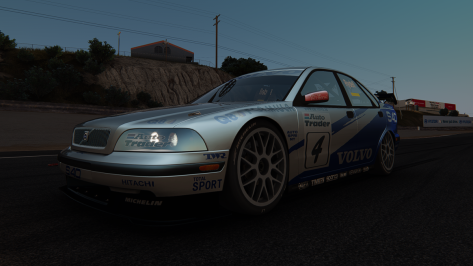
I'm fooling around with pm3dm's Volvo S40 (metallic effect). There is a bug with the exhaust_SUB1, it uses the car skin.

I was trying to change it to the black.dds used by exhaust_SUB0, but the code in the ext_config.ini does not work, the DDS is placed in the extension folder.

What am I missing?

[SHADER_REPLACEMENT_...]
MESHES = exhaust_SUB1
RESOURCE_0 = txDiffuse
RESOURCE_FILE_0 = black.dds
 

Attachments

  • Screenshot_pm3dm_volvo_s40_btcc_ks_laguna_seca_22-11-124-15-58-44-accum.png
    Screenshot_pm3dm_volvo_s40_btcc_ks_laguna_seca_22-11-124-15-58-44-accum.png
    246 KB · Views: 17
  • Screenshot_pm3dm_volvo_s40_btcc_ks_laguna_seca_22-11-124-15-58-59-accum.png
    Screenshot_pm3dm_volvo_s40_btcc_ks_laguna_seca_22-11-124-15-58-59-accum.png
    8.4 KB · Views: 19
Not trying to be a negative Nellie and maybe I just need to adjust some new CSP settings, but i'm not sure how the newer CSP version is an upgrade graphically. The grass_fx is better on older CSP versions and there is no shadowing of distant trees. To me, it's like a step backwards.

Any suggestions on what I can adjust CSP settings wise to fix at the very least the distant tree shadowing? I can live with the grass_fx, but not having the trees shadowed properly in the distance is really turning me off. I looked into the Smart Shadows settings, but there seems to be a lot of options that have been removed. Thanks for any advice.

Older CSP version I was using:
older.jpg


Newer CSP version:
newer.jpg
 
Not trying to be a negative Nellie and maybe I just need to adjust some new CSP settings, but i'm not sure how the newer CSP version is an upgrade graphically. The grass_fx is better on older CSP versions and there is no shadowing of distant trees. To me, it's like a step backwards.

Any suggestions on what I can adjust CSP settings wise to fix at the very least the distant tree shadowing? I can live with the grass_fx, but not having the trees shadowed properly in the distance is really turning me off. I looked into the Smart Shadows settings, but there seems to be a lot of options that have been removed. Thanks for any advice.

Older CSP version I was using:
View attachment 1414741

Newer CSP version:
View attachment 1414743
Ah it's weird cause i've been feeling there's an issue with the Ambient occlusion in the new CSP stuff.$
Also, just check for the shadows under cars, they're way brighter, to a point where they feel very odd on some tracks.


I've solved this in the 2.3.1 CSp preview by adding another shader for ambien occlusion (SSDO or GloomAO from Reshade), but i too think there is something to work on on the matter.

You make me want to give 1.79/pure 1.8 a shot just to make sure it's not stricltly subjective
 
It's official: Ilja has been abducted by aliens and won't be posting any CSP updates until he reaches their home planet which is 43.7 light years away.

Due to the time dilation effect of travelling at near light speed on the alien spacecraft, that means we can expect the next update sometime after the next 2340 years have passed on Earth.

P.S. Merry XMAS to you all! :cheers:
I know this was in jest but FYI...he has not been abducted by aliens.
 

Attachments

  • Screenshot 2024-12-22 111604.png
    Screenshot 2024-12-22 111604.png
    124.2 KB · Views: 22
Hi, just got the game and for fun and curiosity, I want to modify a bunch of GT3 and GT2 cars to make them as fast as prototype and Group C cars. I will give them all the same powerful engine but I know that I need to increase the downforce so that they can keep up with prototype/Group C cars in the turns. However there is so much stuff in the aero.ini that I don't know where to start.
 
Sharing a mod? Host it on GTPlanet Downloads. Free, public hosting for files up to 10GB in size.
Back