General rule: if your AC is working well, don't touch anything, even a single fart can destabilize the cosmic balance 😂

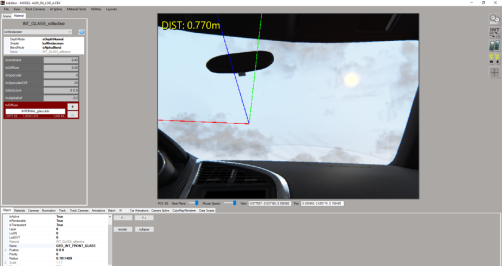
Go into CMshowroom and left click on it from the inside.If you have 2 selections available(click same place multiple times) you have interior glass.If only one then it will be the outer glass.Quick question, how can I tell if a car has internal glass from within CM Showroom? (for CSP Rain usage?)


it comes from the .ini file automatically downloaded by CSP,im still learning so I have no idea how to fix this. im on 2.7p1 and have downgraded to 2.6 with same window net issue. Its completely blocking my view. Any advice? This is the ks_abarth500_assetto_corse


Where would that be? TIA[edit]...and deactivate the automatic download in car config (the 3 small dots)[edit]


Settings > Custom Shaders Patch > cars configs (on the right hand side click the three little dots...)Where would that be? TIA


it comes from the .ini file automatically downloaded by CSP,
delete the file corresponding to the car in Steam\Apps\common\assettocorsa\extension\config\cars\loaded\ and deactivate the automatic download in car config (the 3 small dots)
So... I understand that they still haven't fixed the problems with those automatic updates that make elements of the tracks disappear and screw up the cars, right?Settings > Custom Shaders Patch > cars configs (on the right hand side click the three little dots...)
I never activate the default download, I prefer to test it and if it doesn't work delete or edit the file.So... I understand that they still haven't fixed the problems with those automatic updates that make elements of the tracks disappear and screw up the cars, right?


I dont have this issue, 0.27p1, maybe its on your side?@marc magnela I thought 1.0.5 is the final ACTK Audi A4 update? But the windscreen issue still not solved.
View attachment 1427368
for me I'm sure it comes from a CSP option, it's impossible that some have the problem and others don't, it would be a good idea to make a backup of your settings and do a complete reset of all CSP pages.@marc magnela I thought 1.0.5 is the final ACTK Audi A4 update? But the windscreen issue still not solved.
View attachment 1427368

I have the same problem with AMD and .27p1 I might even go as far as to say it looks a little worse this time but it could be me being disappointed that its still a problem after all this time.I dont have this issue, 0.27p1, maybe its on your side?
Maybe. But I don´t use too many exotic CSP settings, neither have car in my collection which has this issue, so there must be something really wrong here.I dont have this issue, 0.27p1, maybe its on your side?
maybe a setting in the AMD graphics options? it seems that every time it's someone with an AMD card who has the problemI have the same problem with AMD and .27p1 I might even go as far as to say it looks a little worse this time but it could be me being disappointed that its still a problem after all this time.
I've discussed this problem with ACTK, but he doesn't understand it either, for him the kspixelAT is the normal solution for trimming badges, the rest is empty with this shader as in the photo he showed me.Maybe. But I don´t use too many exotic CSP settings, neither have car in my collection which has this issue, so there must be something really wrong here.


Hi Kakauiyt, do you have any news for updates? Thanks a lot
it's for the inner glass that it's not for the badges it's got nothing to do with itAt the same time kunos is using kswindscreen with alpha blend and transparent BUT who are they of course.

I have the same problem here. 0.2.7 p1@marc magnela I thought 1.0.5 is the final ACTK Audi A4 update? But the windscreen issue still not solved.
View attachment 1427368
those who have this problem can change it in CM showroom but it is not normal this shader is not normally made for that.I rest my case. Post the final version whatever it is and anyone can set it as he prefers. This is the magic of modding
what I really do not understand is why he refuses to use the alpha blend since it is not making any problems
I changed mine like in your picture and it did nothing until i edited the ext_config file in the extension folder to what is below and it cleared right up. Hope this helps everybody now with the windscreen issuethose who have this problem can change it in CM showroom but it is not normal this shader is not normally made for that.
View attachment 1427396
modifying the file solves the problem, but I've just realized that it's another CSP bug since 0.2.5, in version 0.2.4 the file works fine without modification.So... I understand that they still haven't fixed the problems with those automatic updates that make elements of the tracks disappear and screw up the cars, right?

ACTK/EASY released v 1.0.5:those who have this problem can change it in CM showroom but it is not normal this shader is not normally made for that.
View attachment 1427396


It causes problems for me, and I can't be the only one.what I really do not understand is why he refuses to use the alpha blend since it is not making any problems


What issues do you have?It causes problems for me, and I can't be the only one.
No issues with ACTK v1.0.5 on CSP v0.1.80p9 out of the box.

On the one hand I'm safe, this year Nvidia will stop supporting the GTX 16 series, so I no longer have anxiety about driver updates.I agree but NVIDIA driver was upgraded for another game ... Not for AC.
The last time I had problems, restoring CSP settings was a solution, but here no change ...
This game make me crazy

I hope that ACTK understands that our problem is int_glass. We all see the pixel at the glass NOT at the stickers. Even the veloce above uses kswindscreen for the int_glass with Alpha Blendit's for the inner glass that it's not for the badges it's got nothing to do with it
for cars with inside windows + separate badges, kspixelAT can be used.
take the Alfa Romeo Giulietta Veloce TCR from WSC as an example, there is the interior window in ksWindscreen and the interior badges in kspixelAT, many mods work this way.
View attachment 1427385View attachment 1427387