- 263

- Greece
What issues do you have?It causes problems for me, and I can't be the only one.
No issues with ACTK v1.0.5 on CSP v0.1.80p9 out of the box.
What issues do you have?It causes problems for me, and I can't be the only one.
No issues with ACTK v1.0.5 on CSP v0.1.80p9 out of the box.


On the one hand I'm safe, this year Nvidia will stop supporting the GTX 16 series, so I no longer have anxiety about driver updates.I agree but NVIDIA driver was upgraded for another game ... Not for AC.
The last time I had problems, restoring CSP settings was a solution, but here no change ...
This game make me crazy

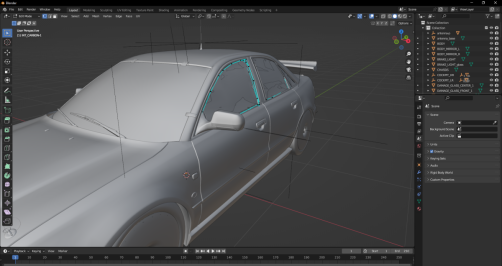
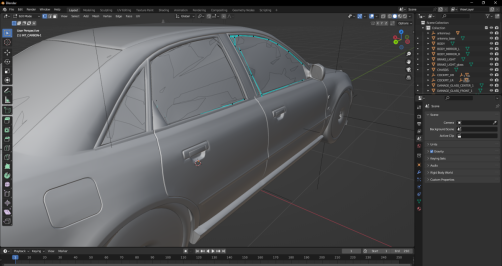
I hope that ACTK understands that our problem is int_glass. We all see the pixel at the glass NOT at the stickers. Even the veloce above uses kswindscreen for the int_glass with Alpha Blendit's for the inner glass that it's not for the badges it's got nothing to do with it
for cars with inside windows + separate badges, kspixelAT can be used.
take the Alfa Romeo Giulietta Veloce TCR from WSC as an example, there is the interior window in ksWindscreen and the interior badges in kspixelAT, many mods work this way.
View attachment 1427385View attachment 1427387


I showed you an example with another car, the kswindscreen is for the window only and not for the badges which is another mesh apart, the kswindscreen is also used for the rain CSP, if the badge was in kswindscreen the rain would go through the badge which would be awful.I hope that ACTK understands that our problem is int_glass. We all see the pixel at the glass NOT at the stickers. Even the veloce above uses kswindscreen for the int_glass with Alpha Blend
And who reported a problem about the badges. I see a language barrier here or what?if the badge was in kswindscreen the rain would go through the badge which would be awful.


With INT_WINDOWS_2 set to Alpha Blending, everything looks kind of "wavy" and indistinct through the windshield glass. When I change it back to Alpha Testing, it looks fine. Never actually seen it happen before.What issues do you have?


Yep, the grid pattern disappears, but returns the problem of the frame and the badge on the windshield overlapping the exterior stickers when looking at the car from the outside...I changed mine like in your picture and it did nothing until i edited the ext_config file in the extension folder to what is below and it cleared right up. Hope this helps everybody now with the windscreen issue
[SHADER_REPLACEMENT_...]
ACTIVE = 1
SHADER = ksPerpixel
MATERIALS = INT_WINDOWS_2
BLEND_MODE = ALPHA_BLEND
IS_TRANSPARENT = 1
CAST_SHADOWS = 0


Thanks.Guys, does anyone know if there is a good (preferably a camtool) camera for Phoenix 1991 by Rainmaker? Has @Gregz0r worked his magic on this one?
 I’ve been a Phoenix GP nut basically since the first race took place in the summer of 1989 and then in F1GP in 1992, so my fascination with it is beyond normal, as I had been following its development since 2019.


Much more accurate yet still looks like a track from a PS3 era game lolThanks.
That’s why I bought EKO Simracing’s version regardless of the price(I know, I know).
The rainmaker one is EKO’s old rF1 track, converted. If EKO’s current one didn’t exist, I’d be all over the rainmaker version, but the EKO one is much, much more accurate and I made cams for that.
It is what it is.Much more accurate yet still looks like a track from a PS3 era game lol
They've lost the plot, you cannot tell me they couldn't optimise their track - it doesn't even look that good compared to shin's rfactor ports (now now I know I've set the bar quite high!)
No changes here on latest invidia driver so far, hope it helps.
After literraly 1 entire day of testing, I don't really know why, but my stuttering issue was solved by disabling "New KN5 loader" on CSP "General patch setting" that it is enable by default ...General rule: if your AC is working well, don't touch anything, even a single fart can destabilize the cosmic balance 😂


NVIDIA card, F302/ACTK 1.0.5 out of the box:Yep, the grid pattern disappears, but returns the problem of the frame and the badge on the windshield overlapping the exterior stickers when looking at the car from the outside...
View attachment 1427417
(This is starting to become a question of honour... 🤦♂️)
EDIT: By the way, AMD card here... although I don't think it has anything to do with the problem.


Just a reminder about the rescaled driver for VR users, not included in the Garage ACTK version. He clips through the back of the seat a little but for me is a much better fit for the wheel, shifter and pedals.Is this F302 Super Touring Car - Audi A4 Quattro STW the most tweaked car ever?
To lighten the rear light lenses which can look extremely dark at times:
Code:;lighten rear light lenses [SHADER_REPLACEMENT_...] MATERIALS = LIGHT_GLASS PROP_0 = ksAmbient, 0.5 PROP_1 = ksDiffuse, 0.1
Also, addMaterial #42to the doublesided mesh config to stop sunlight coming through the dashboard and lighting up the footwells.
Attached is a rescaled/repositioned driver to solve his slight dwarfism and for better pedal reach, and better steering wheel & shifter grip.
(remover the .txt extension and put in the animations folder)
Edit: this car has such a prominent antenna on the roof, it's a shame it's not a separate mesh that can be animated as cars corner, accelerate and brake.
We have the code for it, but it needs to be a separate mesh.
Anybody?
Code:[WOBBLY_BIT_0] NAME = antenna ; name of the node to move CONNECTED_TO = X, Y, Z ; point to which node is attached to, and around which it will rotate MAX_RANGE = 0.003 ; max range node can move from its original position DAMPENING_LAG = 0.99 ; think of it as usual AC lag value, trying to zero node s speed G_GAIN = 1 ; how much G-forces affect node s speed GRAVITY_GAIN = 1 ; how much gravity affects node s speed OFFSET_GAIN = 2000 ; how strong is returning force STIFF_AXIS = 0, 1, 0 ; optional higher stiffness axis to reduce movement along it STIFF_AXIS_STIFFNESS = 0.2 ; now stiff is optional stiffness axis G_FILTER = 0 ; temporal filter for G-forces DEFAULT_GRAVITY_INCLUDED_ALREADY = 1 ; either `0` or `1`; set it to `1` if you don t want gravity to skew your stuff when car is in neutral position
Yeah, I tried doublesiding them a while ago because they weren't visible through the glass from the outside but it kind of made things worse.Made a little investigation on the model in Blender
All the parts that you see as artifacts in the side windows are the internal carbon mesh coming out of the window.
If this part is properly fixed by the original modder then no problems should arise
I'm curious about something. I experience long ai spline loading times on High Force so I had a look at the ai file. It's a huge file size. Something like 103kb. Most ai files under 10kb with some longer tracks (like Nords) pushing 20kb. What's the file size of the fast_lane file on the tracks you are having problems with? I'm wondering if you are seeing the same issue I am on High Force, an overly large ai file.Yeah, I tried doublesiding them a while ago because they weren't visible through the glass from the outside but it kind of made things worse.
BTW, back to the long wait while loading AI splines that a few people are experiencing, has anyone tried the various new CSP options in 'New AI Behaviour' to see if some tickbox combo is responsible?
It seems to affect most, if not all, tracks (and every layout on every track), but only the first time I load it after updating CSP. The next time it seems to load quickly.I'm curious about something. I experience long ai spline loading times on High Force so I had a look at the ai file. It's a huge file size. Something like 103kb. Most ai files under 10kb with some longer tracks (like Nords) pushing 20kb. What's the file size of the fast_lane file on the tracks you are having problems with? I'm wondering if you are seeing the same issue I am on High Force, an overly large ai file.

Same here...slow first load and then fine after that.It seems to affect most, if not all, tracks (and every layout on every track), but only the first time I load it after updating CSP. The next time it seems to load quickly.
Makes me think that CSP is creating a file the very first time, which is then instantly accessed the next time.
Or something.
I don't really know..!


Please don't feel your work is underappreciated Alguecool. Sometimes it's simply that life gets in the way and people don't have enough time for everything. I've still got about 75 folders of mods I downloaded all through 2024 that I haven't got around to installing yet!If the few of us would also have time for just a few laps with the brand new physics data I gently proposed for MY Fairlady asking for feedback, for which NO ONE HERE answered, That would be great.

What, vexed ? Me ? Nooo


I was just about to give them a thumbs up, funnily enough. But it's understandable you'd feel vexed - the car as a whole is an absolutely lovely piece of modding that will not get the attention it deserves simply because there's not enough of us vintage metal lovers around.If the few of us would also have time for just a few laps with the brand new physics data I gently proposed for MY Fairlady asking for feedback, for which NO ONE HERE answered, That would be great.
What, vexed ? Me ? Nooo


After literraly 1 entire day of testing, I don't really know why, but my stuttering issue was solved by disabling "New KN5 loader" on CSP "General patch setting" that it is enable by default ...
If it could help someone, this option may affect stability of performances ...
View attachment 1427429
I tried to warn you...Nothing good can come from the "New KN5 Loader", it should be nuked to a death only reserved for most evil of things.
(I disabled this the moment I saw it in the settings, it felt wrong and evil and deserves a horrible destruction)









The track loading hangs when generating the AI spline according to CM, but that might be a red herring. Worth a try!I tried to warn you...
It think too much settings are enable by default and we don't know exactly what they are really doing ingame ...I tried to warn you...

The track loading hangs when generating the AI spline according to CM, but that might be a red herring. Worth a try!
Yep, out of the box in my case the stickers are fine, no overlap... but the grid pattern in windscreen that blurs the landscape when driving in first person, is present...NVIDIA card, F302/ACTK 1.0.5 out of the box...