Assetto Corsa PC Mods General DiscussionPC 

  • Thread starter Thread starter daan
  • 157,268 comments
  • 51,147,763 views
I'm the only one who have problem with the @Mike08 update of trial mountain?

Downloaded the original track from Overtake (which is called trial_mountain_alpha) and the update which is called trialmountain. So there's no way to just apply on top things and overwrite since they have different folders name. I renamed the alpha to match things, but once loaded the car fly through the ai with no road. I'm missing something?

Nevermind, fixed it by renaming things (kn5 and models.ini). You should btw improve the installation guide for non expert user man, if not they will messup things ;)

Thanks for the work, now is TRIAL MOUNTAIN that i remember (even less pixelated ahahahah)
what exactly have you changed mate? i downloaded them both this morn and just pasted the update into the folder. wondered why i didn't see any difference lol
 
what exactly have you changed mate? i downloaded them both this morn and just pasted the update into the folder. wondered why i didn't see any difference lol
Matched the main folder track name, matched the kn5, mathed the files inside the models.ini and in the ui the folders again. But if, as said, he updated the files, you should redownload in order to do it perfectly without issue :)

  • renamed the trial_mountain_alpha to trialmountain (like the folder name of the Mike08 update)
  • renamed the normal folder to forward (like the name of the Mike08 update)
  • updated the relative kn5 inside the models_xxx.ini files inside to match the names
  • updated the ui folder names (again to match the names)
 
Last edited:
Matched the main folder track name, matched the kn5, mathed the files inside the models.ini and in the ui the folders again. But if, as said, he updated the files, you should redownload in order to do it perfectly without issue :)

  • renamed the trial_mountain_alpha to trialmountain (like the folder name of the Mike08 update)
  • renamed the normal folder to forward (like the name of the Mike08 update)
  • updated the relative kn5 inside the models_xxx.ini files inside to match the names
  • updated the ui folder names (again to match the names)
thanks man :)
 
I have the v1.7, in the championship the SC enters the track to do qualifying and then the race, instead of remaining in the pits.
Yes, that's normal. You absolutely have to put the safety car last when creating your championships and then select it only once during qualifying or at the start of the race. Everything is written in the PDF of the Pro version.
 
A big bug has been introduced with each version of CSP on the 3d trees at the level of the relief of the shadows, currently it is not usable to have something pretty.

1748705721114.png

CPS 0.1.79 shadows work correctly

1748705745414.png

csp 0.2.0 still works, but it's already less pretty

1748705782226.png

completely buggy from CSP 0.2.5 onwards
 
Yes, that's normal. You absolutely have to put the safety car last when creating your championships and then select it only once during qualifying or at the start of the race. Everything is written in the PDF of the Pro version.
every time i select SC it asks to restart the race from CM
 
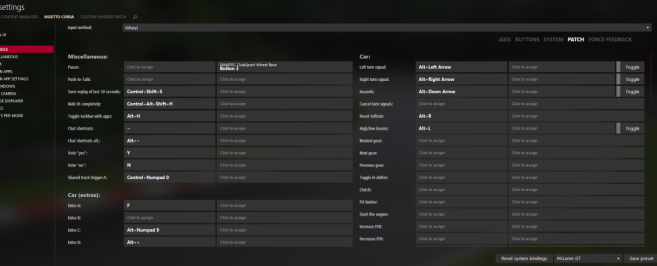
I may have missed this but has the "wiper" function been removed from Content Manager? It used to be in the "PATCH" section of controls but now seems to be gone.

I'm just setting up a new wheel and can't find it to bind to a switch.

I'm on version 0.8.2731.39678
 
I may have missed this but has the "wiper" function been removed from Content Manager? It used to be in the "PATCH" section of controls but now seems to be gone.

I'm just setting up a new wheel and can't find it to bind to a switch.

I'm on version 0.8.2731.39678
It's still in this path. Controls > Patch

My version of the CM 0.8.2747.39678, it's the newly version but it's always has been there.

1748717649928.png
 
It's still in this path. Controls > Patch

My version of the CM 0.8.2747.39678, it's the newly version but it's always has been there.


That part isn't there anymore for me. How strange.
 
Last edited:
Hi all, wanted to post some misc bits I've been piecing together in the lead up to the 2025 Pikes Peak Hill Climb (June 22nd).

First off, did you know AC can simulated altitude? Because I didn't, super cool to find - info. Add the text below to your track surfaces.ini (or for Pikes Peak download the attached zip w/the altitude add on + SurfaceFX addon (by Orizo). Just drag and drop into your "dr_pikes" folder; includes surfaces.ini backup) Requires extended physics to be on. Pikes Peak starting line is at 2862m.
[ALTITUDE]
BASE = 0 ; set real altitude in meter, also based on pit0 position

Secondly, here's a couple of cars I've been tweaking for Pikes Peak Dirt, works w/ext physics. Both cars are from Legion & won't overwrite the originals. I'm far from experienced with modding (learned a lot as I worked w/these, like "tyre types") and they're probably not "exactly realistic" (or error free), but I think they're fun to slide up the hill, so I figured someone else might enjoy them too :cheers:

Still tweaking a few other cars for Pikes Peak (running a time attack all month), if any others make the cut (or these get updates), I'll amend this message with their links.

Pikes Peak Indy Roadster Maserati 8CTF 1946 - Download Link - Info
  • Created Pikes Peak skin (originals in "skin-off") - 1946 Smiths Buffet Special #25 Louis Unser
  • Added CSP tire hints - Treaded
  • Added Steer Assist in setup options (default is set at 50)
  • Changed Driver to Driver_1955 by Legion
  • Changed default visual tire texture to dirt
  • Changed folder name (wont overwrite original car)
Screenshot_legion_maserati_8ctf_pp_dr_pikes_30-4-125-23-6-43.jpg


Pikes Peak Dirt Indy Sprintcar Chevy V8 1966 - Download Link - Info
  • Added Treaded Tire CSP Hints
  • Changed steer lock from 180 to 360
  • Gearing changed from Indy to track
  • Engine(& sound) swap ACL GTC 1967 Corvette C2 Smallblock L79 327ci (attempt to recreate Al Unser's Chevy powered Sprintcar)
  • Changed tire textures (from legion maserati indy roadster 1939)
  • Added ext physics hint to car.ini (I think)
  • Changed folder name (wont overwrite original car)
Screenshot_vintage_sprintcar_chevy_pp_dr_pikes_30-4-125-21-5-14.jpg
 

Attachments

Last edited:
@Zander71 If you go to save the control preset, then when the window opens, edit the preset in notepad, do you see any lines at the bottom mentioning wipers?

This is with my keybindings, but this was in my controls.ini between [_EXT_TURN_SIGNALRIGHT] & [_LAUNCHER_CM] say. If yours doesn't have that, maybe try a preset with it copied in?
[__EXT_WIPERS_1]
BUTTON=-1
BUTTON_MODIFICATOR=-1
ENABLED=0
JOY=-1
KEY=-1
KEY_MODIFICATOR=

[__EXT_WIPERS_2]
BUTTON=-1
BUTTON_MODIFICATOR=-1
ENABLED=0
JOY=-1
KEY=-1
KEY_MODIFICATOR=

[__EXT_WIPERS_3]
BUTTON=-1
BUTTON_MODIFICATOR=-1
ENABLED=0
JOY=-1
KEY=-1
KEY_MODIFICATOR=

[__EXT_WIPERS_4]
BUTTON=-1
BUTTON_MODIFICATOR=-1
ENABLED=0
JOY=-1
KEY=-1
KEY_MODIFICATOR=

[__EXT_WIPERS_LESS]
BUTTON=-1
BUTTON_MODIFICATOR=-1
JOY=-1
KEY=0xBB ; +
KEY_MODIFICATOR= ; +

[__EXT_WIPERS_MORE]
BUTTON=-1
BUTTON_MODIFICATOR=-1
JOY=-1
KEY=0xBD ; -
KEY_MODIFICATOR= ; -

[__EXT_WIPERS_OFF]
BUTTON=-1
BUTTON_MODIFICATOR=-1
JOY=-1
KEY=0x33 ; 3
KEY_MODIFICATOR=16 ; Shift+3
Otherwise, not sure. My CM doesn't have 2 columns in that controls view, may be something, or may just be different resolution settings
 
Last edited:
@Zander71 If you go to save the control preset, then when the window opens, edit the preset in notepad, do you see any lines at the bottom mentioning wipers?

This is with my keybindings, but this was in my controls.ini between [_EXT_TURN_SIGNALRIGHT] & [_LAUNCHER_CM] say. If yours doesn't have that, maybe try a preset with it copied in?

Otherwise, not sure. My CM doesn't have 2 columns in that controls view, may be something, or may just be different resolution settings
It just shows 2 columns if you stretch the screen a bit. Looked at these settings also and the wiper data is all there, just no Car (wiper) section in the patch section. It's always been there previously.
 
It just shows 2 columns if you stretch the screen a bit. Looked at these settings also and the wiper data is all there, just no Car (wiper) section in the patch section. It's always been there previously.


This person said after a wheel change (and the same problem), they deleted the wiper lines in the controls ini. Then I guess restarted CM (and or computer) and then the options were back. Seems worth a try unless you've tried this already


This person said after a wheel change (and the same problem), they deleted the wiper lines in the controls ini. Then I guess restarted CM (and or computer) and then the options were back. Seems worth a try unless you've tried this already

Thanks, but there is no option for wipers in CM anymore for me, the wipers are still working on other wheels.
I've updated CM and restarted etc but showing more Car (extras) options, Extra A to Extra T but no wipers.
 
Also anyone tried these yet?

Yes, because they are not new cars. The download folder has F302, PM3DM, etc cars.

From the YouTube video description:
"ATTENTION : je n ai pas fait de la magie !! j ai juste mis un coup de frais a ces vieux mods et surtout je pense avoir réuni toutes les versions (sauf les mods payant qui ne sont pas dans mon pack)"

Google Translate:
I didn't do any magic!! I just gave these old mods a fresh look and above all I think I have gathered all the versions (except the paid mods which are not in my pack)
 
thanks for this. The og version felt a little too fast and handled a bit weirdly then I saw it was vr driving physics. Did you by chance lower the ambiance sounds of the car? I believe wind noise and the tire skid noise was present in the og, doesn't seem present in this one. If not barely
Og version had to much power, massive amount of downforce and very gripy tires. About sound, only raised external and internal engine sounds. If You wish dm me I will send code with raised ambience sound.
Skins should be with original, but preview not present as there to many skins, sorry.
 
Last edited:
Caterham 620R Public Release!!
Download:https://www.mediafire.com/file/zkzoza1s6e3sqe5/caterham_620r_101creative.rar/file
Converted From PCARS3
-AO inside and out
-Realistic Dashboard
-Physics
-CSP Settings
-Driver Animation
-Panoramic session Start config Daniel Nogal

View attachment 1454291View attachment 1454292View attachment 1454293View attachment 1454294View attachment 1454295
Is it just me or that the lastest CSP broke literally every Caterham 7 mod, even this and the ones on overtake.gg won't move at all when driven
 
Thanks for the excellent skins. Will you release other skins for free after a certain amount of time for the RSS cars?
 
So automobile catalog decided to lock torque data behind a paywall. We can't have nice things for free anymore 😭
Price is actually reasonable but for the amount of cars I research monthly nowadays, it's not worth it. Served me well for the last couple of years but will have to rely on other sources from now on.
 
Sharing a mod? Host it on GTPlanet Downloads. Free, public hosting for files up to 10GB in size.
Back