Assetto Corsa PC Mods General DiscussionPC 

  • Thread starter Thread starter daan
  • 157,256 comments
  • 51,139,618 views
Help please,
I got a problem with all CSP versions above 0.2.3 showing too outshiny bright especially the menu colours.
The newest 0.2.11 even is worst as it adds all colours grayish bland. Clear blue sky is all gray no shine at all but the menu remains too bright so one can hardly read.
All CSPs below work flawless showing correct palette/shaders/reflections inside vr headset.

Problem here is that to race at LFM I'll have to as they require CSP-0.2.7 n above.
The default SOL is in use but all other pp-filters don't cure these symptoms. Also whenever I change CSP versions I restart CM and reset SOL config ingame as recommended.

Specs are a Quest3 via link cable, Win11-7800x3d-RX7900xtx

 
Why not have a second install just for LFM? Also, why SOL and not PURE?

When you say you start CM, are you clearing the AC folder in My Documents? If not, rename the folder to something like Assetto Corsa - Backup then run CM and let it repopulate the folder. This way you can be certain everything is back to defaults and then you can add in the different cfg .ini files one at a time to discover what is causing the issues.
 
Help please,
I got a problem with all CSP versions above 0.2.3 showing too outshiny bright especially the menu colours.
The newest 0.2.11 even is worst as it adds all colours grayish bland. Clear blue sky is all gray no shine at all but the menu remains too bright so one can hardly read.
All CSPs below work flawless showing correct palette/shaders/reflections inside vr headset.

Problem here is that to race at LFM I'll have to as they require CSP-0.2.7 n above.
The default SOL is in use but all other pp-filters don't cure these symptoms. Also whenever I change CSP versions I restart CM and reset SOL config ingame as recommended.

Specs are a Quest3 via link cable, Win11-7800x3d-RX7900xtx
Btw Sol does not work with CSP 0.2.10 or newer!
So that might explain the gray sky. Just use Pure!
 
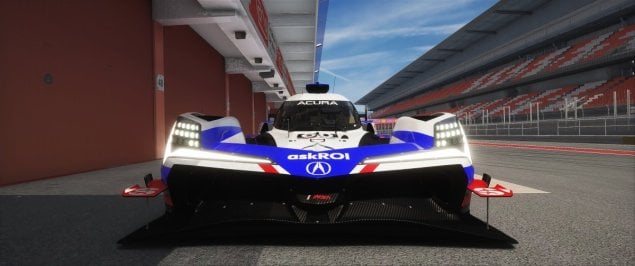
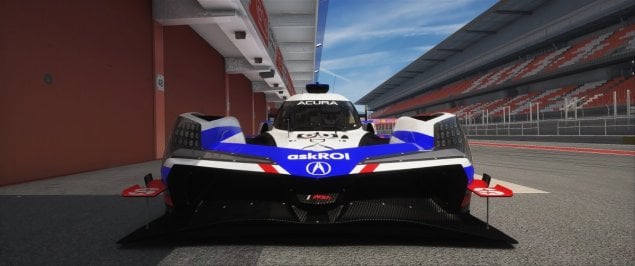
Hi guys, can you explain what a mod is needed to differentiate between daytime and nightime lights? I have this car and I'd really like to enable daytime lights, which currently only come on with the nightime lights.
Thanks to all.
 

Attachments

  • Screenshot_trr_lmdh_acura_arx-06_fn_barcelona_17-6-125-16-6-9.jpg
    Screenshot_trr_lmdh_acura_arx-06_fn_barcelona_17-6-125-16-6-9.jpg
    103.5 KB · Views: 12
  • Screenshot_trr_lmdh_acura_arx-06_fn_barcelona_17-6-125-16-6-11.jpg
    Screenshot_trr_lmdh_acura_arx-06_fn_barcelona_17-6-125-16-6-11.jpg
    102.8 KB · Views: 13
@Peter Boese: after checking, wider shots of the track DO look like your images, but I think my perception about the extreme wet weather skyboxes looking a little bland (like normal overcast skies) is because the horizon (which is mainly what we see through our windscreens) is a lot lighter and less moody/dramatic than the sky directly overhead (which we can't really see in a tin-top). Seems like most of the drama is mainly hidden from view under normal driving conditions. Is there a way to move the drama more into our field of view by extending the moody clouds all the way to the horizon?
You can darken the distance / horizon a bit with the "sky level" parameter:

Before:
standard sky level.jpg


After:
reducedsky.jpg
 
Another fun mystery from Content Manager!! :dopey:


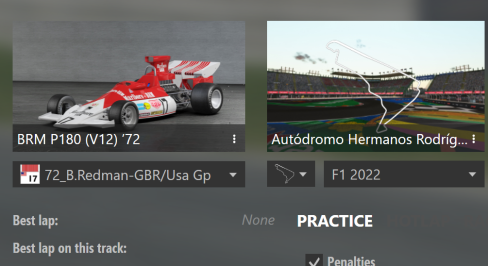
Cant see the best lap in the DRIVE mode but its showing it in LAP TIMES
 

Attachments

  • Screenshot 2025-07-17 111531.png
    Screenshot 2025-07-17 111531.png
    131.7 KB · Views: 17
  • Screenshot 2025-07-17 111541.png
    Screenshot 2025-07-17 111541.png
    5.8 KB · Views: 14
Btw Sol does not work with CSP 0.2.10 or newer!
So that might explain the gray sky. Just use Pure!

Really?

Peter, my all old F1 seasons are SOL based? Should I change them all to PURE based?

How do I define the weather in the championships files with PURE?

Any example code?

This is how I've used the SOL weather.

Code:
      "track": "knr_silverstone_2005/gp",
      "time": 44792,
      "temperature": 28.0,
      "laps": 20,
      "weather": "sol_02_few_clouds",
      "surface": 5
 
Really?

Peter, my all old F1 seasons are SOL based? Should I change them all to PURE based?

How do I define the weather in the championships files with PURE?

Any example code?

This is how I've used the SOL weather.

Code:
      "track": "knr_silverstone_2005/gp",
      "time": 44792,
      "temperature": 28.0,
      "laps": 20,
      "weather": "sol_02_few_clouds",
      "surface": 5
This has nothing to do with the weatherFX style. Those weather presets are still included in Pure because of compatibility reasons.

Those weather presets just define the weather type. And those have not changed, those are steady in CSP and are the same for Sol and Pure and the default weatherFX style. So those would work with any weatherFX style, as long as those “Sol” Weather presets would be installed. But as I said, those are still part of Pure anyway.

Select the “Pure static” weather controller in the CM Drive menu weather selection and it should work with Pure…
 
Last edited:
They also say ACFL 1994 mod is garbage too.

I've been playing thse F1 cars for years and always liked the 1994 ACFL. Amazing sounds, pretty challenging to drive, nice cockpits.

What there is not to like? The season I created is pretty popular.

Over 2000 downlods already... 6K views on the video too... plays really well... great races, no SD-type stuff cars sliding off the track etc. I created the TV graphics and imho they really add to the atmosphere and the 1992 tracks (mainly) are superb (with Thockard 1st class AI). Cars also respond very well to json created driver AI ratings. You can guarantee it's Schumi and Hill taking the poles and winning the races.

Sure... if you play these cars with garbage tracks (with slow, erratic fastlane) these won't perform well. If you want quality drive, you also need quality tracks (and fastlane). Car alone doesn't do the trick.

Over the years people have released so many half assed championships without even testing them... bad track combos... Also... what good does a "AC f1 championship" do if it doesn't have realistic race results or even work properly in some tracks? I had this trial and error phase which was frustrating but I've found the best way to create these... not perfect but very good.

Maybe this video created a few bucks to ACFL... I don't know the guy... I don't care. I don't get a dime... I don't WANT a dime. I have decent work, don't need money. I just want to play these games and share the clssic F1 passion with fellow AC friends. I have no other motivation.

I wish people just dropped the drama queen stuff. We are all improving AC and creating something that no other sim can ever do. Personally, I'd love everything to be public domain and the only common goal would be improving this "AC project". I think 95% of the community is exactly like that though.


I never even tried the 2006 cars as people say they're bad. Nice that you redo them. 2008 cars are very nice.

Mod not up to par, my goodness, how can you say you like it? While the models in version 2 are a bit improved, the cockpits are poor, not to mention the nameplates and sounds... The physics are undrivable, the cars are super fast. Wait a few weeks, there's a promising new 1994 mod coming soon... Free!!!
 
no worries sorry for not putting the link up in the upload i should of done it would of saved you scratching your head
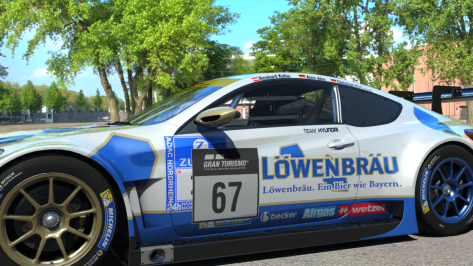
I applied the patch and I still get this gran turismo sticker on top of your skin, is there any way to remove it? Or maybe it's just some CM showroom thing?
 

Attachments

  • __custom_showroom_1752776680.png
    __custom_showroom_1752776680.png
    390.7 KB · Views: 11
Interesting experiment with Kunos F2004 in Kunos Nurburgring, with CSP last stable version 0.179.

AI 100 (Schumacher), driver aggression 25.
AI 97 (Raikkonen) driver aggression 12

Qualifying, ai

Both constantly drove to the gravel in the Valvoline curve. Every single time.

I switched to VRC 2007 tyres.ini there and bang... all issues were gone. And suddenly the AI cars are performing consistently in every track and even drive better than default Kunos.

Maybe not a surprise to anyone, huh?
 
Last edited:
Interesting experiment with Kunos F2004 in Kunos Nurburgring, with CSP last stable version 0.179.

AI 100 (Schumacher), driver aggression 25.
AI 97 (Raikkonen) driver aggression 12

Qualifying, ai

Both constantly drove to the gravel in the Valvoline curve. Every single time.

I switched to VRC 2007 tyres.ini there and bang... all issues were gone. And suddenly the AI cars are performing consistently in every track and even drive better than default Kunos.

Maybe not a surprise to anyone, huh?
Tires are very responsible for many performance params. very small changes on some parameters make big differences (even to ai)
Aero is also a big factor btw, esp drag coefficient (which can be used for top speed and acceleration tuning. If all power, gears and tires are correct and the top speed, or time to top speed... tweaing the aero is the next step )
 
I applied the patch and I still get this gran turismo sticker on top of your skin, is there any way to remove it? Or maybe it's just some CM showroom thing?
This is what i see, i have just checked the download and the ext_config is there so it should be removed if you are in "showroom" and not "cm showroom"

cm showroom does not apply all the bells and whistles it is only applied in "showroom" or out on the track

Screenshot (1009).png
 
Last edited:
Hi All. Does anyone know how to make the headlights on the URD Mercedes CLR LM shine on the track and light up the track at night. The headlights come on but don’t throw any light on track. Many thanks.
 
Hi All. Does anyone know how to make the headlights on the URD Mercedes CLR LM shine on the track and light up the track at night. The headlights come on but don’t throw any light on track. Many thanks.
I remember we had this topic last year, see here:

 
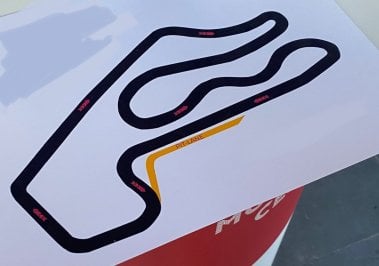
Hello everyone! Do you know what this track is? I can't find him anywhere. Maybe it doesn't exist at all.
 

Attachments

  • track.jpg
    track.jpg
    106.4 KB · Views: 17
Tires are very responsible for many performance params. very small changes on some parameters make big differences (even to ai)
Aero is also a big factor btw, esp drag coefficient (which can be used for top speed and acceleration tuning. If all power, gears and tires are correct and the top speed, or time to top speed... tweaing the aero is the next step )

Does anyone know that some cars respond much stronger to AI rating?

For example the F2002 car based season and the VRC's 2005 and 2007 (all skin based, the base car is the same) are amazingly accurate. 2002 Schumacher gets 80% of all poles in the season which is pretty much accurate. Hamilton and Alonso (at rating 100) get all AI poles in the 2007 season. Not once they were out of top-3 unless they have that random crash in the session.

But when you do the exact same AI settings for some other cars, the results vary a lot. In some QF sessions the highest rated (skin) car (like ai driver 100) can be 3 seconds slower (despite not having any traffic issues).

Is there some random variable in the car data? You know... perhaps the skin based "fabricated cars" choose to drive with maximum rear wing or something?

Just like sometimes AI car decides to pit twice with no reason and the others choose one pitstop. Is there a way affect these variables?

Say, you set the ai cars' max starting fuel sufficient for like 14 laps. And the ai car pits at lap seven and then they might pit again at lap 19 in a 20 lap race (even they have plenty of fuel left). These are very annoying things that you can't set up (I guess).
 
Last edited:
OK, I tried the NVIDIA Preview driver for Smooth Motion activation on a 4090.


It needed a profile inspector upgrade too and I found a link to the 590.x preview without needing to go into the Nvidia developer forum (where it is seemingly impossible to find the preview drivers.)

My base set-up is a Nvidia 566.36, CSP 2.10, Pure, FSR 87% using HP Reverb VR via OpenXR using a Narrow FFR.
I get constant 90 FPS day and night with this, great clarity with all graphics settings maxed.

Any benefit I was going to be put toward a wider FFR or RainFX which generally drops frames unless I compromise on other settings.
No improvement is essential, but I thought I'd give it a go.

The result was with the upgraded driver and smoothing on, a decrease in frames to 75FPS, seemingly the new driver tanked performance, I also tried CSP 2.12 at this same time which may also have generated an issue. I'll try again without the CSP upgrade, try with/without FSR and report, but on the first go round, it wasn't immediately beneficial over the optimised base.
 
ACU Interlagos.

Add another amazing track that no longer works with CSP 0.2.11

Well it works. It races ok. But when the ai cars have time to pit, they drive staight to the concrete wall that is on the left of the pitlane 250 km/h.May they all rest in peace.

Tested version ACU 1.0. I tried another pitlane.ai from some other version. No difference. All crash.

Well I'm not an expert and can't say it's definitely the CSP. But a lot of tracks no longer work like they used to. It can be something else too. The cars pitted and raced without any problems for years at ACU Interlagos. Now they crash when pitting. I don't know what it is... but the old saying "don't fix what ain't broken" applies to CSP/CM/physics/whatever it is. :)
@Apocalypse211 I'm having the same issue with Mosport 2021 ver.3.0 from JohnR. AI cars can no longer leave the pits, they drive straight into the pit wall and keep doing this for the entire race. CM 0.2.11
:banghead:
 
Sharing a mod? Host it on GTPlanet Downloads. Free, public hosting for files up to 10GB in size.
Back