Assetto Corsa PC Mods General DiscussionPC 

  • Thread starter Thread starter daan
  • 154,775 comments
  • 48,696,062 views
Sorry @Peter Boese besides the REAL developments like DLSS4/FSR4/XeSS/DX12u
Upscalers are slop and I for one am sick and tired of developers not optimizing things and just relying on dlss or fsr to fix it. CSP already has FSR anyway, even if it's outdated, Ilja updating it do FSR4 isn't going to be a magic bullet that's going to fix your performance if the current FSR implementation doesn't have you performant and stable. I'm able to run CSP with ExtraFX enable on my extra machine with a 1080 ti, and I can run full grids of cars without FSR. Typically this is GTC60/WSC60 cars on Rainmaker's 60's Laguna Seca, so not the most demanding combination, but still. The benchmark Peter posted is actually very intriguing, this looks like Ilja is doing actual proper optimizations instead of slapping a bandaid on a bullethole, which is what upscalers do. If you want DLSS so badly, here's an article teaching you how to force it any game. Guy also has a pretty good guide on optimizing W11, if you know what you're doing.


Edit: Apparently meme arrows don't work here, my power level has been nerfed considerably.
 
Last edited:
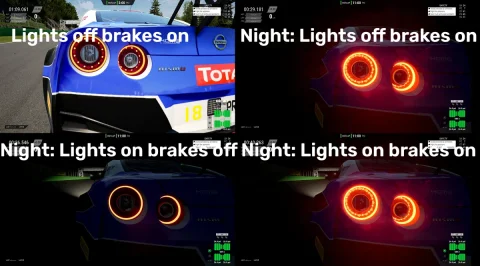
I always thought brake lights were supposed to be mostly red (with a dash of orange, perhaps), not yellow/orange, which I associate more with indicators than brake lights. But maybe it's different for race cars, maybe yellow/orange is considered more visible or something?

One other thing I've just noticed, it's fantastic that the driver's legs are animated, it really adds to the immersion in VR, but the right (accelerator) leg can strobe up and down when at maximum extension for long periods (on lengthy straights, for example). Can some smoothing be applied to the animation perhaps?
screenshot_lights_brakes_nissan.webp
ACC Nissan.
It seems like something got lost in translation, because i was sure it was fine long ago. Then I don't know whether the updates of CSP messed up something in my config. Anyway when I got some spare time, I will have a look to fix it.

p.s.
As for the pedal animation, I will have to check. I don't have VR so I didn't know of possible issues. Just in case I can fix it, I'll DM you to test.
 
Last edited:
Small dedicated app to edit car ai.ini on the fly, to optimize your clumsy AI cars and keep the settings saved in the background.

Capture d'écran 2025-10-17 211306.webp


Pretty self explanitory : you adjust the ai.ini settings, see how it goes on the track, then decides either to save it in the track data folder (creates a settings.ini file there) or to save it globally (settings.ini file saved in the app folder).

Brake hint is extra valuable, you can fix cars either braking too soon or too late on a specific track.

Look ahead Base to adjust the inputs entering a corner, important value, but most of the time the modders get it pretty right.

Look ahead Gas Brake remains a mystery for me.

Steer gain is a nice add, for Fastlanes with proper inputs it really makes for a more consistent AI at lower values.

Aero Hints, easy to figure, can make a difference on high speed corners with high downforce cars.

Tyre Hints, great if you have cars crashing after a few laps with damaged/used/overheating tyres.

Added a few experimental features i found in the lua_sdk (Ai Grip and AI level), the AI grip is extremely effective at 1.8-2.0, so it's basically a cheat for AI cars. The AI level is super experimental, and shouldn't go over 1. It's there until i figure out what to do with it, i'll probably delete it, but maybe some cars would take advantage of it.


Once you reach a perfect race preset, you can hit the "save all cars for ie Spa", and the settings will be automatically loaded for each different car each time you start a session. Saves work on layouts as well. If you enjoy a bunch of settings and want to use them for a different track, you can copy the settings.ini file in the data folder and bring it to any other track, the app will open it at start.

Finally, if the tweaks made work everywhere with a particular car, you can hit "save globally" and forget about it.


There's plenty of cool options you could add here : pits behavior, Fuel tank, Gear setup, etc... Let me know if you have something in mind.

Extra edit : still early stage, feedbacks are welcome. There's a more advanced version available here, with default settings available in a click, and where the app use a preview mode (until you save) : https://www.mediafire.com/file/d6dn5p4ekpxqe86/AIWhisperer.zip/file
 
Last edited:
Sorry @Peter Boese besides the REAL developments like DLSS4/FSR4/XeSS/DX12u
"Real development" pfft okay. Having an AI generate a bunch of imaginary frames for your outdated PC isn't real development. It's slapping an band aid on an issue that can be solved by doing proper optimization.

Idk what kind of outdated hardware you are running to struggle running AC with more than 100FPS. Had no issues running CSP with all the nice stuff enabled on my old ATI Radeon 5770 up until 2023 when i bought my new PC xd
 
Last edited:
"Real development" pfft okay. Having an AI generate a bunch of imaginary frames for your outdated PC isn't real development. It's slapping an band aid on an issue that can be solved by doing proper optimization.

Idk what kind of outdated hardware you are running to struggle running AC with more than 100FPS. Had no issues running CSP with all the nice stuff enabled on my old ATI Radeon 5770 up until 2023 when i bought my new PC xd
That's not what upscalers do, that's frame generation.
 
Its actually pretty easy to say something about a person if you don't know him.

But actually he is really busy on doing the final changes for the update and it will be a big improvement in terms of fps in comparison to the prev. releases.
Well, since today's new release, I can now thankfully find out just what is it that Ilja has been up to.

It made me laugh to read that he really has been traveling with his (new) laptop. ;)
 
do u maybe know if its possible to convert a car from there to assetto?
Yes it is, i had a model of the Golf W12 650, binned it off ages ago though, there is one out in the wild and its from PGR4.


I think pretty much anything can get into AC. I got some snowrunner stuff, loads of carx drift, ATS ETS2, RIDE 5 etc. Provided its been ripped from a game you can get it into AC
 
Last edited:
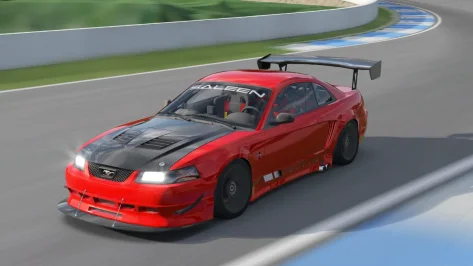
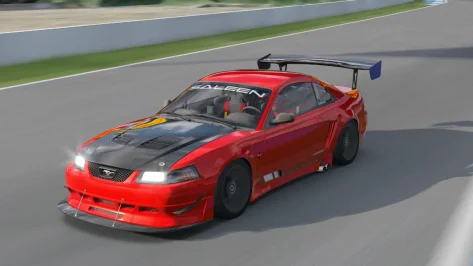
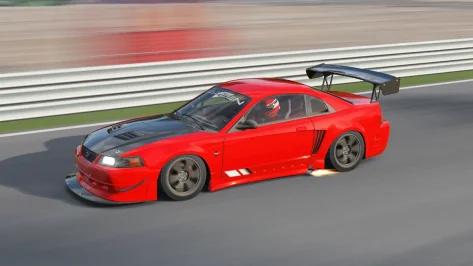
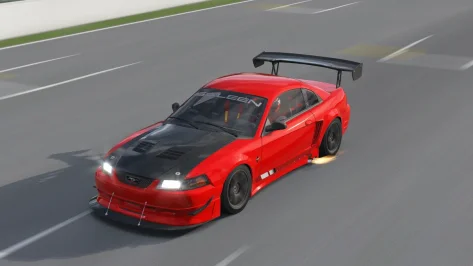
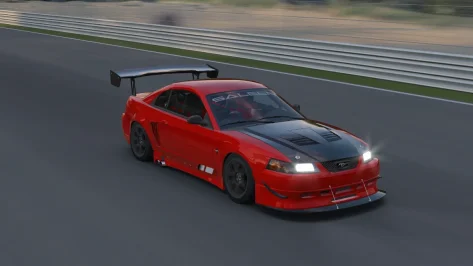
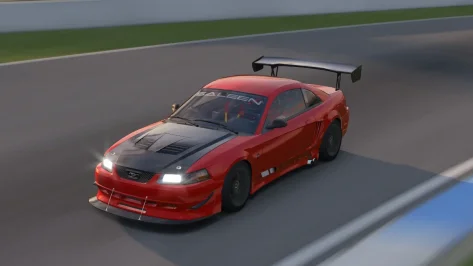
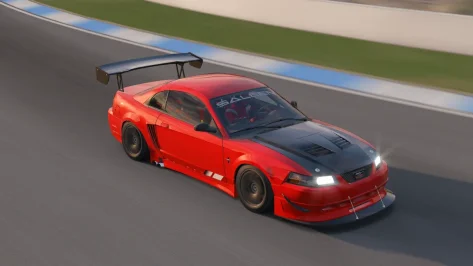
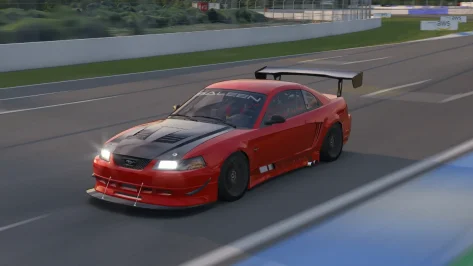
Saleen S281 2000 Track Public Release!!
Download: https://www.mediafire.com/file/b4tnm4gfieqabl1/s281_2000_track_101CREATIVE.rar/file
Converted From FM4
-AO inside and out
-Realistic Dashboard
-Physics
-CSP Settings
-Driver Animation
-Panoramic session Start config Daniel Nogal


View attachment 1486142View attachment 1486143View attachment 1486144View attachment 1486145View attachment 1486146View attachment 1486147View attachment 1486148View attachment 1486149
Hello

Fix cockpit camera
and fix rules setup
Tks

NISSAN GT-R NISMO GT3 2018 V1.0
Sprint and Endurance
LINK 1: https://mods.to/iqZJ68f23ed6ec4c8
LINK 2: https://modsfire.com/v4KjU6rAi2qrRd3

View attachment 1486072

Hi simracers!
I present you the ACC conversion of the NISSAN GT-R NISMO GT3 2018. The car took me quite some time to complete, because it was difficult to gather the old crew to help me working on it, in my spare time, so I had to take several breaks and restarts. But eventually here we are, version 1.0 is ready to drive, because I couldn't leave the "Godzilla" as an unfinished business.

I want to thank my fellows in this long journey:
enkay74, TheSoundguy, Fanapryde, berserker974, ST130013, ThePharaoh89, CrestedIsland.
Special thanks to FileMissing who had the idea of converting the car, in the first place, but he wasn't able to join us and Fanapryde
❤️

I hope you guys will enjoy driving the car.
You will find a .pdf file inside the archive, where you can understand how to operate the car:

— Manual start or automatic start via .bat file. By default the car is on Manual ignition/start mode.
— 3 MOTEC display pages available
— 2 Racelogic display pages
— SAS Driver info display
— Visor up and down
— 2 celebrations


Thank you all, thanks to Kunos for this great evergreen sim.
Ciao! 😁
Could someone test the two versions with different GT3s?
On my PC, both the sprint and endurance versions don't start at the start.
However, if it's a grid with identical GT-Rs, they start normally...
 

Attachments

I've been trying to figure it out for about 10 days, because my "content manager" version (ful) I bought years ago, many of the "apps" are no longer working, and some others (I've never been able to get them to work).

It's no longer working.CMRT, GT3, Rally Voice (and other plugins), Wec Hud.I've never been able to get the Hud (GT7) to work.

I'm literally confused... because there are so many settings (details)... that I might be (forgetting something).

And the virtual mirror version (bipartite)... I also haven't been able to get it to work anymore (that is, if it's still possible with the new updates).
 

Attachments

  • 1.virtual.mirror(bipartite).webp
    1.virtual.mirror(bipartite).webp
    45.3 KB · Views: 11
  • 2.Plugins.Apps.Rally.webp
    2.Plugins.Apps.Rally.webp
    79.5 KB · Views: 9
  • 3.hud.CMRT.webp
    3.hud.CMRT.webp
    109.2 KB · Views: 10

hmm, all the things I have disabled are now enabled by default and/or not able to be disabled?
New KN5 Loader always active? This has caused more issues for more people than any other "new featue"
But yet (i bet) no fix for for cam-facing spectatos popping in at 250m if you deselect "adjust amount of spectators"

Why cant stuff be fixed and stable before crreating 1000 "new features"
Why can we have a genuine "stable branch" that is actually bug free?

sigh
 
Morning,
Searched my a** off, but couldnt find a working solution yet. So maybe someone has figured this out.

The track "Hamburg by 4r" (v1.3) is impossible to load due to the almighty AI Spline. :ouch:

I've tried to enable/disable both options related to AI Spline in CSP, even downgraded CSP to v0.179, waited over an hour if it might start, but nothing. Every other track runs without any problems, but this one just gives me the creeps.

I've read literally everything in this board, at reddit, everything google offered me in the last two weeks.

So help me, :gtplanet:, you're my last hope. :gtpflag:
 
Have given the new CSP a go - clean install, as in wiped everything, including the extension folder in Documents, and started fresh. I always do this for major versions.


Set settings to exactly what they were before (not including the new ones). I keep screenshots.


Performance is considerably worse on both CPU and GPU in 14 and 20 car races (Road One International, Reboot Sebring, Magnificent Park, Reboot Oulton) where I'm familiar with the performance profile. About ~15% worse on average on GPU, way worse on CPU - threads are getting hammered, extended physics or no. I run at a 100 FPS cap - and I was hitting that at about the same rate - but utilization was way, way higher, as were temps.


EDIT: A clean reset of the PC has brought the GPU utilization down to recognizable levels. It's only now about ~3% higher than it was. So if anyone is having that issue post-install, reset your machine. CPU loads are still much higher - particularly on the physical cores.


My screenshots on the new loading screen are also now washed out (I'm on an HDR panel). Very basic thing that always worked before, now broken. Classic. I spent a lot of time getting those screenshots (for other things like league races), but I liked them showing up on load. Now they look like they've been ran through the wash with a half a bottle of bleach. Clearly an HDR compatibility problem.


My AI projects still brake in the middle of the straight for no reason at all. This was the big thing I was waiting for. Tested on Magnificent Park (where the problem was reported) and in two other unfinished WIPs where the problem exists. Reported it in the CSP Discord months ago - nothing came of it. Guess I need to pay into the Patreon again to give feedback. These AIs work as normal, and do not brake in the middle of the straight, with 0.2.10 and (I assume) below.

I guess my AI work remains in limbo - I'm not spending hours working on things that will break in hilarious ways for no reason at all.


I also noticed that AI crash and slam the brakes erratically considerably more often - on tracks where I am well aware of previous CSP behavior (Magnificent Park, Reboot Oulton). The underlying parameters clearly have been modified - to worse results. They also once again have issues getting off the line - while they're not stuck, they're about 25% slower than they were in the start phase. Not good.


My UI start lights seem to be gone, poof, vanished. Can't find them, can't find a setting that changes them - not in the UI menu, nor in any config files that I remember. I need them, unfortunately, as too many tracks have poorly configured or altogether missing start lights.


CSP Settings have been "grouped" and it took me a lot longer to find things that I needed. Some settings have been completely removed - and as RMi said above, the New KN5 loader now seems to be forced on. I have had major problems with crashing on load with the new KN5 loader on previous versions - so this is a bold move!


At least the "high precision lap timer" experiments seem like a nice addition, in theory.


So yeah, first impressions are not good. It didn't fix any of the problems I had, broke a few more things, and worsened performance (for me at least).
 
Last edited:
Anyway, getting off the CSP hate train, has anyone ever done a config or proper rework of Reboot's ancient Atlanta Motorsports Park?

Screenshot_ks_mazda_mx5_cup_atlanta_motorsports_park_18-9-125-3-44-18.webp


Screenshot_ks_mazda_mx5_cup_atlanta_motorsports_park_18-9-125-3-43-36.webp


Screenshot_ks_mazda_mx5_cup_atlanta_motorsports_park_18-9-125-3-43-24.webp


Looked through various search terms in the thread, along with Breathe's list, no luck.

Awesome little track that I'll be running in a league race - but the foliage and grass can be pretty brutal on the latest CSP and Pure.


Would appreciate if anyone knew of a extension config/GrassFX at the very least. Cheers.
 
X90
Have given the new CSP a go - clean install, as in wiped everything, including the extension folder in Documents, and started fresh. I always do this for major versions.


Set settings to exactly what they were before (not including the new ones). I keep screenshots.


Performance is considerably worse on both CPU and GPU in 14 and 20 car races (Road One International, Reboot Sebring, Magnificent Park, Reboot Oulton) where I'm familiar with the performance profile. About ~15% worse on average on GPU, way worse on CPU - threads are getting hammered, extended physics or no. I run at a 100 FPS cap - and I was hitting that at about the same rate - but utilization was way, way higher, as were temps.


EDIT: A clean reset of the PC has brought the GPU utilization down to recognizable levels. It's only now about ~3% higher than it was. So if anyone is having that issue post-install, reset your machine. CPU loads are still much higher - particularly on the physical cores.


My screenshots on the new loading screen are also now washed out (I'm on an HDR panel). Very basic thing that always worked before, now broken. Classic. I spent a lot of time getting those screenshots (for other things like league races), but I liked them showing up on load. Now they look like they've been ran through the wash with a half a bottle of bleach. Clearly an HDR compatibility problem.


My AI projects still brake in the middle of the straight for no reason at all. This was the big thing I was waiting for. Tested on Magnificent Park (where the problem was reported) and in two other unfinished WIPs where the problem exists. Reported it in the CSP Discord months ago - nothing came of it. Guess I need to pay into the Patreon again to give feedback. These AIs work as normal, and do not brake in the middle of the straight, with 0.2.10 and (I assume) below.

I guess my AI work remains in limbo - I'm not spending hours working on things that will break in hilarious ways for no reason at all.


I also noticed that AI crash and slam the brakes erratically considerably more often - on tracks where I am well aware of previous CSP behavior (Magnificent Park, Reboot Oulton). The underlying parameters clearly have been modified - to worse results. They also once again have issues getting off the line - while they're not stuck, they're about 25% slower than they were in the start phase. Not good.


My UI start lights seem to be gone, poof, vanished. Can't find them, can't find a setting that changes them - not in the UI menu, nor in any config files that I remember. I need them, unfortunately, as too many tracks have poorly configured or altogether missing start lights.


CSP Settings have been "grouped" and it took me a lot longer to find things that I needed. Some settings have been completely removed - and as RMi said above, the New KN5 loader now seems to be forced on. I have had major problems with crashing on load with the new KN5 loader on previous versions - so this is a bold move!


At least the "high precision lap timer" experiments seem like a nice addition, in theory.


So yeah, first impressions are not good. It didn't fix any of the problems I had, broke a few more things, and worsened performance (for me at least).
Yep, start lights HUD has been killed by death. Annoying.
Hopefully will be fixed soon.
I'll report it on the CSP Discord unless somebody else already has.
 
Last edited:
What is actually wrong with human beings? Why can't some people just accept other people critisizing stuff?
Why does anything have to come to someone trying to shut stuff down?
I always say it about everything these days, if your own beliefs are so fragile to you that you need everyone else to agree with them.... YOU are the problem.
And that goes for everything, on every side.....
Balanced views are so hard to find these days... ilija litterally releases beta builds ultimately for the army of paying customers to give feed back on bugs.... you try to shut that down, we are all worse off......
So to the guy who did a 'pooh' emiji to RMi's post, and those that will come on to stifle any critisiums, you aren't helping.
 
Yes it is, i had a model of the Golf W12 650, binned it off ages ago though, there is one out in the wild and its from PGR4.


I think pretty much anything can get into AC. I got some snowrunner stuff, loads of carx drift, ATS ETS2, RIDE 5 etc. Provided its been ripped from a game you can get it into AC
would be very nice if someone can help me getting a car from there to ac
 
What is actually wrong with human beings? Why can't some people just accept other people critisizing stuff?
Why does anything have to come to someone trying to shut stuff down?
I always say it about everything these days, if your own beliefs are so fragile to you that you need everyone else to agree with them.... YOU are the problem.
And that goes for everything, on every side.....
Balanced views are so hard to find these days... ilija litterally releases beta builds ultimately for the army of paying customers to give feed back on bugs.... you try to shut that down, we are all worse off......
So to the guy who did a 'pooh' emiji to RMi's post, and those that will come on to stifle any critisiums, you aren't helping.
'Cuz you can't criticise Our Great Leader Ilja's work, simple as.
 
X90
Have given the new CSP a go - clean install, as in wiped everything, including the extension folder in Documents, and started fresh. I always do this for major versions.


Set settings to exactly what they were before (not including the new ones). I keep screenshots.


Performance is considerably worse on both CPU and GPU in 14 and 20 car races (Road One International, Reboot Sebring, Magnificent Park, Reboot Oulton) where I'm familiar with the performance profile. About ~15% worse on average on GPU, way worse on CPU - threads are getting hammered, extended physics or no. I run at a 100 FPS cap - and I was hitting that at about the same rate - but utilization was way, way higher, as were temps.


EDIT: A clean reset of the PC has brought the GPU utilization down to recognizable levels. It's only now about ~3% higher than it was. So if anyone is having that issue post-install, reset your machine. CPU loads are still much higher - particularly on the physical cores.


My screenshots on the new loading screen are also now washed out (I'm on an HDR panel). Very basic thing that always worked before, now broken. Classic. I spent a lot of time getting those screenshots (for other things like league races), but I liked them showing up on load. Now they look like they've been ran through the wash with a half a bottle of bleach. Clearly an HDR compatibility problem.


My AI projects still brake in the middle of the straight for no reason at all. This was the big thing I was waiting for. Tested on Magnificent Park (where the problem was reported) and in two other unfinished WIPs where the problem exists. Reported it in the CSP Discord months ago - nothing came of it. Guess I need to pay into the Patreon again to give feedback. These AIs work as normal, and do not brake in the middle of the straight, with 0.2.10 and (I assume) below.

I guess my AI work remains in limbo - I'm not spending hours working on things that will break in hilarious ways for no reason at all.


I also noticed that AI crash and slam the brakes erratically considerably more often - on tracks where I am well aware of previous CSP behavior (Magnificent Park, Reboot Oulton). The underlying parameters clearly have been modified - to worse results. They also once again have issues getting off the line - while they're not stuck, they're about 25% slower than they were in the start phase. Not good.


My UI start lights seem to be gone, poof, vanished. Can't find them, can't find a setting that changes them - not in the UI menu, nor in any config files that I remember. I need them, unfortunately, as too many tracks have poorly configured or altogether missing start lights.


CSP Settings have been "grouped" and it took me a lot longer to find things that I needed. Some settings have been completely removed - and as RMi said above, the New KN5 loader now seems to be forced on. I have had major problems with crashing on load with the new KN5 loader on previous versions - so this is a bold move!


At least the "high precision lap timer" experiments seem like a nice addition, in theory.


So yeah, first impressions are not good. It didn't fix any of the problems I had, broke a few more things, and worsened performance (for me at least).
Yes agree with all of this.

As well:
disabling "adjust amount of spectators" causes camera_facing spectators to LOD_OUT at aprox 200-250m,,
(this setting when disabled, in my opinion, should show all spectators including camera_facing at all times)

I reported this weeks ago as it is an issue with 2.12p1 and present in the 3.0p110

sigh
 
Its actually pretty easy to say something about a person if you don't know him.

But actually he is really busy on doing the final changes for the update and it will be a big improvement in terms of fps in comparison to the prev. releases.

That might be interesting for many people:
I done a lot of test in Linux in the last weeks and making an easy install video to install CashyOS or Bazzite and AC+CSP+Pure on them.

To compare all the OS i did a lot of test with different CSP versions and it seems the new CSP 0.3 will be really performant again.
Test were made on my main system (i7-13700K/4090)
Windows 11, Bazzite 42, CashyOS 08.2025 (KDE Plasma)
For Linux i use the Proton GE 9.20 (which seems the best for AC - tested also 10-15)

I used the AC benchmark to also have a comparison to Vanilla AC (no mods at all).

For the test with CSP i only used the default wfx no Pure to minimize its influence.

View attachment 1486070
(This chart shows the average fps of the AC benchmark run)

Today i tested 0.3.105 again which is even a bit faster then 0.3.102
This really resonates.
Over the past 4-5 years, I've tried (and failed) a few times to make the jump to Linux, specifically for gaming AC.
This sim has been the last hold-out for me. Everything else in my life has been Linux, and it's cousin, Mac, for ages.
But it's coming together now, I think. The planets are beginning to align...
I look forward to your video and script. Thanks for your work :cheers:
 
Last edited:
Hello

Fix cockpit camera
and fix rules setup
Tks


Could someone test the two versions with different GT3s?
On my PC, both the sprint and endurance versions don't start at the start.
However, if it's a grid with identical GT-Rs, they start normally...
same issue here , if i choose the same mod then ai works as opponent even with other mods but if i am driving another mod the ai with the gt-r mod will not work (it actually rev but cant move)
 
If you want DLSS so badly, here's an article teaching you how to force it any game. Guy also has a pretty good guide on optimizing W11, if you know what you're doing.


Edit: Apparently meme arrows don't work here, my power level has been nerfed considerably.
The whole DLSS4 are just samples for the real bangers and already explained there is more on ideas to make thing better. I know this method, I already did try to force DLSS4 into AC, with the help of others but it did not work. Clearly it did show AC was using DLSS4 but the effects were only more load. Finally I did give up the DLSS4 as my program knowledge, like the Dynamic-link library changing is reaching a border.
If doing a search here there is a guy who did wrote down why my attempt and you sample is not working in AC.
Edit: my AC is still listed as DLSS4 game in a DLSS swapper from Github, so there must be somewhere an hidden or changed Dynamic link library file.
 
Last edited:
X90
Anyway, getting off the CSP hate train, has anyone ever done a config or proper rework of Reboot's ancient Atlanta Motorsports Park?

View attachment 1486208

View attachment 1486209

View attachment 1486210

Looked through various search terms in the thread, along with Breathe's list, no luck.

Awesome little track that I'll be running in a league race - but the foliage and grass can be pretty brutal on the latest CSP and Pure.


Would appreciate if anyone knew of a extension config/GrassFX at the very least. Cheers.
What exactly do you request? Atlanta MSP has already grassfx included, in the CM config file which is loaded automatically.

RainFX is here:

[RAIN_FX]
PUDDLES_MATERIALS =atl_phytex, atl_grass28_new_KSLAYER3, STRP_TRANSITIONS_1, GRASS_WEEDSDIRTA, GRASS_EMBAB, ARMCOPLANTS, RMBL_RT_WET, FLCBL_RT_WET, TREES_AMP, ROADRT_WET, ROAD_FRESH_WET, GRVL_WEEDSGRAVEL, GRASS_WEEDSDIRTA, ROADRT_WET
SOAKING_MATERIALS =atl_phytex, atl_grass28_new_KSLAYER3, STRP_TRANSITIONS_1, GRASS_WEEDSDIRTA, GRASS_EMBAB, ARMCOPLANTS, TREES_AMP, ROADRT_WET, ROAD_FRESH_WET, GRVL_WEEDSGRAVEL, GRASS_WEEDSDIRTA, ROADRT_WET
SMOOTH_MATERIALS =MARSHHUTS, MARSHALFLAG2, GRDL_ARMCOS_01, TWAL_TIRESTACK, CONEA, SECLIGHT_A, FENCE, SUNPAN_GLASS, AMP_MARKERS, EQUIPMENT, FENCEPOLES, Gadgets_Meccanico, BINPLASTIC, VEH_CARTRAILER, VEH_PICKUP, BLD_RTOWER, BINBOTTLE, BLD_VIP, PODIUM_KARTS
ROUGH_MATERIALS =
LINES_MATERIALS =
STREAM_EDGE_... =-4.89, 99.5, -366.6, -5.96, 99.5, -368.03
STREAM_EDGE_... =-6.04, 99.5, -368.03, -7.78, 99.5, -366.72
STREAM_EDGE_... =-6.62, 99.54, -365.23, -4.93, 99.55, -366.5
STREAM_EDGE_... =57.4, 94.44, -365.34, 57.32, 94.44, -365.11
STREAM_EDGE_... =-55.33, 95.57, -550.8, -53.3, 95.57, -551.11
STREAM_EDGE_... =-53.25, 95.57, -551.16, -53.52, 95.58, -552.93
STREAM_EDGE_... =-53.66, 95.62, -552.97, -55.7, 95.62, -552.66
STREAM_EDGE_... =-55.79, 95.57, -552.59, -55.52, 95.57, -550.82
STREAM_EDGE_... =86.31, 88.23, -472.32, 85.88, 88.23, -471.85
STREAM_EDGE_... =86.75, 87.71, -471.74, 86.67, 87.71, -472
STREAM_EDGE_... =86.65, 87.73, -471.99, 86.51, 87.73, -471.95
STREAM_EDGE_... =86.58, 87.73, -471.69, 86.71, 87.73, -471.73
STREAM_EDGE_... =-75.15, 94.38, -546.23, -75.13, 94.38, -546.73
STREAM_EDGE_... =-75.05, 93.59, -546.64, -74.97, 93.6, -546.86
STREAM_EDGE_... =-74.86, 96.4, -546.54, -74.84, 96.39, -547.01
STREAM_EDGE_... =-75.4, 96.63, -546.53, -74.91, 96.41, -546.51
STREAM_EDGE_... =-75.36, 96.63, -547.09, -74.87, 96.4, -547.07
STREAM_EDGE_... =-209.4, 92.31, -407.19, -209.16, 92.07, -407.6
STREAM_EDGE_... =-209.17, 92.05, -407.66, -209.58, 92.05, -407.89
STREAM_EDGE_... =-209.89, 92.31, -407.44, -209.62, 92.07, -407.91
STREAM_EDGE_... =-209.02, 90.05, -407.25, -209.44, 90.06, -407.5
STREAM_EDGE_... =-209.34, 89.27, -407.53, -209.49, 89.26, -407.7
STREAM_EDGE_... =-143.98, 90.64, -202.29, -143.82, 90.65, -200.5
STREAM_EDGE_... =-143.9, 90.69, -202.34, -141.77, 90.69, -202.52
STREAM_EDGE_... =-141.54, 90.64, -200.7, -141.69, 90.65, -202.49
STREAM_EDGE_... =-143.77, 90.64, -200.46, -141.59, 90.65, -200.64
STREAM_EDGE_... =-78.14, 95.36, -40.25, -78.49, 95.36, -40.16
STREAM_EDGE_... =-78.46, 94.77, -40.24, -78.63, 94.76, -40.25
STREAM_EDGE_... =-78.39, 97.06, -40.36, -78.3, 96.86, -39.99
STREAM_EDGE_... =-78.31, 96.85, -39.97, -78.68, 96.85, -39.87
STREAM_EDGE_... =-78.8, 97.07, -40.27, -78.7, 96.86, -39.89
STREAM_EDGE_... =-89.23, 94.28, 194.92, -91, 94.28, 194.74
STREAM_EDGE_... =-91.06, 94.33, 194.8, -91.28, 94.33, 196.95
STREAM_EDGE_... =-91.24, 94.28, 197.02, -89.45, 94.28, 197.21
STREAM_EDGE_... =-98.74, 93.53, 284.75, -98.77, 93.24, 285.23
STREAM_EDGE_... =-99.29, 93.52, 284.71, -99.32, 93.24, 285.18
STREAM_EDGE_... =-104.46, 90.68, 357.58, -106.21, 90.68, 357.4
STREAM_EDGE_... =-106.29, 90.72, 357.48, -106.51, 90.73, 359.59
STREAM_EDGE_... =-104.67, 90.68, 359.87, -106.45, 90.68, 359.69
STREAM_EDGE_... =54.79, 91.51, 286.17, 54.38, 91.26, 286.45
STREAM_EDGE_... =54.37, 91.25, 286.49, 54.64, 91.25, 286.88
STREAM_EDGE_... =55.11, 91.52, 286.63, 54.7, 91.27, 286.91
STREAM_EDGE_... =54.58, 88.47, 286.46, 54.64, 88.46, 286.69
STREAM_EDGE_... =54.41, 89.26, 286.07, 54.69, 89.26, 286.47
STREAM_EDGE_... =81.77, 91.52, 255.72, 82.36, 91.53, 255.86
STREAM_EDGE_... =82.05, 91, 255.06, 81.87, 91, 255.25
STREAM_EDGE_... =89.83, 93.75, 182.38, 91.51, 93.75, 182.97
STREAM_EDGE_... =90.53, 93.8, 180.26, 89.83, 93.81, 182.28
STREAM_EDGE_... =92.3, 93.76, 180.82, 90.58, 93.76, 180.21
STREAM_EDGE_... =81.2, 101.28, 67.6, 81.03, 100.93, 67.94
STREAM_EDGE_... =81, 100.9, 67.95, 80.55, 100.9, 67.73
STREAM_EDGE_... =80.72, 101.31, 67.32, 80.53, 100.92, 67.7
STREAM_EDGE_... =81.4, 98.99, 67.86, 80.96, 98.99, 67.64
STREAM_EDGE_... =81.06, 98.22, 67.59, 80.92, 98.2, 67.46
STREAM_EDGE_... =-78.09, 83.92, -211.41, -77.8, 83.93, -213.55
STREAM_EDGE_... =-78.12, 83.92, -211.38, -79.88, 83.92, -211.62
STREAM_EDGE_... =-79.96, 83.97, -211.7, -79.67, 83.97, -213.81
STREAM_EDGE_... =-79.63, 83.92, -213.9, -77.86, 83.92, -213.66
STREAM_EDGE_... =-17.45, 84.9, -217.5, -17.15, 84.71, -217.16
STREAM_EDGE_... =-17.1, 84.7, -217.15, -16.75, 84.7, -217.47
STREAM_EDGE_... =-17.07, 84.92, -217.91, -16.73, 84.7, -217.53
STREAM_EDGE_... =-17.52, 82.69, -217.16, -17.17, 82.68, -217.47
STREAM_EDGE_... =-17.16, 81.89, -217.36, -16.98, 81.89, -217.45
STREAM_EDGE_... =-28.7, 96.98, -7.15, -28.52, 96.98, -5
STREAM_EDGE_... =-28.54, 96.98, -4.91, -30.34, 96.98, -4.75
STREAM_EDGE_... =-30.4, 97.03, -4.84, -30.58, 97.02, -6.96
STREAM_EDGE_... =-30.55, 96.98, -7.04, -28.74, 96.98, -7.19
STREAM_EDGE_... =-28.32, 95.81, 52.51, -28.19, 95.55, 52.89
STREAM_EDGE_... =-28.22, 95.53, 52.94, -28.69, 95.53, 53.1
STREAM_EDGE_... =-64.11, 86.34, -340.91, -64.08, 86.07, -340.44
STREAM_EDGE_... =-64.13, 86.06, -340.42, -64.61, 86.07, -340.38
STREAM_EDGE_... =-64.67, 86.34, -340.89, -64.64, 86.09, -340.44
STREAM_EDGE_... =-64.94, 84.09, -340.63, -64.47, 84.09, -340.66
STREAM_EDGE_... =57.63, 97.44, -365.45, 57.25, 97.22, -365.46
STREAM_EDGE_... =57.67, 97.48, -364.89, 57.23, 97.23, -364.9
STREAM_EDGE_... =-64.52, 83.31, -340.57, -64.3, 83.31, -340.52
STREAM_EDGE_... =-28.84, 95.8, 52.71, -28.72, 95.55, 53.07
STREAM_EDGE_... =-29.06, 93.57, 52.95, -28.6, 93.58, 52.8
STREAM_EDGE_... =-28.64, 92.78, 52.9, -28.42, 92.78, 52.9
STREAM_EDGE_... =57.49, 95.23, -365.74, 57.48, 95.23, -365.24
STREAM_EDGE_... =57.22, 97.21, -365.41, 57.2, 97.21, -364.93
STREAM_EDGE_... =-7.8, 99.5, -366.66, -6.72, 99.5, -365.22
STREAM_EDGE_... =-98.45, 91.25, 284.98, -98.95, 91.25, 284.95
STREAM_EDGE_... =-98.87, 90.46, 284.87, -99.08, 90.46, 284.78
STREAM_EDGE_... =-104.63, 90.69, 359.78, -104.41, 90.68, 357.66
STREAM_EDGE_... =-99.3, 93.22, 285.22, -98.8, 93.22, 285.26
STREAM_EDGE_... =-89.4, 94.28, 197.14, -89.19, 94.28, 195.01
STREAM_EDGE_... =91.6, 93.76, 182.92, 92.3, 93.76, 180.91
STREAM_POINT_... =

If you need 3D trees, I would have them as well.

20251018-110734-atlanta_motorsports_park.webp
 
Sharing a mod? Host it on GTPlanet Downloads. Free, public hosting for files up to 10GB in size.
Back