Assetto Corsa PC Mods General DiscussionPC 

  • Thread starter Thread starter daan
  • 149,721 comments
  • 45,378,288 views
I upgraded 2 PC’s to Win11 from elderly people, that could not get the win11 update according Microsoft (both 10y of age). If you like to try sent me a pm with your PC specs, who knows I can help.
These upgrade went for both without any problems. Strangely it is my own much modern win11 capable PC that did get a upgrade OK, was and still is the problem.
Thanks for the offer, but I installed a cheap Win11 system to be my internet interface and really don't care to update my game machine to Win11. Based on RMi's situation described above, I could probably bridge the Win10 thru the Win11 and just do the occasional internet visit with the Win10 machine using the bridge.
RMi, does that sound like a safe solution? I appreciate your input.

I'm also contemplating installing AC on the Win11 machine (but only I5 32gb) as a reference (it would also collect new CM updates) not to actually go to the track... With the ultimate version it would be cheap to do it...
 
Last edited:
X90
Anyway, getting off the CSP hate train, has anyone ever done a config or proper rework of Reboot's ancient Atlanta Motorsports Park?

View attachment 1486208

View attachment 1486209

View attachment 1486210

Looked through various search terms in the thread, along with Breathe's list, no luck.

Awesome little track that I'll be running in a league race - but the foliage and grass can be pretty brutal on the latest CSP and Pure.


Would appreciate if anyone knew of a extension config/GrassFX at the very least. Cheers.
I made some changes to the shader two years ago. Maybe some other fixing too, can't remember.
 
Thanks for the offer, but I installed a cheap Win11 system to be my internet interface and really don't care to update my game machine to Win11. Based on RMi's situation described above, I could probably bridge the Win10 thru the Win11 and just do the occasional internet visit with the Win10 machine using the bridge.
RMi, does that sound like a safe solution? I appreciate your input.

I'm also contemplating installing AC on the Win11 machine (but only I5 32gb) as a reference (it would also collect new CM updates) not to actually go to the track... With the ultimate version it would be cheap to do it...
If you are on a cable modem that provides your internal network, you really should just use that.
Of course you could do what you describe but will likely be more hassle than its worth.
You could also get a cheap router and create another private network (I did this when I had 8 computers (and 3 networks) in my home when I lived in the States.
 
WARNING, BRICK MESSAGE NOTICE!: Computer geeks with extensive advanced knowledge in programing crap can skip this message, which is intended for monkey-brained rednecks like myself. You have been warned...


Amidst all this turmoil of issues with CSP, CM, etc, I'm happy to report that I was able to upgrade to Windows 11 without my friend, the Nuclear Kitten, hitting the fateful meltdown button. I know it's not a great feat, but if any of you clumsy human find yourself in the same situation as me and don't dare to take the step, you should know that it's safe to update the operating system without ruining Assetto Corsa. If I've done it, anyone can do it.

My first hassle was backing up to an external drive the three folders https://www.gtplanet.net/forum/threads/assetto-corsa-pc-mods-general-discussion.307899/post-13589428 needed to be saved in case of disaster while upgrading or messing with Windows. In severe cases of hoarding, these folders are so large that they become unwieldy. The SSD on my PC is 2 TB, the same as my external hard drive for backups, and ONLY in mods I have 1.19 TB (uncompressed), which thanks to the magic of the Assetto Corsa compressor takes up 212 GB on disk.

If the destination disk is formatted in exFAT (as usual in external hard drives), Windows does not automatically recompress the backed up files, so if the destination disk is not a lot larger than the source disk, the operation cannot be performed for lack of space. The solution is to format the external hard drive as NTFS and enable the option that allows Windows to compress files saved on it. In theory and according to scientific literature, the NTFS format has some drawbacks compared to exFAT, but it's ok for working with Windows and saving files that we are not going to access constantly, and this has been the trick that saved my derriere.

The next step was the proper upgrading from Windows 10 Home to 11. I took the coward's route cause I didn't want to get bogged down with pre-cooked debloated operating systems, opting to do it with the official options. There are several ways, but in my case, I used the "Windows 11 Setup Wizard" from the official Microsoft website. This method preserves your previous files, apps, and practicallly all your settings, which is the point.

Needless to say that the ideal is to have all programs, drivers, etc. as updated as possible, but it shouldn't be a problem either; my only scare came when the update was interrupted with a warning message that my PC's SSDs weren't up to date, to avoid the (now fixed) problem that arose with one of the latest versions of Windows. Once the latest SSD drivers were installed, the update went smoothly.

Now I'm just finishing updating some programs, trying to optimize Windows to improve its gaming performance (with the help of thousands of geeky YouTube tutorials) and testing Assetto and so far, everything is working fine... Well, FINE within the parameters of Assetto Corsa, you know... 😅


(Of course, take this message with a grain of salt; the facts described worked well in my particular case, and there may be some inaccuracies in my statements, as I'm no expert on the subject, but I think it can serve as a basic guidance. Good luck.)


EDIT: While writing this long message, what a coincidence you were talking about the same matter...
 
Last edited:
I also had 99% CPu and 91% CPU utilization with 0.3.0.
But the display was wrong.
By enlarging the app window, the values dropped to 27% and 45%. Already crazy.
 
I didn't see any mention of it in the patch notes, so I'm guessing no.
Thank you, I did not saw it as well. Tried to explore this by myself with my special F1 1988 grid but crashed so many times before overtaking slow runners that I let down lol

When testing the CSP "Pit when raining - drying" behavior, noticed that when changing tyres when the track has dried, AI cars always go out of pits with medium.

So to allow to go back on track with softs, I made a small tiny app called DumbAI (as a training for me). I'm not sure the isInPit variable works well for me, I had to use instead the isInPitlane boolean to be able to change the tyres compound by setAITyres without having it done directly on track as soon as the track change is triggered.

I post the code here, this is really nothing and quite useless but few days ago people said they were interested in enhancing the pit strategy without using proprietary app so ...
 
Last edited:
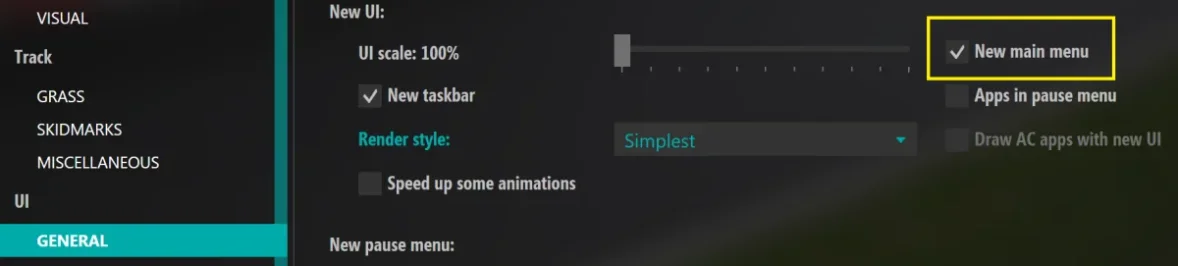
Anyone know how to disable sat nav now? It seems to be on by default and the option to disable it seems to have gone.
Seems like you now have to go to ...assettocorsa\extension\config\car_instruments.ini and set

REMEMBER TO REMOVE THE SEMI-COLON BEFORE THE TEXT IN THE CONFIG, AND THE OPTION TO DISABLE NAV SCREENS WILL BE BACK IN CSP INSTRUMENTS SETTINGS

[BASIC]USE_NAVIGATORS2=0
 
Last edited:
Last edited:
No problems with the v.3 install. Biggest difference was with Pure. I previously found that using the Pure PPF the image was way too bright, so I used that PPF to make fairly heavy adjustments to get it right. With v.3 everything was immediately very dark. Hitting default in Pure PPF brought it back in range and with a brightness increase and a contrast decrease everything is beautiful. In game rendering seems to look better overall than prior to v.3, as if LCF wasn't quite working before. Frame rates are very good (locked at 60 in pancake).
I'm happy :)
 
With the new CSP 3.0, my FPS dropped from 67 to 56 in a race with about 14 cars on a triple screen (4080TI). On top of that, I got light snowfall in October. I'm now back to 2.11. If 3.0 really runs better, some settings that have changed need to be adjusted. But I have no idea which ones.
 
Downloaded the new CSP. Started it up to test. Was getting CPU usage of 30% and GPU 40% on single car test. Now getting CPU 98% and GPU 99%. Tried restarting computer, game ect. Still the same. I have reverted back to 212 and back to normal again.
Not sure if it's the same with you, but I was getting CPU at 100% and GPU at 70%. Turned off the frame limiter, and CPU is now at 30% - but GPU jumped to 100%. Seems that there's something wrong with the new frame limiter.
 
For those with the 100% GPU and CPU - is this only in the chart of the render stats app or is it really causing the PC using 100% GPU and CPU?

Also is there any red dot in the LUA Debug app in-game?
 
Last edited:
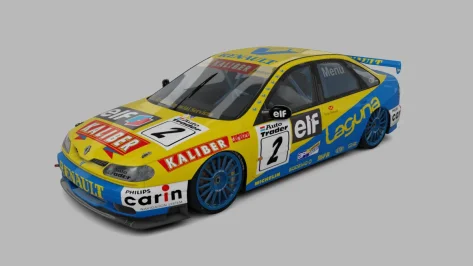
20251018-200000-industrial-f302_renault_laguna_97.webp

Released : Renault Laguna BTCC´97
Author:F302
3D Model by Raceroom
Texture Update : F302
3d work: F302
hope u enjoy the Car
knowing bugs driver shiftanimation
ps : send feedback ,bugs ,missing things
tested on 0.2.12-preview1
PP filer _PURELIFEEVO
have fun!
To install, move folders to "...\SteamApps\common\assettocorsa" or simply
drag'n'drop archive to Content Manager

 
Not sure if it's the same with you, but I was getting CPU at 100% and GPU at 70%. Turned off the frame limiter, and CPU is now at 30% - but GPU jumped to 100%. Seems that there's something wrong with the new frame limiter.
Quick update on this. Frame Limiter is causing CPU to jump to 100%. Waiting for VSync is causing GPU to jump to 100%. I'm guessing both of these were changed, as disabling them got me to performance levels similar to what I used to have.
 
Sorry for the double post but I couldn't include more than 5 media posts in one post.


Panoz Esperante GTR-1 Roadcar sound mod:


The Panoz sound is quite "aggressive" for a street version, cant remember if I changed it or if its the "stock" one


With the new CSP 3.0, my FPS dropped from 67 to 56 in a race with about 14 cars on a triple screen (4080TI). On top of that, I got light snowfall in October. I'm now back to 2.11. If 3.0 really runs better, some settings that have changed need to be adjusted. But I have no idea which ones.
With preview version, snow will begin at 3c ambient temp,even with rain selected
 
Quick update on this. Frame Limiter is causing CPU to jump to 100%. Waiting for VSync is causing GPU to jump to 100%. I'm guessing both of these were changed, as disabling them got me to performance levels similar to what I used to have.
Could you show your settings in CM - AC - video?
 
Added real BTCC logos on the number plates and front glass decals for JK's Laguna :)

Will probably alter these with the real plates and add the 1998 #21 skin when Rustad drove with the works team at Silverstone in the near future but can't be arsed rn.

(JK ur da goat for bringing this one to AC btw :) :) :) )


Attachments

  • __custom_showroom_1760813587.webp
    __custom_showroom_1760813587.webp
    56 KB · Views: 1
Last edited:
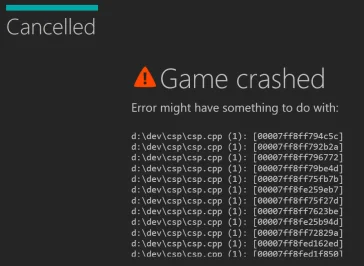
Getting this on loading quite often with the latest CSP.
Anyone else?

View attachment 1486294

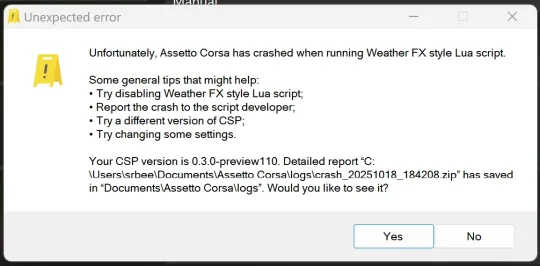
Also get another crash to do with a WeatherFX LUA script, or something.
Stable this build ain't. Not for me at least.

Edit: this one

View attachment 1486302

@Peter Boese any ideas please?
please send me the report file

Did you try with standard Kunos content (cars + tracks)?

Did you already try to reset the CSP settings?
 
Last edited:
Sharing a mod? Host it on GTPlanet Downloads. Free, public hosting for files up to 10GB in size.
Back