Assetto Corsa PC Mods General DiscussionPC 

  • Thread starter Thread starter daan
  • 154,682 comments
  • 48,657,614 views
Hi guys,

I am looking for a Volkswagen Scirocco GT24 mod. There used to be one listed on Assetto Garage, but all I can find is a YT Video:

.

It does not matter if the car is up to modern AC standards, as I want to do a skin for it.
Our team owns a Scirocco GT24 and we want to give it a new design. I would like to experiment in AC to exchange within our team and with the company which will do the actual car wrapping.

I could also use the VLN version of the car, but it has quite a bit different body work.

Maybe one of you still has a GT24 Scirocco on the HD.

Thanx
Daniel
 
Last edited:
Hi guys,

I am looking for a Volkswagen Scirocco GT24 mod. There used to be one listed on Assetto Garage, but all I can find is a YT Video:

.

It does not matter if the car is up to modern AC standards, as I want to do a skin for it.
Our team owns a Scirocco GT24 and we want to give it a new design. I would like to experiment in AC to exchange within our team and with the company which will do the actual car wrapping.

I could also use the VLN version of the car, but it has quite a bit different body work.

Maybe one of you still has a GT24 Scirocco on the HD.

Thanx
Daniel

Hi, sorry for the irrelevant question; has the BPR project been abandoned?
 
Yes, I had it activated, but the correct answer was...


Swisss is my newest hero in my personal Hall of Fame; his suggestion solved my problem. Thank you both so much for your willingness to help and your quick response! 😍
deleted.
 
Last edited:
How's that for a CSP preview? :lol:

1761935218639.webp
 
I'm in the factory driver program for Project Motor Sport but can't really contribute much until VR builds are available.
Have you tried it on pancake? You must have a bit of insight into how it at least is going, all YT stuff is dangerously positive so far...that worries me more.

I maybe didn't explain it very well earlier, having spent 4000 hours and many many years on AC, how ever much I de bloat it it builds up again, and i have so many mods and cars that i can't allow myself to bin off, yet i never use them ever, my days of doing long GT3 races or any long races are gone on AC, so many sims have come and gone and failed to really capture my time, but anything new and shiney is alluring....
If meets my expectations i would gratefully go on a massive bloodbath in AC and strip it of the kind of stuff that PMS will have. Leaving AC as just what it really is anyway, my little play thing for modding, and stop this merry go round of trying the latest CSP's and mods etc etc....
 
Hi guys,

I am looking for a Volkswagen Scirocco GT24 mod. There used to be one listed on Assetto Garage, but all I can find is a YT Video:

.

It does not matter if the car is up to modern AC standards, as I want to do a skin for it.
Our team owns a Scirocco GT24 and we want to give it a new design. I would like to experiment in AC to exchange within our team and with the company which will do the actual car wrapping.

I could also use the VLN version of the car, but it has quite a bit different body work.

Maybe one of you still has a GT24 Scirocco on the HD.

Thanx
Daniel

Is the one shown in the video the VLN version? I found a link to the exact same car, but it says VLN. I'll share it if you don't mind.
 
Have you tried it on pancake? You must have a bit of insight into how it at least is going, all YT stuff is dangerously positive so far...that worries me more.
I haven't really tried the driving, I can't get on at all with sim racing in 2D any more. Looking forward to testing it in VR though.
 
On the matter, for any track creator here @RMi_wood, @shi @Rainmaker87 , i saw that i could apply AI Caution to specific side of the Fastlane. Might not be worth it, but since i have my head in that crap :

This is more a track setting rather than a car one, but i wonder if you guys have exemples of tracks where the car going to pits makes the ones behind slow down before entering pits, messing up the global pace. That could be useful on some tracks. I got that working on Dundrod where it was highly needed but i'm trying to make it a "one button setting".

process would be ->car going pits (i think i saw an API checking the car state about it somewhere)
->detect pit side
->cars behing gets low caution value (maybe little offset to make sure they avoid the pitting car)

= result cars behind go full blast, not paying attention to the car pitting and therefore not slowing down

It's typically ones where there's a corner close to pit entry so there isn't space for them to move over to the side before pitting. Although I think it affects any track where they don't leave the sidelines before slowing for the entry.

Tulln is a really good example on a short track to test, Crystal Palace is a nightmare for it. Silverstone 67 has it a bit. Sergio's Greenwood has it really bad (the entry is right on the line) and I'm sure I can think of 10 more if I look at a list of installed tracks. Feldbergring and Battenbergring by FatAlfie have it too.

Thomson Road has the opposite, so might be worth testing too - there, the pit lane entry is faster than the final corner, so sometimes cars pitting will t-bone the ones that stay on the line.

Thanks so much for this dedication to improving the AI!
 
Last edited:
I've worked out what my problem is with CSP 0.3 and the random flashes I get about every 20 seconds. It is that the GrassFX disappears for 2 frames.


Annoying as the grass looks better nowadays but it is too distracting to put in solid Targa Florio laps as there is so much grass right up to the edge of the road. 😒
 
assettocorsa/extension/config/cars/common/gt3_tyres_kunos.ini
I just delete everything inside that .ini and save it.
thank u very much but it isnt working for the 458 gt2

and also someone has some reference pictures for the diffrent looks of navigators_themes.ini?
 
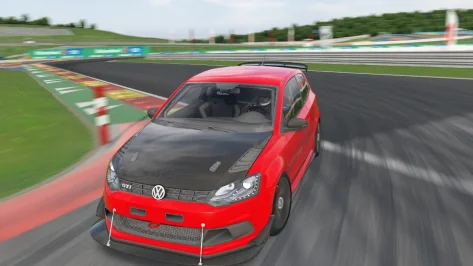
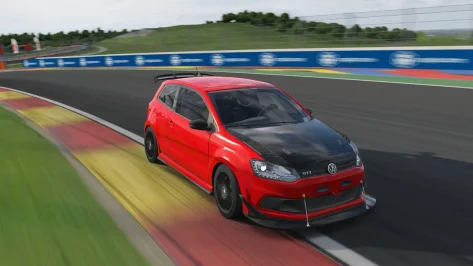
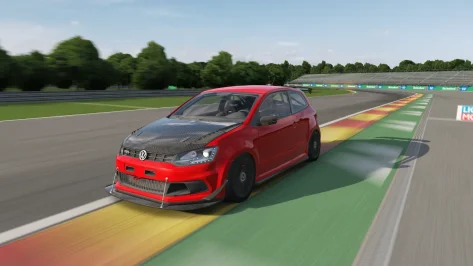
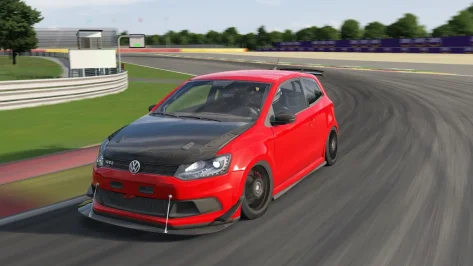
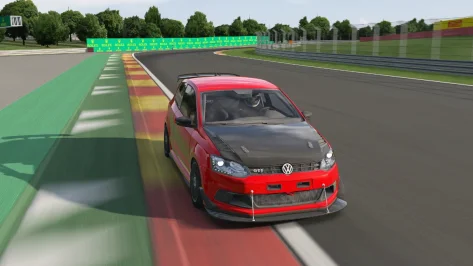
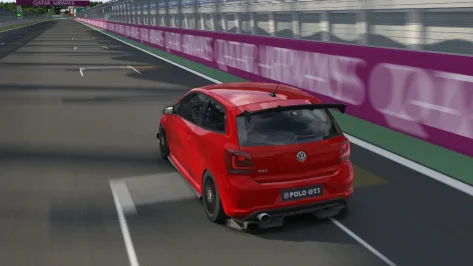
Volkswagen Polo GTI Track 2011 Public Release!!
Download: https://www.mediafire.com/file/8kwwju8365danmn/polo_gti_11_track_101creative.rar/file
Converted From FM4
-AO inside and out
-Realistic Dashboard
-Physics
-CSP Settings
-Driver Animation
-Panoramic session Start config Daniel Nogal

View attachment 1488921View attachment 1488922View attachment 1488923View attachment 1488924View attachment 1488925View attachment 1488926
Hi mate, thanks for the car but - seventh gear is broken?
 
I really wanna switch to CSP 0.3 because the new ghost car feature is super important to me but so far had no luck with it.
My resolution (1440p) is somehow getting messed up, my frames are getting cut in half and to load a car/track it now takes minutes instead of seconds (if it even loads).
No choice but to downgrade for now.
Replying to my own post because I was finally able to find what was causing all my issues with CSP 0.3 in case it helps somebody else.

Changed my V Sync setting in Nvidia Control Panel from ON to "Use the 3D application setting". Left V sync disabled in CM and limited my framerate to 60fps instead. It's all working as intended now but this issue did not happen with 0.2.11

I posted also in the CSP discord in case this can get looked into.
 
Last edited:
Replying to my own post because I was finally able to find what was causing all my issues with CSP 0.3 in case it helps somebody else.

Changed my V Sync setting in Nvidia Control Panel from ON to "Use the 3D application setting". Left V sync disabled in CM and limited my framerate to 60fps instead. It's all working as intended now but this issue did not happen with 0.2.11

I posted also in the CSP discord in case this can get looked into.
I've had the same problem since the last two versions of CSP.


1440P 144Hz G-sync capped at 140 in CM, V-Sync forced on in Nvidia Control Panel, off in game and in CM.

Result : FPS capped at 59...


Only a update or re-install of the driver solve it...

And now I use NCP's FPS limiter, because with CM one, I often see spikes up to 143 FPS.
 
Last edited:
What the hell happened to the "extra HUD elements" section of the GUI.

This. Last section at the bottom.


[18] GUI (2).webp


It is gone. I have searched everywhere I can think of, and used the search function. Nothing.


And wouldn't you know it, the stupid pit limiter and speed limit things are in the top of my screen in online practice when in the pit lane. And I can't find the icons in content/GUI to blank them out/delete them.


Why.


It is so insignificant, and yet so indicative of the state of this program. It makes no sense from any standpoint I can think of. This is something so simple. Why. How. Could it have been broken. It worked fine for years.

It's these little, simple things that really get me. Not the janky physics experiments, or the 500 millisecond frame time spikes for stupid gravel particles or whatever, or the AI all crashing into a heap in the first corner. Those are understandable.

It's these that really annoy me.


EDIT: The values are still there in gui.ini in documents/extension/cfg. They do nothing.
 
Last edited:
X90
What the hell happened to the "extra HUD elements" section of the GUI.

This. Last section at the bottom.


View attachment 1488966


It is gone. I have searched everywhere I can think of, and used the search function. Nothing.


And wouldn't you know it, the stupid pit limiter and speed limit things are in the top of my screen in online practice when in the pit lane. And I can't find the icons in content/GUI to blank them out/delete them.


Why.


It is so insignificant, and yet so indicative of the state of this program. It makes no sense from any standpoint I can think of. This is something so simple. Why. How. Could it have been broken. It worked fine for years.

It's these little, simple things that really get me. Not the janky physics experiments, or the 500 millisecond frame time spikes for stupid gravel particles or whatever, or the AI all crashing into a heap in the first corner. Those are understandable.

It's these that really annoy me.


EDIT: The values are still there in gui.ini in documents/extension/cfg. They do nothing.

It is broken, and has been swept under the rug.
Does it still not work if you reenable them in the template file in \assettocorsa\extension\config\gui.ini by removing the ";" and the "hidden"
1761983044592.webp
On which CSP your are?
 
Last edited:
I've had the same problem since the last two versions of CSP.


1440P 144Hz G-sync capped at 140 in CM, V-Sync forced on in Nvidia Control Panel, off in game and in CM.

Result : FPS capped at 59...


Only a update or re-install of the driver solve it...

And now I use NCP's FPS limiter, because with CM one, I often see spikes up to 143 FPS.
I had this issue yesterday where my game drops to 60fps on the latest csp . Thankyou for pointing out the issue . Did the nvidia driver reimstall fix the issue?
 
X90
Latest CSP hotfix. Manually installed.

Lines are not commented out.

No change.

I may just clean install (again) and see if it returns.
Maybe also update CM. You should have a different arrangement of the CSP modules in the CSP settings with CSP 0.3.xxx

But actually it is commented out in the ini. So maybe this is replaced to somewhere else or the functionality is different now?!

Maybe it is now forced if manual pit speeds are set via the server/track. Or it is currently redesigned in the CSP dev…
 
Last edited:
Replying to my own post because I was finally able to find what was causing all my issues with CSP 0.3 in case it helps somebody else.

Changed my V Sync setting in Nvidia Control Panel from ON to "Use the 3D application setting". Left V sync disabled in CM and limited my framerate to 60fps instead. It's all working as intended now but this issue did not happen with 0.2.11

I posted also in the CSP discord in case this can get looked into.
Thanks so much! Since version 0.3, I couldn't figure out why it took so long to load the cars and track. That's exactly what happened. After removing V-Sync from the NVIDIA panel, it doesn't do it anymore!

Thanks again ;)
 
shi
Antalya Autodrome v1.2
The link is in the quote.
View attachment 1487821View attachment 1487822
v1.2 changelog;
Even when CSP settings → General Patch Settings → CPU optimizations → Chunks optimizations are set to Advanced, ground objects are no longer hidden. (Tested with CSP 0.2.12-preview1.)
Added Chicane layout.
Added marshalls.
Added pit tents.
Fixed single-sided objects.
Fixed mapping of Billboard logo.
Fixed groove.
Updated skidmarks.
Updated ext_config.ini and VAO-patch.
Changed the texture and mapping of the grass.
A few other minor fixes.
@shi

To see the spectators, have to rename the circuit name in the camera facing file, it's the wrong name. ;)

TEXTURE=content/tracks/lamorra_gp/texture/knr_crowds_sitting.dds

to

TEXTURE=content/tracks/antalya_autodrome/texture/knr_crowds_sitting.dds

Nice circuit, thanks
 
Last edited:
Maybe also update CM. You should have a different arrangement of the CSP modules in the CSP settings with CSP 0.3.xxx

But actually it is commented out in the ini. So maybe this is replaced to somewhere else or the functionality is different now?!

Maybe it is now forced if manual pit speeds are set via the server/track. Or it is currently redesigned in the CSP dev…
Peter, you've got a hotline to Ilja so please just ask him to stop removing options and stop forcing things on or off that we could previously select ourselves based on personal preference.
Example: latest CSP notes suggest that navigators will be forced on with no option to deactivate them once performance issues are resolved. What madness is this? Who wants bloody sat-nav when racing around a circuit?
 
Hi guys,

I am looking for a Volkswagen Scirocco GT24 mod. There used to be one listed on Assetto Garage, but all I can find is a YT Video:

.

It does not matter if the car is up to modern AC standards, as I want to do a skin for it.
Our team owns a Scirocco GT24 and we want to give it a new design. I would like to experiment in AC to exchange within our team and with the company which will do the actual car wrapping.

I could also use the VLN version of the car, but it has quite a bit different body work.

Maybe one of you still has a GT24 Scirocco on the HD.

Thanx
Daniel

Try looking here AssettoWorld Scirocco
 
UPDATE Indianapolis (damone13x) shader overhaul and night lights

v4.3
-added rain FX


View attachment 1487905
Do you delete (or save) the original files, then copy yours into the track folder?
 
Sharing a mod? Host it on GTPlanet Downloads. Free, public hosting for files up to 10GB in size.
Back