I think @MrLonguinha17 might have done it before?Does anyone konw if there is a mod of the Wolf WR1 from the 77 F1 Championship ? I really need it in my collection...
Thanks !
I think @MrLonguinha17 might have done it before?Does anyone konw if there is a mod of the Wolf WR1 from the 77 F1 Championship ? I really need it in my collection...
Thanks !
Is there any way I can make these windscreen reflections a bit less glaring? Because I have almost zero visibility in some turns. I'm really not sure if this car related or even track related, because with the same weather conditions on another tracks I haven´t this problem. I remember that some Kunos cars also have this issue. View attachment 1492285
Lower the ksDiffuse on internal glass to 0.2 or something?Is there any way I can make these windscreen reflections a bit less glaring? Because I have almost zero visibility in some turns. I'm really not sure if this car related or even track related, because with the same weather conditions on another tracks I haven´t this problem. I remember that some Kunos cars also have this issue. View attachment 1492285
Well i found a solution, it might help someone.Hi all!
Another CSP headache.
In some mods, the driver model is visible from the side & back windscreens but not from the front!
Any ideas? Sometimes he is visible from the front & not from the side! Hope you can see it in the picture.
Thanks!
There used to be an option for fixing that, in CSP back in the days : Custom Shaders Patch/Graphics Adjustments/Tweaks and deactivate "Draw driver after the car for external cameras"! But not anymore?
How do I change that? I can´t find that line in ext_config.iniLower the ksDiffuse on internal glass to 0.2 or something?
Do you and Fenryr plan on converting more tracks from Motogp? And what version of motogp are you converting from?Make sure we will have everything covered in version 1.0 and btw thanks Masscot/RMI for pylons and other stuff.
In CM Showroom, click the internal windscreen then the three dots next to the material name in the side menu. Unless it's encrypted, in which case check the config I posted a few days ago.How do I change that? I can´t find that line in ext_config.ini
@Fall Guy I lowered that value to 0 % and it removed the glaring reflections, but now the windscreen has like a dirty effect, I honestly find it much cooler![]()
They (afaik) never released a proper CMYK/RGB conversion since it a paint for race cars so probably based on RAL values (rarely they use Pantone).Good morning and happy Sunday.
Does anyone know what shade of blue the "Kouros Blue" used for the Sauber C8/C9 livery is? I've looked for information, but there's no RGB code, only the product code, because it's a specially made paint.
Hi Joe, I love your work. For the grass, I directly replace the ground textures with a few selected ones until I find the right shade based on the vegetation on the track.Now this I can stomach a little better. To each his own and i'm not questioning Fenryr's texture choices. I'm sure they look fine in his eyes. I just know on my system the original grass and trees didn't strike me as being very realistic looking shape wise or color. I think I need a little bit more saturation in the trees though.
Default:
View attachment 1491881
Updated:
View attachment 1491882
Thank you very much 🙏They (afaik) never released a proper CMYK/RGB conversion since it a paint for race cars so probably based on RAL values (rarely they use Pantone).
Starting from the closest RAL value which is the 5022, you can define the RGB and HEX value (but it still a closest version, not the 1:1)
- RGB: R: 10, G: 20, B: 70
- HEX: #0A1446
You can send me anything you've got. I'm always looking for things to use that might make the track better. Just curious though, we are talking about the Fenryr version, correct? Reason I ask is that some of the layouts already have camera_facing files. I think the Nords layout is the only one without them. I can't test them though because only about 3 of the 14 layouts actually load for me. The other ones get stuck loading the ai spline. Never had a track give me ai spline loading issues before. Not sure what mnakes this one different.Hi Joe, I love your work. For the grass, I directly replace the ground textures with a few selected ones until I find the right shade based on the vegetation on the track.
Your trees are gorgeous! If you need camera facing files for the spectators or additional lighting for the night, I can send you mine to save you time.
View attachment 1492409
View attachment 1492410
View attachment 1492411
View attachment 1492412
View attachment 1492413
View attachment 1492414
View attachment 1492415View attachment 1492416
If the windshield bothers you, there is the ultimate solution.Is there any way I can make these windscreen reflections a bit less glaring? Because I have almost zero visibility in some turns. I'm really not sure if this car related or even track related, because with the same weather conditions on another tracks I haven´t this problem. I remember that some Kunos cars also have this issue.
how i can get this setup menu mate?Does anyone knows why in the menu i have the car silhouette and tyres (maybe others stuff too) basically EXTREMELY overexposed (no matter car or track)? Thanks
View attachment 1492393
latest CSP as far as i knowhow i can get this setup menu mate?
I need to check some box in Content manager?latest CSP as far as i know
Latest "preview" from the Patreon **I need to check some box in Content manager?
Thank youLatest "preview" from the Patreon **
not properly the latest one, i mean latests (no idea which one introduced the new menu to be honest). I'm on a older preview version which has less bugs than others but allow me to drive newest cars.Thank you
And what's that version, please?... I'm on a older preview version which has less bugs than others but allow me to drive newest cars.
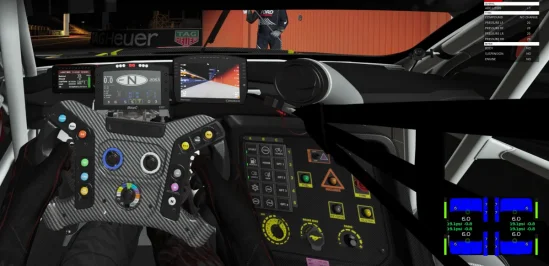
CMRT can't read encrypted data, So it's unable to read tires etc.I've got a problem with the URD Coyote in that the tires are not showing in the indicator. It's just blank. Also in the manual it's showing recommended sound levels but I don't see anywhere to open up that menu. I don't see an URD extended controls anywhere in the app try if there is supposed to be one.
EDIT It's not just with this car it's with any URD car and this new HUD app I've got now. Any URD car I try doesn't show any tire data.
View attachment 1492491
v0.3.0 p110And what's that version, please?
I'm using the app from Please Stop This on OT and works #1I've got a problem with the URD Coyote in that the tires are not showing in the indicator. It's just blank. Also in the manual it's showing recommended sound levels but I don't see anywhere to open up that menu. I don't see an URD extended controls anywhere in the app try if there is supposed to be one.
EDIT It's not just with this car it's with any URD car and this new HUD app I've got now. Any URD car I try doesn't show any tire data.
View attachment 1492491