- 569

- Germany
So it works with all other version, but not with 0.2.11?View attachment 1494501
Oddly I didn't have the issue until I've updated to CSP 0.2.11
Last edited:
So it works with all other version, but not with 0.2.11?View attachment 1494501
Oddly I didn't have the issue until I've updated to CSP 0.2.11


As someone who only plays Assetto Corsa (and by "playing" I mean hoarding new mods, testing them, adjusting them to my liking, keeping them updated, doing short races from time to time, trying to solve yet another Pure or CSP problem.... and I never have enough hours in the day for all of it...), when these questions about new games and such come up, I have the same doubt: do people really have enough time to play more games, really...? 😵💫


I've back tracked to my previous version and now they all have the same issue. Also I've tried the extension method, but the issue is still occurring.So it works with all other version, but not with 0.2.11?


Hmm I used Sky PP for a couple of days and then went back to Pure Candy. I changed something in CSP, but regarding AI New Behaviour. Not at home right now to check, but Sky wasn´t made for Pure maybe? Or it is for a newer version of Pure.But then something must have been changed. It can't change itself out of nothing. Please always check the Lua Debug app ingame if there is any error. Maybe you changed a ppfilter or you installed some CSP settings?!


In case you use CMRT app, remove it and see if that fixes it.I've back tracked to my previous version and now they all have the same issue. Also I've tried the extension method, but the issue is still occurring.


It's not hard to get the track files,Literally all you need is the Giants Editor specifically the Project Motor Racing version. You can then export it all as .obj files and have it ready in blender in less than 10 seconds.Stoffel, I loaded up PCars2 for a few blasts before PMR came out, and i was struck by how incredible it still looks and the track details in particular, question is why has no PCars tracks been converted but the cars have? Is it impossible?
I'd like even some of the track objects, even if not full tracks.....


I neither knew that you can choose only one skin categoryI didn't even know you could do this with the automatic disabling of one skin when you enable another. That's a really cool feature. I'll have to remember this moving forward.
One thing though, you should change the 'categories' name for the two patchy exterior grass skins from grass to something like patchy grass. As it is now, they use the same 'categories' name as the two Grass skins. When you enable one of the patchy skins, it disables one of the regular Grass skins and visa versa.
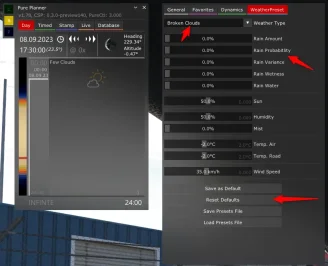
So you set the values in Pure Planner - settings - weather presets?@Peter Boese can you please let me know how to permanently save weather presets after adjusting precipitation down to zero? They keep resetting to defaults. Thank you.

plz send .obj and textures thnxIt's not hard to get the track files,Literally all you need is the Giants Editor specifically the Project Motor Racing version. You can then export it all as .obj files and have it ready in blender in less than 10 seconds.
View attachment 1494526
Would be an good time for anyone to port these to AC...that isn't locked behind an paywall or on their private harddrive...

Sorry, forgot to specify in the original post. I can't get them into blender without it crashing or just not loading anything visually. The items shows up in the sidebar that shows all the objects but they seem to be invisible for me.plz send .obj and textures thnx
It worked! Hecks going on with CMRT? Regardless I don't even use it anymore. Thank you!In case you use CMRT app, remove it and see if that fixes it.

Buuuuuut it has such an amazing t400r 3D model...I know, but, this is worse, total lack of any self respect from the devs and thats in a world of devs with no self respect. To have replays, in 2025 locked at 30fps, and even then they have terrible pop i, its like Ian Bell has dumped this turd to troll everyone whilst he runs off even richer.....
Its sad (in context of sim racing) that nothing seems to be moving forwards, just stuck in this world where nothing can feel anywhere near as good to me as AC can.


But then something must have been changed. It can't change itself out of nothing. Please always check the Lua Debug app ingame if there is any error. Maybe you changed a ppfilter or you installed some CSP settings?!
What are your clip plane settings?
Also you could fastly try this:
Reset CSP settings completely!
Goto /Documents/Assetto Corsa/cfg/ rename the "extension" folder to something different.
Restart CM. It will create a new "extension" folder. You can restore it later.
Select Pure as weather style again in CSP weatherFX settings.


I have converted 3 fictional tracks from GTR2. Details of the circuit can be found in the original link or readme_gtr2.
Original author link (RD)
Le Mancorchamps v1.2 (2025/11/27 Updated)
View attachment 1213266
-CSP recommended
-30 pit/start
-AI, cam
-White & Red cm skin
Credits & Thanks:
Original Track by ChriKoh
-Thank you for giving me permission
AC Converted by @shi (shin956)
AI by @KevinK2
ext_config by @CrisT86
logo.png and sections.ini by @Fanapryde
Additional cams by @DaBaeda
;;;;;;;;;;;;;;;;;;;;;;;;;;;;;;;;;;;;;;;;;;;;;;;
v1.1 changelog;
Added groove, lights, seasons, 2nd windmill.
Adjusted some normals and shaders.
Changed asphalt texture.
Fixed white line.
Edited track map.
Added 2 cams by DaBaeda.
Added logo.png and sections.ini by Fanapryde.
v1.11 changelog;
Hid lemancorchamps_wall.kn5.
v1.2 changelog;
The white lines were made into a separate mesh and smoothed.
Updated gas station textures.
Updated road surface textures.
Fixed some normals and shaders.
Fixed holes.
Updated ext_config,ini and VAO-patch.
Added skidmarks.
Added marshalls.
Added camera facing crowds.
A few minor fixes.
--------------------------------------------------------------------------------
Spaburgring v1.2 (02/03/2023 Update)
View attachment 1221887
-CSP recommended
-30 pit/start
-AI, cam
-White & Red cm skin
Credits & Thanks:
Original Track by ChriKoh
-Thank you for giving me permission
AC Converted by @shi (shin956)
AI by @KevinK2
ext_config by @CrisT86
logo.png and sections.ini by @Fanapryde
Test and Feedback by @Fanapryde
v1.1 changelog;
-Adjusted some normals and shaders
-Added groove
-Updated ext_config.ini and cam
-Removed spaburgring_wall.kn5
-Smoothed physical road surface
-Added logo.png and sections.ini by @Fanapryde
-Changed background
v1.2 changelog;
-Fixed hole. (Thanks clickersnapper01 for the report.)
-Fixed castle normals. (Thanks slider666 for the report.)
-Changed background
3D mountains from Chuck_CG's Landscape pack.
--------------------------------------------------------------------------------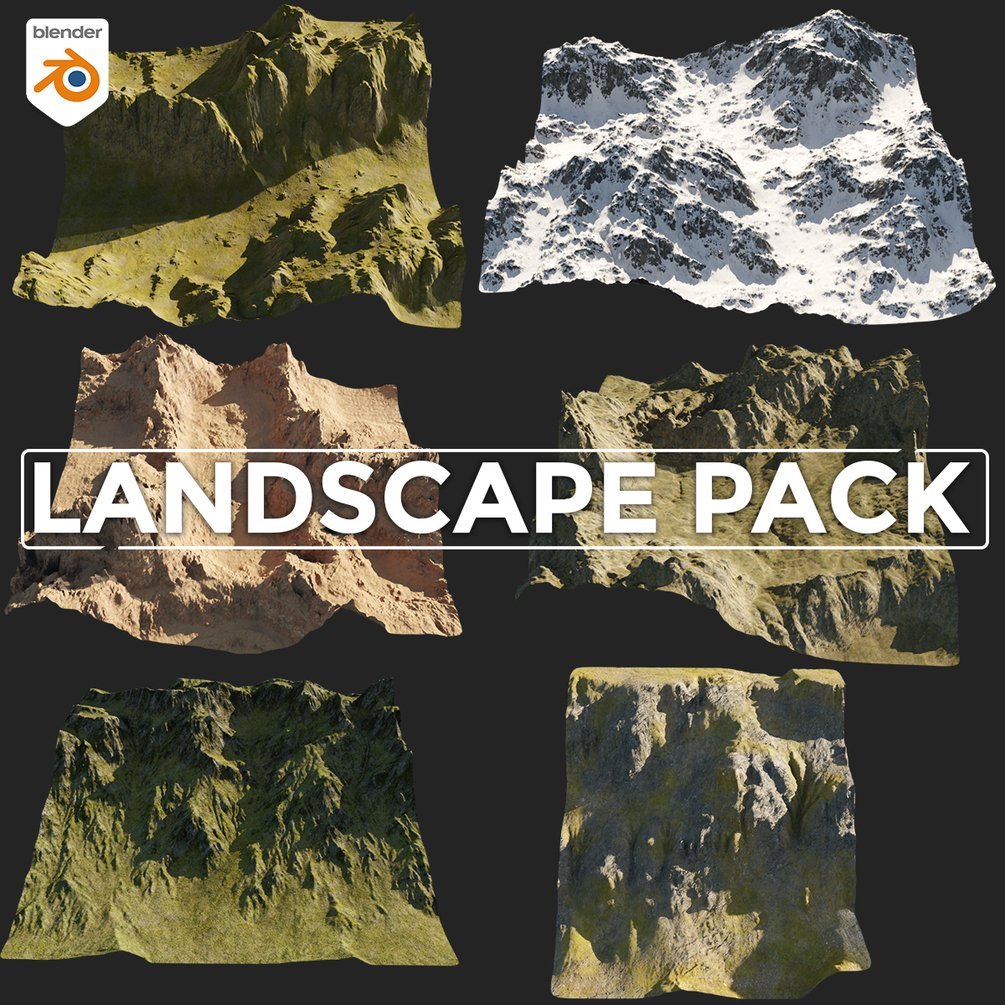
Landscape pack
6 Terrains, 5 displacement maps(1k, 2k)4k PBR textures(color, roughness, normal)open with blender 3.3+Increase subdivision levels for more details.in the images below you can see the levels at 5 then at 0My Portfolio https://www.artstation.com/chuckcgchuckcg.gumroad.com
Zandzuka v1.0 (02/17/2023 Update)
View attachment 1231738
-CSP recommended
-30 pit/start
-AI, cam
-White & Red cm skin
Credits & Thanks:
Original Track by ChriKoh
-Thank you for giving me permission
AC Converted by @shi (shin956)
AI by KevinK2
ext_config by CrisT86
logo.png and sections.ini by Fanapryde
;;;;;;;;;;;;;;;;;;;;;;;;;;;;;;;;;;;;;;;;;;;;;;;
v1.0 changelog;
-Adjusted many normals and shaders
-Added groove
-Added some normal map texture
-Updated ext_config.ini
-Removed zandzuka_wall.kn5
-Added logo.png and sections.ini by Fanapryde
-Changed background
3D mountains from Chuck_CG's Landscape pack.
Thanks for the reply! I'm glad it works now!Ok FYI I removed Pure using the .bat file and reinstalled it, and now everything works fine, even the Planner.
I have no idea what I did to mess up Pure as I’m not someone who experiments with filters all the time, only with cars and tracks configs 😬
May you tell me where can I find this version of the IMSA Mustang with that Big Spoiler? Thank you!Anyone what kind of font used for the number / whistler logo ? Font finders couldn't quite decipher it. Bet it's custom and I'll have to do the 12 by hand uh
View attachment 1494323

@FrustratedUse Is a "new" track from them (i mean, something done in the latests months or is a old track i don't remember)? Because if it's old i probably have reworked it in my archive, if it's new 100% for sure i don't have it, so i didn't reworked it and as far as i noticed, there's no much config for their stuff out there.Does anyone know if there is an config for Autobahn country club circuit by simtraxx that makes it look a bit better? I now understand why some people in here sit an look at tracks with an microscope.
The grass looks like **** and the overall lighting at the track at any time between 05:00 and 15:00 looks weird.
View attachment 1494629


Are you using CMRT broadcast app ? Mine was similar with messed up trees too and as soon as i deleted it the issue went . Appearently it renders things twice.Can someone please help me? I've had this issue for months and I've tried fixing it, but nothing works. I think it's adaptive clip plane that causing the problem. I've been getting this bug in Laguna and Monza and others.
View attachment 1494486
View attachment 1494491View attachment 1494497
You only have too remove CMRT broadcast app , CMRT was fine alone on miine still.It worked! Hecks going on with CMRT? Regardless I don't even use it anymore. Thank you!


I feel your pain brother. I now have about 115 folders worth of mods I've yet to install AND I still don't have enough time to just drive!As someone who only plays Assetto Corsa (and by "playing" I mean hoarding new mods, testing them, adjusting them to my liking, keeping them updated, doing short races from time to time, trying to solve yet another Pure or CSP problem.... and I never have enough hours in the day for all of it...), when these questions about new games and such come up, I have the same doubt: do people really have enough time to play more games, really...? 😵💫


... I now understand why some people in here sit an look at tracks with an microscope...


He quit modding and removed all of his mod the same dayDoes anybody know where I can find all of MPG's mods? His Patreon link brings me to his personal page, not his creator page. Also, various mods I have downloaded (though various third-party sources) have an invalid Discord invite.

Thanks @Peter Boese.So you set the values in Pure Planner - settings - weather presets?
And you save them there? And then if you select a weather in a weather slot, the values are not the saved ones?
Btw, if you set the weather presets, they will not change your values in an existing weather slot.
The preset values will be taken, if you change a weather in a slot. Those are the initial values for a selected weather...


Did you ever open Pure Planner settings - weather presets? Maybe you still have older settings there. Please reset them. Weather like Broken clouds should have 0 also at the probability there:Thanks @Peter Boese.
To clarify, this is how I normally select the weather for a race or hotlap session:
Start the session
Open the Pure Planner
Select 'Day' at the top (which is normally the default)
Click on the 'weather type' icon in the main window, which opens the side-menu of all selectable weather icons
Click the one I want to use, eg Broken Clouds
Click 'Data' at the top, to open the editable parameters
Move the 'Rain Probability' slider to zero
Click 'SAVE' on the Pure Config home screen.
Start the session.
That works for that session, but next time I load AC the 'Rain Probability' for Broken Clouds will be back 10% (or whatever it defaults to).
So my question remains: how can I permanently edit the weather parameters so that Rain Probability is always ZERO for what should ostensibly be 'dry' weathers, to avoid any chance whatsoever of any rain interrupting the session?
If I wanted rain to appear during a session I'd set one of the rain weathers to appear in a timed plan.
I don't want Pure to randomly decide to inject rain into a session that has been set up entirely to use dry weather. It wouldn't be so bad if a few spots of rain didn't instantly turn the track into a flooded ice rink with AI cars skidding off all over the place, but that's another discussion for another time about RainFX and its ridiculous wet weather grip values.