Assetto Corsa PC Mods General DiscussionPC 

  • Thread starter Thread starter daan
  • 152,587 comments
  • 47,244,970 views
I'm currently running 0.2.11, but I've observed it with 0.2.7.

It seems to happen to any track, Kunos included.
OK , I think I did not experiment 0.2.11, I have 0.2.7 but spent not much time with it and used more 0.2.12prev and now I'm trying to stabilize on 0.3.0prev212.

What I can tell you is that when developping DumbAI app for pit stop strategies, what was working to force them to wait a random amount of time in pits during qualifying in 0.2.12p (and tested OK up to 0.3.0p140 ) suddenly did not work in 0.3.0prev212 and so I had to re-write entirely my code for pit stop release.

Some cars were able to go out of pits (like Kunos Lambo Huracan GT3) whereas others were now unable to (Kunos Ferrari 488GT3 and almost all old cars, Kunos or not)

My last update 1.0.2 solved the pit release problem for this CSP version, at least here in my tests and also nobody reported any bug since last week-end 🙃So maybe you coud find a solution with it, if you wanna give it a try, it is available here at GTP

Unfortunately, I must strictly use 0.3.0prev212 for DumbAI as it is the only version that has correct lua functions needed by the app to ensure proper fuel and tyre wear management so I don't think it will work without bugs for older CSP versions.

Will drop you a DM
Do the AI have a skill level higher than 90? I've found in the past when you start using AI with levels 85-89 they don't fully press down the throttle.
In case of the Mirage GR8, the rev limit is 10.500, and the AI is set to shift up at 9.000.

I did a quick test just now to get you the numbers, and the AI was again perfect during qualifying, but I noticed that they didn't even shift up to 5th gear in the race. They stayed in 4th while hovering at 8.600 RPM.

Apparently, they use the full throttle (the bar is full, and the setup debug suggests that as well) but they are clearly holding back so I don't know how accurate it is...or that might just be "AI things".

Actually, the way the AI limited itself at 8.600 RPM and refusing to go beyond that was very suspicious. There has to be a setting for this that I am missing.

Edit: Oh, and there doesn't seem to be anything out of the ordinary in the ai.ini file.
That's a very interesting investigation here !

Could you keep us informed here of your results ? I have read similar questions in the past and your results could give good information to people like me or @Tetri that try to understand how vanilla AC behave (in general)
 
Last edited:
Does anyone know what could be causing this weird reflection bug on the tail lights of the Ferrari F50 V3.2 from Dan Bucsa?

Screenshot_ferrari_f50_1995_simtraxx_brasov_11-1-126-12-38-48.webp
Screenshot_ferrari_f50_1995_simtraxx_brasov_11-1-126-12-37-9.webp


It's only when the tail lights reflect light and with glare it's really annoying.
Shader Patch 0.3.0-preview212
Thanks.
 
Adding onto the copious issues I'm having, Does anyone know why some of my cars appear a bit... Brown?

1770809204002.webp


Here's a car that isn't affected:
1770809240257.webp


It only seems to have started when I installed pure yesterday. I'm using Realistic Turismo PP filter.
 
Adding onto the copious issues I'm having, Does anyone know why some of my cars appear a bit... Brown?

It only seems to have started when I installed pure yesterday. I'm using Realistic Turismo PP filter.
Sounds like you answered your own question in the second sentence. Probably the PP filter isn't designed to be used with whichever version of Pure you've selected, ie LCS or Gamma. I prefer LCS and use the supplied VR pp filter from Peter.
 
Does anyone know what could be causing this weird reflection bug on the tail lights of the Ferrari F50 V3.2 from Dan Bucsa?

View attachment 1512480 View attachment 1512481

It's only when the tail lights reflect light and with glare it's really annoying.
Shader Patch 0.3.0-preview212
Thanks.
Can't help you on the subject (too little knowledge I'm affraid), but...what track is that?
 
Just FYI, your ext_config binds the hood and door animation to extra_a resp. extra_b, which is normally the ignition and starter function. I had to re-assign the animations for the hood and door to different extra functions, otherwise the hood opens while the car is getting started. ;)
Oops... I didn't notice, thanks for pointing this up.;) I focus on lights so didn't even test the rest of a car:). IMO wouldn't use these configs anyway. It's better if all cars look the same.

Are they really applicable beyond the Supertourers? I don't think VRC, RSS, or URD has anything with halogen bulbs and fluted lenses that would warrant actually using that effect, at least as far as headlights are concerned.
True, it looks like only supertourers could use this anyway.
 
Thanks for the Mondeo config @k_p, again it's a big improvement.
The VRC Accord having a plain texture for the rear lights explains my earlier observation about some VRC tourers having lights that look no better than NASCAR stickers... it seems that's practically what some of them are, just textures.
It's a big shame that VRC cut so many corners with the lights on these cars. Proper refractive lights still seem beyond the skills (or priorities) of the big paymod groups, even though bedroom modders have been including them for years.
Maybe it's priorities or maybe you shouldn't look too closely.;) Maybe simply lack of attention to detail. I don't know. What i know, this isn't hard to implement however taking some time, but if you creating mod from scratch and taking money for it, why not make it best possible?

Does anyone know what could be causing this weird reflection bug on the tail lights of the Ferrari F50 V3.2 from Dan Bucsa?

View attachment 1512480 View attachment 1512481

It's only when the tail lights reflect light and with glare it's really annoying.
Shader Patch 0.3.0-preview212
Thanks.
I can't reproduce this on my setup. Are you using Pure? What about changing ppfilter?
I slighty tweak ext_config for taillights, maybe it's that.
 

Attachments

shi
Crowne Plaza Raceway v1.0

View attachment 1512460View attachment 1512461
Fictional circuit.
Conversion from GTL.

-CSP recommended
-42 pit/start
-AI, cam

Credits & Thanks;
RACE07 Track by SimBin Studios
GT Legends converted by ?

AC converted by @shi (shin956)
logo.png by @Breathe
Alternative Adboards skin by @Masscot
RainFX config by @Quikslvr
Crowds texture by @Kniker97
marshall and textures by Kunos

Enjoy.

Little issue: the lighthouse bulb should always glow even in the day light.
The red line could be a fix

[MATERIAL_ADJUSTMENT_...]
ACTIVE = 1
DESCRIPTION=lighthouse bulb glow
MESHES = club-9_1
KEY_0 = ksEmissive
VALUE_0 = 255,255,255,50
VALUE_0_OFF=255,255,255,50
KEY_1 = ksAlphaRef
VALUE_1 = -193
VALUE_1_OFF=0
CONDITION = SHARP_SUN_A
 
k_p
I can't reproduce this on my setup. Are you using Pure? What about changing ppfilter?
I slighty tweak ext_config for taillights, maybe it's that.
I am using Pure 3.10 Lowres with the 3.14 Hotfix 4; changing ppfilters did absolutely nothing..

The modified ext_config WORKED!! Whatever you tweaked did the trick.
Thank you!
 
Does it happen with any track / car combination (Kunos or mods ?)
What is your CSP version ? because there are sometimes changes in the pit behavior between CSP version and some cars more or less support them.
I got the opposite Im doing the 1964 british saloon championship and the 1st race at snetterton it is supposed to rain and they start on wets but they still pit .Its a full 30 lap race but I dont know why they are pitting they should make full race as it rains all race.Guess i change to random dry in pure and see if they still pit(im a newb to this dumbai app)but having fun....lol

im using 0.3.0prev212 also....thanks for any newb friendly help
 
Are they really applicable beyond the Supertourers? I don't think VRC, RSS, or URD has anything with halogen bulbs and fluted lenses that would warrant actually using that effect, at least as far as headlights are concerned.
What about the RSS classic endurance pack (edit: and GT-N pack too), wouldn't they qualify? Regardless, not using refractions on these paymod super tourers seems like a bit of a missed opportunity by VRC, especially when most amateur modders seem to include them as a matter of course.
 
Last edited:
Hello, I have a problem with the Porsche 992 (Protech P92) from RSS. All the skins that have a number plate that lights up at night don't appear, even during the day. I'm talking about the entire number plate, not just the numbers. There's no problem with number plates that don't light up.
Can anyone help me?
 
Little issue: the lighthouse bulb should always glow even in the day light.
The red line could be a fix

[MATERIAL_ADJUSTMENT_...]
ACTIVE = 1
DESCRIPTION=lighthouse bulb glow
MESHES = club-9_1
KEY_0 = ksEmissive
VALUE_0 = 255,255,255,50
VALUE_0_OFF=255,255,255,50
KEY_1 = ksAlphaRef
VALUE_1 = -193
VALUE_1_OFF=0
CONDITION = SHARP_SUN_A
According to my research, the lights of ordinary lighthouses are extinguished during the day, though there are exceptions.
 
Sounds like you answered your own question in the second sentence. Probably the PP filter isn't designed to be used with whichever version of Pure you've selected, ie LCS or Gamma. I prefer LCS and use the supplied VR pp filter from Peter.
Hmm, it still seems a bit brown even with the default PPfilter, it's not a big deal.
 
Adding onto the copious issues I'm having, Does anyone know why some of my cars appear a bit... Brown?

View attachment 1512484

Here's a car that isn't affected:
View attachment 1512485

It only seems to have started when I installed pure yesterday. I'm using Realistic Turismo PP filter.
Maybe the color in that texture is brown?!
You can check this with the ingame CSP object inspector and a color picker like "Just Color Picker".

So you have a reference and not only your eyes to measure something!

1770888146976.webp
Then make a screenshot and use a colorpicker to measure the color:
1770888219824.webp
 
Maybe the color in that texture is brown?!
You can check this with the ingame CSP object inspector and a color picker like "Just Color Picker".

So you have a reference and not only your eyes to measure something!

View attachment 1512702Then make a screenshot and use a colorpicker to measure the color:
View attachment 1512703
I think you're right, I had a look in the CM showroom and it appears brown, plus in the preview, I've just noticed that it looks brown too.
 
I am using Pure 3.10 Lowres with the 3.14 Hotfix 4; changing ppfilters did absolutely nothing..

The modified ext_config WORKED!! Whatever you tweaked did the trick.
Thank you!
Hi,
This got me triggered; am wondering if their is a difference in PURE "Lowres" vs "Highres". Is there and what are those, if any?
 
Hi,
This got me triggered; am wondering if their is a difference in PURE "Lowres" vs "Highres". Is there and what are those, if any?
No there is no difference!
We measured it in my Pure Dev group and there is really no difference between low res and high res even in VR.

So the first intention to do a lowres version was to support GPUs with very low VRAM.

BUT!

Pure uses the BC7 format for the dds texture. This format supports a good compression with nearly no loss of the details.
a 16384x4096 pixel bitmap has a size of steady 64MB in this format. But the best part of this format is, the texture is NOT decompressed in the VRAM like with all other dds or png formats. It will still have 64 MB in VRAM because it is directly supported by the common GPUs today!!!

And therefore the dds in BC7 can be copied without any subroutines by the CPU to the GPU/VRAM. This leads to a texture loading 1000 times faster than the normal texture loading. And therefore Pure can use loading and unloading this files live.

So with Pure there are over 50 of those highres skydomes (~3.5 GB), BUT only a maximum of 2 of them are loaded into the VRAM at the same time. If the weather changes you will have a fade between 2 textures, but after the weather change it will unload the not needed texture again.

Therefore Pure Highres only needs 136 MB of VRAM in maximum for 2 highres skydomes and 2 lowres masks (4096x1024 / 4 MB per dds). The mask is used to hide the clear sky and let stars, moon and the sun shine through.

So it makes absolutelly no sense to use Pure Lowres because of performance reasons, you just have ugly res skydomes then with no performance gain. Thats why i no longer provide it via the official way. No normal or low spec GPU will benefit from the lowres package anymore.
 
Last edited:
Adding onto the copious issues I'm having, Does anyone know why some of my cars appear a bit... Brown?

View attachment 1512484

Here's a car that isn't affected:
View attachment 1512485

It only seems to have started when I installed pure yesterday. I'm using Realistic Turismo PP filter.
it is the terrible pp filter. use the filters included with Pure first before trying all the terrible filters going around. stay away from any patreon paid ones like c13ages, they dont offer anything better than the pure filters, which you can adjust to your own liking (and then sell on patreon lol)
 
No there is no difference!
We measured it in my Pure Dev group and there is really no difference between low res and high res even in VR.

So the first intention to do a lowres version was to support GPUs with very low VRAM.

BUT!

Pure uses the BC7 format for the dds texture. This format supports a good compression with nearly no loss of the details.
a 16384x4096 pixel bitmap has a size of steady 64MB in this format. But the best part of this format is, the texture is NOT decompressed in the VRAM like with all other dds or png formats. It will still have 64 MB in VRAM because it is directly supported by the common GPUs today!!!

And therefore the dds in BC7 can be copied without any subroutines by the CPU to the GPU/VRAM. This leads to a texture loading 1000 times faster than the normal texture loading. And therefore Pure can use loading and unloading this files live.

So with Pure there are over 50 of those highres skydomes (~3.5 GB), BUT only a maximum of 2 of them are loaded into the VRAM at the same time. If the weather changes you will have a fade between 2 textures, but after the weather change it will unload the not needed texture again.

Therefore Pure Highres only needs 136 MB of VRAM in maximum for 2 highres skydomes and 2 lowres masks (4096x1024 / 4 MB per dds). The mask is used to hide the clear sky and let stars, moon and the sun shine through.

So it makes absolutelly no sense to use Pure Lowres because of performance reasons, you just have ugly res skydomes then with no performance gain. Thats why i no longer provide it via the official way. No normal or low spec GPU will benefit from the lowres package anymore.
So basically for my personal situation (where the GPU is the bottleneck since i have a ultra high-end pc but running an old 1060 6gb) i should switch from low res to high res without any fear?
 
Good afternoon all

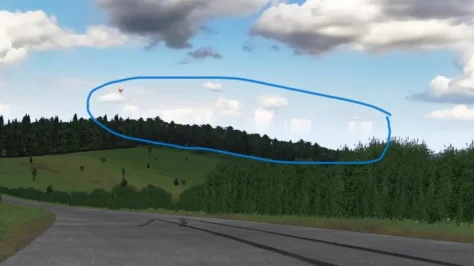
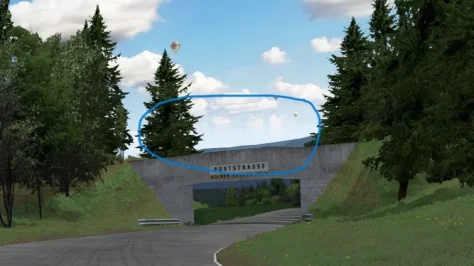
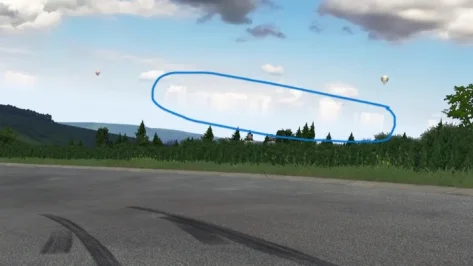
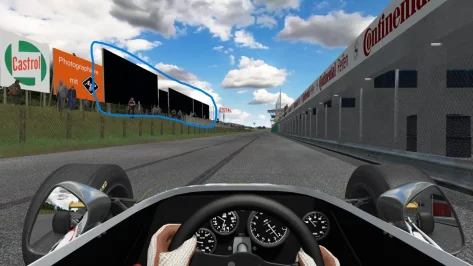
Any idea what's going on with my Nürburgring 1967 by William Tricker several advert boards are black ? and in places the clouds for some reason are smeared/dragged downwards I deleted my old copy of the track and reinstalled it but no change. It is only this track doing this.

Regards

Mark
 

Attachments

  • Screenshot_hss_1970_brm_p153_nurburgring1967_12-1-126-12-8-58.webp
    Screenshot_hss_1970_brm_p153_nurburgring1967_12-1-126-12-8-58.webp
    34.8 KB · Views: 1
  • Screenshot_hss_1970_brm_p153_nurburgring1967_12-1-126-12-9-41.webp
    Screenshot_hss_1970_brm_p153_nurburgring1967_12-1-126-12-9-41.webp
    55.3 KB · Views: 1
  • Screenshot_hss_1970_brm_p153_nurburgring1967_12-1-126-12-8-2.webp
    Screenshot_hss_1970_brm_p153_nurburgring1967_12-1-126-12-8-2.webp
    31.9 KB · Views: 1
  • Screenshot_hss_1970_brm_p153_nurburgring1967_12-1-126-12-6-23.webp
    Screenshot_hss_1970_brm_p153_nurburgring1967_12-1-126-12-6-23.webp
    122.6 KB · Views: 1
it is the terrible pp filter. use the filters included with Pure first before trying all the terrible filters going around. stay away from any patreon paid ones like c13ages, they dont offer anything better than the pure filters, which you can adjust to your own liking (and then sell on patreon lol)
It's definitely the livery, or something about how RSS does carbon fibre,as even with default pure PPfilters, it still appears.
 
Good afternoon all

Any idea what's going on with my Nürburgring 1967 by William Tricker several advert boards are black ? and in places the clouds for some reason are smeared/dragged downwards I deleted my old copy of the track and reinstalled it but no change. It is only this track doing this.

Regards

Mark
Hey,Some of those older track mods are done wrong in terms of where the geometry is place to:
1770901322288.webp


So in this case the track is 1.4km too low, but you can adjust the horizon offset for this track and save it as the tracks config then:
1770901339461.webp
 
Hey, how did you record cars rotating in the CM showroom like that? I can't seem to get the showroom on full screen.
Try the following... Once in 'Showroom' mode, click & hold right-mouse-button... This combination enables to auto-rotate around the car in an anti-clockwise direction.

If you click+hold the left-mouse-button, you can manually drag the mouse to rotate around the car (in any direction).

Kinda a pipe dream but I wish some GT6 tracks would make their way to AC - like Apricot Hill, Cape Ring, Circuito de Madrid, Matterhorn and finally some proper versions of Deep Forest and Mid-field Raceway. Must be a bitch to port and work on tho :(
Came across a reddit-post sometime in 2024 that quoted "All Gran Turismo tracks for AC"... See attached text-file for DL links. Unsure if URLs are still active (fingers-crossed). [REMOVED. DM.]
Ok so no manual or whatsoever, but please can somebody explain on what coordinates I should use here if wanting pits sound.
View attachment 1512377
To continue from last post re: pit-lane SFX

Whilst ingame, press F7 key, this enables you to manually travel to pit-area (using arrow-keys, page-up & page-down keys, & mouse for swivel-direction)

The image below is a 'quick & rough' sample to explain the next steps that will assist with coordinates - hope this helps.

If not, DM for further assistance.

objects-inspector_coordinates.webp


Happy racing!
 
Last edited:
No there is no difference!
We measured it in my Pure Dev group and there is really no difference between low res and high res even in VR.

So the first intention to do a lowres version was to support GPUs with very low VRAM.

BUT!

Pure uses the BC7 format for the dds texture. This format supports a good compression with nearly no loss of the details.
a 16384x4096 pixel bitmap has a size of steady 64MB in this format. But the best part of this format is, the texture is NOT decompressed in the VRAM like with all other dds or png formats. It will still have 64 MB in VRAM because it is directly supported by the common GPUs today!!!

And therefore the dds in BC7 can be copied without any subroutines by the CPU to the GPU/VRAM. This leads to a texture loading 1000 times faster than the normal texture loading. And therefore Pure can use loading and unloading this files live.

So with Pure there are over 50 of those highres skydomes (~3.5 GB), BUT only a maximum of 2 of them are loaded into the VRAM at the same time. If the weather changes you will have a fade between 2 textures, but after the weather change it will unload the not needed texture again.

Therefore Pure Highres only needs 136 MB of VRAM in maximum for 2 highres skydomes and 2 lowres masks (4096x1024 / 4 MB per dds). The mask is used to hide the clear sky and let stars, moon and the sun shine through.

So it makes absolutelly no sense to use Pure Lowres because of performance reasons, you just have ugly res skydomes then with no performance gain. Thats why i no longer provide it via the official way. No normal or low spec GPU will benefit from the lowres package anymore.
Wow... this info is a game changer, Peter... Thank you for your support.

BTW, is there any specific slider in Pure for brightness adaptation in dashboards, and not the whole scene?
Some dashboards, especially those with a white/gray background, have an excessively strong brightness at night, I have to reduce the brightness of the scene in full to reduce it. In races with day/night change it is a problem because we have to know the specific behavior of the car dash at night to change the glare before the start.
Thank you again.
 
No there is no difference!
We measured it in my Pure Dev group and there is really no difference between low res and high res even in VR.

So the first intention to do a lowres version was to support GPUs with very low VRAM.

BUT!

Pure uses the BC7 format for the dds texture. This format supports a good compression with nearly no loss of the details.
a 16384x4096 pixel bitmap has a size of steady 64MB in this format. But the best part of this format is, the texture is NOT decompressed in the VRAM like with all other dds or png formats. It will still have 64 MB in VRAM because it is directly supported by the common GPUs today!!!

And therefore the dds in BC7 can be copied without any subroutines by the CPU to the GPU/VRAM. This leads to a texture loading 1000 times faster than the normal texture loading. And therefore Pure can use loading and unloading this files live.

So with Pure there are over 50 of those highres skydomes (~3.5 GB), BUT only a maximum of 2 of them are loaded into the VRAM at the same time. If the weather changes you will have a fade between 2 textures, but after the weather change it will unload the not needed texture again.

Therefore Pure Highres only needs 136 MB of VRAM in maximum for 2 highres skydomes and 2 lowres masks (4096x1024 / 4 MB per dds). The mask is used to hide the clear sky and let stars, moon and the sun shine through.

So it makes absolutelly no sense to use Pure Lowres because of performance reasons, you just have ugly res skydomes then with no performance gain. Thats why i no longer provide it via the official way. No normal or low spec GPU will benefit from the lowres package anymore.
Thats good to know. But if its not taking to much effort don't give up on low res version. I still use them because of slow connection and faster download times.
 
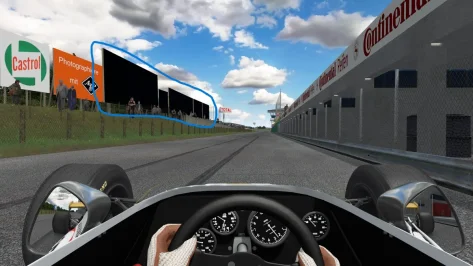
Problem with clouds sorted by Peter Boese, still got the problem with some billboards/advertising hoardings being black any ideas (Nürburgring 1967 by William Ricker.

Regards

Mark
 

Attachments

  • Screenshot_hss_1970_brm_p153_nurburgring1967_12-1-126-12-6-23.webp
    Screenshot_hss_1970_brm_p153_nurburgring1967_12-1-126-12-6-23.webp
    122.6 KB · Views: 1
Sharing a mod? Host it on GTPlanet Downloads. Free, public hosting for files up to 10GB in size.
Back