Assetto Corsa PC Mods General DiscussionPC 

  • Thread starter Thread starter daan
  • 157,756 comments
  • 51,914,182 views
I installed my version of CSP 0.2.11 free version, but I no longer have rain with Pure.

I think the rain feature is included with the Patreon version?

I don't mind having the paid version, but the preview version of CSP 0.2.11 is build 3460. The problem is that with this version, I can't use the Alfa Romeo 156 from VRC. It requires CSP 0.2.11, but build 3465. Is there a paid version of CSP with build 3460?

If not, how can I get rain in the free version of CSP but with Pure, not Sol?
Thanks

Can anyone help me?
 
Last edited:
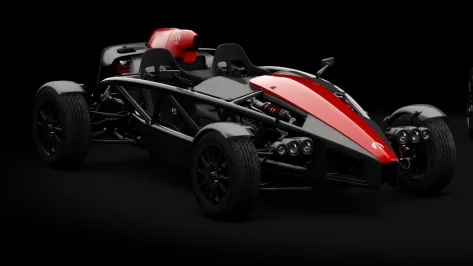
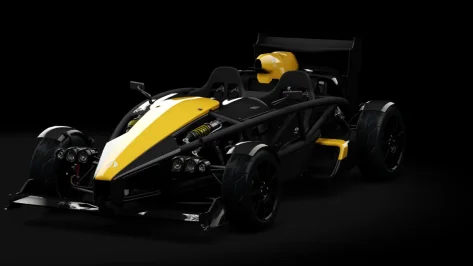
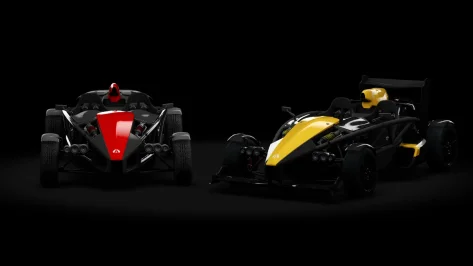
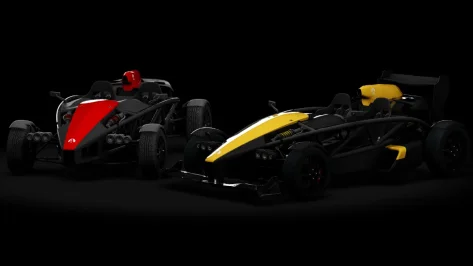
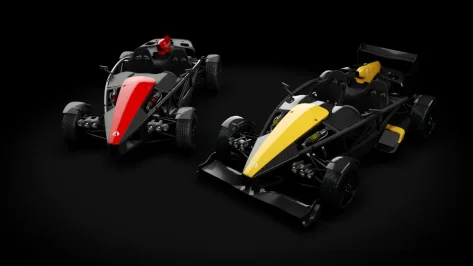
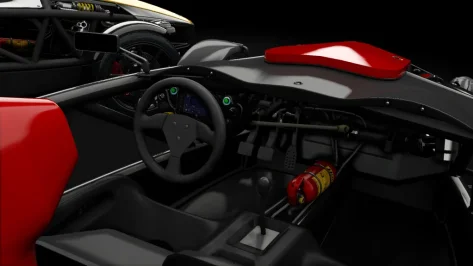
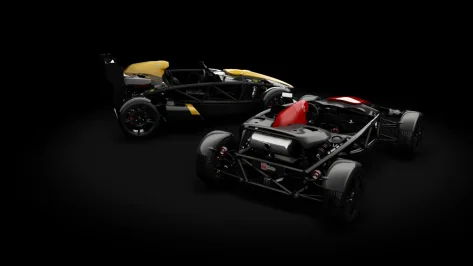
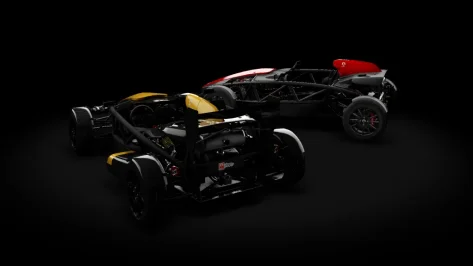
Ariel Atom 4 + Ariel Atom 4R Public Release!!

Download: https://www.mediafire.com/file/jn7ijcpbh7nrx7b/Ariel_atom_4_101creative.rar/file

Converted From PCARS, FH5, THE CREW 2

-AO inside and out

-Realistic Dashboard

-Physics

-CSP Settings

-Driver Animation

-Panoramic session Start config Daniel Nogal
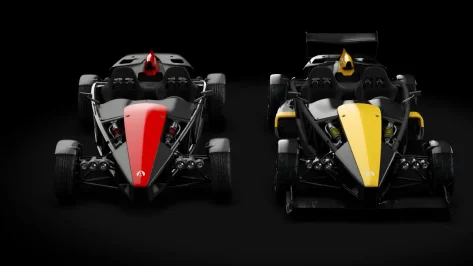
__custom_showroom_1770999281.webp__custom_showroom_1770998982.webp__custom_showroom_1770998977.webp__custom_showroom_1770998970.webp__custom_showroom_1770998967.webp__custom_showroom_1770998930.webp__custom_showroom_1770998906.webp__custom_showroom_1770998896.webp__custom_showroom_1770998891.webp
 
I installed my version of CSP 0.2.11 free version, but I no longer have rain with Pure.

I think the rain feature is included with the Patreon version?

I don't mind having the paid version, but the preview version of CSP 0.2.11 is build 3460. The problem is that with this version, I can't use the Alfa Romeo 156 from VRC. It requires CSP 0.2.11, but build 3465. Is there a paid version of CSP with build 3460?

If not, how can I get rain in the free version of CSP but with Pure, not Sol?
Thanks

Can anyone help me?
Sol or Pure have nothing to do with rain. Rain comes always and only with a CSP preview version.
CSP free like 0.2.11 = CSP without rain.
So the preview version of 0.2.11 is 0.2.12p1 (the p stand for preview). You get those preview from Ilja Jusupovs Patreon.
For Sol or Pure it does not matter what version of CSP you use. You just need CSP 0.2.3 or later...
 
Screenshot 2026-02-13 192752.webp

Hi, I need your help. The dashboard lighting is too bright. How can I fix it? My car is a Nissan Silvia Spec-R Aero from Jugge8.I'm using Pure LCS.
 
Sorry about this, but some necessary small fixes for problems I found when shrinking the carpet kerbs in the Lesmo turns. Use the link in the quote or the mega link below. Just unziip and overwrite when it asks.

Alternative Mega link: rj_monza

-- Fixed holes in the physical mesh in the Lesmo and Ascari areas.
-- Corrected some misaligned vertices that created a gap between visible meshes.
-- Lowered the grass\sand blend mesh in some parts to eliminate a floating look.
-- Reduced the width of the carpet kerbs in the Lesmo turns.
Discovered a little problem while I was expanding the sand pit around Parabolica. Apparently there is a sand\asphalt blend mesh I never knew existed that doesn't show because of incorrect shader settings. Replace the ext_config file with the attached one. It's not a perfect fix, but it will do for now. I will fix it correctly in the kn5 file for the next update. If you customized the ext_config file and don't want to have to redo your changes, just copy and paste this code into your existing config file.

[SHADER_REPLACEMENT_...]
ACTIVE = 1
MATERIALS = brd2
BLEND_MODE = ALPHA_TEST
DEPTH_MODE = NORMAL
 

Attachments

What setting in csp do I need to uncheck to stop having blocky looking shadows (I'm not talking about what someone posted above), I'm talking about the shadow having almost like a 8bit/16bit shading on the tarmac.
 
Still the same no difference 😡 any other ideas ?
1. Disable the alternative skin and then re-enable it. This loads the skin again properly into the track.

2. If it does not fix it, please try my CSP settings (backup yours before, so you can revert).


If it does not help, I am out of ideas.
 
Good afternoon

Does anyone know which option in CM resolves the strange flags on the runway?

Jacarepagua (Reiza, Mordido)

CSP 3.0 pw12
Screenshot_rollovers_c7r_imsa_mdd_jacarepagua_13-1-126-16-26-11.webp
 
Hi all,

I've been absent from the AC community for a while so I hope you don't mind me leaping back in with a question.

I've noticed some strange behavior with starts on Le Mans 1970 by KJRacing81/nobody. Start behavior varies according to CSP version and New AI behaviour options. A similar pattern is seen on other tracks with Le Mans-style starts.

Here's a pictorial summary:
CSP_Le_Mans_1970_start.webp


CSP 0.2.10 or later results in either a slow processional start down the pit lane or mass carnage and aeroplane crashes, depending on whether the "Straighten AIs trajectory when starting" option is selected. Even with "New AI behavior" completely disabled, I still get that processional start. CSP 0.2.9 or earlier works fine, as long as the "Straighten AIs trajectory when starting" option is turned off.

Has anyone else experienced this, and is there maybe a fix? Thanks for any advice.
 
Sol or Pure have nothing to do with rain. Rain comes always and only with a CSP preview version.
CSP free like 0.2.11 = CSP without rain.
So the preview version of 0.2.11 is 0.2.12p1 (the p stand for preview). You get those preview from Ilja Jusupovs Patreon.
For Sol or Pure it does not matter what version of CSP you use. You just need CSP 0.2.3 or later...
I understand, but my Pure works very well, but only in the rain, since I have the free version. As I explained, I can't get the paid version because of the Alfa Romeo VRC.

Yes, version 0.2.12, but is it as stable as the recommended version, 0.2.11?
 
Hello, it is possible with a lua script to hide some meshes of the car when it detects there is damage on a specific part of the car ? (front and rear bumpers, suspensions) to do for example a broken front wing for an open-wheeler. Thanks
 
I could use some help from someone familiar with what Monza looks like currently. I'm working on the sand placement for Parabolica using a Google Maps overhead image. I think the map is from the 2022 or 2023 F1 race. From what I can see, the sand is right up against the kerb coming out of Parabolica but is not cut so close in the entry and middle of the turn. Something like the image.

acs 2026-02-13 22-15-28.webp


Is that correct? Seems odd to have the sand so close coming out but leave such a wide area of asphalt in the beginning and middle sections. I just want to make sure that hasn't been changed recently. Thanks for any help...
 
I understand, but my Pure works very well, but only in the rain, since I have the free version. As I explained, I can't get the paid version because of the Alfa Romeo VRC.

Yes, version 0.2.12, but is it as stable as the recommended version, 0.2.11?
I don't think you understand!
CSP 0.2.12p1 is actually 0.2.11 + rain

The public versions and the corresponding "p1" versions are actually equal, BUT the p1 versions have also the preview features activated, like "rainFX".

0.2.7p1 = 0.2.6 + rain
0.2.8p1 = 0.2.7 + rain
0.2.9p1 = 0.2.8 + rain
0.2.10p1 = 0.2.9 + rain
0.2.11p1 = 0.2.10 + rain
0.2.12p1 = 0.2.11 + rain
and in the future there will be a CSP 0.3.0 version and guess how the preview version would be called then?
0.3.1p1 = 0.3.0 + rain

But currently there are only 0.3.xxx preview versions available. There are many developments right now.
 
Last edited:
I could use some help from someone familiar with what Monza looks like currently. I'm working on the sand placement for Parabolica using a Google Maps overhead image. I think the map is from the 2022 or 2023 F1 race. From what I can see, the sand is right up against the kerb coming out of Parabolica but is not cut so close in the entry and middle of the turn. Something like the image.

View attachment 1513102

Is that correct? Seems odd to have the sand so close coming out but leave such a wide area of asphalt in the beginning and middle sections. I just want to make sure that hasn't been changed recently. Thanks for any help...
I would say that makes sense. It allows for party time mid corner with overtakes allowed, and then making sure all the boys are back in their barracks come corner exit time, thus avoiding many a car crash.
 
I could use some help from someone familiar with what Monza looks like currently. I'm working on the sand placement for Parabolica using a Google Maps overhead image. I think the map is from the 2022 or 2023 F1 race. From what I can see, the sand is right up against the kerb coming out of Parabolica but is not cut so close in the entry and middle of the turn. Something like the image.

View attachment 1513102

Is that correct? Seems odd to have the sand so close coming out but leave such a wide area of asphalt in the beginning and middle sections. I just want to make sure that hasn't been changed recently. Thanks for any help...
Ciao Joe! Try here, there are many videos of tests they did in Monza in January/February. 😉

 
Hi all,

I've been absent from the AC community for a while so I hope you don't mind me leaping back in with a question.

I've noticed some strange behavior with starts on Le Mans 1970 by KJRacing81/nobody. Start behavior varies according to CSP version and New AI behaviour options. A similar pattern is seen on other tracks with Le Mans-style starts.

Here's a pictorial summary:
View attachment 1513076

CSP 0.2.10 or later results in either a slow processional start down the pit lane or mass carnage and aeroplane crashes, depending on whether the "Straighten AIs trajectory when starting" option is selected. Even with "New AI behavior" completely disabled, I still get that processional start. CSP 0.2.9 or earlier works fine, as long as the "Straighten AIs trajectory when starting" option is turned off.

Has anyone else experienced this, and is there maybe a fix? Thanks for any advice.
Haven't tried this particular track with CSP 0.3.x yet but I have the same problem with le_grand_circuit_1967 using CSP 0.3.0-preview212. No idea how to fix it.
 
Yeah, that's it. I'll go ask them why.
I'd like to notify everyone who has downloaded the 2026 skins from iChano, he seems to have fixed the problem now, but you'll need to redownload the skins.
 
Necroing about safety from a couple of post ago! Here something about safety copy/paste, from X4fab Patreonsite, how small it looks who knows it can be helpfully:

Sadly, it looks like we’re starting to see some bad-faith modders in the community. So, I thought I’d make a small post with a few recommendations, and work on making CSP a bit safer.

First of all, please keep an eye on the type of content you’re installing, and if you’re not using Content Manager to install a mod (or if it’s being installed as a generic mod), glance through the files to see what actually is being added. If it’s something like a new car, or something else contained within the “content” folder, it’s perfectly safe. But if a mod adds anything to “apps”, “extension”, “launcher”, “plugins”, “server” or “system”, or if it includes any DLL (or EXE for you to run), such a mod can, potentially, do anything it wants on your system, so please check those mods thoroughly. Especially if it’s a stolen mod: those are sometimes repacked by third parties, so some of the files might be edited.

With the original Assetto Corsa, there are plenty of ways a mod could add its own logic. Apart from obvious stuff like including its own version of Reshade DLL or adding a new Python app, they could also alter launcher logic, add a new AC plugin, adjust one of JS files loaded by the original launcher, swap Python libraries (either standard or AC ones). And, to be clear, the original Python apps of Assetto Corsa can do anything they want. If anything, they can do a whole lot more compared to Lua apps, but those also have pretty much no limits. And when it comes to this type of thing, if a script can as much as simply save a file somewhere within the Assetto Corsa folder, that’s already more than enough to compromise data files.

Now, Custom Shaders Patch adds a lot of other types of scripts for all sorts of tasks. Ever since adding script support to Content Manager (which allowed us to have much nicer, if static, weather conditions back in the day), I was always fascinated by how much flexibility can be achieved with a simple Lua script. But, the way the whole thing is currently set, those scripts aren’t a weaker alternative to Lua apps. If anything, Lua apps are the weak ones, with delayed loading, and sometimes loading skipped altogether. A specialized script — such as Pure (a great WeatherFX style by Peter Boese) — loads first, and has full access to your file system and other processes! So, all the scripts you’re installing explicitly (with CM warning you about potential dangers), and going to CSP settings to enable explicitly — including post-processing scripts, GamepadFX scripts and more — all can do pretty much anything. That’s how Pure can edit configs and load extensions, how Curved Monitor filter can export settings, it allows for Mobile GamepadFX script to exchange data with the phone, or for Wooting keyboard script to read analog values from those keyboards. It also allows for traffic mode to load missing assets, and more.

There are only three exceptions: car scripts (both regular and physics), track scripts and, of course, online scripts. Those are the scripts you might not be aware of installing, and they are fully sandboxed and can’t really do anything like saving files.

In the next update, I’ll add something for CSP to ask each time before starting a new script with full files access, and something for scripts to opt-out of that access. But even with that addition, I ask you to still be cautious — a malicious mod could always find a way to circumvent some of these protections, like replacing a config of another mod changing its behavior in a potentially threatening way. Using Content Manager to install mods and keeping an eye on its warnings should be enough though.

For extra safety, I’m also going to add some settings for blocking out scripts entirely, and maybe something that would prevent sandboxed scripts from accessing the internet (although, that might break some things like Android Auto or online scripts).

If it is illegal to post this, let me know then I will delete it! Please moderators do not ban me, think it's safety first?
 
Last edited:
Ciao Joe! Try here, there are many videos of tests they did in Monza in January/February. 😉

Damn, wish I had some of these videos sooner. I got things way off. I see Lesmo and Ascari have wider kerbs with no carpet\concrete runoff area (whatever they are called) anymore. The sand goes right up against the kerbs now.

I'm not sure I have it in me to try and fix things. It's such a frustrating process because I don't know what i'm doing. I'll spend an hour or more in Blender doing what I think is right only to find out I screwed up something once I load it in the game and have to start over.
 
Anyone having problem with CSP 0.3 crashing when going into VR. Goes in VR for a few seconds then crashes and throws you out.
CSP 0.2.12 works fine. Any ideas please. Reported to Ilja but no reply.
 
Hi all! where to find the preset for the Moza Racing R3 bundle
steering wheel?
I'm sorry for my translation.
 
Last edited:
Haven't tried this particular track with CSP 0.3.x yet but I have the same problem with le_grand_circuit_1967 using CSP 0.3.0-preview212. No idea how to fix it.
Thanks. It's some small consolation to know it's not just me then.
 
Sharing a mod? Host it on GTPlanet Downloads. Free, public hosting for files up to 10GB in size.
Back