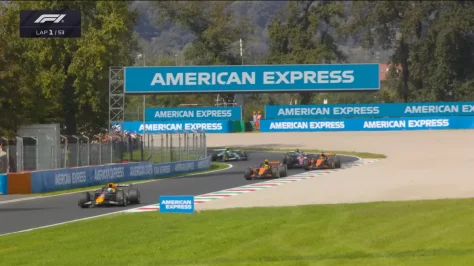
yeah I had this posted to their Discord and they acknowledge it months ago and I was surprised no updates with the new cars being released...someone needs to fix the suspension phasing through the brake disk as it does not look like they will.

Hoping to find a way to get the VRCphysics-ish to fit the Nissan and Volvo so they can join inyeah I had this posted to their Discord and they acknowledge it months ago and I was surprised no updates with the new cars being released...
Touring car related, I guess the PM3DM Nissan probably won't see any more work on it? The setup menu without spring rate adjustment means you basically can't race the car if you put more fuel in it...I could I guess just try to turn fuel consumption to really low and run with little fuel...



I gave it a try,@Tetri
If the car had turbo (60s-90s) it would be nice to be able to adjust it with AIW or a ai_hints.ini for BOP use to assure adequate apparent performance results. I'd say pick any old porsche turbo (935?) If the turbo was adjustable back in period, implementing the amount of turbo (by %) used (as if the driver might adjust it in a race) would be useful. Brute force on the straights! If it burns the turbo out (or we can't make the corner cuz it's too fast), then we learn something
(OR should we just leave it to manual control in the car)


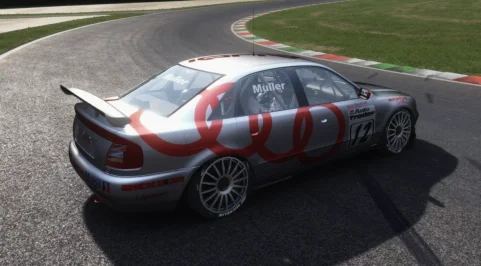
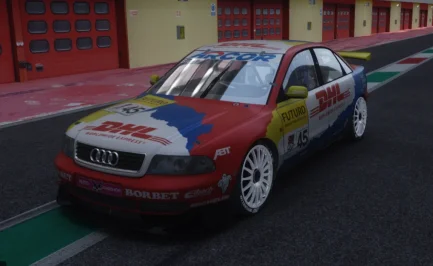
Assuming you are using the skins you paid for by DD SimDesign. That's intended. Its how they looked back in the day. The BTCC Audi's had some weird paint on their cars. If you for some reason want it removed just remove these lines in the ext_config.ini inside the skins folderWhy does the body on the VRC Auriel 4 look matte or satin when it should be glossy ? (It's fine with the Beamer 320)
Is it possible to modify ext_config to have a glossy body ?
View attachment 1513365
I suspect this applies not only to DDsimdesign skins (and you're right, these silver skins are like aluminum, so it's quite accurate), but also to Auriel 4's material/shader settings.Assuming you are using the skins you paid for by DD SimDesign. That's intended. Its how they looked back in the day. The BTCC Audi's had some weird paint on their cars. If you for some reason want it removed just remove these lines in the ext_config.ini inside the skins folder
[Material_CarPaint_Metallic]
Materials = MAIN_PAINT
UseMetallicReflections = 1
FlakesK = 1
ClearCoatThickness = 0.2
FresnelC = 0.2
SpecularMult = 0.45
AmbientSpecular = 8
BrightnessAdjustment = 0.85
AmbientSpecularEXP = 3
SpecularBase = 5, 30
SpecularSun = 10, 500
FresnelMax = 0.8


Maybe you lowered the no. of channels because some latest cars have tons of voices in their soundbanks and that used to make the cpu go wild in big races?Found it! Here's what fixed it for me:
In audio_engine.ini file ( in ..\steamapps\common\assettocorsa\system\cfg ) , I had MAX_CHANNELS on 64
(thinking I would never need over 64 simultaneous sound-effects and this would give lower latency on the audio I changed it a while back... only to notice the crash issue later and forgot I had done this.)
Setting MAX_CHANNELS back to the original 256 solved the 1-2 second audio loss right after a collision.
Lesson learned (again): don't touch what isn't broken!
EDIT : I settled on these values for lowest audio latency :
[SETTINGS]
LATENCY=0 ;unless your system struggles with it, keep this as low as possible
ENABLE_AUDIO=1 ;obviously keep this on
MAX_CHANNELS=256 ;do not lower for risk of audio cut-outs with large grids / collisions
UPDATE_INTERVAL=1 ;default 0 = "auto" which gives approx 15 to 20ms delay , 1 = Fastest interval with least delay
ENABLE_PERFORMANCE_SPEW=0 ;leave this , only put to 1 for debugging audio issues (more gets written in the log file then)
LIVE_UPDATE=0 ;leave this unless you know what you are using it for


I've done a physics swap if you want it?yeah I had this posted to their Discord and they acknowledge it months ago and I was surprised no updates with the new cars being released...
Touring car related, I guess the PM3DM Nissan probably won't see any more work on it? The setup menu without spring rate adjustment means you basically can't race the car if you put more fuel in it...I could I guess just try to turn fuel consumption to really low and run with little fuel...

I just increased the default rod length. Will run fine with full tank on the default setup.I've done a physics swap if you want it?

Settings-Custom Shaders Patch-AI (New Behavior)I can't find it. Can you tell me where I need to check the box so that after the race ends I can drive another lap and not be moved straight to the pits?
That's probably a safer bet. I don't want to be distributing pay-mod stuff. I literally did it for myself so I could BOP the grids easier.I just increased the default rod length. Will run fine with full tank on the default setup.
just for information,I suspect this applies not only to DDsimdesign skins (and you're right, these silver skins are like aluminum, so it's quite accurate), but also to Auriel 4's material/shader settings.
With the skin below, there's no [Material_CarPaint_Metallic] line in the skin's folder, and it's the same issue:
View attachment 1513410

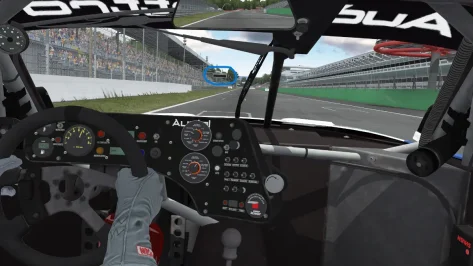
Good Evening SirI have no idea if the width is accurate, but at least I got the kerb setup closer to what it should be for Lesmo. Ascari is going to be tough because the kerbs are not straight.
View attachment 1513411
View attachment 1513412
Interesting discoveries...I gave it a try,
it seems to be hardcoded into Ac's AI's behavior. I can influence the car#0 (player's car) without issues, but here's the pattern for the AI . I took the 935 as an example, i suppose it's the same pattern for other cars.
In qualifications, they would make a first lap with 40% turbo, wastegate @40-50%, then unleash full power for next laps.
In race, whatever i do (including modifying the engine values in the acd and getting rid of the max boost value), i'm stuck with a wastegate @0.800 (0.85 for the payer) and a boost @1.6 (2.0 for the payer).
I suppose that would explain their good results in qualifs and their poor ones in race. i could try to double the value and create a dedicated AI version to see if i can match the player's car still.
But as for lua scripts, i couldn't control the wastegate/turbo neither from an app nor from a dedicated physics.lua directly into the car's folder, so i'm not confident it can be done (or it's above my abilities, with is far from an unreachable ceiling). That is quite annoying though, because i saw i had access to all the other setup values, meaning, with access to this, you could create and use dedicated setups for each ai car... I guess it's on the workbench on Ilja's side, i'll dig on the discord.


I have no idea if the width is accurate, but at least I got the kerb setup closer to what it should be for Lesmo. Ascari is going to be tough because the kerbs are not straight.
View attachment 1513411
View attachment 1513412
@sab001so i'm not confident it can be done (or it's above my abilities, which is far from an unreachable ceiling)
I think Sab's issue is more about AI losing 4 seconds a lap and being unable to reach top speed : the automatic race engineer would pick the proper gear ratio but the AI couldn't reach its top speed on straights with a butchered turbo value (80% is pretty low). Knowing AC's damage system, on most cars a turbo stuck @95% would still be safe and do the job.Interesting discoveries... @Badgerman
But to be honest, back in the old days - you didn't run down Mulsanne with maximum turbo boost unless you were in a major fight close to the end of the race. Back in the 70-80's they'd only turn the boost up for qualifying, during the race you ran as low boost as you could get away with, otherwise you'd grenade the engine long before the race was over.
It's only been very recently where endurance races are 24-hour sprints. Back "in the day" it was all a matter of preserving your car until the last hour or two
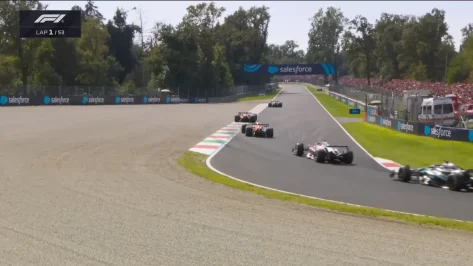
Damn, it's what I was afraid of. I made them too wide by about a quarter of an F1 car. The way I have them, an F1 car fits almost perfectly between them from kerb edge to kerb edge. I'm about ready to chuck the whole thing. I spent about two days getting it to this point after my first attempt was wrong and I don't feel like wasting another two days trying to fix it again.If you can get a VRC or RSS 2025 F1 car on your racetrack and check proportions against kerb / curb width.
For me it seems around 2/3rd of the F1 2025 car width is the kerb / curb in those 2 corners, on second pic it is from the outside of rear left to the inside of rear right tire.
Pictures as I see, are heavily downscaled after upload, here is the official video for better quality> YouTube F1 race summary link

there is a discord group. you can find aii you need thereHi all! where to find the preset for the Moza Racing R3 bundle
steering wheel?
I'm sorry for my translation.


How do I install it, please?I just increased the default rod length. Will run fine with full tank on the default setup.


I've set it up. But everyone else keeps driving at full throttle, even though I've set it to 30%. Most of the time, the AI doesn't even pull into the pit lane, it just keeps going. Only when I'm actually in my spot are they all suddenly there. Is this a CSP bug?Settings-Custom Shaders Patch-AI (New Behavior)
View attachment 1513428