- 2

- United States
I can't find it. Can you tell me where I need to check the box so that after the race ends I can drive another lap and not be moved straight to the pits?


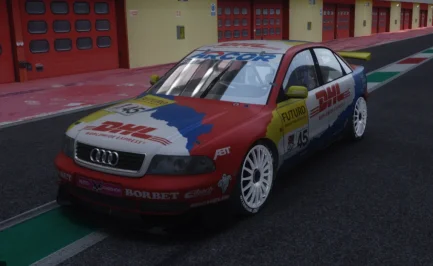
Assuming you are using the skins you paid for by DD SimDesign. That's intended. Its how they looked back in the day. The BTCC Audi's had some weird paint on their cars. If you for some reason want it removed just remove these lines in the ext_config.ini inside the skins folderWhy does the body on the VRC Auriel 4 look matte or satin when it should be glossy ? (It's fine with the Beamer 320)
Is it possible to modify ext_config to have a glossy body ?
View attachment 1513365
I suspect this applies not only to DDsimdesign skins (and you're right, these silver skins are like aluminum, so it's quite accurate), but also to Auriel 4's material/shader settings.Assuming you are using the skins you paid for by DD SimDesign. That's intended. Its how they looked back in the day. The BTCC Audi's had some weird paint on their cars. If you for some reason want it removed just remove these lines in the ext_config.ini inside the skins folder
[Material_CarPaint_Metallic]
Materials = MAIN_PAINT
UseMetallicReflections = 1
FlakesK = 1
ClearCoatThickness = 0.2
FresnelC = 0.2
SpecularMult = 0.45
AmbientSpecular = 8
BrightnessAdjustment = 0.85
AmbientSpecularEXP = 3
SpecularBase = 5, 30
SpecularSun = 10, 500
FresnelMax = 0.8


Maybe you lowered the no. of channels because some latest cars have tons of voices in their soundbanks and that used to make the cpu go wild in big races?Found it! Here's what fixed it for me:
In audio_engine.ini file ( in ..\steamapps\common\assettocorsa\system\cfg ) , I had MAX_CHANNELS on 64
(thinking I would never need over 64 simultaneous sound-effects and this would give lower latency on the audio I changed it a while back... only to notice the crash issue later and forgot I had done this.)
Setting MAX_CHANNELS back to the original 256 solved the 1-2 second audio loss right after a collision.
Lesson learned (again): don't touch what isn't broken!
EDIT : I settled on these values for lowest audio latency :
[SETTINGS]
LATENCY=0 ;unless your system struggles with it, keep this as low as possible
ENABLE_AUDIO=1 ;obviously keep this on
MAX_CHANNELS=256 ;do not lower for risk of audio cut-outs with large grids / collisions
UPDATE_INTERVAL=1 ;default 0 = "auto" which gives approx 15 to 20ms delay , 1 = Fastest interval with least delay
ENABLE_PERFORMANCE_SPEW=0 ;leave this , only put to 1 for debugging audio issues (more gets written in the log file then)
LIVE_UPDATE=0 ;leave this unless you know what you are using it for


I've done a physics swap if you want it?yeah I had this posted to their Discord and they acknowledge it months ago and I was surprised no updates with the new cars being released...
Touring car related, I guess the PM3DM Nissan probably won't see any more work on it? The setup menu without spring rate adjustment means you basically can't race the car if you put more fuel in it...I could I guess just try to turn fuel consumption to really low and run with little fuel...


I just increased the default rod length. Will run fine with full tank on the default setup.I've done a physics swap if you want it?

Settings-Custom Shaders Patch-AI (New Behavior)I can't find it. Can you tell me where I need to check the box so that after the race ends I can drive another lap and not be moved straight to the pits?
That's probably a safer bet. I don't want to be distributing pay-mod stuff. I literally did it for myself so I could BOP the grids easier.I just increased the default rod length. Will run fine with full tank on the default setup.
just for information,I suspect this applies not only to DDsimdesign skins (and you're right, these silver skins are like aluminum, so it's quite accurate), but also to Auriel 4's material/shader settings.
With the skin below, there's no [Material_CarPaint_Metallic] line in the skin's folder, and it's the same issue:
View attachment 1513410

Good Evening SirI have no idea if the width is accurate, but at least I got the kerb setup closer to what it should be for Lesmo. Ascari is going to be tough because the kerbs are not straight.
View attachment 1513411
View attachment 1513412
Interesting discoveries...I gave it a try,
it seems to be hardcoded into Ac's AI's behavior. I can influence the car#0 (player's car) without issues, but here's the pattern for the AI . I took the 935 as an example, i suppose it's the same pattern for other cars.
In qualifications, they would make a first lap with 40% turbo, wastegate @40-50%, then unleash full power for next laps.
In race, whatever i do (including modifying the engine values in the acd and getting rid of the max boost value), i'm stuck with a wastegate @0.800 (0.85 for the payer) and a boost @1.6 (2.0 for the payer).
I suppose that would explain their good results in qualifs and their poor ones in race. i could try to double the value and create a dedicated AI version to see if i can match the player's car still.
But as for lua scripts, i couldn't control the wastegate/turbo neither from an app nor from a dedicated physics.lua directly into the car's folder, so i'm not confident it can be done (or it's above my abilities, with is far from an unreachable ceiling). That is quite annoying though, because i saw i had access to all the other setup values, meaning, with access to this, you could create and use dedicated setups for each ai car... I guess it's on the workbench on Ilja's side, i'll dig on the discord.


I have no idea if the width is accurate, but at least I got the kerb setup closer to what it should be for Lesmo. Ascari is going to be tough because the kerbs are not straight.
View attachment 1513411
View attachment 1513412


@sab001so i'm not confident it can be done (or it's above my abilities, which is far from an unreachable ceiling)
I think Sab's issue is more about AI losing 4 seconds a lap and being unable to reach top speed : the automatic race engineer would pick the proper gear ratio but the AI couldn't reach its top speed on straights with a butchered turbo value (80% is pretty low). Knowing AC's damage system, on most cars a turbo stuck @95% would still be safe and do the job.Interesting discoveries... @Badgerman
But to be honest, back in the old days - you didn't run down Mulsanne with maximum turbo boost unless you were in a major fight close to the end of the race. Back in the 70-80's they'd only turn the boost up for qualifying, during the race you ran as low boost as you could get away with, otherwise you'd grenade the engine long before the race was over.
It's only been very recently where endurance races are 24-hour sprints. Back "in the day" it was all a matter of preserving your car until the last hour or two
Damn, it's what I was afraid of. I made them too wide by about a quarter of an F1 car. The way I have them, an F1 car fits almost perfectly between them from kerb edge to kerb edge. I'm about ready to chuck the whole thing. I spent about two days getting it to this point after my first attempt was wrong and I don't feel like wasting another two days trying to fix it again.If you can get a VRC or RSS 2025 F1 car on your racetrack and check proportions against kerb / curb width.
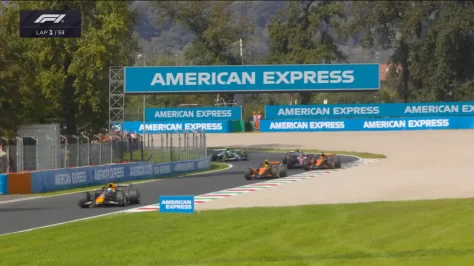
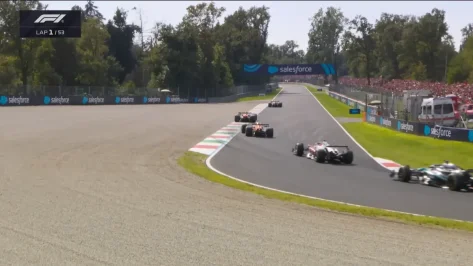
For me it seems around 2/3rd of the F1 2025 car width is the kerb / curb in those 2 corners, on second pic it is from the outside of rear left to the inside of rear right tire.
Pictures as I see, are heavily downscaled after upload, here is the official video for better quality> YouTube F1 race summary link

there is a discord group. you can find aii you need thereHi all! where to find the preset for the Moza Racing R3 bundle
steering wheel?
I'm sorry for my translation.


How do I install it, please?I just increased the default rod length. Will run fine with full tank on the default setup.


I've set it up. But everyone else keeps driving at full throttle, even though I've set it to 30%. Most of the time, the AI doesn't even pull into the pit lane, it just keeps going. Only when I'm actually in my spot are they all suddenly there. Is this a CSP bug?Settings-Custom Shaders Patch-AI (New Behavior)
View attachment 1513428
"script.lua" 😅 (@Tetri: What do I name the script that I put in the data folder?
Hi, can't help you on the subject due to lack of sufficient knowlegde on this. But I see the RSS GT-MX, right? Is it good (compared to F302 and/or Ceky's)? Worth the purchase (Or do I know the answer already since this one originates from RSS)?Anyone had this - can’t make a shot in CM showroom - get this error - cant remember when it started and what changed. Tried with different CSP versions but no difference.View attachment 1513490


Could be. I'm on 0.3.0p212. The ai do perform the cool down lap, but not at the throttle % I've chosen...seemed to be way faster, but they do enter their pit box and stop, then wait for me to enter your pit box before the race results display instantly at that point.I've set it up. But everyone else keeps driving at full throttle, even though I've set it to 30%. Most of the time, the AI doesn't even pull into the pit lane, it just keeps going. Only when I'm actually in my spot are they all suddenly there. Is this a CSP bug?

I'm glad they were helpful; Monza in winter is truly depressing. 😅Damn, wish I had some of these videos sooner. I got things way off. I see Lesmo and Ascari have wider kerbs with no carpet\concrete runoff area (whatever they are called) anymore. The sand goes right up against the kerbs now.
I'm not sure I have it in me to try and fix things. It's such a frustrating process because I don't know what i'm doing. I'll spend an hour or more in Blender doing what I think is right only to find out I screwed up something once I load it in the game and have to start over.
Being anxious about these things, I checked all the .dll files present in the indicated folders, the only suspects are the ones below, do you have them too?Necroing about safety from a couple of post ago! Here something about safety copy/paste, from X4fab Patreonsite, how small it looks who knows it can be helpfully:
Sadly, it looks like we’re starting to see some bad-faith modders in the community. So, I thought I’d make a small post with a few recommendations, and work on making CSP a bit safer.
First of all, please keep an eye on the type of content you’re installing, and if you’re not using Content Manager to install a mod (or if it’s being installed as a generic mod), glance through the files to see what actually is being added. If it’s something like a new car, or something else contained within the “content” folder, it’s perfectly safe. But if a mod adds anything to “apps”, “extension”, “launcher”, “plugins”, “server” or “system”, or if it includes any DLL (or EXE for you to run), such a mod can, potentially, do anything it wants on your system, so please check those mods thoroughly. Especially if it’s a stolen mod: those are sometimes repacked by third parties, so some of the files might be edited.
With the original Assetto Corsa, there are plenty of ways a mod could add its own logic. Apart from obvious stuff like including its own version of Reshade DLL or adding a new Python app, they could also alter launcher logic, add a new AC plugin, adjust one of JS files loaded by the original launcher, swap Python libraries (either standard or AC ones). And, to be clear, the original Python apps of Assetto Corsa can do anything they want. If anything, they can do a whole lot more compared to Lua apps, but those also have pretty much no limits. And when it comes to this type of thing, if a script can as much as simply save a file somewhere within the Assetto Corsa folder, that’s already more than enough to compromise data files.
Now, Custom Shaders Patch adds a lot of other types of scripts for all sorts of tasks. Ever since adding script support to Content Manager (which allowed us to have much nicer, if static, weather conditions back in the day), I was always fascinated by how much flexibility can be achieved with a simple Lua script. But, the way the whole thing is currently set, those scripts aren’t a weaker alternative to Lua apps. If anything, Lua apps are the weak ones, with delayed loading, and sometimes loading skipped altogether. A specialized script — such as Pure (a great WeatherFX style by Peter Boese) — loads first, and has full access to your file system and other processes! So, all the scripts you’re installing explicitly (with CM warning you about potential dangers), and going to CSP settings to enable explicitly — including post-processing scripts, GamepadFX scripts and more — all can do pretty much anything. That’s how Pure can edit configs and load extensions, how Curved Monitor filter can export settings, it allows for Mobile GamepadFX script to exchange data with the phone, or for Wooting keyboard script to read analog values from those keyboards. It also allows for traffic mode to load missing assets, and more.
There are only three exceptions: car scripts (both regular and physics), track scripts and, of course, online scripts. Those are the scripts you might not be aware of installing, and they are fully sandboxed and can’t really do anything like saving files.
In the next update, I’ll add something for CSP to ask each time before starting a new script with full files access, and something for scripts to opt-out of that access. But even with that addition, I ask you to still be cautious — a malicious mod could always find a way to circumvent some of these protections, like replacing a config of another mod changing its behavior in a potentially threatening way. Using Content Manager to install mods and keeping an eye on its warnings should be enough though.
For extra safety, I’m also going to add some settings for blocking out scripts entirely, and maybe something that would prevent sandboxed scripts from accessing the internet (although, that might break some things like Android Auto or online scripts).
If it is illegal to post this, let me know then I will delete it! Please moderators do not ban me, think it's safety first?