- 102

- Italy
The same here, mate. I´m using your preset.previews have changed again after the latest CSP update.......settings are unchanged
The same here, mate. I´m using your preset.previews have changed again after the latest CSP update.......settings are unchanged


nice work on that car!Released : Audi RS2 Touringcar (Fictional)
Author:F302
3D Model Car :The Crew2
Texture Update : F302 (rework)
3d work: F302
Template includ.
I hope u enjoy the Carps : send feedback ,bugs ,missing things
tested on 0.3.0-preview140
PP filer PURELIFE EVO GT
have fun!
To install, move folders to "...\SteamApps\common\assettocorsa" or simplydrag'n'drop archive to Content Manager
https://mega.nz/file/xTcE3RiC#4r6T2l0Skyql1r4aW9hfU4pFn6n9IUxD9RyYsVj-_xo
View attachment 1524707


Easily fixable by changing the visual height in the data files.

i spotted this......the blur is correct on all wheels and the other 3 are good just this one is a bit outReleased : Audi RS2 Touringcar (Fictional)
Author:F302
3D Model Car :The Crew2
Texture Update : F302 (rework)
3d work: F302
Template includ.
I hope u enjoy the Carps : send feedback ,bugs ,missing things
tested on 0.3.0-preview140
PP filer PURELIFE EVO GT
have fun!
To install, move folders to "...\SteamApps\common\assettocorsa" or simplydrag'n'drop archive to Content Manager
https://mega.nz/file/xTcE3RiC#4r6T2l0Skyql1r4aW9hfU4pFn6n9IUxD9RyYsVj-_xo
View attachment 1524707


Thanks Peter!You also mean the heat distortion effect?
View attachment 1524638

I had that with DLSS, you can fix it by changing the preset (preset M for example got rid of ghosting for me as opposed to whatever the auto selection was) or by changing from DLSS to Snapdragon GSR2, which I find to be a little bit better than DLSS right now.Guys, help me solve a problem. I've been having this ghost-like effect in the shadows of the car ever since the new CSP. The faster I go, the more the reflection increases and multiplies. Even changing the PPfilter doesn't go away.
I noticed that if I disable ExtraFX, it disappears, but even disabling the settings one by one doesn't remove it. What setting could it be?
Thanks
Extremely based, we love fictional carsReleased : Audi RS2 Touringcar (Fictional)


Original showroom has a wooden floor, those white line are the plank ends I beleivepreviews have changed again after the latest CSP update.......settings are unchanged
old
View attachment 1524756
new
View attachment 1524757


Cant tell any differences in low quality browser screenshots though.DLSS on:
View attachment 1524667
DLSS off/MSAA 8x
View attachment 1524668
My DLSS settings:
View attachment 1524669


Hi dears, I'm looking for a WTCR pack of 2020 season. It has been relased? Do you know where I can get this mod?
thx in advance.

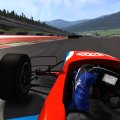

looks like the GTP resized the pic, the main thing is kinda visible though, the track edge white line, in DLSS it kinda terminates halfway up the screen and when you are driving it kinda renders infront of you as you get there. Without DLSS you can see the line pretty much all the way til horizon...Cant tell any differences in low quality browser screenshots though.

I released a hotfix for Pure. It is now needed to care about the postprocessing of the virtual mirros. With the newest CSP it is possible to override its shader and so an own postprocessing could be made.No, but here's what I found:
So, could we assume that this new upscaling methods doesn't deal correctly the "white reference point" for virtual mirror, whatever that means?
- with Pure LCS, every new upscaling method gives virtual mirror excessively bright when the sun is on the sky, no matter what other settings in weather or graphics adjustments you choose.
- with Pure Gamma the mirror is somehow ok (not entirely correct) but only if you check "Automatically guess white reference point" from Weather FX - Experimental tweaks. Otherwise the virtual mirror is unusable bright.
Which NVidia driver have you reverted to then? Just curious knowing.I've been sticking with an old version of the nVidia driver for my 3090ti, mainly because for some reason past 2025 the new versions of the drivers doesn't let me use 1440p anymore. Outside of AC I don't really play a whole lot of other things that really uses DLSS or anything so I didn't really care about the new drivers(also since I am using a TV as my single monitor I do vsync to 60fps so extra fps isn't a thing to me). To give this new CSP a fair shake I updated to the latest driver and sticks with 4k res. Playing with different DLSS settings and honestly it doesn't really help me playing the game. 4k looks good, but I can run 4k with 8x MSAA and no DLSS, and with 46 cars they don't see that different to running with DLSS in balanced and the MSAA looks marginally better especially with that draw distance thing that I was trying to show before. And in replay anything thats more distant looks distorted in DLSS modes. And both sometime noticeably drops below 60fps with traffic. So I've since changed back to my old driver and back to running 1440p with everything else maxed out.
Cool effort bringing the old game to run new tech, but I guess new tech isn't that useful to my use...


is that 3.21?I released a hotfix for Pure


Also its rather useless, different spot, different sunlight angle.Cant tell any differences in low quality browser screenshots though.
@DriverOne You can download here aa Nazareth (On Breathe list 3.2 too)I am desperately (literally) looking for track aa_nazareth for AC. Thank you so much if some great member can pls help me.
It is called Pure 3.21 Hotfix1 (Pure 3.22)is that 3.21?


Quick question : is the '16 TS050 in the pipeline ? I've got the PC2 model sitting on my drive but rally cba to do it.View attachment 1524816
Hello!
Today, finally release day for all of our Audi LMP's, including our newest addition, the 2016 Audi R18 LM spec version, Audi's final contender for the 24H of Le Mans.
Tom also included an physics update for the 2016 Porsche 919 from Kunos, so those cars are balanced to race together.
Included:
All already released cars received some minor updates here and there.
- 2009 Audi R15 TDi - Sebring spec
- 2009 Audi R15 TDi - Le Mans and Petit Le Mans spec
- 2010 Audi R15+ TDi - ALMS/LMS Spec
- 2010 Audi R15+ TDi - Le Mans spec
- 2011 Audi R18 TDi
- 2012 Audi R18 TDi Ultra
- 2012 Audi R18 e-tron quattro
- 2013 Audi R18 e-tron quattro RP3
- 2016 Audi R18 RP6
- 2016 Porsche 919 - only data.acd with Physics update (kunos car)
Also thanks to MS6Driver and Skierdude for the skins on these cars,
Enjoy!
View attachment 1524814View attachment 1524815View attachment 1524813View attachment 1524812View attachment 1524811

Thank you very much! 👍@DriverOne You can download here aa Nazareth (On Breathe list 3.2 too)
anyway update fixed my problems. thank you guys.ExtraFX is active?
Video Single Screen mode is used?
NVidia GPU?
any dxgi.dll in use?
Because you should not care about optiscaler, it should work with default usage. So i guess there is no fix in general for CSP, but something is not fitting
Nope, only the 2013 one. I don't have any time as well to start anything else, sadlyQuick question : is the '16 TS050 in the pipeline ? I've got the PC2 model sitting on my drive but rally cba to do it.

566.36, its like from end of 2024. I tried a bunch in between and that was the newest one that lets 1440p work on my setup...Which NVidia driver have you reverted to then? Just curious knowing.
(I myself am not using the far latest also, but 591.74 Studio (NSD) works very well for me on RTX 4070 Super.)
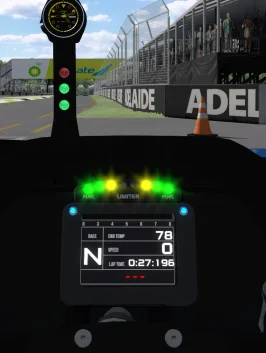
Try to reduce de fourth number (from left to right) in COLOR on the leds blocks on digital_instruments.ini. If there’s only three numbers, add a fourth like 0.1 and calibrate it.how to turn down the brightness off those lights down without touching the glare quality
is there a .ini file to change that