

- 370

- Norway
This is genius! Very nice work!Something old, something new, some ... oh ffs, just take my life, Porsch.

This is genius! Very nice work!Something old, something new, some ... oh ffs, just take my life, Porsch.


Yeah of course you´ll be not responsiblethen I think the regular expand should work (I do not think it's an issue that one part is on HDD ...)
mind you, I have never done it , and ultimately if something does go wrong I cannot be held responsible!
The HDD is much slower of course , so once car and track files are being put on there , they will read much slower ... but for AC




In case you didn't see my post further up the page:Yeah of course you´ll be not responsible
I am not a pc noob, but no IT specialist either, so i was pretty sure HDD will not work. And yes loading times in AC are not really a problem, since they do not happen while driving. They are already longer than regular because of the compression. I am a patient person
The option with the c: drive shrink is also possible, but i am affraid of, because of the message i got ""The choosen Base Volume will convert to a dynamic Volume......so installed Systems can not be started " I just don`t know what exactly is meant here.
I think i`ll try the HDD sometime. Right now i am cleaning all cars folders from unused skins, so i can "survive" longer without expanding the disc
Thank you jac0 for your pointers. 👍
Can even be done with USB drives - https://www.peterviola.com/easy-usb-drive-mirroring-with-windows-10-storage-spaces/You could always temporarily (if you have the space to do it) move everything to a folder on your C:\ then use Windows Storage Spaces to combine drives into a single virtual drive then move everything to that. You can add more drives at a later date too.



sx_lemans no chicane ?I'm having an issue with my ARX-06 LMDH mod (shared with some other ones), where if I try to run the entirety of the Mulsanne chicaneless, it suddenly loses acceleration about 2/3rds of the way, even with no damage on. I can run the entire straight with the Kunos 155 DTM & R18, with the 155 redlining half the time. What's going on???

Link updated to new version with what I think is better looking grass. Basically, it's a fork of the original grass so it has very faint mow lines like the original. Not the dramatic mow lines I was hoping to achieve like i've seen in real life photos but still a better looking grass than I came up with on the previous version. Still includes the one Grass track skin if you want more of a yellow tint to the grass.Donington Park 2018 Mod
This is an updated version of the test mod I put out a few days ago. Because of the number of changes, it got difficult to do it as a mod to the original track. I made it a standalone track so as not to fool with the original version. All credit for the track goes to the original author Brun. It will come up as Donington Park 2023 in your track list, but the year is not indicative of how the track is represented. I just needed some way to recognize which track was which. You can edit the ui files and give it whatever name you want.
Please let me know of any problems or suggestions so I can try and make it better.
Donington Park 2023
Changes from past version:
-- Added original author's name and version number to the track ui files.
-- Made the 40 pit layouts from Paprika work with my changes.
-- Added geo tags to the ui files.
-- Animated all of the flags that were not animated. I'm not real happy with the new flags, but at least they are animated. I wanted flags that were attached to the pole and did not arc in heavy winds, but I couldn't figure out how to make them. Plus they have an odd shading. In some directions, they are very bright and in other directions they are darker. Most likely a fault in the way I made them from lack of knowledge. If I ever find a way to fix these issues, I will update the flags.
-- Some tweaks to the night lighting and also enabled the lights to turn on when it rains.
-- Incorporated my grass changes directly into the kn5 file so it would be easier for people to make their own track skins.
-- Little tweaks to the ai sidelines to keep them off the raised kerbs. If you use a 3rd party ai already, then you may not need this.
-- Re-made the starting position file for the 40 pit GP layout from Paprika. Thanks to @Quikslvr for pointing it out to me. It must have been created for online use because he had the cars lined up in a position of the road that wasn't part of the track. This caused the ai cars in the back not to move at the start. It's not perfect and the tail end cars take some time to get moving, but at least they move now.
-- Fixed blurry Paddock area texture
-- Added semaphore lighting to start lights
One thing I still want to do is find a way to bring back the mow lines that the real track has. I've got some ideas on a way to do it, but I didn't want to hold up the release just for that.
View attachment 1286295


please provide screenshot, ideally with track position shown in fraction for example 0.1234@weikangcai your updated track still has parts of the environment missing, plus other various issues.
Are you going to continue refining it?
Link for the current updated version:

WeTransfer | Send Large Files Fast
The simple, quick and secure way to send your files around the world without an account. Share your files, photos, and videos today for free.we.tl


I can take a look.Hi all. is someone able to make new side lines for funabashi long? I tried but have some kind of error with the left side. And want to redo them 'cause the cars clip the "nut-wheels" and go flying. Strangely, it's the only layout I had problems with, the rest give me no problems

I'll change this with the next update.I did find that changing the [FRONT] ROD_LENGTH in Suspension.ini from 020 to 030 stopped the nose grounding out so much and got me 10s a lap.
No problem on my side.Are the flames working correctly for you? Mine seem to be located somewhere inside the rear bumper.
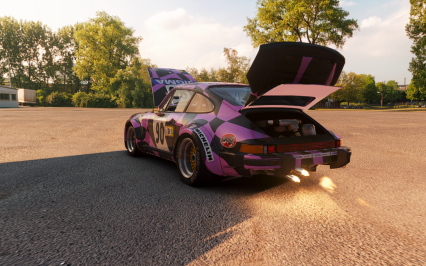
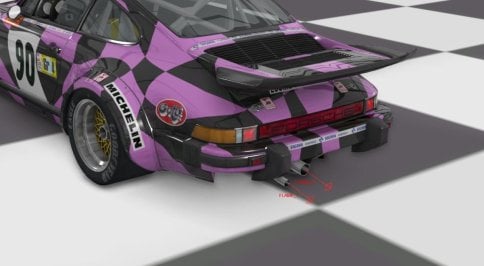



Interesting issue. I checked it with the Nicecuppatea cars and did not had any problems.I wonder if someone might be able to shed light on something that's always bothered me. On some cars, generally those with separate windscreens as opposed to modern integrated windshields, the windscreen glass material reduces the darkness of the shadows under competitors' cars (or eliminates the shadows completely). This happens regardless of lighting conditions. For example, here's what normal car shadows look like:

But here's what I see through the windscreen:


I'd like the shadows to remain dark. I've fixed it on a couple cars by going into the CM showroom and messing with the values for the glass material, changing the alpha mode from "alpha blending" to "alpha testing" and/or the blend mode from "normal" to "read only." While I have no idea what I'm doing here, this worked for SimDream's Maserati 6CM (for instance), but not for HSS's Alfa Romeo P2.
Does anyone have any idea why this happens and/or how to fix it?



This may helpQuick question here:
Is creating a Championship in Content Manager the best/easiest way or is there a better alternative?
What’s wrong about creating championships with vanilla launcher?Quick question here:
Is creating a Championship in Content Manager the best/easiest way or is there a better alternative?

FYI: for me the flames are coming out of the tailpipes (perfectly aligned).Absolutely love it. Running a soft Nords setup I did find that changing the [FRONT] ROD_LENGTH in Suspension.ini from 020 to 030 stopped the nose grounding out so much and got me 10s a lap. Before, heading down the Dottinger Hohe, I was having trouble keeping hold of my wheel. Maybe will help out someone else. The noise of this car is sublime, I think it's my favourite release this year.
Are the flames working correctly for you? Mine seem to be located somewhere inside the rear bumper.

Flames working correctly today, vagaries of CSP and VR. 👍

There's no download button, I guess. Sometimes, Legion just posts WIPs.FYI: for me the flames are coming out of the tailpipes (perfectly aligned).
Unrelated:
Legion posted a Maserati 570S
but with the new layout , I can't seem to find the download button ... Anyone can point out where it is?

Nice. Great workRELEASE: BMW Z4M COUPE "SCHUBERT MOTORSPORT ZURICH 24HR REPLICA SKIN" 2K/4K/6K
First thing is first.........how to install.........you should be able to drag and drop this into CM after choosing what res you want, just drag the content folder over.
the only thing i could not do was to chrome the "M" letter on the sides, to make it chrome you need a reflection really and that is not easy everything i tried looked terrible, i am sure there are ways but i do not know, i tried everything even chroming the whole car to then skin it over again in white leaving the chrome "M" but that did not work however im pretty pleased with this and that small difference doesn't take away from it. Its a decent car and not bad to skin this is for DaWallace version i have no idea if it works on the OG asettogarage version. interior skin done aswell as tyres e.t.c. If you dont like the tyres you can remove the files but you will be left with plain tyres that say "pirelli" on them, in my reference picture the car has nothing on the tyres its just plain but i havent seen a pic of this on track all the pics i used were of it stationairy in a showroom or a corgi model, interior is made of my head as there are no interior pictures to go by. Again if the interior skin is not to your liking then you can remove this. Not perfect i mean what is in life?? but not far of i have tried to be as accuarate as possible given the pictures i had to go by
in the downloads section i put this as a v1.0 as i feel its finished but you can be the judge of that
thanks to @DaWallace for the re-tweak and the 3d work, was it you who bothered to AO map this properly?
thanks to @Alguecool again for the back and forth with questions
edit i just noticed the light blue on the msport was not lined up correctly, just fixed and updated the download page
enjoy
View attachment 1292831View attachment 1292832
For sure. Giving the BMW a proper body AO was the easiest task, compared to working on the interior and the other small details.😅thanks to @DaWallace for the re-tweak and the 3d work, was it you who bothered to AO map this properly?


Thanks - nobody expects perfection, I was more interested in whether you were going to continue refining the track.please provide screenshot, ideally with track position shown in fraction for example 0.1234
I also need to double check with rf2 version to see whose problem it is.
Every track has bugs, for example, one can easily fall through the grass and into the void on sergio loro's suzuka 60's. outside 130R and around spoon curve, yet people still call it a "good track"
The best way to avoid bugs is not making tracks or doing anything at all.
Anyway here're persistent ini files, in case you want to fix them yourself.

thanks for mapping it correctly, it made it much more fun and enjoyable because i knew i could get the finished product at the endNice. Great work
For sure. Giving the BMW a proper body AO was the easiest task, compared to working on the interior and the other small details.😅
-new championship added: Formula Regional Oceania 2023 from New Zealand
-added crowds to Chang International Circuit
-added the new Lexus RC F GT3 2023 (GT-M Lux V8) by RSS to IMSA series and race grids
-faster AI for the RSS Mercedes-AMG GT3 Evo
-faster AI for the RSS BMW Hypercar
-changed IMSA Acura Hypercar to the new SimDream version + added faster AI
-changed WEC 2023 Vanderwall Hypercar to the new SimDream version + added faster AI
-updated Trans Am grid with the Challenger
-updated missing link for Velo Citta
-renamed Stock Car Pro Series 2022 race grid
 www.patreon.com

Acura ARX-06 2023 (SimDream) faster AI
Alfa Romeo Giulietta Spider 1955 (Simaothekid) electronics fix
Alfa Romeo Spider 1986 (MacedoSTI) better shader
Audi R8 LMS EVO II GT3 (FSR) faster AI
BMW M Hybrid V8 2023 (RSS) faster AI
Daihatsu Midget II D-Type (TheNuvolari) autoshift fix
Donkervoort D8 GTO 2013 (Gijs L) brighter shader
Ferrari F355 Berlinetta (GADU Boys) fix pit after lap one
Formula Mazda 2013 (Blaze) Masscots shift animation easy install
Grand Prix 1973 (SimDream) AI fix + real names v2.2
Honda Prelude MK5 1999 (MNBA) AI + autoshift fix
Jaguar D-Type 1955 (Velo) better FFB
Lamborghini Diablo SE30 Jota 1995 (A3DR) fix pit after lap one
Lamborghini Murciélago 2005 (Jerry Wei) fix pit after lap one + autoshift
Lamborghini Murciélago LP 670-4 SV (Jerry Wei) fix pit after lap one
Lotus Esprit V8 2002 (GADU Boys) autoshift and electronics fix
McLaren F1 1994 (Yasuo) electronics fix
Mercedes-AMG GT3 Evo (RSS) faster AI
Mercedes-Benz A200 (101Creative) AI and autoshift fix
Mercedes-Benz AMG One 2021 v0.92 (MNBA) better AI behavior
Morgan Plus 4 1961 (GeroDa74) steer ratio fix
Porsche 356 A-1600 Speedster 1957 (GeroDa74) autoshift fix
Spyker C8 Laviolette (Katyusha) electronics fix
Toyota MR-S 2003 (101Creative) autoshift fix
Vanwall Vandervell 680 2023 (SimDream) faster AI www.racedepartment.com
Chang International Circuit (Mitja Bonca) crowds
Colline de la mer (carTOON) fixing
Ebisu Higashi (perma369) working timing
Gemello (carTOON) CSP update
Goodweek (carTOON) CSP update
Guangdong (Paulmarc) CSP update
Highlands Motorsport Park (Neil Shaw) fix grass and gravel
Kirkispark (carTOON) CSP update
Kirkmoar (carTOON) CSP update + road mesh fix
Ludovito (carTOON) CSP update
Mobara Twin Circuit (skyflightmusic) timing fix
Tamiami Park (shi) faster AI
Taupo (shi) faster AI for present layout www.racedepartment.com


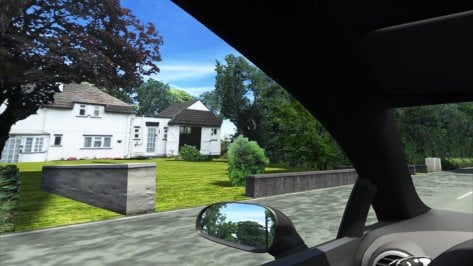
The gaps/floaties/etc are likely due to the way the original GPL mod was produced with the cockpit view as the intended view and the way the game renders.Thanks - nobody expects perfection, I was more interested in whether you were going to continue refining the track.
Hence the bug reports. They aren't criticism, they're intended to help. You might not spot stuff that others do (it's easier to spot stuff like this in VR, for example).
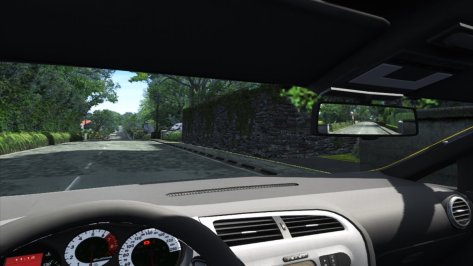
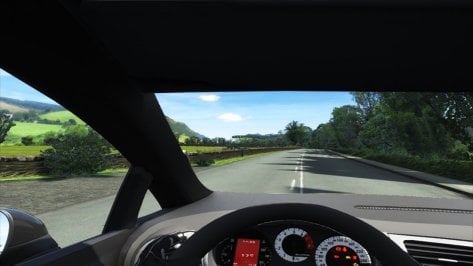
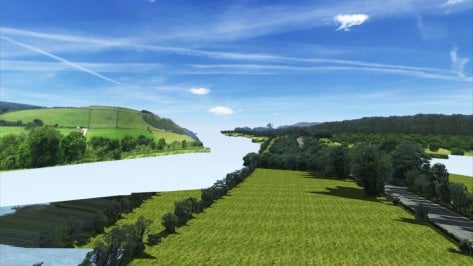
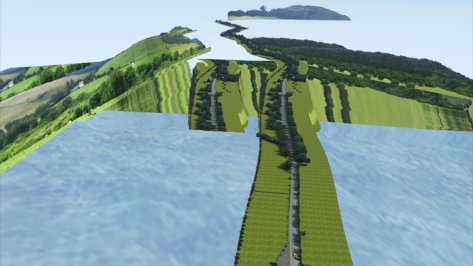
Here's some screenshots showing gaps between walls and road (there's a similar gap at hedge tops too) and floating houses and bits of missing landscape, all visible under normal driving conditions.
Hope they help, but if you're finished with the track and are taking it no further, then thanks anyway.
IOM is designed specifically around Draw Distance for GPL cockpit view. Draw Distance(LOD) is important for optimization as well as showing or hiding road and scenery at proper designed distance.
RF2 conversion has kept same principle in mind. It means player with view other than cockpit may find that scenery or road sections appear too soon or in the air, due to the different camera position or LODMultiplier value. The recommended way to enjoy this track is through cockpit view.
Note, if a track piece appears in the mid of air along the forward driving direction while using cockpit view, it means the car mod is set on a higher LODMultiplier value than default 1.0 value. Additionally, the default value for Swingman view is 2.0, which also enables you to see further than the track LOD is designed for. However there is no way to enforce LODMultiplier value from track itself, the only fix is by editing car mod camera file.
OK, but most of them can be seen from cockpit and they can all be fixed for AC.The gaps/floaties/etc are likely due to the way the original GPL mod was produced with the cockpit view as the intended view and the way the game renders.
Point is the original mod by Jim Pearson had some very specific points that had to be met for any prospective conversions.OK, but most of them can be seen from cockpit and they can all be fixed for AC.


