Assetto Corsa PC Mods General DiscussionPC 

  • Thread starter Thread starter daan
  • 149,721 comments
  • 45,380,042 views
I just rode Lemalands from lemax again. Then I noticed that the blades of the windmill don't turn at all. So I thought I'd just try to do it myself. It worked. For anyone who is interested, simply copy the code and paste it into the configuration file. If you want to adjust the speed, just play around with the speed multiplier.


Code:
[WRAP_MESHES_...]
NAME = windmill
MESHES = ROTATEZ8.0_mlinrot
PIVOT_POS = -175.46, 5.84, -353.34


[ANIMATED_...]
NODE = windmill
WINDMILL_DIR = 1, 1, 1      ; direction of wind to which windmill would react
WINDMILL_DIR_EXP = 0.5         ; increase to decrease spinning from almost-sideways wind¹
WINDMILL_DIR_BOTH_SIDES = 1  ; set to 0 to make wind blowing from the back to have no affect
SPIN_AXIS = 0, 0, 1          ; spinning axis
WIND_SPEED_KMH_MIN = 0.5     ; wind speed at which windmill starts to spin
WIND_SPEED_KMH_MAX = 50      ; wind speed at which windmill spins at its highest speed
WIND_SPEED_KMH_STOP = 0      ; wind speed at which windmill forcefully stops²
LAG_UP = 0.999               ; lag for speeding up
LAG_DOWN = 0.999             ; lag for spinning down
LAG_BRAKING = 0.98           ; lag for forceful stop
SPEED_MULT = 0.4              ; spinning speed multiplier*
Thanks, is it possible to do the same on the windmill from @Gilles75 Beez track.
I never could that thing rotating.
https://www.racedepartment.com/threads/carrieres-de-beez-1-0.153850/
 
Well, seems like that for me on CSP 0.2.3p1 (SOL 2.29 + Pure 0.225) AI is completly broken.
Several tracks + cars combos = AI drivers stuck on start an if I drive throu them - then they slooooowly start to ride, one-by-one.
Any thougts what could caused that?
 
Last edited:
Thanks for your work.
Two things to maybe revisit/make clear.
1. The ext_config code is specific about the kn5 to work with: "trr_porsche_963_lmdh.kn5", so that needs user editing to work with the SDD version: "lm_hypercar_963_lmdh.kn5"
2. Seems like you might have shipped the original kn5?

View attachment 1317279

Or have I just missed the bus completely?
It's the same steering wheel from ACF, which is widely used in every Porsche 963 in the scene (as far as I know), but the chassis tweaked. Everyone is up to use it in whatever car, just changing the kn5 on the ext_config which I intend that everyone know how to do and maybe it only works in the TRR and ACF car. I only recommend TRR as the ext_config is for that car, but for whoever aware of it then just add the MODEL_REPLACEMENT code of the ext_config of that car to the other config file of the car. Also it depends on whether the car has the same digital instrument scheme or not.
 
Last edited:
Hi everyone and happy new year!

Has anyone tried a weekend and had trouble with the AI when in qualifying? In some circuits they are unable to leave the pitlane. And it happens in several circuits. Does anyone know if it has to do with the latest CSP version? I'm on the 0.2.3 preview 1. Should I just go back to an older version? Or should I totally turn off the new AI behaviour?
 
Courage C41, C50, C51, C52 Megapack for Assetto Corsa 0.8

download: https://www.mediafire.com/file/g72q...C41%2C_C50%2C_C51%2C_C52_MegaPack_0.8.7z/file

Variants

Courage C41 Porsche'97
Courage C50 Porsche'99
Courage C51 Nissan'98
Courage C52 Nissan'99
Courage C52 Nissan V2'99
Courage C52 Peugeot'00


Credits

Model improvements: Kamil Cader, Peugeot905

Physics: Fullnoise,Peugeot905,Kamil Cader

Other Lemans Prototypes: https://www.mediafire.com/folder/7g6488jsyt2ux/Lemans_Prototype_Near_Finalized

Screenshots: AndyGTR

Testing Help: Luke Welch/NINJAADEGU


7gM2cd.jpg

B51RaM.jpg

Dx6BiW.jpg

EsLUGh.jpg

eTDJW9.jpg

FSojqZ.jpg

kKiPkV.jpg
KNscYJ.jpg
kxHB2l.jpg
lJk28q.jpg

oo9TC0.jpg

OsQo2I.jpg

TuV2Hm.jpg

Twr0Hx.jpg

v6EWHx.jpg

XPlGj9.jpg
YMEetY.jpg
 
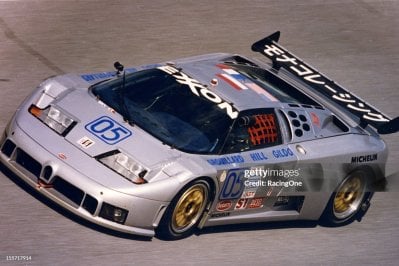
Does anyone knows if there is a skin for the Bugatti EB 110, representing the car that raced in the 1996 Daytona 24h?

I know there are at least 2/3 versions of this car modded for AC already, but I'm looking for one with this particular skin.
 

Attachments

  • gettyimages-155717914-2048x2048.jpg
    gettyimages-155717914-2048x2048.jpg
    175.7 KB · Views: 25
Last edited:
Does anyone knows if there is a skin for the Bugatti EB 110, representing the car that raced in the 1996 Daytona 24h?

I know there are at least 2/3 versions of this car modded for AC already, but I'm looking for one with this particular skin.
Not exactly the same, but maybe this IMSA skin is something foy you coming with this EB110?:

https://mega.nz/folder/9jIzFKDJ#ZZJKqYa-m9cpYqY5Q8ufhA

(downlaods are free, no payware are something else!!!)
 
Last edited:
Does anyone knows if there is a skin for the Bugatti EB 110, representing the car that raced in the 1996 Daytona 24h?

I know there are at least 2/3 versions of this car modded for AC already, but I'm looking for one with this particular skin.

One of the 2 skins included with the mod is similar to this one.

1704661716419.jpeg
 
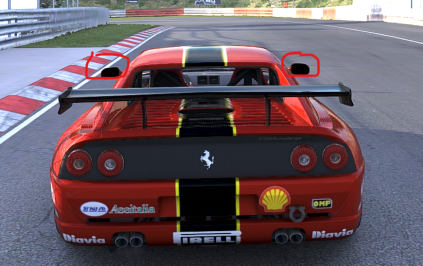
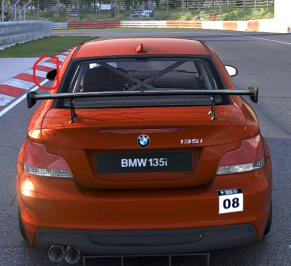
Hi everyone,
Has anyone had a problem with the mirrors darkening from the outside view? as in the pictures. Another problem on some cars, with the internal view I see the image inverted from the rear view mirrors. However, I noticed that it happens to me with the new csp 0.2.3 preview. Thanks in advance
 

Attachments

  • Screenshot 2024-01-07 225819.png
    Screenshot 2024-01-07 225819.png
    224.2 KB · Views: 23
  • Screenshot 2024-01-07 230013.png
    Screenshot 2024-01-07 230013.png
    173.3 KB · Views: 21
Anybody ????.... Please
That's the great thing about AC! You can do it instead of waiting for someone else to fulfill your every need.
There's even tutorial videos to help you out and get you going!
 
i need some help with the urd dtm 2018 cars.
i installed some skins with real tires and the skin works fine but the tires are still the "stock" urd. can someone maybe say whats wrong? as seen here the car should have dunlop tires but has manrood tires insteadView attachment 1317371
Those cars have tire textures set in their ext config, that's why they don't use tire textures from the skin folders.
 
Not exactly the same, but maybe this IMSA skin is something foy you coming with this EB110?:

https://mega.nz/folder/9jIzFKDJ#ZZJKqYa-m9cpYqY5Q8ufhA

(downlaods are free, no payware are something else!!!)


One of the 2 skins included with the mod is similar to this one.

View attachment 1317481
Thanks for the help guys.

Apparently, version #01 was the one used in the 3h of Watkins Glen in 95. For me, it's already great, since it fulfills my requirement as a grind filler.
 
X90
Figure this is worth a separate post, as it entails a question.

So, I finally knuckled down and learned how to improve AI lines. I have a strangely functional AI Line for @RMi_wood 's Washington DC Street Circuit that I mentioned above. AI is 4-4.5 seconds quicker than stock in the RSS Lambo, and about ~3.5 seconds quicker in the TT Cup. Everything seems to be working well - I weaved in extra hints and incidents are now quite rare. A good thing, considering this circuit is a complete death trap.

I just have one problem - on first boot, the cars will not start when the lights go out. They'll just sit there at the start-finish line, slowly edging out of their starting box until they roll away slowly a half minute later. If I restart the event once, though - even if it's instant and I don't even see the lights go out - they roll away at lights out perfectly.

Is this a problem with my AI line, or perhaps an issue with the track? I don't see any major segmentation at the start-finish line in the purple fast_lane, as I was sure to overlap. The left and right boundaries are also as far left and right as they can be at the grid - so no cars are outside of the red boundaries at the start. Disabling the AI behavior in CSP does nothing, sadly.

I feel like it's my simple mistake - I'd appreciate someone in the know chiming in to point me in the right direction.

If I can get this start issue squared away, I'd be happy to give this line out for further testing. Cheers.
Giving this a bump to see if anyone has a solution to this AI line issue I have with my RMi Washington DC revision. In a race or Weekend, all cars will not start unless the event is restarted once - then it works perfectly. My fast lane is perfectly woven, my sidelines are extremely accurate and everything works great once it's restarted - it's just that the first boot never works.

I tried to run a Time Attack to generate a new overlays.ini, and it did not do it. Removing the overlays.ini from the track folder altogether did nothing either. That is likely not the source of the issue.

Google is bringing up nothing definitive for me either. I'd prefer to not have to start again if there's a potential fix. Other than this one problem, the AI is actually quite impressive and is ready for release.

Anyone with track modding experience that's seen this before, I'd appreciate some advice. Cheers.
 
Last edited:
I just rode Lemalands from lemax again. Then I noticed that the blades of the windmill don't turn at all. So I thought I'd just try to do it myself. It worked. For anyone who is interested, simply copy the code and paste it into the configuration file. If you want to adjust the speed, just play around with the speed multiplier.


Code:
[WRAP_MESHES_...]
NAME = windmill
MESHES = ROTATEZ8.0_mlinrot
PIVOT_POS = -175.46, 5.84, -353.34


[ANIMATED_...]
NODE = windmill
WINDMILL_DIR = 1, 1, 1      ; direction of wind to which windmill would react
WINDMILL_DIR_EXP = 0.5         ; increase to decrease spinning from almost-sideways wind¹
WINDMILL_DIR_BOTH_SIDES = 1  ; set to 0 to make wind blowing from the back to have no affect
SPIN_AXIS = 0, 0, 1          ; spinning axis
WIND_SPEED_KMH_MIN = 0.5     ; wind speed at which windmill starts to spin
WIND_SPEED_KMH_MAX = 50      ; wind speed at which windmill spins at its highest speed
WIND_SPEED_KMH_STOP = 0      ; wind speed at which windmill forcefully stops²
LAG_UP = 0.999               ; lag for speeding up
LAG_DOWN = 0.999             ; lag for spinning down
LAG_BRAKING = 0.98           ; lag for forceful stop
SPEED_MULT = 0.4              ; spinning speed multiplier*
Thanks for this! Lemalands is a wonderful track, I wrote Lemax months ago asking if he planned on adding more grid spots but never got a reply. I'm hoping someone adds some more grid slots eventually because 12 cars is just a tease of what this track is capable of.
 
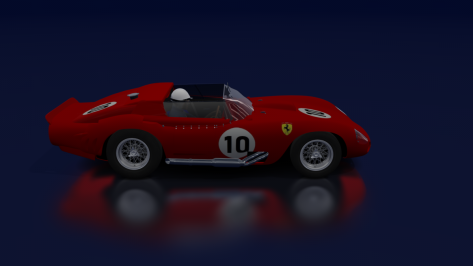
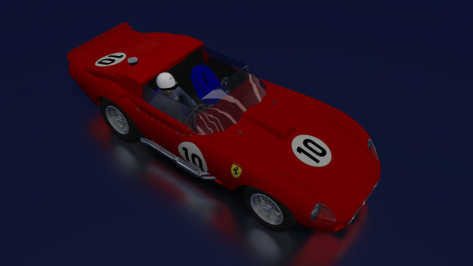
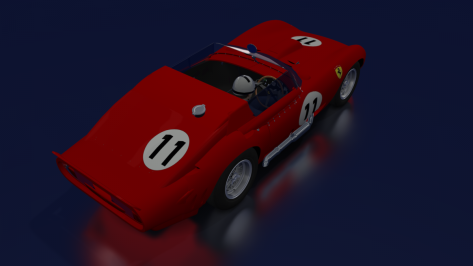
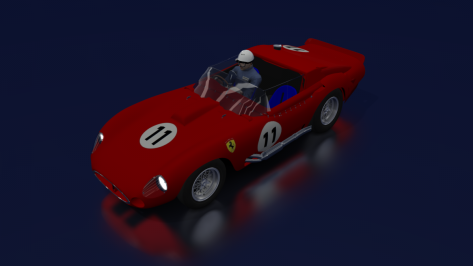
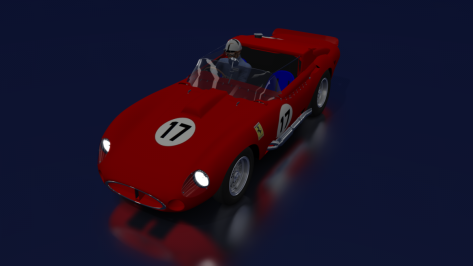
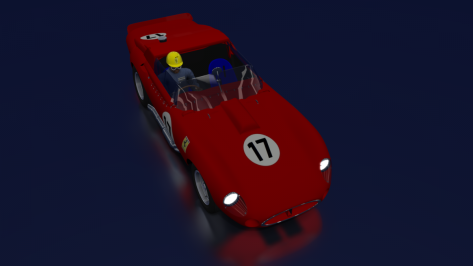
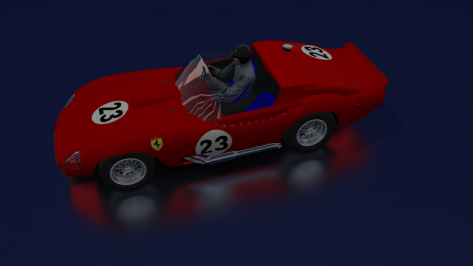
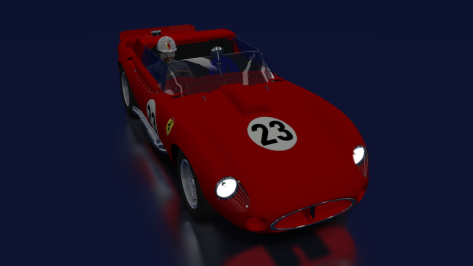
Another Ferrari to make up the Le Mans grid (1961)
An invention for the 250TR/61The 246SP version (I used the same model)

Car number 10 (O.Gendenbien - P.Hill - Scuderia Ferrari)
Car number 11 (W.Mairesse - M.Parkes - Scuderia Ferrari)
Car number 17 (P.Rodriguez - R.Rodriguez - NART)
Car number 23 (W. von Trips - R.Ginther - Scuderia Ferrari)

Later, start track testing.
 

Attachments

  • __custom_showroom_1704679559.png
    __custom_showroom_1704679559.png
    73.5 KB · Views: 28
  • __custom_showroom_1704679580.png
    __custom_showroom_1704679580.png
    72.1 KB · Views: 31
  • __custom_showroom_1704679600.png
    __custom_showroom_1704679600.png
    74.5 KB · Views: 27
  • __custom_showroom_1704679630.png
    __custom_showroom_1704679630.png
    68.6 KB · Views: 24
  • __custom_showroom_1704679665.png
    __custom_showroom_1704679665.png
    66 KB · Views: 26
  • __custom_showroom_1704679690.png
    __custom_showroom_1704679690.png
    59.9 KB · Views: 31
  • __custom_showroom_1704679714.png
    __custom_showroom_1704679714.png
    75 KB · Views: 29
  • __custom_showroom_1704679741.png
    __custom_showroom_1704679741.png
    66.2 KB · Views: 29
And I've vanished again for quite a bit....
Countach 25th Anniversary progress.
Untitled1.png

The car is now ready to be imported into AC since I've sorted out all of the mesh issues... And I've managed to reduce the polycount from 1150k polys to around 890k. I've still yet to decide if the car should have a HD variant (This one) and a performance friendly version with 250k-to 400k polygons...
AO baking and other improvements shouldn't take long.
This took longer than expected for a Kunos Countach reskin...
Polyphony really found a way to torture modders with the tessellation method they use for models.
And some meshes were either damaged or incomplete (meshes that you need to boolean and or fix yourself).
 
Last edited:
Well, seems like that for me on CSP 0.2.3p1 (SOL 2.29 + Pure 0.225) AI is completly broken.
Several tracks + cars combos = AI drivers stuck on start an if I drive throu them - then they slooooowly start to ride, one-by-one.
Any thougts what could caused that?
Try rolling back to a Older CSP. I had a Issue couple updates back that broke my AI in the Rain they started doing the braking and stopping and accelerating again in long braking zones. They were working Perfect before I updated. I notified them in the Discord they were aware of the problem they said but hasn't been fixed so I'm staying for now on the CSP that works for me :) I always read comments now before updating I use to just update but yeah I get a bit nervous to update these days lol
 
Nissan Z (RZ34) GT500 2022 1.0


Full description on YouTube

Credits:
TheNuvolari - 3D model, sounds, skins, physics tweaks, porting the car to AC
XAVITHEHOBBIT - References help, testing
mhmd - 3D consultant, References help, remeshing several parts
Csaba007 - Physics
Tummie555 - Driver animations
enkay74 - Driver & crew textures
ChemFlummi, x4fab - Encryption

If you think 5 months of work is worth a donation:

DOWNLOAD: https://sharemods.com/bxeryp6z9906/z_gt500_2022_1.0.zip.html
DOWNLOAD SKINNING KIT: https://sharemods.com/f1tu45a6jofg/z_gt500_skinning_kit.zip.html

If you find any bugs or want to leave feedback please don't quote me here as I'm not really active on this site anymore, you can find me on Discord (thenuvolari19)
 
Last edited:
.kn5 Converter not working

I want to create a 3d render of a car on Hakone Nanamagari right, and i used kn5conv.exe to convert the .kn5 files to .obj. Everything works except the textures - all of them are blue for some reason? any suggestions how to fix this? I also tried EK Nanamagari but its not use either.View attachment 1317347View attachment 1317348
it's an encrypted track, so you can't basically do what you want. Delete everything.
 
Nissan Z (RZ34) GT500 2022 1.0


Full description on YouTube

Credits:
TheNuvolari - 3D model, sounds, skins, physics tweaks, porting the car to AC
XAVITHEHOBBIT - References help, testing
mhmd - 3D consultant, References help, remeshing several parts
Csaba007 - Physics
Tummie555 - Driver animations
enkay74 - Driver & crew textures
ChemFlummi, x4fab - Encryption

If you think 5 months of work is worth a donation:

DOWNLOAD: https://sharemods.com/bxeryp6z9906/z_gt500_2022_1.0.zip.html
DOWNLOAD SKINNING KIT: https://sharemods.com/f1tu45a6jofg/z_gt500_skinning_kit.zip.html

If you find any bugs or want to leave feedback please don't quote me here as I'm not really active on this site anymore, you can find me on Discord (thenuvolari19)

Excellent. Been looking forward to the missing piece of the SuperGT puzzle. Can't wait to try it. 👏
 
I have BOPed some 90s GT1 cars for singleplayer championship purposes, if someone is interested:

 
Nissan Z (RZ34) GT500 2022 1.0


Full description on YouTube

Credits:
TheNuvolari - 3D model, sounds, skins, physics tweaks, porting the car to AC
XAVITHEHOBBIT - References help, testing
mhmd - 3D consultant, References help, remeshing several parts
Csaba007 - Physics
Tummie555 - Driver animations
enkay74 - Driver & crew textures
ChemFlummi, x4fab - Encryption

If you think 5 months of work is worth a donation:

DOWNLOAD: https://sharemods.com/bxeryp6z9906/z_gt500_2022_1.0.zip.html
DOWNLOAD SKINNING KIT: https://sharemods.com/f1tu45a6jofg/z_gt500_skinning_kit.zip.html

If you find any bugs or want to leave feedback please don't quote me here as I'm not really active on this site anymore, you can find me on Discord (thenuvolari19)

Why is the car so small?
The cockpit is absolutely tiny, and (I'm not exaggerating for comic effect here) the driver looks to be about six years old.
In VR it's like driving a toy car.
I think something's gone very wrong with the scaling here.

Compare windscreen width and headlight separation with a standard Z400:

1704708938502.png


Here's the cars superimposed over each other (offset left-right) to better demonstrate the windscreen/a-pillar width differences:

1704709741496.png


BTW, forgot to say - thanks very much for the car! :)
 
Last edited:
Why is the car so small?
The cockpit is absolutely tiny, and (I'm not exaggerating for comic effect here) the driver looks to be about six years old.
In VR it's like driving a toy car.
I think something's gone wrong with the scaling here.
Blender shows correct parameters idk even after exporting with FBX units scale, idk what AC does with the model in ksEditor afterwards

Frankly I don't wish anyone to work with the interior of a Super GT car because modeling an interior from 3 pictures is quite the challenge to say the least and mediocre onboard videos from one angle don't do justice
 
Last edited:
Why is the car so small?
The cockpit is absolutely tiny, and (I'm not exaggerating for comic effect here) the driver looks to be about six years old.
In VR it's like driving a toy car.
I think something's gone very wrong with the scaling here.

Compare windscreen width and headlight separation with a standard Z400:

View attachment 1317584

Here's the cars superimposed over each other (offset left-right) to better demonstrate the windscreen/a-pillar width differences:

View attachment 1317591
Compared to the URDs

1704709958024.png


Looks great, but scaling seems off.
could of course be the URDs also.
 
Last edited:
Blender shows correct parameters idk even after exporting with FBX units scale, idk what AC does with the model in ksEditor afterwards

Frankly I don't wish anyone to work with the interior of a Super GT car because modeling an interior from 3 pictures is quite the challenge to say the least and mediocre onboard videos from one angle don't do justice
Now try a forgotten racecar from 60 years ago. You'd be happy with 3 pictures :lol:

It's really strange because Blender is well known for mixing up scaling with FBX on a 1/100 scale, but not for a few % has it seems too. Can you do the same scaling test than mascot in blender, to be sure ?

Scaling seems to be quite a regular problem with AC's cars, really.
Future idea for x4fab : managing to get a fonctioning simple "global rescaling" tool in CM so modders don't have to redo the whole car by hand :bowdown:
 
Sharing a mod? Host it on GTPlanet Downloads. Free, public hosting for files up to 10GB in size.
Back