Assetto Corsa PC Mods General DiscussionPC 

  • Thread starter Thread starter daan
  • 154,739 comments
  • 48,687,465 views
Anyone know how to disable sat nav now? It seems to be on by default and the option to disable it seems to have gone.
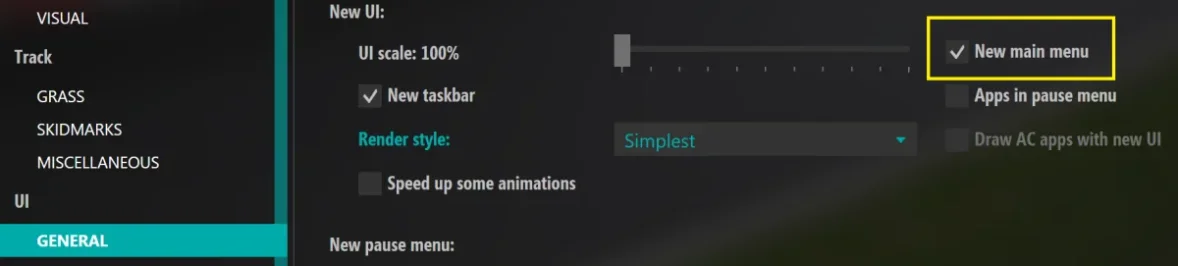
Seems like you now have to go to ...assettocorsa\extension\config\car_instruments.ini and set

REMEMBER TO REMOVE THE SEMI-COLON BEFORE THE TEXT IN THE CONFIG, AND THE OPTION TO DISABLE NAV SCREENS WILL BE BACK IN CSP INSTRUMENTS SETTINGS

[BASIC]USE_NAVIGATORS2=0
 
Last edited:
Last edited:
No problems with the v.3 install. Biggest difference was with Pure. I previously found that using the Pure PPF the image was way too bright, so I used that PPF to make fairly heavy adjustments to get it right. With v.3 everything was immediately very dark. Hitting default in Pure PPF brought it back in range and with a brightness increase and a contrast decrease everything is beautiful. In game rendering seems to look better overall than prior to v.3, as if LCF wasn't quite working before. Frame rates are very good (locked at 60 in pancake).
I'm happy :)
 
With the new CSP 3.0, my FPS dropped from 67 to 56 in a race with about 14 cars on a triple screen (4080TI). On top of that, I got light snowfall in October. I'm now back to 2.11. If 3.0 really runs better, some settings that have changed need to be adjusted. But I have no idea which ones.
 
Downloaded the new CSP. Started it up to test. Was getting CPU usage of 30% and GPU 40% on single car test. Now getting CPU 98% and GPU 99%. Tried restarting computer, game ect. Still the same. I have reverted back to 212 and back to normal again.
Not sure if it's the same with you, but I was getting CPU at 100% and GPU at 70%. Turned off the frame limiter, and CPU is now at 30% - but GPU jumped to 100%. Seems that there's something wrong with the new frame limiter.
 
For those with the 100% GPU and CPU - is this only in the chart of the render stats app or is it really causing the PC using 100% GPU and CPU?

Also is there any red dot in the LUA Debug app in-game?
 
Last edited:
20251018-200000-industrial-f302_renault_laguna_97.webp

Released : Renault Laguna BTCC´97
Author:F302
3D Model by Raceroom
Texture Update : F302
3d work: F302
hope u enjoy the Car
knowing bugs driver shiftanimation
ps : send feedback ,bugs ,missing things
tested on 0.2.12-preview1
PP filer _PURELIFEEVO
have fun!
To install, move folders to "...\SteamApps\common\assettocorsa" or simply
drag'n'drop archive to Content Manager

 
Not sure if it's the same with you, but I was getting CPU at 100% and GPU at 70%. Turned off the frame limiter, and CPU is now at 30% - but GPU jumped to 100%. Seems that there's something wrong with the new frame limiter.
Quick update on this. Frame Limiter is causing CPU to jump to 100%. Waiting for VSync is causing GPU to jump to 100%. I'm guessing both of these were changed, as disabling them got me to performance levels similar to what I used to have.
 
Sorry for the double post but I couldn't include more than 5 media posts in one post.


Panoz Esperante GTR-1 Roadcar sound mod:


The Panoz sound is quite "aggressive" for a street version, cant remember if I changed it or if its the "stock" one


With the new CSP 3.0, my FPS dropped from 67 to 56 in a race with about 14 cars on a triple screen (4080TI). On top of that, I got light snowfall in October. I'm now back to 2.11. If 3.0 really runs better, some settings that have changed need to be adjusted. But I have no idea which ones.
With preview version, snow will begin at 3c ambient temp,even with rain selected
 
Quick update on this. Frame Limiter is causing CPU to jump to 100%. Waiting for VSync is causing GPU to jump to 100%. I'm guessing both of these were changed, as disabling them got me to performance levels similar to what I used to have.
Could you show your settings in CM - AC - video?
 
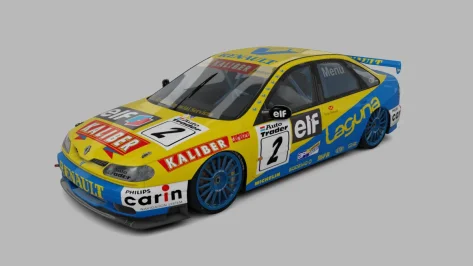
Added real BTCC logos on the number plates and front glass decals for JK's Laguna :)

Will probably alter these with the real plates and add the 1998 #21 skin when Rustad drove with the works team at Silverstone in the near future but can't be arsed rn.

(JK ur da goat for bringing this one to AC btw :) :) :) )


Attachments

  • __custom_showroom_1760813587.webp
    __custom_showroom_1760813587.webp
    56 KB · Views: 11
Last edited:
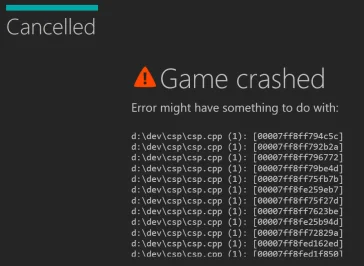
Getting this on loading quite often with the latest CSP.
Anyone else?

View attachment 1486294

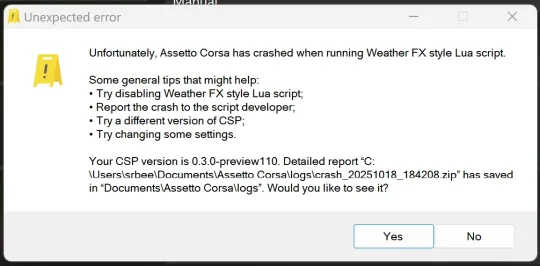
Also get another crash to do with a WeatherFX LUA script, or something.
Stable this build ain't. Not for me at least.

Edit: this one

View attachment 1486302

@Peter Boese any ideas please?
please send me the report file

Did you try with standard Kunos content (cars + tracks)?

Did you already try to reset the CSP settings?
 
Last edited:
I was getting a big lack of motivation for the 2006 mod.

Simdream doing a 2006 season now killed it even more.


View attachment 1486308


No I'm joking lmfao i will make sure that this doesn't go without any real competition. Can't let that free money cash grab get the cake due to no serious alternative

Being a 100% biased Kimi fanboy that 2006 was very dull season for me anway. But 2007... I loved that. :D

Doesn't ACFL already have 2006 cars? I think I have them but since I don't like that particular year I doubt I have ever tested them.

That's probably going to be the base of the commercial SD mod.

SimDream probably examines carefully everything that's good in that ACFL mod.... and then throws it away.
 
Last edited:
Getting this on loading quite often with the latest CSP.
Anyone else?

View attachment 1486294

Also get another crash to do with a WeatherFX LUA script, or something.
Stable this build ain't. Not for me at least.

Edit: this one

View attachment 1486302

@Peter Boese any ideas please?

since new CSP version, I'm seeing again memory issues w preview generation after couple of cars , a new memory leak probbably sneaked in...

View attachment 1486303
All stable on my side, with improved FPS
 
Being a 100% biased Kimi fanboy that 2006 was very dull season for me anway. But 2007... I loved that. :D

Doesn't ACFL already have 2006 cars? I think I have them but since I don't like that particular year I doubt I have ever tested them.

That's probably going to be the base of the commercial SD mod.

SimDream probably examines carefully everything that's good in that ACFL mod.... and then throws it away.
No they will take 3d models from the same guy that made their 2009 boat cars.

And the livery will be made by AI. Just like the picture of the 2006 announcement. Just zoom in you will see how cringe the AI is.
 
No they will take 3d models from the same guy that made their 2009 boat cars.

And the livery will be made by AI. Just like the picture of the 2006 announcement. Just zoom in you will see how cringe the AI is.

We will see what they come up with, but their previous GP 2000 mod, I have looked in detail used 3GB more of VRAM compared to your F1 2007 mod, where I could contribute in later stages of the development a bit. Quality wise SD did not have any edge for the 3GB extra textures, they simply were wasting VRAM for nothing due to very poor DDS mapping / utilization.

And again my focus is online racing, nice to have 1 car with good fps offline, but if you load 20 cars and go online racing 60 FPS is... well very bad.
 
Hi. How do you change the app window display. Thanks.
You grab the bottom corner and stretch the window.
Sounds like I had the same experience as you.
I ran my favourite test scenario to see the improvement - full grid at Nords which runs perfectly at 5200x3400 in 0.2.11
Loaded in 0.3 and got multiple periods of fps dropping into the low 80s, basically undrivable.
Switched straight back to 0.2.11.
Hopefully there will be a quick fix.
I lost the starting lights too and had the 100% CPU / GPU issue.
 
I lost the starting lights too and had the 100% CPU / GPU issue.
I had the '99% CPU Occupancy' warning appear at the top of the display for the first time in years. I'd totally forgotten it even existed.
My VR performance is definitely reduced too, based on similar known race benchmarks to yours.
Hardly progress, is it?
 
Last edited:
Sharing a mod? Host it on GTPlanet Downloads. Free, public hosting for files up to 10GB in size.
Back