Assetto Corsa PC Mods General DiscussionPC 

  • Thread starter Thread starter daan
  • 157,651 comments
  • 51,567,082 views
As far I'm concerned, for Dumb AI, it is just a small service app I started for myself, out of curiosity. It is not linked with other apps and I use Tetri exploration results with his AI Whisperer to gather insights on "how AI works naturally in AC" and "what I could use to improve my tries"

The Dumb AI app runs each timeframe to check for situations where the original AI seems to be lacking something and try to propose something else by overiding the original behavior.

So far, it just has 3 functionnalities:
- try to expand blue flag behavior by trying to create better overtake opportunities for the leader that is outlapping so that it gets not stuck anymore, but also without provoking crashes or producing new bugs

- overide the "pit when raining" behavior: the original one works very well but I noticed the AI get back on track always with medium tyres compound. This is a good example where you just lack a small thing but have to rewrite the whole process to overide the original situation: from detecting track weather changes to how to make pit the AI and set its tyres to the softer compound

- propose understandable pit strategies: I'm mainly an "arcade-like offline gamer" so I like the idea to be able to simulate rules for different championships but without having to parametrize a zillion of things from scratch each time you want to race. My aim is to propose simple AI strategies that would apply automatically.

Want to have a rule where AI and you must change tyres once in the race ? let's create something that would in the end be just a button to push and the AI will compute itself a frame with small random effects to add diversity.

Want to create a very complex strategy scripted for each AI , what it should do at each lap, etc... ? let's create a json format where you could put all this information and that would be read just by pressing a different button.

I just use my app so I don't know how the Dumb AI would behave when multiple apps give concurrent advices/insights to the same AI. I didn't create a tutorial for it because I was not sure people would use it, I see it has some download but so far had no return about bugs or about new functionnality proposal etc...
You should definitely keep improving the app, adding more stuff as you go such as improving start of race behavior, yellow flag/safety car behavior, side by side racing, accident ahead behavior, qualifying strategy and so on... There are apps that do those things that you could take some inspiration if you want, but having everything in a single app would be very welcome. AI is probably the worst area of Assetto Corsa nowadays, so the more AI tools we have, the better. Not sure how far you want/can go with this, but those are just some ideas to improve the app.
 
Friends,

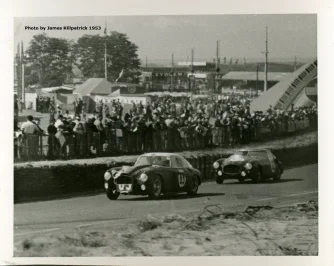
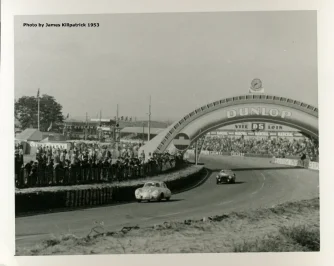
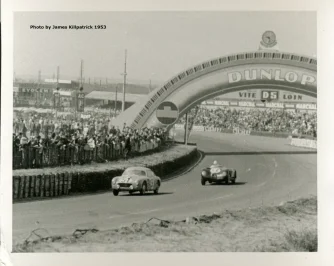
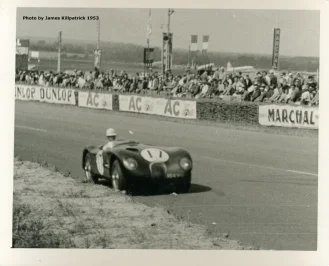
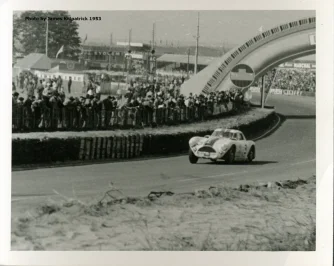
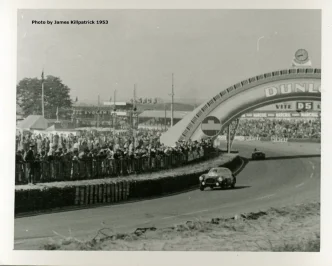
While digitizing some of my late father-in-law's slides I have come across several photographs he took while attending the 24 Hours of Le Mans in 1953. James Killpatrick was serving in the US Army as a counterintelligence officer and was a big Briggs Cunningham fan. While I don't think these photos shed any additional light on liveries, etc., I thought you might appreciate them nonetheless. Moments in time which capture the atmosphere of a great race. James was a fantastic fellow - after the Army he became a journalist - Reuters, US News, etc. He passed in 2009, and I miss his friendship and his stories.

Hopefully some inspiration for more AC mods!
 

Attachments

  • Biondetti-Gonzalez Lancia D20, Ascari-Villoresi Ferrari 340 MM.webp
    Biondetti-Gonzalez Lancia D20, Ascari-Villoresi Ferrari 340 MM.webp
    111.1 KB · Views: 11
  • Veuillet-Müller Porsche 356.webp
    Veuillet-Müller Porsche 356.webp
    93.2 KB · Views: 17
  • Stempert-Schwartz Panhard Dyna X87, Moss-Walker-Rolt Jaguar C-type.webp
    Stempert-Schwartz Panhard Dyna X87, Moss-Walker-Rolt Jaguar C-type.webp
    107.4 KB · Views: 16
  • Moss-Walker-Rolt Jaguar C-type.webp
    Moss-Walker-Rolt Jaguar C-type.webp
    120.2 KB · Views: 16
  • Moran-Bennett Cunningham C-4RK.webp
    Moran-Bennett Cunningham C-4RK.webp
    96.2 KB · Views: 14
  • Marzotto-Marzotto Ferrari 340 MM.webp
    Marzotto-Marzotto Ferrari 340 MM.webp
    96.5 KB · Views: 12
Hi everyone, I have a question for anyone who may have had the same problem with the latest CSP updates. As soon as I hit the track, whether for practice or a race, the system slows down and I get the following message: "CPU OCCUPANCY > 99%." Does anyone know how to fix it? Thanks in advance.
 
guys, how do i install neckfx settings someone uploaded on overtake?
 

Attachments

  • 1762212547391.webp
    1762212547391.webp
    57.5 KB · Views: 11
Hi everyone, I have a question for anyone who may have had the same problem with the latest CSP updates. As soon as I hit the track, whether for practice or a race, the system slows down and I get the following message: "CPU OCCUPANCY > 99%." Does anyone know how to fix it? Thanks in advance.
Happened the same to me. Limiting the framerate to 60 FPS (or 140 depending your hardware) fixes the issue.

Edit: Not via the NVIDIA panel, but in CM settings.
 
Last edited:
This escalated quickly and took on a life of its own. A simple adboard refresh became a much bigger overhaul with a lot of help from @shi, Nukedrop, @mteam and others.
Soon™

View attachment 1489628
I'm going to take credit for this for bringing it up in this thread, lol ;) :gtpflag:


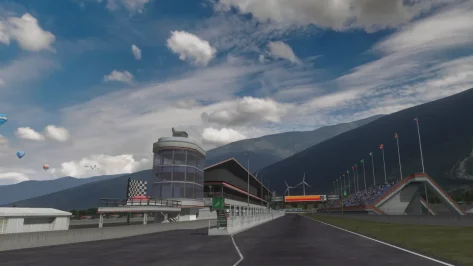
And the mountains! Awesome.
 
Last edited:
New version of Performance Points (PP) Generator is out!
Version 0.3
  • Added: Lightweight Cars Balancing modifier
  • Added: New Custom PP Grids for ±1% & ±2.5% PP Difference
  • Fixed: Dynamic Mode not applying correctly
  • Fixed: User preferences not persisting across sessions
  • Internal: Minor stability and calculation fixes
DOWNLOAD LINK: (The file is apparently too large, so I'm putting the download link) https://www.mediafire.com/file/ajajy6agp2kulsv/AC_PP_Script__-_0.3.zip/file
 
Last edited:
Hi everyone, I have a question for anyone who may have had the same problem with the latest CSP updates. As soon as I hit the track, whether for practice or a race, the system slows down and I get the following message: "CPU OCCUPANCY > 99%." Does anyone know how to fix it? Thanks in advance.
Is it because it appeared after upgrading to CSP0.3.0? I only resolved it by manually editing the registry to force AC to run in "High" mode.
 
Last edited:
I swear most of the people on here are spending more time looking at how the game looks with an microscope than actually playing it lol

The grass one in particular adds a lot to the immersion level IMO, driving past it now (even at speed) it can be noticeable how 'flat' it is compared to older CSP versions, no microscope needed.
 
Last edited:
shi
Road One International v1.3

View attachment 1253826
Converted from rFactor.
Fictional circuit in Canada.

-CSP recommended
-32 pit/start
-AI, cam
-2 layouts
-camtool

Credits & Thanks;

A fantasy track made by Alexandre Ulleri for NR2003.
Converted to GTR2 by DeHAwk.
Updated by Khan1670.
Converted and updated for rFactor by @Zwiss and Thank you for giving me permission

Converted to AC by @shin956
AI, camtool by @Viola_seven
AI (reverse layout) by @KevinK2
.lua and font by @gunnar333
Extra object placement, fence texture by @CosmiC10R
Background texture edit(v1.0), sky objects and textures by @Masscot
Background texture edit(v1.0) by @twobegreen
Some object and textures by kunos
logo.png by @Fanapryde
Background Mountain and dam by Tyrone
physics mesh by @pugsang
cam by @DaBaeda
Test and Feedback by @Breathe , @Masscot , @twobegreen , @slider666 , Jonah Hax
Tracks maps by Jonah Hax

Enjoy.

note:
If you want to remove tar lines repeatedly, go to the end of ext_config.ini and set ACTIVE to 1.

;;;;;;;;;;;;;;;;;;;;;;;;;;;;;;;;;;;;
v1.1 changelog;
-Added Background Mountain and dam by Tyrone.
-Rework Trees (Removed Treewall).
-Added physics mesh by pugsang.
-Added animated flag-waving spectators.
-chopper and balloon have been updated by Mascot.
-Smoothed out the edges of the road.
-Some textures were upscaled with AI.
-Changed the billboard texture to the one made by Mascot.
-Made it possible to select the logo texture created by Mascot as skins.
-Original billboard textures are included as skins.
-Updated preview.

v1.2 changelog;
Added AI lines and sidelines created by IMEAN to the normal layout. (Thanks!)
Fixed a hole in the grass.
Fixed flickering on billboards.
Added sand edges.
Reworked groove and skidmarks.
Updated flags.
Changed crowd textures by Kniker97. (Thanks)
A few other minor fixes.
Even when CSP settings → General Patch Settings → CPU optimizations → Chunks optimizations are set to Advanced, ground objects are no longer hidden. (Tested with CSP 0.2.12-preview1.)

v1.3 changelog;
Updated camera_facing crowds mesh and config.
Updated ext_config.ini. ( jumbo screen)
Added ‘countdown’ markers by Mascot. (Originals are in the skin folder)
Replaced fence texture from Mascot.

Road One International v1.3

v1.3 changelog;
Updated camera_facing crowds mesh and config.
Updated ext_config.ini. (jumbo screen)
Added ‘countdown’ markers by @Masscot . (Originals are in the skin folder)
Replaced fence texture from @Masscot . (Thanks)

1762246488085.webp
 
Are you planning to share this preview? Looks great! Is it using CSP final preview rendering?
yes, it´s a CSP preview setting. But for now it´s not working properly for the latest CSP -.-
nevertheless I could share the preset
 
Last edited:
Now that I can actually drive in wet weather without things looking like a Powerpoint presentation:
How do you set the wetness to build up realistically?
Start on a dry sunny track, some light drizzle appears, and before I even need to turn my wipers on puddles instantly appear at the side of the track. It's just not realistic at all.
Ditto on a soaking wet track with huge puddles everywhere, the sun comes out and within a few seconds the track is bone-dry. You can actually see the puddles shrinking in real time like water getting flushed down the toilet.
Is it supposed to be like this, speeded up for dramatic effect?
Looks very weird.
How come the default settings aren't more realistic?
Or am I doing something wrong and there's a tick box I missed somewhere?
(latest Pure reset to defaults, latest CSP).
 
Now that I can actually drive in wet weather without things looking like a Powerpoint presentation:
How do you set the wetness to build up realistically?
Start on a dry sunny track, some light drizzle appears, and before I even need to turn my wipers on puddles instantly appear at the side of the track. It's just not realistic at all.
Ditto on a soaking wet track with huge puddles everywhere, the sun comes out and within a few seconds the track is bone-dry. You can actually see the puddles shrinking in real time like water getting flushed down the toilet.
Is it supposed to be like this, speeded up for dramatic effect?
Looks very weird.
How come the default settings aren't more realistic?
Or am I doing something wrong and there's a tick box I missed somewhere?
(latest Pure reset to defaults, latest CSP).
Why don´t you use the live weather feature and let the things be like they are?
 
You should definitely keep improving the app, adding more stuff as you go such as improving start of race behavior, yellow flag/safety car behavior, side by side racing, accident ahead behavior, qualifying strategy and so on... There are apps that do those things that you could take some inspiration if you want, but having everything in a single app would be very welcome. AI is probably the worst area of Assetto Corsa nowadays, so the more AI tools we have, the better. Not sure how far you want/can go with this, but those are just some ideas to improve the app.
Thank you, yes there is still plenty of room for improvement.

Right now, Dumb AI costs between 0.01 and 0.02 ms for an update(dt) for a memory use between 1 and 2 Mo. I read somewhere that the AC model physics is running at 333MHz, so that lets us max 3ms to avoid any risk of mismatch with the physics. More likely less because the lua API may be quick but is not native C and there are also other app running in the background.

The qualifying stategy looks possible and should not cost too much I think. Basically adding a lap counter to the bot class in Qualify session and counting one lap, two laps and then get back to stand with blue flag behavior on with a timer per bot so that they are not all at the same time on the track. I'll have a look at it !

Virtual safety car, I see it basically as a setSpeedLimit for all driver under some condition. I have not really checked the yellow flag behavior API, I'll have a look.

The problem of the start of the race is I believe closely linked to the native overtake decision. I'm not sure we can access to the native AI code, btw I wonder how CSP is doing its AI adjustments , they don't seem to make an official lua app for it so I suppose they include it in the dll using C/C++/C# whatever the native language of AC ?
 
Last edited:
Why don´t you use the live weather feature and let the things be like they are?
Would that solve the accelerated wetting and drying though?
And sometimes I want to decide what weather to use rather that mimicking whatever's outside, eg having a sunny day interrupted by summer showers adds some nice variety to races... but the immersion get killed with the Benny Hill speeding up of the effects.
I'm guessing there must be a way to get the transitions more realistic, but I'm not sure how. And not sure why this isn't the default setting.
 
Last edited:
I swear most of the people on here are spending more time looking at how the game looks with an microscope than actually playing it lol
This forum has turned from a mod source to a problem solver. We used to have track and car mods daily. Now it seems like it's mostly I'm having this problem or that. Who gives a crap about what the grass looks like when your going 125 MPH. I feel alot of problems are caused by the hundreds if not thousands of different types of mods people have installed. I'm no computer expert, but there has to be conflict with so many mods.
 
Is it because it appeared after upgrading to CSP0.3.0? I only resolved it by manually editing the registry to force AC to run in "High" mode.
Hi. How do you do the manual editing of the registry please to resolve this issue. Many thanks. At the moment I reverted to 2.12.
 
Would that solve the accelerated wetting and drying though?
And sometimes I want to decide what weather to use rather that mimicking whatever's outside, eg having a sunny day interrupted by summer showers adds some nice variety to races... but the immersion get killed with the Benny Hill speeding up of the effects.
I'm guessing there must be a way to get the transitions more realistic, but I'm not sure how. And not sure why this isn't the default setting.
1762263384566.webp

I'm not really sure if this has something to do with your problem, but what time multiplier is set when you press that 3-dot button?
 
Now that I can actually drive in wet weather without things looking like a Powerpoint presentation:
How do you set the wetness to build up realistically?
Start on a dry sunny track, some light drizzle appears, and before I even need to turn my wipers on puddles instantly appear at the side of the track. It's just not realistic at all.
Ditto on a soaking wet track with huge puddles everywhere, the sun comes out and within a few seconds the track is bone-dry. You can actually see the puddles shrinking in real time like water getting flushed down the toilet.
Is it supposed to be like this, speeded up for dramatic effect?
Looks very weird.
How come the default settings aren't more realistic?
Or am I doing something wrong and there's a tick box I missed somewhere?
(latest Pure reset to defaults, latest CSP).
Its your decision how you want this:

If you want a dynamic progression with rain, wetness and water, you can use the dynamic option infront of those parameters:
1762265686541.webp


But you can also build a plan, where those values are forces within every slot. So you could define a steady fixed setting:
1762265749810.webp


Then sure the values are set acoording to the values in the data tab of Pure Planner.

But for a automatic progression use the dynamic option.


If you switch to the "Timed" plan, you will have already a useful template there where those options are activated.
Just add more slots an define their durations:
1762265913844.webp


The Timed mode is actually the most practical plan. But you could also just use the "live" plan. It has this dynamic progression deactivated, because it will change the weather every 5 min with the real weather and so you have a slow progression with 5 min duration to the current weather, but you can also set the dynamic progression there:
1762266075949.webp

You can even set your own rain, wetness or water levels there if you want...
 
Last edited:
Sharing a mod? Host it on GTPlanet Downloads. Free, public hosting for files up to 10GB in size.
Back