

Excited, if it drives like their Aston with the cosmic update it's going to be the best version we'll ever get, + all the extension that bonny was showing off for it was insane.


Rss dont use cosmic physics. only VRC use that. the model if you compare it to the rss one looks better, also possibilty of having lights config incluiding postion like the wec who in the rss dont. For me the list is: VRC , URD and RSSIts crazy that URD was the first of the 3 big mod teams and are so far behind in every way compared too RSS and VRC .


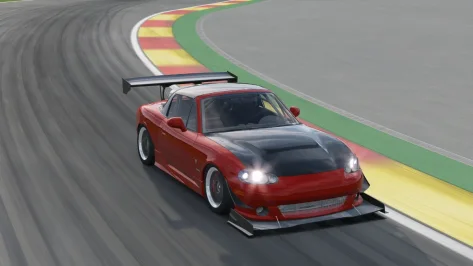
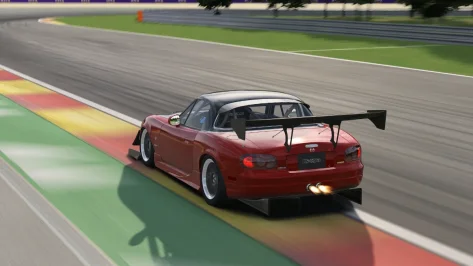
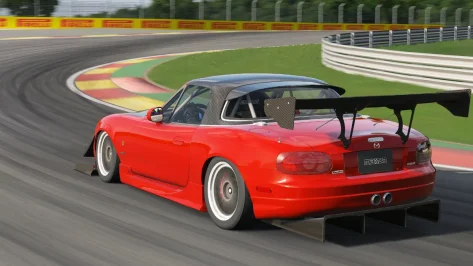


Citing myself because I noticed there was a "between sessions" fuel consumtion estimate for the car available in the settings screen/ fuel. Don't know if it was there before CSP 0.3.0.140. But if it is on screen, it must be stored somewhere ;-)Hi @Thockard , thank you for the test !
It could be also possible in the future to manage fuel level at start, but it seems quite hard to predict fuel consumption for a lap, hence you'd have to run one lap before gathering the data and apply, or use saved data from former races. Maybe we could use data from qualifying for example, that would be a nice way to tackle the problem for the race? But in theory, you can set up a particular tyre compound with a particular fuel level with different kind of pit stops later.


Its crazy that URD was the first of the 3 big mod teams and are so far behind in every way compared too RSS and VRC .
It's crazy to see these two messages almost directly below each other.Excited, if it drives like their Aston with the cosmic update it's going to be the best version we'll ever get, + all the extension that bonny was showing off for it was insane.
my list is physics: VRC>URD>RSS. models: RSS>VRC>URD. overall: VRC>RSS=URDRss dont use cosmic physics. only VRC use that. the model if you compare it to the rss one looks better, also possibilty of having lights config incluiding postion like the wec who in the rss dont. For me the list is: VRC , URD and RSS


I've had this issue ever since the new UI came out for AC. When I do a weekend and qualifying is done, this button doesn't work when I want to check what the quali times were. It clicks but instantly goes back to race. Do you guys have the same issue and/or have you found a fix for it?
View attachment 1490541







For tracks where Turn 1 is close to the Start/Finish line, there's a little trick.Good day all. Has anybody have a decent AI fastlane for the Rabbit Field track. Its an excellent track, but turn 1 is a nightmare. I have tried different AI lines myself with the aid of AI hints. But turn 1 being so close to the start line at high speed, i cannot improve it.
The faster cars just overshoot the chicane.
Thanks
Thanks so much for the reply & explanation. ive learned something new .For tracks where Turn 1 is close to the Start/Finish line, there's a little trick.
AC detects the Start/Finish line using AC_TIME_0_L/R.
When creating the AI line, place AC_TIME_0_L/R slightly away from Turn 1.
Then create the AI line.
After that, place AC_TIME_0_L/R back in its original position.
This ensures the timer starts at the intended location.
This explains why rabbit_field_timing.kn5 is in the Track folder.
I'm attaching rabbit_field_timing.kn5, slightly offset from Turn1.
Improvements to the AI are welcome. I'm not a very good driver, so I can't create a fast AI at this time.

Beginnings are so tough, as can be seen in your profile picture from back then...I just realized that I joined GTPlanet 20 years ago!!


Rss dont use cosmic physics. only VRC use that. the model if you compare it to the rss one looks better, also possibilty of having lights config incluiding postion like the wec who in the rss dont. For me the list is: VRC , URD
Theres just no comparison between RSS and URD , in terms of model quality and driving feel .RSS and VRC are a closer comparison but RSS still come out on top . If you seriously think URD and RSS model wise compare id suggest you visit your nearest optician. Xavi what do you use to drive with ?Rss dont use cosmic physics. only VRC use that. the model if you compare it to the rss one looks better, also possibilty of having lights config incluiding postion like the wec who in the rss dont. For me the list is: VRC , URD and RSS
Jaguar XJ6 by Speed90 edit Geppo
added CSP animations
new shader for carpaint and chrome
reflective headlights
glass ready for rain
the internal windows cast shadows
skin with original colors


The simple test is to switch back to 0.2.x and see if it cures the problem. Then you will know for sure if it is a CSP problem or not.A "typical" friday night problem, could someone help me?
So I have a mod that could easily go over 260 km/h in Fuji. Now it won´t drive past 230 km/h. And that 260 km/h was with ballast applied and with TC on and regular aero value. I have tried to turn the TC off and move the aero slider all the way to the left, and of course remove the ballast, but it won´t make any effect. This car has also fixed gear ratios so that can´t be the problem as well. I have also reset the setup to default (which could attain the 260 km/h) but it won´t reach said speed again. Now that I think I had this problem yesterday with another mod, AI trashed me in Imola and they had same car as mine. They were much faster in the straight sections of the track. I really hope CSP has not messed up something in my game, but I haven´t touch anything in settings lately
ChatGPT is telling me all sorts of weird stuff and invented CSP settings when asked about this, but only one thing he could be right is that latest CSP builds are so buggy
Yep, that fixed the issue. And I switched again to 0.3.0-preview140-full and cars were having their normal top speed too. Hope it won´t happen again...Something really wonky happened with car physics or God knows what, one of those inexplicable things of latest CSP buildsThe simple test is to switch back to 0.2.x and see if it cures the problem. Then you will know for sure if it is a CSP problem or not.
You really just saying stuff out your buttTheres just no comparison between RSS and URD , in terms of model quality and driving feel .RSS and VRC are a closer comparison but RSS still come out on top . If you seriously think URD and RSS model wise compare id suggest you visit your nearest optician. Xavi what do you use to drive with ?


I updated the linkCould you please reupload it...link doesnt work anymore


I just want to clarify: URD has made huge strides in terms of model quality. The contrast between the old EGTs and the new versions is incredible, for example, and it's to be appreciated. Right now, URD has nothing to envy (in general, as a baseline, to be specific LOL) to RSS and URD in terms of graphics.Theres just no comparison between RSS and URD , in terms of model quality and driving feel .RSS and VRC are a closer comparison but RSS still come out on top . If you seriously think URD and RSS model wise compare id suggest you visit your nearest optician. Xavi what do you use to drive with ?


