

- 156

- United Kingdom
What do I do with this ? tried masscots texture file didn't work. Do I just copy spa\texture\Alu_detail4.dds and put it somewhere ?spa\texture\Alu_detail4.dds worked for me.
Regards
Mark
What do I do with this ? tried masscots texture file didn't work. Do I just copy spa\texture\Alu_detail4.dds and put it somewhere ?spa\texture\Alu_detail4.dds worked for me.


Have you considered Fenryr´s Spa 2025 yet? Give it a try, it´s laser scanned (ACC convert) and way more detailed in terms of topography and road feel. It´s public available so here the link (v1.1):Both mods have been updated to include @Masscot active airspace features. Use the links in the quote to get the updated version you use. You should be able to extract the new versions and overwrite when it asks, but I would suggest you disable\backup or delete all of the old track skins first. Some files have changed and some skins have been removed. And remember, you do not need to use any of the track skins. They are there simply optional ways to make some parts of the track look different.
I still recommend using the stand alone track version, but if you prefer the version that installs into the original Spa folder, please be aware that I don't thoroughly test that version so I can't guarantee everything will work correctly.
Updates:
-- Added most of @Masscot active airspace features. I did not include the crowds because of the hassle that would have been to make them work with the newer layouts.
-- The animated flagmen must be activated by enabling the Animated Flagmen track skin. It made no sense to me to have animated flagmen when I was driving a practice session so I set things up so they could be turned off or on as needed.
-- The 'Misc Textures WEC' skin has the nice WEC textures @Masscot included with his airspace mod.
-- Little tweaks here and there to some shader values and other config stuff.
View attachment 1506620
 (better trees/colors) But, if I'm doing a big endurance race I'll use Fenryr's cuz the endurance pits are correct. It's a tough choice, for sure. Life is good (or were you suggesting to racinjoe that he start working on the fenryr version? doh)


Oh Man thanks!Disable the "Dynamic windscreen reflections" under Windscreen FX. It doesn't render the reflections properly in some cars
And this, fix the abarth 500 display, thanks !Yes, you need to untick this in general patch settings - GPU optimizations (I`m on 0.2.12-preview1)
View attachment 1506540

You have to enable the skin AnimatedFlagmen (people on stands wave the flags, not marshals) and CountryFlags@racinjoe013 After all the work you put into those country flags at Spa, I can't see them anywhere. Where are they on the track? And which marshals should be animated? (Don't think they're there either. The airspace is there.) BTW, that link for the separate spa update was the full track, not just an update. Was that intended?

The mod was originally released as a standalone track because the original Spa 2022 track from guigui0256 made changes to the Kunos Spa layout that I didn't want. Some people asked if I would make a version of the mod that would install into the original Spa folder, so I did. That's the reason why there are two mods and yes, one of them is supposed to be a full track.@racinjoe013 After all the work you put into those country flags at Spa, I can't see them anywhere. Where are they on the track? And which marshals should be animated? (Don't think they're there either. The airspace is there.) BTW, that link for the separate spa update was the full track, not just an update. Was that intended?
Have you considered Fenryr´s Spa 2025 yet? Give it a try, it´s laser scanned (ACC convert) and way more detailed in terms of topography and road feel. It´s public available so here the link (v1.1):
Hope we get also Pyyer´s extensions this year onto it.

This is what mine looked like before.
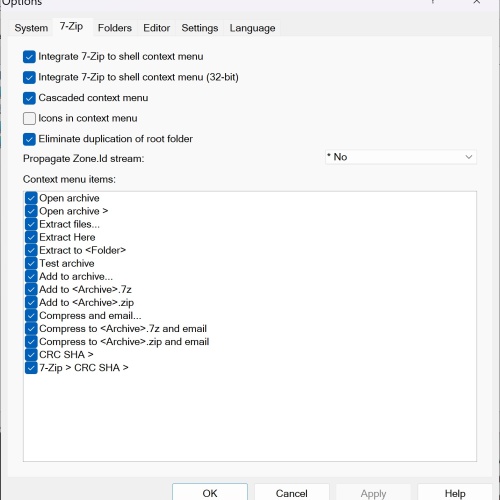
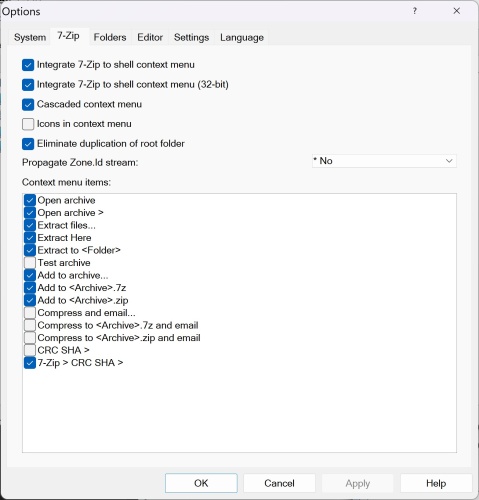
Sorry it was not meant that you should work on it, just a heads-up in case you did not try the track yet.The mod was originally released as a standalone track because the original Spa 2022 track from guigui0256 made changes to the Kunos Spa layout that I didn't want. Some people asked if I would make a version of the mod that would install into the original Spa folder, so I did. That's the reason why there are two mods and yes, one of them is supposed to be a full track.
As for your animated flagmen problem, it would help if I knew which version of the mod you use. If it's the full track version, then all you should have to do is make sure you enable the animated flagmen skin. If it's the version that goes in the original Spa folder, as I mentioned in the update, I could not guarantee it would work correctly. I don't have the Spa folder on my system anymore since I have all the layouts in my spa_2022 track folder. I made some educated guesses on how things needed to be setup for it to work. Sounds like maybe I guessed wrong.
I have it and i'm considering whether I want to go through the trouble of porting my mod over to it. As usual for me with Fenryr tracks, visually it looks terrible on my end and would take a lot of work to get it to where I like it. I'm not sure the improvements in topography and road feel are worth the time. Maybe some day when i'm out of projects and have nothing to do.


With your restless mind, I highly doubt that day will ever come... 🤭... Maybe some day when i'm out of projects and have nothing to do.
Hello,i have a milky rear mirror how to fix it please (RSS - GT-M Macca 72 V8 Evo)
View attachment 1507064


On Macca this has no effect. And with their in game app "RSS_settings" you can adjust only the brightness of the display like in PURE with CSP_lights display.


already done that ,still the same thing
is there aalready done that ,still the same thing
nopeis there a
[Material_DigitalScreen]
entry in the car's config? car content folder/extension/ext_config.ini
There is an ext_config_mfd.ini in display folderis there a
[Material_DigitalScreen]
entry in the car's config? car content folder/extension/ext_config.ini
Only the last 3 of them: Mustang, Aston and McLaren.nope
i tryed the other gt-m cars from rss ,and they have the same milky like rear digital mirror


Any use? Might be able to isolate the text from here, or use it to find the font (if it's the correct one).Two questions:
1.) Does anyone know what font this is:
View attachment 1507167
2.) Are there any photoshop experts out there who could make this bridge banner? I can't find a png version of it anywhere on the net.
View attachment 1507168


The font is a custom Unicredit font. They offer it for free via a Creative Commons license, but you're required to credit the host, by inserting this link in the webpage where you use it. <div>Icons made from <a href="https://www.onlinewebfonts.com/icon">svg icons</a>is licensed by CC BY 4.0</div>Two questions:
1.) Does anyone know what font this is:
View attachment 1507167
2.) Are there any photoshop experts out there who could make this bridge banner? I can't find a png version of it anywhere on the net.
View attachment 1507168

Yea, i see they use their own scriptable displays for it. But anyway. I'm searching for a way...There is an ext_config_mfd.ini in display folder
[Material_DigitalScreen]
Meshes = GEO_Lua_Display
ScreenScale = 800
ScreenAspectRatio = 0.6
MatrixType = TN
I see the MatrixType is not "perfect" is "TN". I put "perfect" in there but maybe is not enough cause it didn't change anything.
That would be great. Thanks for trying. As for the size, i'm not really sure. I guess the wider the better in case I to downsize it. You lose less detail downsizing. But for staters, I would say 2048 or 4096 wide.The font is a custom Unicredit font. They offer it for free via a Creative Commons license, but you're required to credit the host, by inserting this link in the webpage where you use it. <div>Icons made from <a href="https://www.onlinewebfonts.com/icon">svg icons</a>is licensed by CC BY 4.0</div>
I'll have a go at it this evening. What resolution would you like, Joe? Or more to the point, how wide?
I can try to help, but you need to let me know which version of the mod you use. Is it the standalone or the one that installs in the Spa folder?@racinjoe013 No animated flagmen on your new Monza (just freshly downloaded) (sure is beautiful though) Went back to your Spa2022 and determined that the animated flagmen don't work on the 2022 layout, but all good on the 2023 layout. Also found that on Kunos Spa the animated flagmen only work when the Active Airspace layout is selected (nothing on the Pyyer WEC layouts, even when animated flagmen and country flags skins are selected). I wonder if there's a way to get them ^ working on these other layouts...


Hi Joe, did a quick first run , w these settings:Monza 2025 (beta)
monza_2025_beta
Throwing this out there for anyone to try in the hopes to get a little feedback. I am concerned about flickering on the sponsor banners. I had to fix a lot of them and redo a lot of the uv mapping for the textures. I do not see any but i'm on an old CSP version and don't know if that would make a difference.
Don't let the name fool you. This is not a representation of the track in 2025. It's just a name I picked so I can separate this version from the Kunos version in my CM track list. It is nothing more than all of the mods i've created or downloaded for Monza rolled into one track so I can keep the original Kunos version 'clean'. It is a beta version (about 50-60%% complete) so you can expect to see some obvious mistakes and maybe some poor texture choices. Because it's based on the original Kunos track, you are free to use any mods for that track with this one, such as ai files, track skins, etc. The one thing you can't do is use a mod that will overwrite the ext_config file. That would cause some issues.
Credits:
-- @Masscot for the animated flagmen and balloons
-- Assets used from the monza2022crf version of the track.
-- knicker for the crowd files.
While this track is not as confusing as some of my other ones, I still need to explain a few things:
-- There are two layouts, the base layout and a raceday layout that adds sponsor banners in some spots based on a 2025 GT World Challenge video I watched as a reference. The raceday layout is best to use with modern cars because the sponsors wouldn't make much sense for cars 10+ years old. Also, when using the raceday layout, I would suggest enabling the 2025 Raceday track skin to complete the look.
-- There are three 'Years' track skins that will bring back certain buildings and structures to make the track more period accurate. For example, enabling the 2010 (probably should have been named pre-2010) skin will make the track look like the Kunos default version with no structures hidden. I'm not sure what will happen if you try to use the raceday layout with either the 2010 or 2013 track skin. It might cause some issues with new and old structures overlapping. The raceday layout was mostly designed to use with the 2025 track skin.
-- For performance reasons, I have the animated flagmen and live jumbotron displays off by default for older computer users. You can turn them on by enabling the appropriate track skin. Plus it's nice to turn them off when driving a practice session.
-- Last thing, there is a huge difference in how bright the crowds look depending on whether you use CSPs 'New spectators rendering method' so you might have to do some adjusting to the ambient and diffuse values in the camera_facing file. I have it setup for my CSP options, but yours may be different.
Have fun and hope to hear from someone on any issues you may see. If not, then i'll just keep plugging along thinking everything is all right.


