Assetto Corsa PC Mods General DiscussionPC 

  • Thread starter Thread starter daan
  • 155,319 comments
  • 49,259,900 views
It's definitely the audio files (swapping for a known working one fixes the issue), but I'm wondering if the audio was always clipping in med/large grids for these 'broken' cars, or whether it's a new CSP bug if Ilja's been tweaking how audio is processed.
Can't see anything in the CSP audio options, but I'm sure there used to be an option to limit audio on large grids. Maybe that option is now hidden and defaults to 'off', whereas it should actually be 'on' to avoid the distortion. shrugs
CSP 0.3.0-preview361

CSP/Patch/Optimizations/CPU optimisations/Limit audio

I've tested a complete field with over 30 cars of GT4s from Guerilla Mods and I have sound problems with the standard value 25 for limit audio. If I change it to 10, the sound problems are gone. I use the value 10 for a long time now, as this problem isn't new and caused by cars with too many sound channels (over 100).

To minimize the sound problems, you should also check the file audio_engine.ini in "assettocorsa\system\cfg" and change MAX_CHANNELS=256 to MAX_CHANNELS=512
 
Last edited:
CSP 0.3.0-preview361

CSP/Patch/Optimizations/CPU optimisations/Limit audio

I've tested a complete field with over 30 cars of GT4s from Guerilla Mods and I have sound problems with the standard value 25 for limit audio. If I change it to 10, the sound problems are gone. I use the value 10 for a long time now, as this problem isn't new and caused by cars with too many sound channels (over 100).

To minimize the sound problems, you should also check the file audio_engine.ini in "assettocorsa\system\cfg" and change MAX_CHANNELS=256 to MAX_CHANNELS=512
Thanks, that was the setting I was searching for. I was looking unsuccessfully in the 'audio' section for it, forgetting that logical thought should not be applied when navigating the CSP user interface.
'10' does seem to be the magic number for eliminating the crackling from big fields of the GT4 cars. Thanks again.
 
Hey @Peter Boese or anyone, any guidance on why when I change to overcast, the windows go very silvery like the pics? I am using LCS, pure candy. Perfect in sunshine and any other condition. Any help appreciated
 

Attachments

  • Screenshot 2026-04-17 194044.webp
    Screenshot 2026-04-17 194044.webp
    100.1 KB · Views: 2
  • Screenshot 2026-04-17 194009.webp
    Screenshot 2026-04-17 194009.webp
    111.6 KB · Views: 4
Last edited:
Has anyone worked out yet what causes some cars to have distorted/crackling audio in medium-large grids?
Car-specific FMOD issue or a new general CSP bug?
Weird that it affects some cars but not others.
I have been waiting as well to know the reason ... Like my friend timo does scratch sound since beginning , never ever had problem in ac since the csp now is tweaking sound , it comes

as i said after 2.11 it started

Could be nice to have a report on what to correct on Fmod ...
 
CSP 0.3.0-preview361

CSP/Patch/Optimizations/CPU optimisations/Limit audio

I've tested a complete field with over 30 cars of GT4s from Guerilla Mods and I have sound problems with the standard value 25 for limit audio. If I change it to 10, the sound problems are gone. I use the value 10 for a long time now, as this problem isn't new and caused by cars with too many sound channels (over 100).

To minimize the sound problems, you should also check the file audio_engine.ini in "assettocorsa\system\cfg" and change MAX_CHANNELS=256 to MAX_CHANNELS=512
Sadly remains on my side

What i do not understand is

when i run 2.11 csp version , with the same quality settings everywhere , i have got no problem at all regarding sound crackling

But those latest csp are maybe costing a lot of performance issues regarding optimisations ????

no idea ...
 
Sadly remains on my side

What i do not understand is

when i run 2.11 csp version , with the same quality settings everywhere , i have got no problem at all regarding sound crackling

But those latest csp are maybe costing a lot of performance issues regarding optimisations ????

no idea ...
I've reported it on the shaders patch Discord, so anyone affected please add any info that might help. Ilja does sometimes actually read these reports.
 
Last edited:
Some question on the Guerilla GT4 cars, at first a bunch of them all have similar issues, where the brake/taillights glow in a distance in giant orange balls. But I tweaked them in the ext_config where it seems to make sense and most seems to go away, aside from the Camaro and the Aston(Camaro shown here, this is a zoomed in pic), this mostly happens when they are in a distance. In the case of the Camaro too the position of those glowing balls also don't seem to line up with the lights on the car...Also way too bright(and orange) when they do light up. Can anyone give me some tips on editing the ext_config to modify this...

View attachment 1529141
View attachment 1529144
@benbaron the Mercedes AMG GT4 still has this problem. I just ran a field of the updated GT4s at Brno and the Merc was the only one I spotted with this issue.
 
shi
ODRT Ring v1.1

View attachment 1530551
Fictional circuit in Italy.
Conversion from GTR2.

-CSP recommended
-36 pit/start
-AI, cam

Credits & Thanks;
rFactor Original Track by Gianfranco
GTR2 Conversion by BillBro
-Thank you for giving me permission (BillBro)

AC Converted by @shi (shin956)
logo.png by @Fanapryde
some objects and textures by kunos

Enjoy.

;;;;;;;;;;;;;;;;;;;;;;;;;;;;;;;;;;;;;;;;;;;;;;;
v1.01 changelog;
Billboards and distance markers created by @Masscot are now included in kn5. (Thanks)
The original billboards are now included in the file as skins.
Changed one of the tree texture.
Changed grass textures.
Changed crowds textures to those created by @Kniker97 . (Thanks)
Fixed floating tree.
Fixed mapping of terrain.
Updated semaphore.ini by @Quark67 . (Thanks)
Updated preview.

v1.1 changelog;
Replaced guardrail and fence model.
Added tire walls.
fence and tire wall model: https://forum.studio-397.com/index.php?threads/blender-track-objects-for-you.70997/
Added marshalls.
Added lights to the tunnel.
Added sand edges.
Smoothed kerb edges.
Updated pit tents.
Updated ext_config.ini.
Updated preview.
Reworked groove and skidmarks.
Reworked fast_lane.ai.
Fixed holes.
The number of pit/start was increased to 36.
Other minor fixes.

ODRT Ring v1.1


v1.1 changelog;
Replaced guardrail and fence model.
Added tire walls.
fence and tire wall model: https://forum.studio-397.com/index.php?threads/blender-track-objects-for-you.70997/
Added marshalls.
Added lights to the tunnel.
Added sand edges.
Smoothed kerb edges.
Updated pit tents.
Updated ext_config.ini.
Updated preview.
Reworked groove and skidmarks.
Reworked fast_lane.ai.
Fixed holes.
The number of pit/start was increased to 36.
Other minor fixes.
 
It was an auto-update via CM.
those uptade i did are not yet going thought auto update

i did some physiks stuff which was better BOP from my driving style ,

futher test will come to different people

of course , more feedback coming will as well improve the whole pack ;)

thank you for using it by the way
 
those uptade i did are not yet going thought auto update

i did some physiks stuff which was better BOP from my driving style ,

futher test will come to different people

of course , more feedback coming will as well improve the whole pack ;)

thank you for using it by the way
Ah, so all the updates I did were for a much earlier revision? Damn, that was a waste of time then. 😆
It had been a while since I used them.
Can you remind me of the link for the latest update?
 
Ah, so all the updates I did were for a much earlier revision? Damn, that was a waste of time then. 😆
It had been a while since I used them.
Can you remind me of the link for the latest update?
That's the last one I see.

 
Last edited:
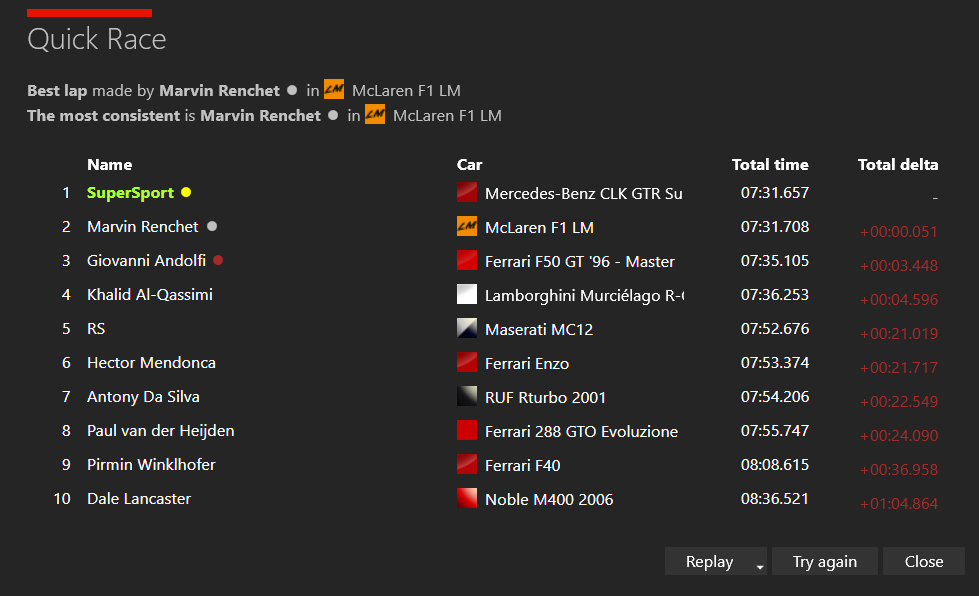
Benchmark testing to see the gaps between classes:

PtaK7V2.png

The F40 has since been corrected as I accidentally gave it too much downforce which caused it to handle much better than the rest of it's class. The F50 GT and R-GT have also been made slightly faster since then too. The Panoz GTR-1 is very competitive now but it seems like the AI thinks the car is abit shorter than it is because the front overhang sometimes clips walls on tight turns which causes the AI to spin out, so I will try to fix that if possible.

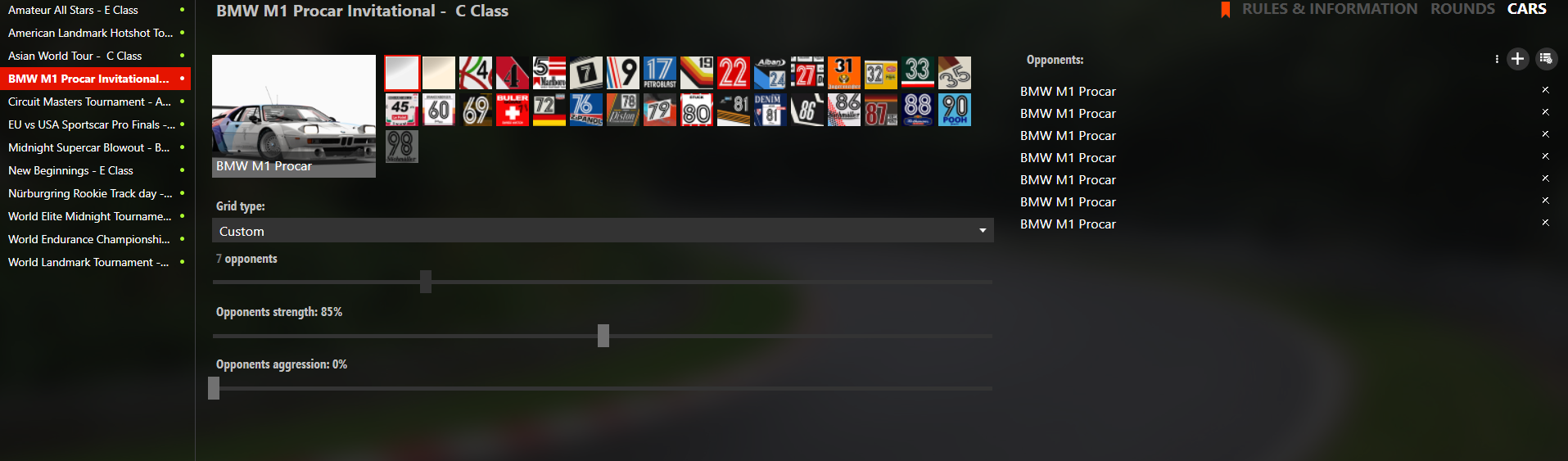
Custom planned championships update
bD0HEcD.png

For some of the classes I will do much like PGR4 and have "Invitational" events to introduce you to faster classes, not all classes will have this but a few will.

All of the classes with the exception of D and E class are finished, I will eventually do F class but not G due to the very limited number of cars in the class. I have to tweak the XJ220 for B class and if I cannot fix the issue with the Zonda then I sadly will not include it for B class.

For D class only the Diablo VT 6.0 is done and for E class only the Supra is done at the moment so that's atleast 15 more cars to do for each class.

The previous released cars are all updated for A class as they are now much faster than previous, this was done in order to widen the performance gap and because quite a few cars in the class needed major corrections and are now much closer to how they were in PGR, which basically means that some will be noticeably faster or slower than others, while for I would say 90% of the classes it depends on the track and grid placement. So in other words, any of the cars used will have a fair chance at any of the races, minus the DBR9 due to it being extremely slow but during testing it can make podium on twistier circuits though it will be a challenge.
 
Ah, so all the updates I did were for a much earlier revision? Damn, that was a waste of time then. 😆
It had been a while since I used them.
Can you remind me of the link for the latest update?
sorry for the confusion , basically u can use the 1.1 latest and then copy on top what i send here in the mega link , so no time wasted ;)
 
Sharing a mod? Host it on GTPlanet Downloads. Free, public hosting for files up to 10GB in size.

Latest Posts

Back