- 293

- Germany
Just need someone to convert it...The Carrera4 track had it in its GTR2 or PnG version
View attachment 1199133
Just need someone to convert it...The Carrera4 track had it in its GTR2 or PnG version
View attachment 1199133
Release of BMW M1 Procar v2.5
View attachment 1199035
View attachment 1199036
Changelog:
- Reworked exterior materials and shader
- Added new interior textures
- Added skin templates for wheelcover and steering wheel
- Added skin package folder with the old skins (2k & 4k)
- Added wheelcover templates (wheelcover A & wheelcover B) *
- Added folder with tyre textures
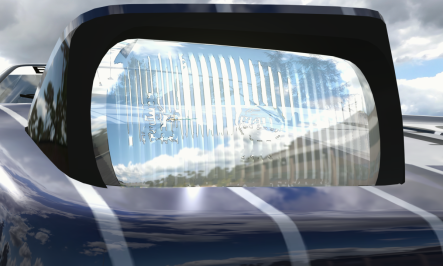
- Reworked refracting headlights and taillights *
- Extended Physics/Rain tyres *
- Reworked car physics
- Added new LODs
- All lights reworked in 3D model
- New damage and dirt textures, credits to RealAKP. A big thank you for those
- Reworked light settings *
- Changed impact damage at the rear
- Replaced skins with skins from Johnny23 - Racedepartment (readme file with further credits and links)
- EXTRA-A: Fog lights (and the extra of the fictional skin) *
- EXTRA-B: Interior light *
- EXTRA-C: Drivers door *
- EXTRA-D: Co-Drivers door *
- now with CM autoupdate
* CSP required
Whats new?
You can find now in the "templates and tyres" folder some subfolder: "previews", "skin templates", "tyres" and "wheelcover"
View attachment 1199037
- "previews" folder - in the folder you can find the preview preset for creating new previews with your own skins and it has included a photoshop template for the "turbofan/rim" symbol in the previews.
- "skin templates" folder - there is photoshop and gimp template included for the body skins. and now we have added photoshop templates for the new steering wheel mapping and for the car rims.
- "tyres" folder - there are five different tyres included, you can use for your own skins or just swapping to the skins you want. just copy and paste all the *.dds files from the choosen tyre folder to the skin folder you want.
- "wheelcover" folder - in the wheelcover folder you can find "wheelcover A" and "wheelcover B" and the photoshop template for creating your own design on the turbofan. in the two folder (A & B) you can find the standard texture , the needed extension file and the normalmap dds file. copy all three files to the skinfolder you want. In the "wheelcover B" folder you can find 10 new design textures for the turbofan you can use.
Download:![]()

File on MEGA
mega.nz
Have fun!
Pfalzdriver & DaWallace
[SHIFT_ANIMATION]
BLEND_TIME=100
POSITIVE_TIME=300
STATIC_TIME=10
NEGATIVE_TIME=300
PRELOAD_RPM=8500
INVERT_SHIFTING_HANDS=0

Release of BMW M1 Procar v2.5
View attachment 1199035
View attachment 1199036
Changelog:
- Reworked exterior materials and shader
- Added new interior textures
- Added skin templates for wheelcover and steering wheel
- Added skin package folder with the old skins (2k & 4k)
- Added wheelcover templates (wheelcover A & wheelcover B) *
- Added folder with tyre textures
- Reworked refracting headlights and taillights *
- Extended Physics/Rain tyres *
- Reworked car physics
- Added new LODs
- All lights reworked in 3D model
- New damage and dirt textures, credits to RealAKP. A big thank you for those
- Reworked light settings *
- Changed impact damage at the rear
- Replaced skins with skins from Johnny23 - Racedepartment (readme file with further credits and links)
- EXTRA-A: Fog lights (and the extra of the fictional skin) *
- EXTRA-B: Interior light *
- EXTRA-C: Drivers door *
- EXTRA-D: Co-Drivers door *
- now with CM autoupdate
* CSP required
Whats new?
You can find now in the "templates and tyres" folder some subfolder: "previews", "skin templates", "tyres" and "wheelcover"
View attachment 1199037
- "previews" folder - in the folder you can find the preview preset for creating new previews with your own skins and it has included a photoshop template for the "turbofan/rim" symbol in the previews.
- "skin templates" folder - there is photoshop and gimp template included for the body skins. and now we have added photoshop templates for the new steering wheel mapping and for the car rims.
- "tyres" folder - there are five different tyres included, you can use for your own skins or just swapping to the skins you want. just copy and paste all the *.dds files from the choosen tyre folder to the skin folder you want.
- "wheelcover" folder - in the wheelcover folder you can find "wheelcover A" and "wheelcover B" and the photoshop template for creating your own design on the turbofan. in the two folder (A & B) you can find the standard texture , the needed extension file and the normalmap dds file. copy all three files to the skinfolder you want. In the "wheelcover B" folder you can find 10 new design textures for the turbofan you can use.
Download:![]()
File on MEGA
mega.nz
Have fun!
Pfalzdriver & DaWallace
And 15 people bought it...I found a mod even more overpriced than Jaskier's stuff:
G80 SPORT
ifso.gumroad.com
It's about $18 in USD.![]()
Disable it before downloading, after you're done installing, re-enable WDI can't help with this, sorry... I totally removed Windows Defender from my PC.
But I think that he put the file on quarantine or something similar....
Yeah, the shift animation is one thing wich i'm not happy with too, as VR driver. I worked a couple of days on animate gear stick with skinned mesh, but it won't working ingame. Maybe i will try again to bring that ingame.Fantastic work!
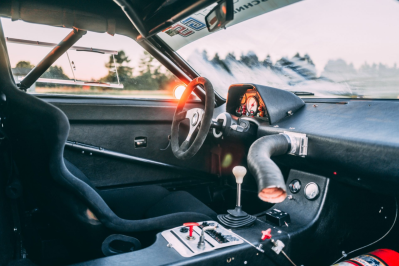
As a VR driver the Procar's shifting animation has always bothered me as the driver just quickly 'taps' the gearknob in a totally unconvincing way, but I've finally found one that's a vast improvement. However, the gearknob now clips through the driver's hand ever-so-slightly, so it'd be good if you could shorten the gearstick accordingly (a 2-min job in Blender) as this animation really does look much better.
I've adjusted your timing too. It was a bit slow before, and you shouldn't really ever have BLEND_TIME any longer than 100 as it adds too long a delay before the driver starts reaching for the gear stick.
Anyway, try these and see what you think.
(remover the .txt extension)
edit: also, the Procar should have a rear-view mirror. No idea why this one doesn't - I'm guessing the doner car from pCARS didn't have one?Code:[SHIFT_ANIMATION] BLEND_TIME=100 POSITIVE_TIME=300 STATIC_TIME=10 NEGATIVE_TIME=300 PRELOAD_RPM=8500 INVERT_SHIFTING_HANDS=0
It'd be wonderful if one was added back in (suitably tilted towards the driver) as they're bloody useful, and there is a view out through the back window between the louvres.
View attachment 1199149
edit 2: the mirror could be harvested from this standard production (non-Procar) M1, but it'd be good if it was adjusted so that it was tilted towards the driver.

![]()
bmw_m1_e26_m1
MediaFire is a simple to use free service that lets you put all your photos, documents, music, and video in a single place so you can access them anywhere and share them everywhere.www.mediafire.com
edit 3: the hood and trunk animations are borked, they teleport shut after opening.
Great work on the skins, so i decided to replace all the old skins with your work. 😌👌Very nice job, wow! (...proud to see my skins from RD here)
Fabulous work on this car. It's really wonderful in VR now. One thing though, and I'll try not to add too much to frustration levels but is it just me, or are the rims rather excessively bright and shiny. Same with some of the other materials (e.g., chassis/fuel filler/rear wing flap/tyres). If this is intentional or the result of me having a dodgy Pure/CSP configuration I'll gladly pull my head in. There's also a rather dramatic colour change of the mesh-style rims when the blurred texture kicks in.Yeah, the shift animation is one thing wich i'm not happy with too, as VR driver. I worked a couple of days on animate gear stick with skinned mesh, but it won't working ingame. Maybe i will try again to bring that ingame.
I will add your animation and rework the shift stick.
Ok, rear mirror... i will add this thing too.😅
View attachment 1199222
Hm... for me it looks Ok. 🤔 Maybe others have the same issues/opinion. Then i can look at it again.Fabulous work on this car. It's really wonderful in VR now. One thing though, and I'll try not to add too much to frustration levels but is it just me, or are the rims rather excessively bright and shiny. Same with some of the other materials (e.g., chassis/fuel filler/rear wing flap/tyres). If this is intentional or the result of me having a dodgy Pure/CSP configuration I'll gladly pull my head in. There's also a rather dramatic colour change of the mesh-style rims when the blurred texture kicks in.
Not the turbofans, these rims...Hm... for me it looks Ok. 🤔 Maybe others have the same issues/opinion. Then i can look at it again.
Wich rims do you mean? The rims with the turbofans? Didn't noticed this color change on blurred texture. Will check this too.
Oh, never checked the blurred rim texture, but that will be a easy thing to correct.🙂👍Not the turbofans, these rims...
View attachment 1199223
See how the tyres look quite shiny too.
Bright, shiny bits...
View attachment 1199224
This is with CSP 0.1.79-preview5, Pure 0.142 and C13CameraObscura (but it's similar with other PP filters)
www.racedepartment.com
Hello Natan5,can someone made one file for all that skins ? it would be great !!!!
great news mate .thanksHello Natan5,
packs will come. Now that I have collected all the 1994-1996 photos available, I work on a race per race basis. Event if I have already released skins for Jarama 94 and Paris 94, the plan is to finish Paul Ricard now. I release every skin I do on a one by one basis during the process and I collect the feedback given and note down "To Do's" for every skin. When finished with the last skin of a race I will try to solve all the things noted down, update the skins which needed work and pack all skins together to release a pack.
The same goes for updates of some of the car models.
For 1994 we will at least see the following packs:
- Paul Ricard
- Jarama
- Paris
For the other races I might release separate skins, as I do not have enough photos to base my work on.
Daniel
PS: the photo situation for 1995 and 1996 is much better :-). But searching for info and talking to people from the era is also fun and part of the challenge. My hope is that in the meantime missing circuits like Paul Ricard (long) or Zhuhai Street Circuit or missing cars like the 964 Turbo S LM will be added to AC as well. One day we might have something nearly complete........
Release of BMW M1 Procar v2.5
View attachment 1199035
View attachment 1199036
Changelog:
- Reworked exterior materials and shader
- Added new interior textures
- Added skin templates for wheelcover and steering wheel
- Added skin package folder with the old skins (2k & 4k)
- Added wheelcover templates (wheelcover A & wheelcover B) *
- Added folder with tyre textures
- Reworked refracting headlights and taillights *
- Extended Physics/Rain tyres *
- Reworked car physics
- Added new LODs
- All lights reworked in 3D model
- New damage and dirt textures, credits to RealAKP. A big thank you for those
- Reworked light settings *
- Changed impact damage at the rear
- Replaced skins with skins from Johnny23 - Racedepartment (readme file with further credits and links)
- EXTRA-A: Fog lights (and the extra of the fictional skin) *
- EXTRA-B: Interior light *
- EXTRA-C: Drivers door *
- EXTRA-D: Co-Drivers door *
- now with CM autoupdate
* CSP required
Whats new?
You can find now in the "templates and tyres" folder some subfolder: "previews", "skin templates", "tyres" and "wheelcover"
View attachment 1199037
- "previews" folder - in the folder you can find the preview preset for creating new previews with your own skins and it has included a photoshop template for the "turbofan/rim" symbol in the previews.
- "skin templates" folder - there is photoshop and gimp template included for the body skins. and now we have added photoshop templates for the new steering wheel mapping and for the car rims.
- "tyres" folder - there are five different tyres included, you can use for your own skins or just swapping to the skins you want. just copy and paste all the *.dds files from the choosen tyre folder to the skin folder you want.
- "wheelcover" folder - in the wheelcover folder you can find "wheelcover A" and "wheelcover B" and the photoshop template for creating your own design on the turbofan. in the two folder (A & B) you can find the standard texture , the needed extension file and the normalmap dds file. copy all three files to the skinfolder you want. In the "wheelcover B" folder you can find 10 new design textures for the turbofan you can use.
Download:![]()
File on MEGA
mega.nz
Have fun!
Pfalzdriver & DaWallace
I wish it was possible to rescale the model. the car is too bigOh, never checked the blurred rim texture, but that will be a easy thing to correct.🙂👍
I can reduce the reflection/glare a bit on these parts and checking the tyres too.👍
Is the (fictional) Ferrari 488 GT4 still available somewhere?
www.racedepartment.com
Was already discussed a couple of weeks ago.I wish it was possible to rescale the model. the car is too big
Yeah. Sadly it's not easy. If you rescale the model, all animations will be gone and ***ked and need to be redone from beginning. And I don't want and can do this.😔😓I wish it was possible to rescale the model. the car is too big
Race Department and @Breathe 's track list (in his signature here).For a newb to the PC world, is there a good place to start for finding tracks and vehicles? Steam workshop perhaps? I've got it on my wishlist waiting for a sale, as I've spent enough on it before for Xbox.
Racedepartment is a good start and there are a lot of videos for beginners on youtube to startFor a newb to the PC world, is there a good place to start for finding tracks and vehicles? Steam workshop perhaps? I've got it on my wishlist waiting for a sale, as I've spent enough on it before for Xbox.
Thank you @ZombieBoy1978.Race Department and @Breathe 's track list (in his signature here).
I've never read it myself, but he has told me repeatedly that it's a good place to look for links 😁