- 10

- France
Do you have the link to this car please?View attachment 1308563
i have this one from Assoluto Racing
Do you have the link to this car please?View attachment 1308563
i have this one from Assoluto Racing


The button, push the button...I gave you my little finger, but you ripped me right in half... 😂
Thanks... TO YOU, OF COURSE! 😁... 5. Thanks...


Try:View attachment 1308706
View attachment 1308707
since upgrading csp/sol etc this track suddenly has trees like this, how do I go about fixing this?
;unfeck borked tree normals, should work if ksTree shader is used
[ALTER_NORMALS_...]
MATERIALS = shader:ksTree
OFFSET = 0, 1e9, 0; or try 0, -1, 0 (-1 = normals point down, can give better results sometimes)
; note, ksambient might need raising if -1 used, might need lowering if 1 is used
DESCRIPTION= lighten/darken trees after normal fix above
MATERIALS = shader:ksTree
PROP_... = ksAmbient, XX ; 0.4 up or down
PROP_... = ksDiffuse, 0.2
:also useful:
;fade out x/y-tree planes when pointing directly towards viewer
[SHADER_REPLACEMENT_...]
MATERIALS = ?tree?, ?TREE? ;assumes 'tree' naming convention, any non-compliant will need adding manually
MESHES = ?tree?, ?TREE? ;assumes 'tree' naming convention, any non-compliant will need adding manually
MATERIAL_FLAG_0 = 1
CAST_SHADOWS = 1
SHADER = ksTree

excellent, just the trick thanksTry:
Code:;unfeck borked tree normals, should work if ksTree shader is used [ALTER_NORMALS_...] MATERIALS = shader:ksTree OFFSET = 0, 1e9, 0; or try 0, -1, 0 (-1 = normals point down, can give better results sometimes) ; note, ksambient might need raising if -1 used, might need lowering if 1 is used DESCRIPTION= lighten/darken trees after normal fix above MATERIALS = shader:ksTree PROP_... = ksAmbient, XX ; 0.4 up or down PROP_... = ksDiffuse, 0.2 :also useful: ;fade out x/y-tree planes when pointing directly towards viewer [SHADER_REPLACEMENT_...] MATERIALS = ?tree?, ?TREE? ;assumes 'tree' naming convention, any non-compliant will need adding manually MESHES = ?tree?, ?TREE? ;assumes 'tree' naming convention, any non-compliant will need adding manually MATERIAL_FLAG_0 = 1 CAST_SHADOWS = 1 SHADER = ksTree



 www.racedepartment.com
www.racedepartment.com
www.racedepartment.com
Ferrari F40 '92(v1.5) by F40 LM Lover
Change Logs
1) AO Map of Dashboard is fixed
2) Interior Roof mesh is smoothing.
3) Gap of room mirror is fixed.
4) Rim blurs are added.
5) Rim Meshes are fixed.
6) Lighting effect are changed.
7) PBR by davey.1989(Thank you! My friend!)
8) Many bugs are fixed
9) Rear Light Texture is changed
1. Features
-.Extra A : Left Door Open/Close
-. Extra B : Right Door Open/Close
-. Extra C : Rear Cowl Open/Close
-. Extra D : Frunk Open/Close
-. Extra E : Left Window Open/Close with Driver's Arm
-. Extra F : Fog Lights on with Driver's Arm
2. Fully working Instruments
3. Driver's Animation
-. GAS/Brake/Clutch Pedal
-. Low/High Beam On
-. Hazard
-. Turn Left/Right Blinkers
-. Wiper On/Off
-. H-Patern Gear Shifting
-. Hand Brake
-. Horn
It is required CSP 1.76 or above Version.
But It is tested on CSP 2.1 Preview24.
4. Download Link is in the description of this video
5. Thanks
;fix shadow-casting sun in cockpit
[SHADER_REPLACEMENT_...]
ACTIVE = 1
MATERIALS = INT_Glass ; internal glass material name
CAST_SHADOWS = 0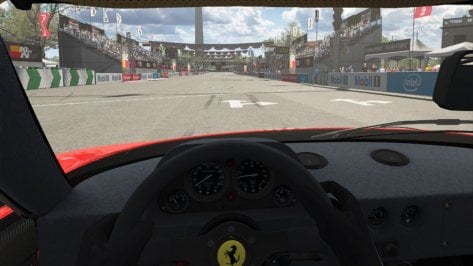
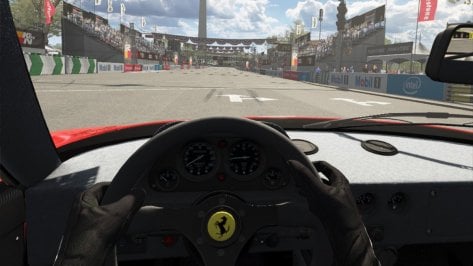

OK!! I will do that things!!Very nice indeed, thanks - but (like the previous version) the cockpit glass doesn't let shadow-casting light in.
Add this to the end of the config:
Code:;fix shadow-casting sun in cockpit [SHADER_REPLACEMENT_...] ACTIVE = 1 MATERIALS = INT_Glass ; internal glass material name CAST_SHADOWS = 0
Before:
View attachment 1308727
After:
View attachment 1308728


Great, thanks - did you see my edit about the cockpit audio?OK!! I will do that things!!
I believe it will be better~!
Great, thanks - did you see my edit about the cockpit audio
Ferrari F40 '92(v1.5) by F40 LM Lover
Change Logs
1) AO Map of Dashboard is fixed
2) Interior Roof mesh is smoothing.
3) Gap of room mirror is fixed.
4) Rim blurs are added.
5) Rim Meshes are fixed.
6) Lighting effect are changed.
7) PBR by davey.1989(Thank you! My friend!)
8) Many bugs are fixed
9) Rear Light Texture is changed
1. Features
-.Extra A : Left Door Open/Close
-. Extra B : Right Door Open/Close
-. Extra C : Rear Cowl Open/Close
-. Extra D : Frunk Open/Close
-. Extra E : Left Window Open/Close with Driver's Arm
-. Extra F : Fog Lights on with Driver's Arm
2. Fully working Instruments
3. Driver's Animation
-. GAS/Brake/Clutch Pedal
-. Low/High Beam On
-. Hazard
-. Turn Left/Right Blinkers
-. Wiper On/Off
-. H-Patern Gear Shifting
-. Hand Brake
-. Horn
It is required CSP 1.76 or above Version.
But It is tested on CSP 2.1 Preview24.
4. Download Link is in the description of this video
5. Thanks

Thanks for this upgrade.Speaking of Ferrari,I created a mix, of the Velo, Shokeu's and modbase versions, for the F430 GT2, with some lighting, lod replacement, among others...If anyone happens to have this car in a better version, please let me know. There are other things missing, but the most necessary thing would be to separate the meshes from the wipers, why I don't know...
There are also strange reflections on the windshield, I think they are due to the skins, if you know any solution, I would appreciate it
(the folder was created as GT3, but the model and some skins, along with the GT2 physics)
As it is an old mod, and free, I imagine we could improve it, not just to fill the grid...
P.S
Well, after much research and elaboration, I discovered that there are 3 models of this car, all with skins that don't fit together, and another, with similar physics.
However, I provide a download link here for anyone who wants to help or discuss these changes.
I tested it against cars RSS GT-N, Gallardo GT2, BMW M3 GT2 kunos, DW Ultima, Vertigo and Marcos, and apparently, it balanced well.
Link updated
ferrari_f430_gt3 - Google Drive
ferrari_f430_gt3 - Google Drive
drive.google.com
Ferrari F430 GT2/GTC
Velo/shokeus/modbase
The most necessary thing would be to separate the meshes from the wipers
There is another model, F430 GT3, more updated, with endurance headlight lenses, and PDK animation, but which also requires wipers. If you allow, I will post the link for you to analyze
Hugs from Brazil
Sorry for that.Very nice indeed, thanks - but (like the previous version) the cockpit glass doesn't let shadow-casting light in.
Add this to the end of the config:
Code:;fix shadow-casting sun in cockpit [SHADER_REPLACEMENT_...] ACTIVE = 1 MATERIALS = INT_Glass ; internal glass material name CAST_SHADOWS = 0
Before:
View attachment 1308727
After:
View attachment 1308728
Cockpit audio is quite muffled too. The F40 famously had very little sound baffling, so it should perhaps sound more raw and visceral in the cabin... maybe not that much different from the external audio?
For example, none of the exhaust audio can currently be heard in the cockpit, and everything sounds 'dull', like I'm wearing earplugs.


in CM showroom , select the glass and then turn on transparancy... (beware it alters the kn5 file , cm makes a backup first though - but you will not be able to enter online server w your fixed car if the server is running the original car... )Hi all, I downloaded the Pagani Utopia R from Assetto World and in VR the view out of the window has taken me back to the LSD in the 60's. You can't see out and when you move your head you a mirrored streaming image affect.
Is there a quick fix for this sort of thing or throw it in the bin.


The Matra M620 seems to be a little faulty i think. When i drive it, it's fine but when the Ai drive it, the wheels clip through the top of the car and the body scrapes the ground, and it drives off some of the cornersGood afternoon.
After many tests and improvements to the textures (when possible), by our mate "MrHunt" there are several models from Team Matra, most of them "imported" just the main body (models from the Absolute Le Mans Mod GTR2).
ABSOLUTE LE MANS MODDING TEAM
Antoniog7772
Jempy
Marco1990
Saxony
matteo
Der_jaguar
Commodore
Joeschmoe
Prostriker92
almafera
nickM
The Matra 620 (1966) version would need to be improved (either by the authors themselves, who are always improving; or someone else).
Included in the pack (to make things easier), is the MS 630 model (which I downloaded), which was improved (I don't remember the name now, I exchanged some ideas with him, he improved, in addition to this Matra model, two versions of the Ferrari 206 Dino, which I'm still testing, and also making adjustments to create a version of the 365p2 (1966).
Includes the model of our mate "MrHunt" for those who don't have it yet (other skins and just search).
I mentioned to him that the car's sound was spectacular (but I didn't change the models) that I had already converted (maybe I will do it later). Some models have a better "symphony" in the noise of the V12, it remains to be adapted later.
I had to adapt the "shorttail" model from Brands Hatch, as it didn't exist anywhere else. There is still room to improve the models, as many of them I don't know how to adjust the "headlights", instrument panel, etc...
All models tested, working, and with a "BoP" compared to other cars of the time and with Le Mans race times (within acceptable) as it is complicated to adjust everything (as there are many variables.
Most of the tests were done with setup (basic), gear ratio (the longest), fuel (about 1/3 of the tank).
One lap when leaving the pits, and the next (taking time), most of the time with "slower cars" ahead.
Some cars (mainly the Le Mans skins), there are 2 versions (one for each driver), so if you have a favorite driver in a certain race, for example (Beltoise/Jarier), both versions are already ready (with the helmets of each one).
Below are some prints of some skins and most versions. That's it for now. Let's have fun. Soon I hope to pass on the other models (to compose the grids). Good fun everyone!!
EQUIPE MATRA ( 1966 - 1974 )
FIX
For those who downloaded the "Equipe Matra" pack, I don't know why, the "folder", "UI" of the ( MATRA MS680 '74 ) was missing.
Follow the file link to download.

Ferrari F40 '92(v1.5) by F40 LM Lover
Change Logs
1) AO Map of Dashboard is fixed
2) Interior Roof mesh is smoothing.
3) Gap of room mirror is fixed.
4) Rim blurs are added.
5) Rim Meshes are fixed.
6) Lighting effect are changed.
7) PBR by davey.1989(Thank you! My friend!)
8) Many bugs are fixed
9) Rear Light Texture is changed
1. Features
-.Extra A : Left Door Open/Close
-. Extra B : Right Door Open/Close
-. Extra C : Rear Cowl Open/Close
-. Extra D : Frunk Open/Close
-. Extra E : Left Window Open/Close with Driver's Arm
-. Extra F : Fog Lights on with Driver's Arm
2. Fully working Instruments
3. Driver's Animation
-. GAS/Brake/Clutch Pedal
-. Low/High Beam On
-. Hazard
-. Turn Left/Right Blinkers
-. Wiper On/Off
-. H-Patern Gear Shifting
-. Hand Brake
-. Horn
It is required CSP 1.76 or above Version.
But It is tested on CSP 2.1 Preview24.
4. Download Link is in the description of this video
5. Thanks

there's something really wrong w the trees on this one... (tree outlines seem to have this effect like mouse pointer trails option in windows if you know what I mean... )Townsville Street Circuit v1.1
The link is in the quote.
v1.1 changelog;
Added 3D terrain.
Updated road line meshes and textures.
Updated billboard textures.
Updated ext_config.
Updated road mapping.
Changed crowd textures by Kniker97. (Thanks)
Updated fast_lane.ai by Rainmaker. (Thanks)
Updated pit_lane.ai.
View attachment 1307981


That I applied lods from the Shokeu's model, because I didn't have any, I don't know how to create lods, but even with this message, the car loads on the track. I also created a GT3 version, with more powerful physics (according to real specifications), with different skins and bodywork. These 2, need proper cleaners and lods.Thanks for this upgrade.
I've have a question: I've got an error while loading the car:
"Brake_Disk_N.dds is missing when loading fearrarif430lodC.kn5"
Is it something missing or do I not have a parent Car?
Thanks I'll try to find Shokeus 430 and find the appropriate files.That I applied lods from the Shokeu's model, because I didn't have any, I don't know how to create lods, but even with this message, the car loads on the track. I also created a GT3 version, with more powerful physics (according to real specifications), with different skins and bodywork. These 2, need proper cleaners and lods.



Excuse me, but where can I find it? Thanks in advance

[RAIN_FX]
PUDDLES_MATERIALS = Road, RoadDark, RoadMid, PitlaneConcrete, PitlaneTarmac, Kerb, PitlaneExit, OuterFence, MelbourneBuilding
SOAKING_MATERIALS = Road, RoadDark, RoadMid, PitlaneConcrete, PitlaneTarmac, StartGantrySign, PitlaneBuildingWalls, MelbourneThing, PitlaneExit, OuterFence, Tree?
SMOOTH_MATERIALS = PitlaneGrandstand, PitlaneBuilding, GoddardsBuilding, PaddockBuildings, PitEndSign, StarkeysWarehouse
ROUGH_MATERIALS = ground?, Infield?, Car, FenceMesh, Armco, Walls, ground1002, Pitwall

;Starting Line Bridge
STREAM_EDGE_... = -221.74, 99.72, 78.6, -215.45, 99.73, 45.43
STREAM_EDGE_... = -217, 99.75, 44.8, -223.41, 99.71, 78.62

;GoddardsBuilding
STREAM_EDGE_... = -118.38, 99.8, 123.74, -115.47, 99.69, 107.53
STREAM_EDGE_... = -115.53, 99.76, 107.63, -167.52, 99.71, 98.18

STREAM_EDGE_... = -171.29, 99.72, 118.76, -157.4, 99.76, 121.25
STREAM_EDGE_... = -157.01, 99.69, 119.83, -145.03, 99.75, 121.97
STREAM_EDGE_... = -144.63, 99.73, 120.78, -133.06, 99.68, 122.76
STREAM_EDGE_... = -132.61, 100.1, 122.61, -118.58, 99.79, 123.87

;PitlaneGrandstand
STREAM_EDGE_... = -192.18, 102.19, 95.58, -221.78, 101.09, 99.76

;PitlaneBuilding
STREAM_EDGE_... = -226.64, 104.45, 92.99, -233.22, 103.76, 91.87
STREAM_EDGE_... = -231.86, 98.41, 91.91, -250, 98.42, 88.46
STREAM_EDGE_... = -249.96, 99.81, 88.85, -299.54, 99.8, 79.41
STREAM_EDGE_... = -295.59, 95.77, 80.53, -332.45, 95.78, 73.51
STREAM_EDGE_... = -332.37, 95.32, 73.54, -367.42, 95.33, 66.87
STREAM_EDGE_... = -367.39, 94.81, 66.88, -402.77, 94.83, 60.16

;PaddockBuildings
STREAM_EDGE_... = -402.41, 94.64, 57.96, -409.46, 94.61, 56.78

;MelbourneThing
STREAM_EDGE_... = -426.14, 100.03, 202.81, -425.42, 100, 202.98
STREAM_EDGE_... = -425.42, 100, 202.98, -424.14, 100.05, 201.9Hello,Ultima GTR v0.8
View attachment 1308298
Changelog:
- adjusted suspension (Ultima V8 & Ultima 3.2)
- whp data corrected (Ultima V8 & Ultima 3.2)
- added some details (Ultima V8 & Ultima 3.2)
- remodeled the new front parts (Ultima V8)
- added new textures (Ultima V8 & Ultima 3.2)
- reworked metal base interior ▷ was stretched on both door sides (Ultima V8 & Ultima 3.2)
- reworked lowbeam headlight (Ultima V8 & Ultima 3.2)
- changed gear settings ▷ 2 gear sets available (for now) (Ultima V8 & Ultima 3.2)
- fixed internal windows reflection (Ultima V8 & Ultima 3.2)
- adjusted interior soundsettings (Ultima V8 & Ultima 3.2)
- reworked skins (Ultima V8 & Ultima 3.2)
- adjusted interior light (Ultima V8 & Ultima 3.2)
- delete previous versions and do a clean install -
DOWNLOAD: https://mega.nz/file/hcpFQTSK#wecDsKqdgaeivZv7TKjMa92Qk8SqhEmhksiauRXFMhg
Hi everybody, thanks for all of you, makers of good mods for the comunity.Ultima GTR v0.8
View attachment 1308298
Changelog:
- adjusted suspension (Ultima V8 & Ultima 3.2)
- whp data corrected (Ultima V8 & Ultima 3.2)
- added some details (Ultima V8 & Ultima 3.2)
- remodeled the new front parts (Ultima V8)
- added new textures (Ultima V8 & Ultima 3.2)
- reworked metal base interior ▷ was stretched on both door sides (Ultima V8 & Ultima 3.2)
- reworked lowbeam headlight (Ultima V8 & Ultima 3.2)
- changed gear settings ▷ 2 gear sets available (for now) (Ultima V8 & Ultima 3.2)
- fixed internal windows reflection (Ultima V8 & Ultima 3.2)
- adjusted interior soundsettings (Ultima V8 & Ultima 3.2)
- reworked skins (Ultima V8 & Ultima 3.2)
- adjusted interior light (Ultima V8 & Ultima 3.2)
- delete previous versions and do a clean install -
DOWNLOAD: https://mega.nz/file/hcpFQTSK#wecDsKqdgaeivZv7TKjMa92Qk8SqhEmhksiauRXFMhg

Hi guys, I'm currently having trouble with getting the city background and most of the buildings on the Interlagos 1975 mod. They're not showing up no matter what I do. Anyone know what the problem may be? All help would be appreciated

Thanks jac0, I can't get to the menu you have shown but I did see transparent is set to no but I can't see were to change it.in CM showroom , select the glass and then turn on transparancy... (beware it alters the kn5 file , cm makes a backup first though - but you will not be able to enter online server w your fixed car if the server is running the original car... )
A totally different question from me: anyone knows a fix for these blank previews lately?
View attachment 1308800
with CSP for final render on , the generated rendered preview pic is showing no car, while the car is centered visibly in the preview pane. Tried also on/off all the ceckboxes visible in my screenshot...