Assetto Corsa PC Mods General DiscussionPC 

  • Thread starter Thread starter daan
  • 157,268 comments
  • 51,147,290 views
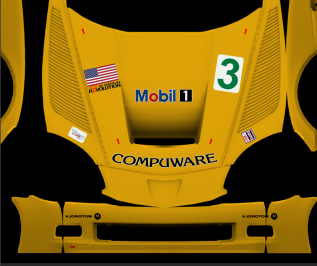
Ok, regarding my last post - I got some people telling me to test skin F302's C6R and I did. It was going very well... until I discovered that the mapping on the bumper is backwards, not sure if this is how it is, but it should be fixed.

1.PNG
1-1.PNG

2.PNG
2-2.PNG


I don't think I'll fault F302 for this one, but the AO seems to be weird in the screenshot below, just a heads up. That's all.

3.PNG


BTW, Here I was practicing to do the PSI Experience livery and found out that I can't even touch the bumper on this C6R. Not sure if this is the models fault or the livery editor, but something tells me it's the editor. Can someone tell me the best and or "user friendly" 3D livery editor? Is it Mudbox? blender? What is it? I'm tired of this livery editor and it's flaws!
4.PNG
 

Attachments

  • 2.PNG
    2.PNG
    107.8 KB · Views: 37
Hi everyone, if you could help me please. For a few days the cars in off-line weekend mode have not left the pits, it is certainly a CSP setting that causes the problem. By uninstalling it everything works fine. the tracks that have the problem have always worked correctly so far.

any suggestions?
Thank you
 
Who knows why the wheels of cars disappear? We are talking about Pessio mods, TransAM Legends and some others. If you approach them, the wheels appear. This happens starting with the CSP 1.80-Preview346 and only with the camera from the cockpit. Wheels also appear in the new CSP if you disable Graphic Adjustments
This problem exists at least since 2021 and has nothing to do with new versions of CSP. The activation of "graphics adjustments" changes the way, the game handles the LODs. This is a good thing, because it helps to improve the performance of the game and so should be activated. But it causes the problem for a handful of cars, that the LODs for 6 of these cars in the distance don't have tyres. The stock Kunos Lotus 49 has the problem, the stock Kunos Ferrari 312/67 doesn't. I don't know exactly what causes the problem, but it can be the names of the meshes of the tyres of the cars. The Lotus 49 doesn't have the word "tire" or "tyre" in the names of the meshes of the tyres, the Ferrari does. So CSP seems to think, that these meshes are not important and hides them in the distance, to improve the performance.

You can solve the problem by changing a value from 10 to 16 in a hidden section in "graphics_adjustment.ini" in "assettocorsa\extension\config".

[VISIBLE_CARS]
; hidden
; four values are for: LOD A, simplified LOD A, simplified some more, LOD D

MAIN=2, 4, 16, 200

If you also remove ";hidden", you can edit the value directly in CM under "CUSTOM SHADERS PATCH/GRAPHICS ADJUSTMENTS".

To test the new setting, you can use the Kunos Lotus 49 in a Quick Race with 19 opponents at Spa 1966. When you start from position 20 and the field drives through "Eau Rouge" in front of you after the start, you will easily see, whether 6 cars in front of you are without tires or not.
 
Ok, regarding my last post - I got some people telling me to test skin F302's C6R and I did. It was going very well... until I discovered that the mapping on the bumper is backwards, not sure if this is how it is, but it should be fixed.

View attachment 1319309View attachment 1319310
View attachment 1319314View attachment 1319315

I don't think I'll fault F302 for this one, but the AO seems to be weird in the screenshot below, just a heads up. That's all.

View attachment 1319322

BTW, Here I was practicing to do the PSI Experience livery and found out that I can't even touch the bumper on this C6R. Not sure if this is the models fault or the livery editor, but something tells me it's the editor. Can someone tell me the best and or "user friendly" 3D livery editor? Is it Mudbox? blender? What is it? I'm tired of this livery editor and it's flaws!
View attachment 1319338
Jeez and here I am painting stuff on PSD and looking at the showroom in another window... How do you use that ? I've got the full CM btw lol
 
Jeez and here I am painting stuff on PSD and looking at the showroom in another window... How do you use that ? I've got the full CM btw lol
It's called Paintshop app. I honestly don't recommend this, it has some bad flaws depending on what model and livery you're trying to make. Take it from me, I've used this app to create my entire C5R pack and wasn't very pleased with the processes of it's tools and assets. I had to use the ERASER TOOL to actually paint the car. Sometimes when you're done with your livery, THE ENTIRE PROCESS IS GONE EVEN IF YOU SAVE IT! I've had that happened to me before with one of Be_Modding's 996 Bi Turbo Porsches.

I also hate the fact that the livery editor doesn't update your folder live when you want to add more sponsors or stickers to your car while being in the process of making the livery. For that you'll have to close out the game for your sticker(s) to appear in the app. I will admit, it's better than to just make a livery all in 2D in photoshop/gimp. Once you get the work flow going between the app and your photo editing software, it's better.

Here's where I got it from, direct download: https://github.com/ac-custom-shaders-patch/app-paintshop/releases/latest/download/Paintshop.zip
 
Anyone skinning this motor vehicle by F302?

I am going to be starting another round of skinning tomorrow and i just wanted to check to see if anyone was already doing skins for this?.

thanks
Someone was doing skins for this car, if I remember well it was Mr Hunt, but I'm not completely sure... I know I was looking forward to them, but it's been awhile since last info... Maybe the man himself can shed more light on the current situation/plans... This car could definitely use some skins though
 
Someone was doing skins for this car, if I remember well it was Mr Hunt, but I'm not completely sure... I know I was looking forward to them, but it's been awhile since last info... Maybe the man himself can shed more light on the current situation/plans... This car could definitely use some skins though
yes! that's the person i had in my head i thought someone posted up about it ages ago thanks for the reminder of who it exactly was.

@MrHunt are you doing/planning on doing this skin? if so i shall leave it and crack on with another car

Screenshot (380).png
 
Last edited:
It's called Paintshop app. I honestly don't recommend this, it has some bad flaws depending on what model and livery you're trying to make. Take it from me, I've used this app to create my entire C5R pack and wasn't very pleased with the processes of it's tools and assets. I had to use the ERASER TOOL to actually paint the car. Sometimes when you're done with your livery, THE ENTIRE PROCESS IS GONE EVEN IF YOU SAVE IT! I've had that happened to me before with one of Be_Modding's 996 Bi Turbo Porsches.

I also hate the fact that the livery editor doesn't update your folder live when you want to add more sponsors or stickers to your car while being in the process of making the livery. For that you'll have to close out the game for your sticker(s) to appear in the app. I will admit, it's better than to just make a livery all in 2D in photoshop/gimp. Once you get the work flow going between the app and your photo editing software, it's better.

Here's where I got it from, direct download: https://github.com/ac-custom-shaders-patch/app-paintshop/releases/latest/download/Paintshop.zip
Well thanks for the comment, I think I'll stick with dear ol' Photoshop lol
 
Custom Championship.
Qualifying: 10 Min
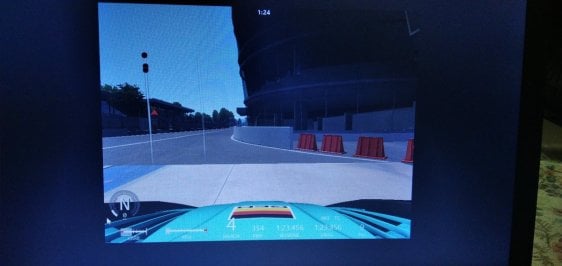
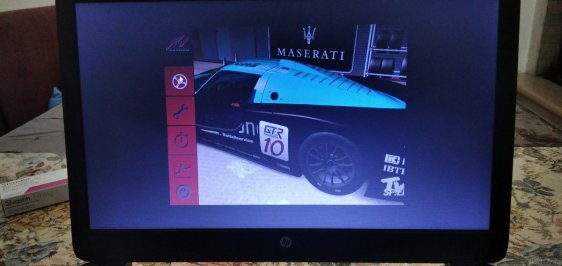
Mod: Rss Gt, MC12 Kunos, Corvette C5-R Legion, Monza circuit (kunos), 22 cars. Everything freezes in this phase, after 10 minutes it unlocks, the qualifications are over and I'm 9th without EVER DRIVING because the game crashed...😅😥😡🤔
 

Attachments

  • IMG_20240114_222216.jpg
    IMG_20240114_222216.jpg
    93.2 KB · Views: 33
  • IMG_20240114_221725.jpg
    IMG_20240114_221725.jpg
    96.6 KB · Views: 29
Last edited:
Daggnabbit.
I had steadfastly resolved not to just buy, buy, buy cos it's new and shiny, and then you go and say something like that :)
Oh well, be right back ... in a couple of hours.
I'll buy it when there's more or when they (eventually) will realize we sad end-users must bop the stuff by hand.
If I can wait you can too.
 
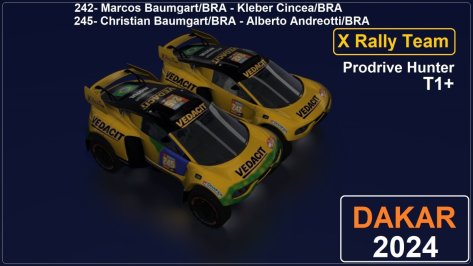
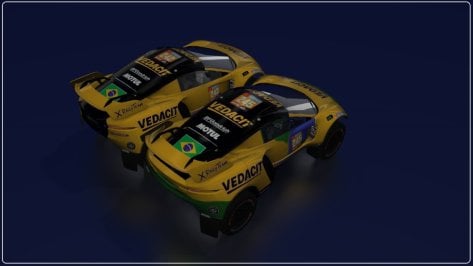
Taking advantage of the moment of the 2024 Dakar Rally, I decided to try to adapt the skin of the Brazilian Team (X Rally Team) with the Prodrive Hunter car.
I used the Gravel mod car (BRX Hunter 2022).As the skin map is very complicated, I just made the adapted versions, starting from the original skin (Vedacit), which came with the car.
 

Attachments

  • __custom_showroom_1705278789.jpg
    __custom_showroom_1705278789.jpg
    99.3 KB · Views: 54
  • __custom_showroom_1705278810.jpg
    __custom_showroom_1705278810.jpg
    63.1 KB · Views: 53
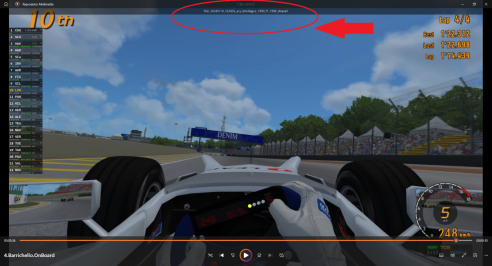
Could anyone tell me why this message appears every time I race on Assetto Corsa?I don't know what I activated (which key I pressed without knowing).
 

Attachments

  • assetto.corsa.png
    assetto.corsa.png
    244.7 KB · Views: 41
Walk on, nothing to see here, just another crappy mod :lol:

Volkswagen Scirocco MK2 GTX 16V
Code:
Original model by FM7
AC version by Pfalzdriver
If you like the car, feel free to buy me a beer (or two): https://streamlabs.com/pfalzdriver

1982 paved the way for a new generation Scirocco. This more rounded, slightly longer Scirocco was designed internally by Volkswagens styling studio. Based on the same platform as the original Scirocco, the new body allowed drag coefficient to be reduced from 0.42 to 0.38.

EXTRA-A = Interior light*
EXTRA-B = Open/close hood/trunk*
EXTRA-C = Open/close doors*
EXTRA-E = Open/close sunroof*
EXTRA-F = Foglight*

I've used as much real data as I could get my hands on. Engine and gearbox is fully made with proper torgue data, gear rations fit the real 2Y gearbox by Volkswagen. Aero and suspension had to be some compromise. Full AO inside and outside is present. All lights and instruments are working*.

Have fun with another classical german car. :)

* CSP required!
Tested with Shaders patch version 0.2.3-preview1. No warranty for prior versions, but everything down to CSP 0.1.79 should work without issues.
Known issues
  • Steering and shift animation arent completely right
  • Rear wiper detached when opening trunk (I hide it as a workaround, not that pretty tho)
  • No girlfriend, condoms, cigarettes or road maps available :cheers:
__custom_showroom_1705221607.jpg
Screenshot_pfa_vw_scirocco_53b_first_snow_12-0-124-19-15-17.jpg
Screenshot_pfa_vw_scirocco_53b_ks_nurburgring_14-0-124-16-49-14.jpg


Download at GTPlanet or Sharemods
 
This problem exists at least since 2021 and has nothing to do with new versions of CSP. The activation of "graphics adjustments" changes the way, the game handles the LODs. This is a good thing, because it helps to improve the performance of the game and so should be activated. But it causes the problem for a handful of cars, that the LODs for 6 of these cars in the distance don't have tyres. The stock Kunos Lotus 49 has the problem, the stock Kunos Ferrari 312/67 doesn't. I don't know exactly what causes the problem, but it can be the names of the meshes of the tyres of the cars. The Lotus 49 doesn't have the word "tire" or "tyre" in the names of the meshes of the tyres, the Ferrari does. So CSP seems to think, that these meshes are not important and hides them in the distance, to improve the performance.

You can solve the problem by changing a value from 10 to 16 in a hidden section in "graphics_adjustment.ini" in "assettocorsa\extension\config".

[VISIBLE_CARS]
; hidden
; four values are for: LOD A, simplified LOD A, simplified some more, LOD D

MAIN=2, 4, 16, 200

If you also remove ";hidden", you can edit the value directly in CM under "CUSTOM SHADERS PATCH/GRAPHICS ADJUSTMENTS".

To test the new setting, you can use the Kunos Lotus 49 in a Quick Race with 19 opponents at Spa 1966. When you start from position 20 and the field drives through "Eau Rouge" in front of you after the start, you will easily see, whether 6 cars in front of you are without tires or not.
Thank you! It works! Interestingly, with CSP 1.80-Preview218, mods that I indicated have wheels even unchanged in Graphic Adjustments
 
Last edited:
I know a few of us are suffering with AI weirdness lately (cars not leaving pits, not starting the race etc) and just wanted to add an observation which could help someone who might be looking into these anomalies.

I have a recurring bug (I think someone else also reported it recently) where the 4th place driver in a race does not move at the race start and a pile up ensues. Happens on multiple tracks with many different cars, mixed grids or all same car, new AI behaviour on or off makes no difference.

The observation, which may or may not shed some light is that when this bug occurs there are some drivers facing the wrong way inside the cockpits of some cars. Looks hilarious but this bug is killing the game for me. There's only so much hotlapping I can enjoy.
 
Problem with VRC 9X8 Hypercar. No CPS version only runs on electric. The dashboard is not turned on and does not turn on with the ignition and start commands of the CSP version. Someone like me?
 
Problem with VRC 9X8 Hypercar. No CPS version only runs on electric. The dashboard is not turned on and does not turn on with the ignition and start commands of the CSP version. Someone like me?
I had the exact same problem yesterday with the no CSP version. But it happened to me after I had installed the real life skins from RD. I tried to install it again and I ended up not being able to see anything on the steering wheels dashboard either. I had to give up. I ll try later again today. Hope that someone has a solution til then
 
Some updates for the F1 2023 helmets:

Added new helmets:

Mexico: Perez, Bottas

Qatar: Gasly

Brazil: Hamilton, Ocon, Gasly

Austin: Leclerc, Sainz, Gasly, Norris, Zhou, Magnussen, Hulkenberg, Ricciardo

Las Vegas: Verstappen, Perez, Leclerc, Sainz, Ocon, Piastri, Bottas, Alonso, Stroll, Magnussen, Ricciardo, Albon

Abu Dahbi: Leclerc, Gasly, Magnussen, Tsunoda, Ricciardo

 
I know a few of us are suffering with AI weirdness lately (cars not leaving pits, not starting the race etc) and just wanted to add an observation which could help someone who might be looking into these anomalies.

I have a recurring bug (I think someone else also reported it recently) where the 4th place driver in a race does not move at the race start and a pile up ensues. Happens on multiple tracks with many different cars, mixed grids or all same car, new AI behaviour on or off makes no difference.

The observation, which may or may not shed some light is that when this bug occurs there are some drivers facing the wrong way inside the cockpits of some cars. Looks hilarious but this bug is killing the game for me. There's only so much hotlapping I can enjoy.
I experienced a similar issue for the first time at Le-mans yesterday where the AI cars sometimes don't even get off the line but the same cars tested at Charlotte Motor Speedway race without issues, at least for me.

I see this issue is also at Nordschleife 2023 (Pyyer) version but the normal Nordschleife (Kunos) version there is no issue with the Ai when the race starts.
 
Hi Joe ,

I noticed when I switched to the pure PP filter when I installed the newest Pure yesterday, that even after a total reset to default via the Pure config app, everything was too dark...

I use the Improved Visuals Pure CS filter. Screen and VR ppfilter and must say I like the results alot better then with Peter's latest own pure pp filter...
Not only are the images lighter and more accurate for the time of day, but also I notice that emitted light from brake lights and dash instruments etc are more realistic and immersive.

A very good example to showcase the reason esp in VR I preffer this PP filter over to the native pure filter by Peter Boese :
take the Volkswagen Golf Mk2 Tuned "Unknown v1.1" (found on ACTK garage),
when you turn on the headlights the dials and digits of the speedometer emit a blue light.
With the default pure filter , they become almost unreadable and they "sink" (I don't know how else to call it, they move down a bit in the Z axis if you know what I mean. flicking on/off the lights , you will see what I mean - potentially only in VR!)

With the aforementioned IV PureCS filter this effect is not at all there, and the lights on the instruments are beautiful and realistic.

As you correctly mentioned, using different PP filters, gives other results, so maybe before changing actual textures , we should all agree what PP filter to use a base of refference ?? (and my vote goes to this IV PureCS filter) :lol:

I urge you to try it
(esp before making tracks darker, it's good to select the best possible PP filter first ;)
maybe there's better ones but this one is the best one I came across , and it seems to get updated frequently along w Pure updates) - I'm at v2.0 and now already it's at 2.14 (which I will install now - hope it didn't get worse)
:cheers:
what was too dark? Only the low tones? Because the default pure ppfilter is even brighter than the one from Pure 0.235.
I fixed the tonemapping in it. Also at Pure Discord, there is a new variant of the Pure filter in the hotfix section. It has brighter lowtones at night.

If low tones are too low, you can adjust this in the tonemapping with this slider. If you activate the curve, you see what you are doing there:
1705314428995.png
 
Last edited:
Sharing a mod? Host it on GTPlanet Downloads. Free, public hosting for files up to 10GB in size.
Back