- 316

- Southampton
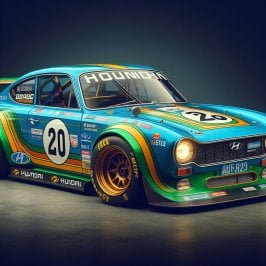
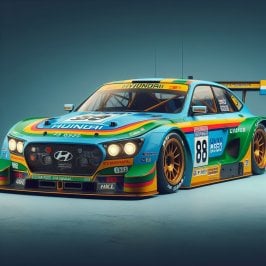
Whilst messing around with AI image generator I asked it to create a 70's style Hyundai sports car. Any 3d modelers out there fancy creating one of these beauties?!


This issue typically occurrs with track layouts utilizing extended track physics as evidenced by the "surfaces.ini" file with the following line: WAV_PITCH=extended-0I experienced a similar issue for the first time at Le-mans yesterday where the AI cars sometimes don't even get off the line but the same cars tested at Charlotte Motor Speedway race without issues, at least for me.
I see this issue is also at Nordschleife 2023 (Pyyer) version but the normal Nordschleife (Kunos) version there is no issue with the Ai when the race starts.

Thanks for the tips, it is definitely that in my case.This issue typically occurrs with track layouts utilizing extended track physics as evidenced by the "surfaces.ini" file with the following line: WAV_PITCH=extended-0
The race will start normally if you immediately escape from the bugged start and select "restart session".
I suspect Mr. Jusupov will fix this, of course the timing is anyone's guess.


I don't know for sure but it's like I'm wearing (dark grey) sunglasses ... Even at noon everything was just not bright enough (w pure filter), with the other one it's all good.what was too dark? Only the low tones? Because the default pure ppfilter is even brighter than the one from Pure 0.235.
I fixed the tonemapping in it. Also at Pure Discord, there is a new variant of the Pure filter in the hotfix section. It has brighter lowtones at night.
If low tones are too low, you can adjust this in the tonemapping with this slider. If you activate the curve, you see what you are doing there:
View attachment 1319489
 )
)
Now we just need an AI 3D-model generator.Whilst messing around with AI image generator I asked it to create a 70's style Hyundai sports car. Any 3d modelers out there fancy creating one of these beauties?!


I had this problems using the RARE verison of tracks and rules ON, when i disabled it and started using the normal tracks instead, it is now working normally and yesterday i did a race with the AI without any issues.I know a few of us are suffering with AI weirdness lately (cars not leaving pits, not starting the race etc) and just wanted to add an observation which could help someone who might be looking into these anomalies.
I have a recurring bug (I think someone else also reported it recently) where the 4th place driver in a race does not move at the race start and a pile up ensues. Happens on multiple tracks with many different cars, mixed grids or all same car, new AI behaviour on or off makes no difference.
The observation, which may or may not shed some light is that when this bug occurs there are some drivers facing the wrong way inside the cockpits of some cars. Looks hilarious but this bug is killing the game for me. There's only so much hotlapping I can enjoy.


It does exist. But it wont do anything close to usable in AC in years, I think.Now we just need an AI 3D-model generator.

I'm sure that with learning,feeding the AI with well conceived shape, 3d, polygon number, it will be ok in the futurIt does exist. But it wont do anything close to usable in AC in years, I think.


Exactly this is happening to me. Would be great if someone knew how to resolve please. Is it a CSP problem.I experienced a similar issue for the first time at Le-mans yesterday where the AI cars sometimes don't even get off the line but the same cars tested at Charlotte Motor Speedway race without issues, at least for me.
I see this issue is also at Nordschleife 2023 (Pyyer) version but the normal Nordschleife (Kunos) version there is no issue with the Ai when the race starts.
For now use the workaround mentioned by Jody, works for me.Exactly this is happening to me. Would be great if someone knew how to resolve please. Is it a CSP problem.

Could you make a screenshot with comparisons, because the pure ppfilter should be on the edge of "It's not too bright yet". So maybe there is something with the installation.I don't know for sure but it's like I'm wearing (dark grey) sunglasses ... Even at noon everything was just not bright enough (w pure filter), with the other one it's all good.
But then again the emitted lights on the dials was too bright in comparison (and that shifting effect of blue light on/off not to forget screwing with the readability even).
I urge you to try and compare yourself (w that Golf Tuned - and I hope you get your filter to look as good as the IV PureCS one, and we can then all just use your filter as the default/benchmark one.
After all your filter will be the very first to get updated if any new features in Pure warrants a change to the PP filter...
But I do think it needs to be fine out of the box (with the default values), and not that everyone needs to go fiddle and tweak the sliders to get it to look fine. (ps: if the values in blue are the default ones, then you have altered quite a few values it seems. So what you see is no longer what 95% of us see.)
For now I stick to the IV PureCS one... (also : not keen on using Discord esp to download a file - I hope you keep putting the files on Patreon for those of us not riding the Discord train.
Cheers and thanks for your wonderful contributions to this amazing sim!

If not already done by someone, I will report this to Ilja (not the fix, but the issue itself). Was chatting with him about last week already. I think it´s appreciated.For now use the workaround mentioned by Jody, works for me.
Hopefully it will be fixed in a next CSP version.
I don't know why but screenshots are a no-go since I don't see anything on my screen when in-game (all black) , only have image in the VR headset (quest3 , usb3 link cable) ...Could you make a screenshot with comparisons, because the pure ppfilter should be on the edge of "It's not too bright yet". So maybe there is something with the installation.

View attachment 1319463
- No girlfriend, condoms, cigarettes or road maps available
Download at GTPlanet or Sharemods

 www.gtplanet.net
actually its the difference of ambient light V1 and V2. It seems the PureCS is still using V1, which just produces wrong ambient light. But in some situations this wrong ambient light is better for artificially making the scenery brighter.I don't know why but screenshots are a no-go since I don't see anything on my screen when in-game (all black) , only have image in the VR headset (quest3 , usb3 link cable) ...
I will check see later this evening if I have the same when putting on monitor.
EDIT : also on Single screen rendering the difference is visible and representative of what I see in the VR headset to some extent
pure pp filter:
View attachment 1319537View attachment 1319538
with IV PureCS_2.0 filter:
View attachment 1319536View attachment 1319541
Although, here with a sunset and sun directly into the eyes, it get's to be a complete different pic on screen vs VR (for the pure filter)...
View attachment 1319544View attachment 1319543
(left = pure , right = IV PureCS_2.0 )
Here on screen render pure seems better, and in VR the sunlight being brighter is also more realistic , but the instrument panels and steering wheel are almost invisible, they are so dark (much darker then on the screenshot, even darker then how you see on the right screenshot... ).
When I look down (away from the sun) after a second or 2 the image gets much brighter (as if my eyes needed to adjust to the low light condition)... it simulates the eyes closing to protect due to too much light coming in, but that is best left to the actual eye's (no? i could be wrong but now the darkening happens twice, once irl and once simulated...)
With the IV PureCS filter there's also a bit that effect, but it does not darken the dash and wheel to the extent they can't be seen (and it's in VR like in the screenshot)
Strange one. I started the practice with the none CSP version with only electric sound. I watched the replay and the engine sound was there. I then resumed the practise and the car engine sound and dashboard display was on. Must be some sort of CSP bug I guess.I had the exact same problem yesterday with the no CSP version. But it happened to me after I had installed the real life skins from RD. I tried to install it again and I ended up not being able to see anything on the steering wheels dashboard either. I had to give up. I ll try later again today. Hope that someone has a solution til then
TreeFx for KS Nürburgring - worth a release? What do you think?

Did you miss the giant houseplants ?I would like to see the trees. FYI....something sounds wrong with your car. Is the motor about to explode?


If that's a hill you're willing to die on to defend, then so be it, but they do look better when used right. You're also never going to see another title from here on out use 2d X-Wing cardboard cutout trees, so if that's a deal breaker, you might be stuck using 10 year old Assetto Corsa for a long while. Not the worst thing to happen though I guess.Did you miss the giant houseplants ?
I'm still to see the first track being improved by adding treeFX tbh. They kill performance, look ugly, change shape, pop in....

1- I have never seen any tree IRL that looks like the commonly used 3d trees in AC, never.If that's a hill you're willing to die on to defend, then so be it, but they do look better when used right. You're also never going to see another title from here on out use 2d X-Wing cardboard cutout trees, so if that's a deal breaker, you might be stuck using 10 year old Assetto Corsa for a long while. Not the worst thing to happen though I guess.
It says you're using a 1080ti. For triples? In this day and age. That's stretching that card out pretty thin. You could kill all pop in/shape change and performance drops by upping that guy right there.
I personally like 3d trees and think it's just a necessary step in trying to keep AC relevant in 2024. AC2 is coming, and so are the 3d trees.

Hi everyone, is there some updated link to this mod?NeilB's LMP cars rework: Oreca 03 Nismo'11
View attachment 994487
https://mega.nz/file/KTh0nZ6I#bT0cejTTMdlerSnO642BjS3y5pmVtHIljC0jgx4FvJE
This is one of 7 variants made. Let me know if theres something to fix and if You like it or not.

I mean if you're doing some simple club/grid filler liveries on a car that doesn't have any skins it's an absolute godsend, but otherwise I'd learn to paint in 2D on Photoshop for any actual replicas or high quality liveries of course lol.It's called Paintshop app. I honestly don't recommend this, it has some bad flaws depending on what model and livery you're trying to make. Take it from me, I've used this app to create my entire C5R pack and wasn't very pleased with the processes of it's tools and assets. I had to use the ERASER TOOL to actually paint the car. Sometimes when you're done with your livery, THE ENTIRE PROCESS IS GONE EVEN IF YOU SAVE IT! I've had that happened to me before with one of Be_Modding's 996 Bi Turbo Porsches.
I also hate the fact that the livery editor doesn't update your folder live when you want to add more sponsors or stickers to your car while being in the process of making the livery. For that you'll have to close out the game for your sticker(s) to appear in the app. I will admit, it's better than to just make a livery all in 2D in photoshop/gimp. Once you get the work flow going between the app and your photo editing software, it's better.
Here's where I got it from, direct download: https://github.com/ac-custom-shaders-patch/app-paintshop/releases/latest/download/Paintshop.zip
I decided to try the CSP version with the extended controls app this time, which is very easy to install. Just changed from there the buttons for the ignition and the starter to something easier to remember them. It worked perfectly with the real life skins and tyres as well, without installing any other extension etc.Strange one. I started the practice with the none CSP version with only electric sound. I watched the replay and the engine sound was there. I then resumed the practise and the car engine sound and dashboard display was on. Must be some sort of CSP bug I guess.

Here it is. I edited the existing .ini in AC>Extension>Config>Tracks>Loaded. So paste it back in there.
I've got the same problem with Geraint Thomas's ClearGT: Transparent Car Preview app.right im done trying to scratch my arse with this. can someone shed some light on this. i am fiddling with previews and i have found 1 which i want to use. i go through the process and it never applies it. the first picture is what i want and what it says will appear and picture 2 is what i end up with...........
i can get it to work ok if i untick "use csp for final preview render"
am i able to get it so that it works with that box ticked?
thanks
View attachment 1319651
View attachment 1319649
I would like to see the trees. FYI....something sounds wrong with your car. Is the motor about to explode?
Did you miss the giant houseplants ?
I'm still to see the first track being improved by adding treeFX tbh. They kill performance, look ugly, change shape, pop in....
Okey dokely, so it seems we got a conclusion and I keep them in the bin. Thanks anyway.1- I have never seen any tree IRL that looks like the commonly used 3d trees in AC, never.
2- my 1080 ti with triples still gives me 140 FPS AVG on e.g. the Nordschleife with Y trees
3- these Y-trees look massively better than 3D's, they move nicely in the wind, keep their shape, don't pop, look good when wet.
4- and they look way more natural and closer to RL than these 3d monstrosities.
View attachment 1319664