Assetto Corsa PC Mods General DiscussionPC 

  • Thread starter Thread starter daan
  • 156,561 comments
  • 50,662,012 views
Formula Mazda LODs.


thanks!

in return here a repack of all the skins I had installed, with matching crew and driver helmets (so they are not all the same colors anymore)
 
Oh boy, that feeling will happen many more times, I can guarantee you this.

a few personal tips on that :
  • Like I said, compression is the enemy. Not because it's bad, but because it behave like a c*nt. The closer to full black/white the worst it is. There is no secret ingredient to it (known to me...), but a little helper is to apply a b/w neutral filter on your AO texture (with photoshop for example) before exporting it to dds and using/modifying it. It will remove the purple/green weirdos which commonly appears in the bright to grey/grey to dark transition area. Again, the bigger the base image, the better, but the harsher the compression can appear on the final result.
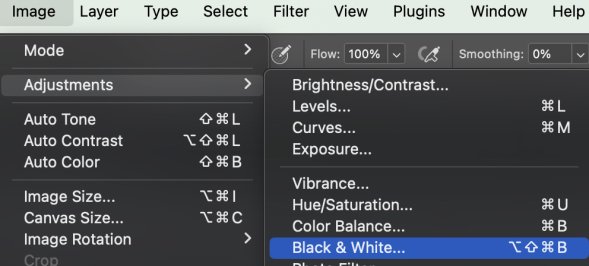
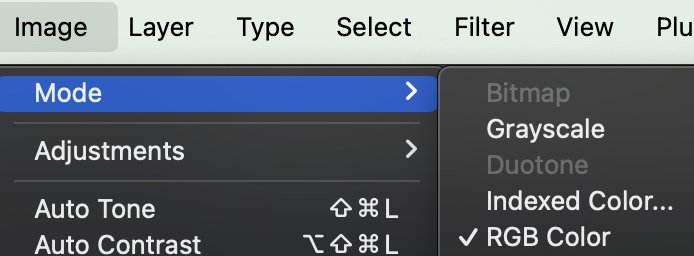
Where do I find a b/w neutral filter in Photoshop? (menu) (please :))
 
As a layman in the field, I have always wondered how it's possible that mods with an impressive appearance and full of detail are not difficult to handle by the computer and that other mods of much lower quality are insatiable devourers of fps...

After reading these latest conversations about optimization I'm beginning to understand a little more why, and my admiration for modders continues to grow, and above all, for those who share their work selflessly. Thank you all very much, once again.

(Kiss Ass Mode, off)
 
@DaWallace I'm always a little bit confused by the Guerilla mods. For example regarding the GT4 pack, do I keep on eye on the guerilla-mods.de forum for updates, or should I look at the patreon site? The Patreon seems to have a much higher version number than the forum.
 
Where do I find a b/w neutral filter in Photoshop? (menu) (please :))
If it's a whole image then the simplest way is to convert the image to Grayscale, and then back to RGB mode. i.e Image>Mode>Grayscale and then same but RGB.
Alternately you can use a Black & White Adjustment, which offers more choices and adjustments. Adjustments can of course be applied to individual layers. Sometimes that's important, most of the time a simple back and forth does the trick.
 

Attachments

  • Screenshot 2024-02-29 at 18.15.13.jpg
    Screenshot 2024-02-29 at 18.15.13.jpg
    64.5 KB · Views: 19
  • Screenshot 2024-02-29 at 18.14.43.jpg
    Screenshot 2024-02-29 at 18.14.43.jpg
    27.5 KB · Views: 21
If it's a whole image then the simplest way is to convert the image to Grayscale, and then back to RGB mode. i.e Image>Mode>Grayscale and then same but RGB.
Alternately you can use a Black & White Adjustment, which offers more choices and adjustments. Adjustments can of course be applied to individual layers. Sometimes that's important, most of the time a simple back and forth does the trick.
I had been working on an issue of strange green color banding on the Ferrari 296 skins I just did. The RGB->Greyscale->RGB worked well for me but not doing it on the AO base layer but on a layer I used as grey paint (although it incorporated the AO). Same thing I guess. Anyway it worked. There's still a small amount of dispersed green in it, but way way less. I will update those 296 skins (posted here) today.
- I'm thinking to run that process on everything/layer that doesn't have color. Could even do it just the greyscale part of an image containing color. Hmmmm...

Before - After
Thanks for the tip!
cf_ferrari_296_gt3_Paint-Fix.jpg
 
Last edited:
View attachment 1332713

Hi everyone.
Does anyone know if there is a way to put the safety net of the McLaren 720 GT3 Evo (version: mclaren_720_gt3_acc) in the correct position?
add this to your ext_config:


[MODEL_REPLACEMENT_...]
FILE=mclaren_720s_gt3.kn5, mclaren_720s_gt3_lodb.kn5, mclaren_720s_gt3_lodc.kn5, mclaren_720s_gt3_lodd.kn5, mclaren_720s_gt3_lod_b.kn5, mclaren_720s_gt3_lod_c.kn5, mclaren_720s_gt3_lod_d.kn5
HIDE=Object-002

pretty sure this sorts it out by removing it

if you want in the right place i think you will need to do that in 3d afaik

maybe someone knows more than me on this but that's all i know of
 
Last edited:
@sab001 yep, typical example of a compression going rogue. the b/w filter trick works but wont do everything, it just helps removing the color artifacts from gray values.

Like Leopard said ninja'ly, menu above layers, adjustment, black and white filter, no other changes needed. You can then zone it by erasing parts from the mask, if you want. For a whole image, menu image/mode also does it.
 
Still working on my side. Did you update CM and Simplygon to the latest versions?
Grüße in die Pfalz.
I allways updated it in the past in this state. But now there is now download available anymore. You need to request a Eval License before. Form needs Infos i don't want to give.

Good luck that you license stays active for longer.
 
View attachment 1332713

Hi everyone.
Does anyone know if there is a way to put the safety net of the McLaren 720 GT3 Evo (version: mclaren_720_gt3_acc) in the correct position?
@Breanuts posted a fix a while ago that might help:
 
@DaWallace I'm always a little bit confused by the Guerilla mods. For example regarding the GT4 pack, do I keep on eye on the guerilla-mods.de forum for updates, or should I look at the patreon site? The Patreon seems to have a much higher version number than the forum.
I would say Patreon. Because all our mod downloads are on patreon and so this is the first adress for the latest versions. Otherwise all our mods are in the autoupdater from CM and if we update a mod, it will automatically updated via CM, normally...but sometimes the autoupdater from CM is bugged.

Unfortunately, we currently don't have anyone who moderates and updates the forum consistently and regularly, which is why there are always differences between the version numbers. I always try to look there regularly, but unfortunately I don't always manage to do so due to lack of time.
 
add this to your ext_config:


[MODEL_REPLACEMENT_...]
FILE=mclaren_720s_gt3.kn5, mclaren_720s_gt3_lodb.kn5, mclaren_720s_gt3_lodc.kn5, mclaren_720s_gt3_lodd.kn5, mclaren_720s_gt3_lod_b.kn5, mclaren_720s_gt3_lod_c.kn5, mclaren_720s_gt3_lod_d.kn5
HIDE=Object-002

pretty sure this sorts it out by removing it

if you want in the right place i think you will need to do that in 3d afaik

maybe someone knows more than me on this but that's all i know of
I had the same issue a while back, just updating to a newer CSP fixed it.
 
I can't wait for that Mosler GT3 and Saleen S7.R Evo to be finish and who knows what Zin has cooking up next.
Unfortunately, I have to say that the Mosler will need more time. I have the next exam coming up in May, which I've been preparing for again since the beginning of the year and therefore have less time for modding. But I still try to keep up with it. Thats the reason why the progress on the Mosler is this slow.😓
 
Hello

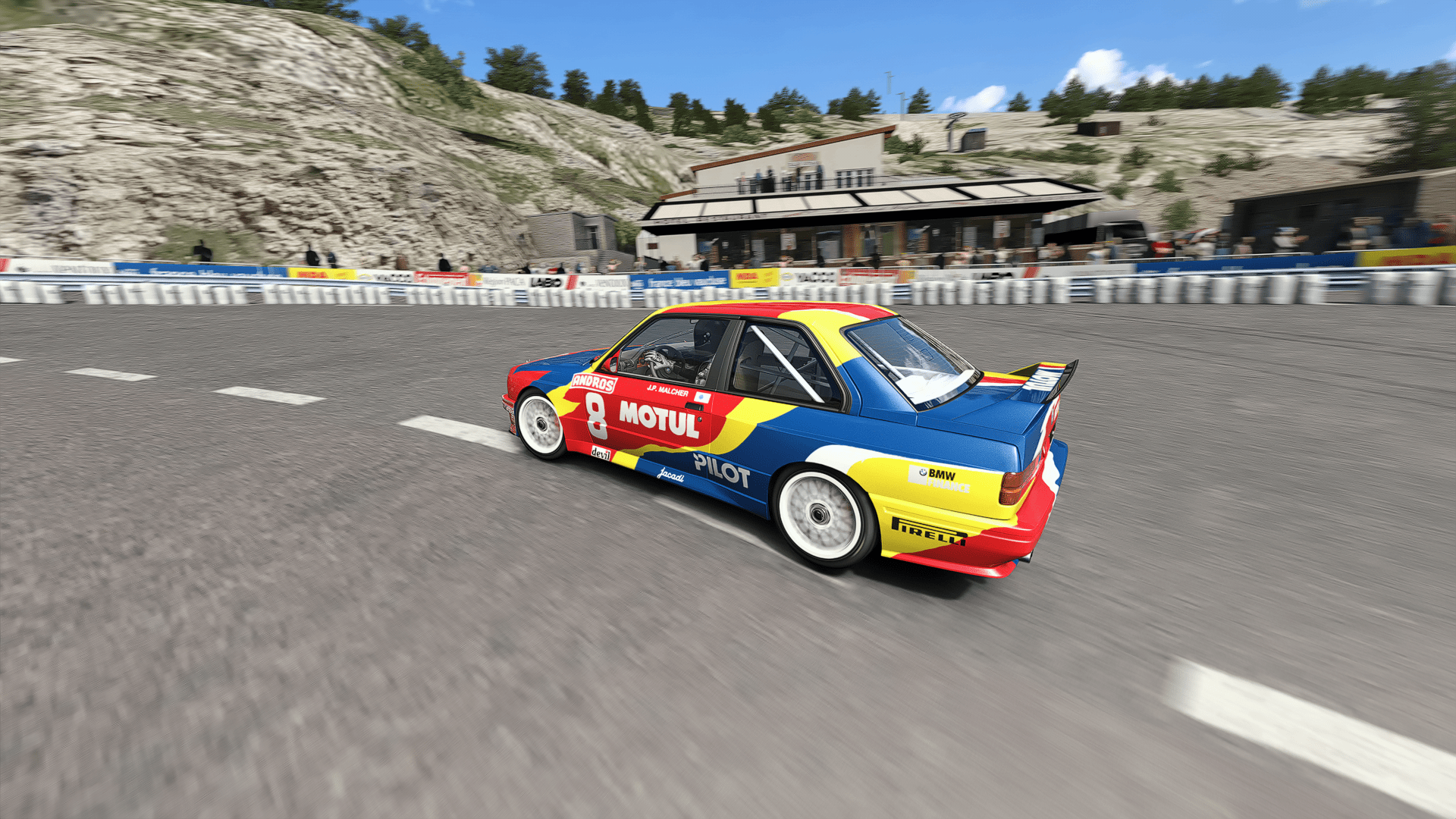
After completing the MONT-VENTOUX hillclimb (modern version, 10.05 km)... Coming soon...

stesteve.jpg


6n7g.png


Screenshot-ford-sierra-cosworth-rs500-gra-mont-ventoux-3-1-124-16-21-50.jpg

..I'm starting a new track that I'd like to be able to create a personal grasses pack for. I downloaded and opened the "grass gen" application

A folder containing the thumbnails has been created. I managed to edit thumbnails in photoshop. But then, I have no idea how to save this new series of vegetations... I imagine that it is the "atlas" file... but I don't know what to do...

Capture d'écran 2024-02-29 191453.png


Capture d'écran 2024-02-29 191443.png

Many thanks if anyone can give me any information!
 
I would say Patreon. Because all our mod downloads are on patreon and so this is the first adress for the latest versions. Otherwise all our mods are in the autoupdater from CM and if we update a mod, it will automatically updated via CM, normally...but sometimes the autoupdater from CM is bugged.

Unfortunately, we currently don't have anyone who moderates and updates the forum consistently and regularly, which is why there are always differences between the version numbers. I always try to look there regularly, but unfortunately I don't always manage to do so due to lack of time.
Since i'm not a Patreon member of theirs, I can't keep tabs on the new stuff. Are you saying there has been a GT4 update released or is there one forthcoming?

On another note for the ai experts. Do the recorded sidelines have any impact on an ai car's lap times or do they just set boundaries? I only ask because I recorded some new sidelines for one of the stock tracks, but I didn't touch the existing fast_lane file. After inserting my new sidelines into the fast_lane file by holding down the shift key, the ai lost about 2-3 seconds on their lap times. I'm confused by this because it's the same ai line. The only difference is that it has my new sidelines. Any thoughts from anyone?
 
Hey, just a quick question, I’ve been building some championships in CM, but I keep losing data - on the round/circuits page, changes made to start time, temp and weather revert to prior to the change (I save the changes), it’s not consistent, sometimes they do and sometimes they don’t, there maybe a pattern but I haven’t identified it yet. It does seem to happen to championships I’ve cloned to make a different version (different lengths or driver) Similarly, on the description/points page, the description, author and version disappear, again not to all of them. Also on occasions when I click on a championship it immediately italicised (indicating it’s changed) yet I’ve made no change. Has anyone experienced this, or have any suggestions?
 
Hey, just a quick question, I’ve been building some championships in CM, but I keep losing data - on the round/circuits page, changes made to start time, temp and weather revert to prior to the change (I save the changes), it’s not consistent, sometimes they do and sometimes they don’t, there maybe a pattern but I haven’t identified it yet. It does seem to happen to championships I’ve cloned to make a different version (different lengths or driver) Similarly, on the description/points page, the description, author and version disappear, again not to all of them. Also on occasions when I click on a championship it immediately italicised (indicating it’s changed) yet I’ve made no change. Has anyone experienced this, or have any suggestions?
Yes, same here and no solution asfaik, hopefully a new cm version or something will fix it some day?it's been like this for a long time.
 
Last edited:
I know I've been writing a lot lately but I need you again. I was doing some testing and I noticed something, but I don't know whether to call it a problem. Practically:

1) If the AI uses a data containing csp brakes, the AI either no longer brakes or race braking and accelerating at the same time;

2) If I start a session with AI using the data folder, the AI behaves as in the point 1 and I can brake

3) If I force AC to load the data.acd file, AC either explodes or I remain stuck in my grid spot with all the cars on the grid clipped into mine (and with the impossibility of doing anything because I have the sim at 300%). In any case, with csp brakes + data.acd I can't brake;

4) If I remove csp brakes everything goes back to normal.

Am I doing something wrong?
 
Last edited:
Since i'm not a Patreon member of theirs, I can't keep tabs on the new stuff. Are you saying there has been a GT4 update released or is there one forthcoming?

On another note for the ai experts. Do the recorded sidelines have any impact on an ai car's lap times or do they just set boundaries? I only ask because I recorded some new sidelines for one of the stock tracks, but I didn't touch the existing fast_lane file. After inserting my new sidelines into the fast_lane file by holding down the shift key, the ai lost about 2-3 seconds on their lap times. I'm confused by this because it's the same ai line. The only difference is that it has my new sidelines. Any thoughts from anyone?
Sidelines are impacting both boundries and lap times. They are funneling the cars and I 've learned that they are as important as fast lane. Only combination of fast lane, sidelines and ai hints give you required behaviour. If one of elements is off, whole thing will not work out properly.
 
Last edited:
Sidelines are impacting both boundries and lap times. They are funneling the car and I 've learned that they are as important as fast lane. Only combination of fast lane, sidelines and ai hints give you required behaviour. If one of elements is off, whole thing will not work out properly.
Thanks for the info. I never knew sidelines impacted lap times.

The tutorial I read many years ago never mentioned they had any impact so i've always recorded the sidelines driving at a snails pace so I could get the lines right. That might explain why most of the tracks i've done ai for always seem to end up being slower. Typically that's a good thing for me, but on this track I actually need them to be faster and i've had no luck doing it with the hints file.
 
Sidelines are impacting both boundries and lap times. They are funneling the cars and I 've learned that they are as important as fast lane. Only combination of fast lane, sidelines and ai hints give you required behaviour. If one of elements is off, whole thing will not work out properly.
The three are interrelated. I can record "slow" cautious fast lane but with aggressive sides and hints I can make the ai speed up a lot.
And opposite I can make "fast" aggresive fast lane and slow it down with hints and sides.
Sides have several tasks. They might be aimed at reducing the overtakings, setting track limits not allowing to touch higher kerbs or opposite allowing for aggresive riding

Thanks for the info. I never knew sidelines impacted lap times.

The tutorial I read many years ago never mentioned they had any impact so i've always recorded the sidelines driving at a snails pace so I could get the lines right. That might explain why most of the tracks i've done ai for always seem to end up being slower. Typically that's a good thing for me, but on this track I actually need them to be faster and i've had no luck doing it with the hints file.
It doesn't matter at which speed you record the sides but where you record them.
Once I had an argument with Kevin who introduced me to AC AI logic as what is the best practice. It was for Jarama track. I was going to fastest possible option with very agressive sides and he was about to make it more relaxed to have slower times but fewer crashes. At the end of the day its a matter of balance and personal preference.
 
It doesn't matter at which speed you record the sides but where you record them.
Once I had an argument with Kevin who introduced me to AC AI logic as what is the best practice. It was for Jarama track. I was going to fastest possible option with very agressive sides and he was about to make it more relaxed to have slower times but fewer crashes. At the end of the day its a matter of balance and personal preference.
While I would like to speed them up, I do have to admit that I have been having some great battles with the ai even at these reduced speeds. I used to be able to get them on any turn at this track as long as I went in with at least my nose ahead of them, but that is no longer the case. If we are even the slightest bit side by side, they are probably going to beat me out of the turn.

Basically what i've done is made them faster in the turns but slower on the straights compared to the stock ai. I wish I could get their straight line speed back up to where it was because then i'd have a real battle on my hands. I'm just not sure what to add to the hints file to make them faster on the straights. A HINT entry only seems to impact their speed in the turns.
 
Sharing a mod? Host it on GTPlanet Downloads. Free, public hosting for files up to 10GB in size.
Back