

- 131

- Germany
the second skin is for URD´s SNX (2021)Whoa whoa whoa, which cars did you make for the skin besides GTR (which I know from URD)? I want these..
the lexus is not a really good model, but does it for filling the grid -> Lexus LC500 GT500
the second skin is for URD´s SNX (2021)Whoa whoa whoa, which cars did you make for the skin besides GTR (which I know from URD)? I want these..

Seen attach image, the parts in yellow on the AO map are what you are looking for.
words of wisdom... thanks againyeh you would need to import the model in blender or whichever software you choose
if you want "perfect" skins its really the only way............and i am talking 100% perfect
the amount of time's i have said "i wish i could uv map" is in the hundred's, i just dont have what it takes to do 3d let alone the computer for it.
so i go by the "it is what it is" quote
if i do a car and its that bad i just dont do it and find another car instead
although you may be lucky i think someone has pointed out that those bits are hidden in the ao on that car
my advice for that would be to make the AO layer slightly transparent so you can see more........sometimes stuff is hidden in the AO this has happened to me on alot of the stuff i have done, best practice to always mnake that layer slightly treansparent as one of the first things you do
also when you have a car that you dont know, just chuck a few random shapes e.t.c all over it..............just to see what its mapped like.........the last thing you want is to get 50% of the way through the skin only to realise the uv is unusable in certain area's and you then realise you wasted 5-10-15 hours....i hate it when that happens and its always when your trying to do something REALLY accurate.........

There are more bugs with CSP 0.2.7-preview1 and Pure 2.38 hotfix1. I don't see the sun disk and moon anymore. Only if I change the time to sunset the sun disk returns, but the moon is lost for now (maybe stolen by aliens or Elon Musk?I 'm having 2 super weird bugs with CSP 2.7.1 :
The brightness of the screen suddendly go down, for really any reason. It's like the auto exposure gets stuck ay some point.
I can tweak the settings in CSP, and somehow at some point it's back. Any setting that would drastically force down brightness in CSP?
It's really weird, for a race i'm having a blast with incredible graphics, then it goes down after some sun glare of weather change.
Same for replays, it's like lottery, same race can be crystal bright or dull dark.
Also, even with the 2.38 Pure fix i can't bring the rain back, i only have snow. Not really an issue for now anyway.
 )
)


Bonjour, quelqu'un a-t-il un lien fonctionnel vers Touring Car Series 2015 de PTSims Modding Team ?
 www.overtake.gg
Thank you very muchSkins - WTCC 2017 skinpack except Lada
Chabalian submitted a new resource: WTCC 2017 skinpack except Lada - For TCS mod by PTsims - WTCC - 2017 This is a pack of the liveries from the WTCC 2017 after the race of Italy at Monza For the mod WTCC TC1 by PTsims.net : TCS16 v1.3 for AC that you find there: Mod edit - External download...
I have found another bug with the new KN5 loader. The pitcrews of all teams have now the graphics of the pitcrew of the player's car. I have to disable "Shared KN5 materials" under "General Patch Settings/New KN5 loader" to fix this.Have you turned off New KN5 Loader?


Beautiful car and great fun! Been having a blast with a grid of these at Brands Hatch Indy...Mazda Atenza CUP Public Release!!
Download:https://www.mediafire.com/file/l9ikiw1p9wayi8m/mazda_atenza_cup101creative.zip/file
Converted From GT7
-AO inside and out
-Realistic Dashboard
-Physics
-CSP Settings
-Driver Animation
-Panoramic session Start config Daniel Nogal
Garage ACTK help:
-COCKPIT_HR updated
-Add LODs
-Update collider.kn5
View attachment 1419986View attachment 1419987View attachment 1419988View attachment 1419989View attachment 1419990View attachment 1419991


Spa 1938 has been updated to version 1.06. Use the link in the quote if you want the update. It would be best to delete or backup your existing folder.Spa Vintage Track Updates:
These are my updates to all three versions of the Spa Vintage tracks. They are all full stand alone tracks because it was suggested that I do it this way instead of config\track skin mods.
All versions now have a vao patch, animated flags, working clock tower and new grass and tree textures. They also have two additional track skins that get a progressively bluer tint and less saturation. The skins also have only the files I altered from the original so you can edit them to make a skin that fits your liking. There are also new ext_configs for each track that add seasonal changes, some shader adjustments and a few other things.
Explanation about each one so you know which one to download. They each represent a specific version of the track:
Spa-Francorchamps 1938:
Spa-Francorchamps 1938
-- Based on the Spa_Faux_Pre_War version. All credits for the track go to Legion.
-- Additions include all things listed above plus removal of floating flag poles that had no flags and scaling of flag poles that were floating off the ground. Plus I added collision physics to most of the haybales. Some I left without to help with AI behavior. All other things about the track are the same as the original.
Spa-Francorchamps 1966:
Spa-Francorchamps 1966
-- Based on the Spa_1966 version. All credits for the track go to the Reboot Team.
-- Additions include all things listed above plus collision physics to most haybales. Some I left without to help with AI behavior. Also included the Spa 1966 AI done by Parri. The original AI is still included in the ai_original and data_original folders. Just rename them to ai and data to revert back to the original AI behavior. All other things about the track are the same as the original.
Spa-Francorchamps 1934 & 1966:
Spa-Francorchamps 1934 & 66
-- Based on the Spa_THR version. All credits for the track go to the Reboot Team and Waffles for the THR updates.
-- Additions include all things listed above plus a new AI line for the 1934 layout done by me. The original AI was unusable. It was my first attempt at an AI line so don't expect perfection. All other things about the track are the same as the original.
Please point out any and all mistakes. I'm sure there are a few. Was kind of hard managing three versions of the same track. I was never sure if I made the same changes on all three tracks.
View attachment 1419335


I did wonder why some of my installed mods now suddenly exhibit this behaviour, where all the ai car's drivers suddenly have the same gloves and overalls as the car I'm driving.I have found another bug with the new KN5 loader. The pitcrews of all teams have now the graphics of the pitcrew of the player's car. I have to disable "Shared KN5 materials" under "General Patch Settings/New KN5 loader" to fix this.
As I wrote disable "Shared KN5 materials" under "General Patch Settings/New KN5 loader" in CSP settings to fix this.I did wonder why some of my installed mods now suddenly exhibit this behaviour, where all the ai car's drivers suddenly have the same gloves and overalls as the car I'm driving.
Where's the Enable tickbox located, so I can turn this off?


ITS RIGHT HERE... (WAITING TO POSSES YOUR SOUL AND DELIVER HELL UPON YOU)I did wonder why some of my installed mods now suddenly exhibit this behaviour, where all the ai car's drivers suddenly have the same gloves and overalls as the car I'm driving.
Where's the Enable tickbox located, so I can turn this off?


I used the one from 101Creative...I'm absolutly out of the loop for this class, what's the mod you're reffering to please?
2 excellent mods from Team Bazza! Thousand Thanks! What a pity that Velos Breadvan couldn't be integrated.10 points, much nicer thanks
Noted, will look into it


Has anyone tweaked the digital_instruments.ini yet to fix the floating digits on the dash display? If so, please share.Mazda Atenza CUP Public Release!!
Download:https://www.mediafire.com/file/l9ikiw1p9wayi8m/mazda_atenza_cup101creative.zip/file
Converted From GT7
-AO inside and out
-Realistic Dashboard
-Physics
-CSP Settings
-Driver Animation
-Panoramic session Start config Daniel Nogal
Garage ACTK help:
-COCKPIT_HR updated
-Add LODs
-Update collider.kn5
View attachment 1419986View attachment 1419987View attachment 1419988View attachment 1419989View attachment 1419990View attachment 1419991
;hide the flickering roll cage welds
[MODEL_REPLACEMENT_...]
FILE=?.kn5
HIDE=int16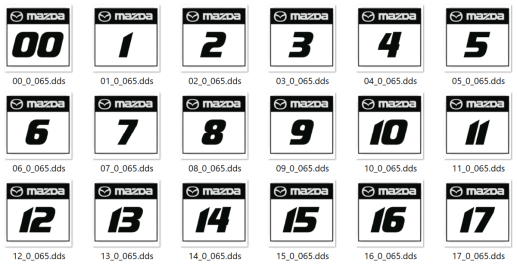

I added this to their Github site as an issue 3 days ago and they labeled it a bug, regression. Didnt know there was a fix...thank you very much.I have found another bug with the new KN5 loader. The pitcrews of all teams have now the graphics of the pitcrew of the player's car. I have to disable "Shared KN5 materials" under "General Patch Settings/New KN5 loader" to fix this.
 www.gtplanet.net

Regarding the numbers, YES I DO!Has anyone tweaked the digital_instruments.ini yet to fix the floating digits on the dash display? If so, please share.
If any VR users find the flickering roll cage welds a little distracting, hide them with this:
Code:;hide the flickering roll cage welds [MODEL_REPLACEMENT_...] FILE=?.kn5 HIDE=int16
Edit: Also, anyone interested in unique numbers for each skin rather than all cars being No.1?
If so, I'll rename them appropriately and pack them up into each skin folder for an easy insertion.
I'll also redo them to match the car numbers rather than 00-17.
They work fine with the LODs too.
View attachment 1420190
Edit 2: they'll look something like this, with edge transparency fixed and a Castrol Edge logo footer.
View attachment 1420191



Also noticed the brake/tail lights from the WSC's Ferrari 365 P2 are not working, at least for me10 points, much nicer thanks
Noted, will look into it
when that happened to me it was because I did not have Lighting FX enabled in CSP.Also noticed the brake/tail lights from the WSC's Ferrari 365 P2 are not working, at least for meView attachment 1420223

Its an easy fix, open the mirror app and flip it!Anyone noticed the 910/6 from the WSC pack's mirror is backward? The driver's door mirror at least...
View attachment 1420252
If you use Pure, what ppfilter you are using, when the exposure is not right?I 'm having 2 super weird bugs with CSP 2.7.1 :
The brightness of the screen suddendly go down, for really any reason. It's like the auto exposure gets stuck ay some point.
I can tweak the settings in CSP, and somehow at some point it's back. Any setting that would drastically force down brightness in CSP?
It's really weird, for a race i'm having a blast with incredible graphics, then it goes down after some sun glare of weather change.
Same for replays, it's like lottery, same race can be crystal bright or dull dark.
Also, even with the 2.38 Pure fix i can't bring the rain back, i only have snow. Not really an issue for now anyway.

It's fine and will be released next month.Talking about WIP tracks, how's Phoenix coming along ?
I had the same “problem”, then I zoomed the cam out and realized, it’s the shadows of the clouds 😅 maybe the difference in the exposure is slightly too much. But it’s ok :-)If you use Pure, what ppfilter you are using, when the exposure is not right?
If you set temperatures higher than 3°C it will no longer snow, except with Snow and Sleet weather types, there snow is forced.


... anyone interested in unique numbers for each skin rather than all cars being No.1?...

It's pretty random, with any ppfilter, either Pure or random ones.If you use Pure, what ppfilter you are using, when the exposure is not right?
If you set temperatures higher than 3°C it will no longer snow, except with Snow and Sleet weather types, there snow is forced.
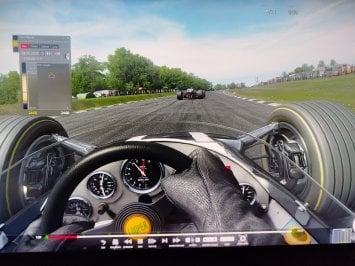
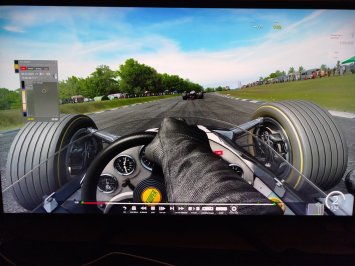
Could you please monitor that value with the "pure" ppfilter?It's pretty random, with any ppfilter, either Pure or random ones.
It happens after 15 mins, sometimes less. Restarting the session fixes it for now.
Here are 2 pics, same time of the day, same spot, same ppfilter, when the brightness suddendly drops :
View attachment 1420282
View attachment 1420290
When it works though, the new glare effects of Pure and whatever happens in csp 2.7 are absolutly insane (on that note, the purecandy is so bright it actually set all my desk papers on fire), i've never seen my game look so good. The light at noon is now perfect. I'm still exploring the new possibilities - that is, until the game decides to engage safe mode for my eyes😂. Switching to CSP 2.5 solves the problem but it's hard to let those new features go.
As for the snow, it was indeed the temperature, i didn't check.
I was used to the temp to automatically fit the date (i'm usually driving between may and september), gonna check if it's a feature i disabled in the weather menu.
On a side note, it saddens me a bit cause my ppfilters are now waaaaaay worse than what the big guys can do. I am officially not skilled enough to follow up with the script writing😅


