For those who like it like me, even though we still don't officially have the Ferrari 330P3, P3 Spider (and some 412p skins), a specific folder for the cars from last year (I made small adjustments in the last few days).
So I decided to make one for the 330P3 (with the respective adapted skins) along with other things I downloaded.Just like in the 412p.
This way the 1966/1967 WSC grids are more complete.For those who happen to have the cars (the folders are independent), if by chance they are not to everyone's liking, just discard them after testing.Here are some prints of the car skins.
Hi guys, i'm in the process of creating a car mod (i'm quite noob).
Managed to bring the car into the game from Blender, and materials done on ksEditor. Everything was fine. Now I wanted to bring back the car into Blender to do some last 3D tweaks, and here, the problem i'm facing now (and i've never seen this) is that when I try and Unpack KN5 LOD from CM Showroom, the FBX file generated has one part missing.
Not invisible or missplaced, it's just gone. The mesh is not there, neither the material that was atteched to it (the mesh in question is the undercarriage of the car, which was just a black shaded texture). The car itself in the game and showrooms it's fine, the undercarriage is there, but as soon as the FBX is unpacked, it's not there anymore, neither ksEditor or Blender.
I would gladly appreciante some help with this because it's driving me crazy, I never thought something like this could happen.
Hi guys, i'm in the process of creating a car mod (i'm quite noob).
Managed to bring the car into the game from Blender, and materials done on ksEditor. Everything was fine. Now I wanted to bring back the car into Blender to do some last 3D tweaks, and here, the problem i'm facing now (and i've never seen this) is that when I try and Unpack KN5 LOD from CM Showroom, the FBX file generated has one part missing.
Not invisible or missplaced, it's just gone. The mesh is not there, neither the material that was atteched to it (the mesh in question is the undercarriage of the car, which was just a black shaded texture). The car itself in the game and showrooms it's fine, the undercarriage is there, but as soon as the FBX is unpacked, it's not there anymore, neither ksEditor or Blender.
I would gladly appreciante some help with this because it's driving me crazy, I never thought something like this could happen.
So rather than exporting the kn5 file, why didn't you go back to the original Blender file and edit what you needed to there, then re-export, run through kseditor again (which will be quick because you have everything set already, if you have saved them), and then export the kn5 again? That's much easier than trying to reverse engineer the whole thing again.
that's nice, now when your English teacher would ask you the secrete recipe to have a good English level, instead of saying "I watch Netflix movies with English subtitles" you say "I watch my daily GTPlanet rant post"
Hi. I ended up with 3 cars. I tested each one then deleted the one which didn’t load to track. I had already deleted the gadu ones so I guess it was the original WSC one to be deleted. Hope this helps.
Ok, i'll get you a copy, but I want t try and resolve a couple of issues first if they are not too much trouble. There's a couple of buildings that are completely black on one side. I'd like to fix that that as long as it doesn't require having to edit the tracks .kn5 file. Same goes for the haybales. The bottom half of the objects are shadowed in a weird way.
Hello,
Hope you all are doing finest and (by the looks of it) have great fun driving and further enhancing AC1!
Recently I have upgraded my PC (bought new set) and now fully enjoying AC1 in 4K (Jeez, what a difference!)
All my most enjoyable mods installed. But I have a question now; how to change driver in certain cars (For instance, driving a street car with driver with helmet no longer is to my liking). I have a good driver ('Jason') which I'd like to see in my AMG Hammer (to name one), how to do this? In which (ini?) file is this embedded? Would grateful receiving a solution for this. I'm no modder (needless saying perhaps). Thanks much in advance for your kind assistance.
Hello,
Hope you all are doing finest and (by the looks of it) have great fun driving and further enhancing AC1!
Recently I have upgraded my PC (bought new set) and now fully enjoying AC1 in 4K (Jeez, what a difference!)
All my most enjoyable mods installed. But I have a question now; how to change driver in certain cars (For instance, driving a street car with driver with helmet no longer is to my liking). I have a good driver ('Jason') which I'd like to see in my AMG Hammer (to name one), how to do this? In which (ini?) file is this embedded? Would grateful receiving a solution for this. I'm no modder (needless saying perhaps). Thanks much in advance for your kind assistance.
The file is driver3d.ini in the data.acd. You can unpack and access the data.acd file with Content Manager. Also check the individual livery folder for skin.ini file, which can dictate the suit, gloves, and helmet that the driver wears.
Hello,
Hope you all are doing finest and (by the looks of it) have great fun driving and further enhancing AC1!
Recently I have upgraded my PC (bought new set) and now fully enjoying AC1 in 4K (Jeez, what a difference!)
All my most enjoyable mods installed. But I have a question now; how to change driver in certain cars (For instance, driving a street car with driver with helmet no longer is to my liking). I have a good driver ('Jason') which I'd like to see in my AMG Hammer (to name one), how to do this? In which (ini?) file is this embedded? Would grateful receiving a solution for this. I'm no modder (needless saying perhaps). Thanks much in advance for your kind assistance.
Hello,
Hope you all are doing finest and (by the looks of it) have great fun driving and further enhancing AC1!
Recently I have upgraded my PC (bought new set) and now fully enjoying AC1 in 4K (Jeez, what a difference!)
All my most enjoyable mods installed. But I have a question now; how to change driver in certain cars (For instance, driving a street car with driver with helmet no longer is to my liking). I have a good driver ('Jason') which I'd like to see in my AMG Hammer (to name one), how to do this? In which (ini?) file is this embedded? Would grateful receiving a solution for this. I'm no modder (needless saying perhaps). Thanks much in advance for your kind assistance.
Ok, i'll get you a copy, but I want t try and resolve a couple of issues first if they are not too much trouble. There's a couple of buildings that are completely black on one side. I'd like to fix that that as long as it doesn't require having to edit the tracks .kn5 file. Same goes for the haybales. The bottom half of the objects are shadowed in a weird way.
Wow, this is one messed up track. Not sure i'll be able to fix some if the issues without having to re-make the kn5 file. You might have to live with just my shader edits.
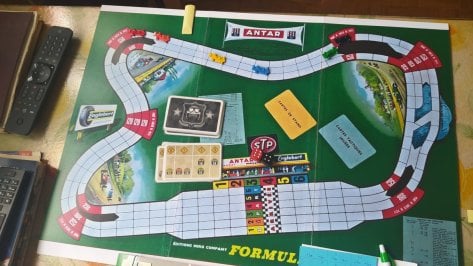
I started back in the "prehistoric" era... F1 board game (year 1972).
I still have it today. Originally it only had the Interlagos circuit and (6 F1 miniatures), but with my creativity, I created other circuits from the time (adding up to 24 cars and replacing the original 6-point roulette wheel with a "plate with 24 points").
Hello everyone again. I need your help again. A few days ago I had to restart my PC due to a blue screen problem and luckily I didn't lose all my mods, but there are some things that don't appear in the list of apps on the right side of the screen (for example the one to hide all the Hud in replays). What should I do to fix it? I looked through the list of installed apps and managed to fix some but not all. Thank you in advance.
Regarding the TVR Griffith problem: thanks to everyone for answering me. Unfortunately no, I didn't read the pdf (my fault). Lately I don't have much time to dedicate to AC and I simply installed everything without reading anything.
Hello everyone again. I need your help again. A few days ago I had to restart my PC due to a blue screen problem and luckily I didn't lose all my mods, but there are some things that don't appear in the list of apps on the right side of the screen (for example the one to hide all the Hud in replays). What should I do to fix it? I looked through the list of installed apps and managed to fix some but not all. Thank you in advance.
Suggestions:
1. Don't run any file system checking or repair tools untill you've manually checked and you're sure the files are broken/missing. Some of those tools can be a chainsaw unless you're familiar.
2. Take a look in \Steam\steamapps\common\assettocorsa\apps (or wherever that is for you). There should be two folders "lua" and "python".
3. Check if the missing apps actually still have files/folders in there.
4. They are, restart Content Manager and in "miscellaneous | PYTHON APPS" and "miscellaneous | LUA APPS", check if they're listed there.
5. Some apps install as mods, so also check "mods" if they're available or enabled (like Nuzzis stuff)
6. If it's all gone, you might have to get comfortable with chkdsk and it's options, or live dangerously and just re-install the missing apps?
Regarding the TVR Griffith problem: thanks to everyone for answering me. Unfortunately no, I didn't read the pdf (my fault). Lately I don't have much time to dedicate to AC and I simply installed everything without reading anything.
Hello,
Hope you all are doing finest and (by the looks of it) have great fun driving and further enhancing AC1!
Recently I have upgraded my PC (bought new set) and now fully enjoying AC1 in 4K (Jeez, what a difference!)
All my most enjoyable mods installed. But I have a question now; how to change driver in certain cars (For instance, driving a street car with driver with helmet no longer is to my liking). I have a good driver ('Jason') which I'd like to see in my AMG Hammer (to name one), how to do this? In which (ini?) file is this embedded? Would grateful receiving a solution for this. I'm no modder (needless saying perhaps). Thanks much in advance for your kind assistance.