Assetto Corsa PC Mods General DiscussionPC 

  • Thread starter Thread starter daan
  • 157,285 comments
  • 51,161,831 views
Imola 2024 faster AI

Screenshot_ks_ferrari_488_challenge_evo_fn_imola_26-3-125-13-58-1.jpg
 
I just got a completely new PC and I've done a fresh install of Assetto Corsa. Content Manager, CSP, etc. and now I get crashes near-100% of the time when trying to load the game.

00007FFA8CB3441E (d3d11): (filename not available): CreateDirect3D11SurfaceFromDXGISurface
AC\cameramirror.cpp (49): CameraMirror::renderOpaque
AC\mirrortexturerenderer.cpp (118): MirrorTextureRenderer::render
AC\sim.cpp (2558): Sim::renderScene
AC\game.cpp (126): Game::embarrassed:nIdle
AC\game.cpp (210): Game::run
AC\acs.cpp (477): wWinMain
f:\dd\vctools\crt\crtw32\dllstuff\crtexe.c (618): __tmainCRTStartup
00007FFA92D826AD (KERNEL32): (filename not available): BaseThreadInitThunk
00007FFA938EA9F8 (ntdll): (filename not available): RtlUserThreadStart

I reinstalled the base game and it keeps giving me the same error no matter what CSP settings I try, or which version I use.

From going from an old PC where the AI would always get stuck on the grid every race to a new PC where the game doesn't even start when I try running it, I'm about ready to throw in the towel and forget about AC. I want to play the game but some cars like the new RSS GT-M cars effectively lock you into needing CSP 2.7+ or else you can't play.
 
Last edited:
I just got a completely new PC and I've done a fresh install of Assetto Corsa. Content Manager, CSP, etc. and now I get crashes near-100% of the time when trying to load the game.

00007FFA8CB3441E (d3d11): (filename not available): CreateDirect3D11SurfaceFromDXGISurface
AC\cameramirror.cpp (49): CameraMirror::renderOpaque
AC\mirrortexturerenderer.cpp (118): MirrorTextureRenderer::render
AC\sim.cpp (2558): Sim::renderScene
AC\game.cpp (126): Game::embarrassed:nIdle
AC\game.cpp (210): Game::run
AC\acs.cpp (477): wWinMain
f:\dd\vctools\crt\crtw32\dllstuff\crtexe.c (618): __tmainCRTStartup
00007FFA92D826AD (KERNEL32): (filename not available): BaseThreadInitThunk
00007FFA938EA9F8 (ntdll): (filename not available): RtlUserThreadStart

I reinstalled the base game and it keeps giving me the same error no matter what CSP settings I try, or which version I use.

From going from an old PC where the AI would always get stuck on the grid every race to a new PC where the game doesn't even start when I try running it, I'm about ready to throw in the towel and forget about AC. I want to play the game but some cars like the new RSS GT-M cars effectively lock you into needing CSP 2.7+ or else you can't play.
If you install via .bat the standard physic you can play without the latest CSP required. Of course you cut the CSP features out but is a solution. I honestly prefer the RSS way than the VRC one which have double cars and double skins which eats space in the SSD.
 
I just got a completely new PC and I've done a fresh install of Assetto Corsa. Content Manager, CSP, etc. and now I get crashes near-100% of the time when trying to load the game.

00007FFA8CB3441E (d3d11): (filename not available): CreateDirect3D11SurfaceFromDXGISurface
AC\cameramirror.cpp (49): CameraMirror::renderOpaque
AC\mirrortexturerenderer.cpp (118): MirrorTextureRenderer::render
AC\sim.cpp (2558): Sim::renderScene
AC\game.cpp (126): Game::embarrassed:nIdle
AC\game.cpp (210): Game::run
AC\acs.cpp (477): wWinMain
f:\dd\vctools\crt\crtw32\dllstuff\crtexe.c (618): __tmainCRTStartup
00007FFA92D826AD (KERNEL32): (filename not available): BaseThreadInitThunk
00007FFA938EA9F8 (ntdll): (filename not available): RtlUserThreadStart

I reinstalled the base game and it keeps giving me the same error no matter what CSP settings I try, or which version I use.

From going from an old PC where the AI would always get stuck on the grid every race to a new PC where the game doesn't even start when I try running it, I'm about ready to throw in the towel and forget about AC. I want to play the game but some cars like the new RSS GT-M cars effectively lock you into needing CSP 2.7+ or else you can't play.
After a fresh install of Assetto Corsa on a new PC, you must start the game once on steam without Content Manager, CSP, etc. Steam will then install some additional stuff you need to run the game. I had this problem last year when I moved AC to my new PC.
 
anyone else who got that weird lights beside the tail lights and under the car?

default pure pp filter is activated
Screenshot_tcc_peugeot_405_stw_togliatti_ring_smp_26-3-125-21-59-27.jpg
 
Last edited:
Was harder than I thought it would be, but I kind of settled on one of these two versions for now. I looked through a lot of pics of Kyalami and the track seems to have a wide variety in how the terrain looks. I may end up trying to make one that looks really burnt out, but this will do for now. For me at least, it's better than the default look. You might not pick up on the difference, but on one of them, the grass is a little more red\yellow tinted.

Default:
1.jpg


New 1:
2.jpg


New 2:
3.jpg
 
Was harder than I thought it would be, but I kind of settled on one of these two versions for now. I looked through a lot of pics of Kyalami and the track seems to have a wide variety in how the terrain looks. I may end up trying to make one that looks really burnt out, but this will do for now. For me at least, it's better than the default look. You might not pick up on the difference, but on one of them, the grass is a little more red\yellow tinted.

Default:


New 1:


New 2:
New 1 is nice!
 
Been driving a lot of cars on Kyalami(both new and the previous 2016 version) so good to see more work being done on it...

Tried this car, F302/RMS reworked CA06, the driver seems to be positioned weird(a bit high?) and also the arms sticks out, I am wondering if its not a scaling thing also....Other than that the car is actually pretty fun to drive and mostly to look at too...

1745777533259.jpeg
 
Finally.

Your post has made me aware of this track, which I had no idea about... Thanks, buddy! 😄
 
Finally.


Happy Pumped Up GIF by Universal Pictures Home Entertainment
/raises the Genoatrack Uno/Reboot Team Bat-Signal...

would love a proper update to this one, been years since I drove it last. I'll give it a try again this week.

Cheers @IMEAN as always
 
Hi all!

Remember the stuttering issues in the beginning of the first lap in a session (race, practice or hotlap)?
I think i've found a workaround solution.
Start the session & before you start moving the car, just glance left, right & backwards.
Those 2-3 stutters (which usually follow) are gone.
Maybe a bug with CSP Neck FX?
Anyway it might help someone!

Have a nice day/night.
 
Hi all!

Remember the stuttering issues in the beginning of the first lap in a session (race, practice or hotlap)?
I think i've found a workaround solution.
Start the session & before you start moving the car, just glance left, right & backwards.
Those 2-3 stutters (which usually follow) are gone.
Maybe a bug with CSP Neck FX?
Anyway it might help someone!

Have a nice day/night.
I get the stutters and don't use neck fx.
 
Grass skins for @Vernonfs Kyalami GP Circuit which you can get HERE . It's unfinished, but good enough for people who might be interested in giving it a try.

If you want to give this a try, make a copy of the track's existing ext_config file. I added some entries at the bottom which will make a mess of the default grass if you decide to go back to it.

I tried to match the default grass brightness with my skins. If you find the grass to be too light or dark, go the the Additional Stuff section at the bottom of the ext_config file and play around with the Ambient and Diffuse values for the grass\top SHADER_REPLACEMENT secton.

There is also an optional folder in the download that will replace one of the track's kn5 files. I kept getting a missing texture error when loading the track so I had to fix the problematic kn5 file. If you don't have this problem, just skip extracting what's in the 'optional' folder.

vv_kyalami_grass_skins

As usual I can't make it simple because I love having the option to change how the track looks. You will always want to keep the 'Grass (Keep Enabled)' skin enabled. Then enable one of the other skins to get the type of grass look you prefer.

Patchier (best matches the default grass):
1.jpg


Patchy:
2.jpg


Semi Patchy:
3.jpg


Lush:
4.jpg
 
Last edited:
I get the stutters and don't use neck fx.
I did not say that Neck FX is the cause of the stutter problem. I used a question mark. "?". Which means i asked.
Do you get the stutters only in the beginning of the lap?
If "yes" then try what i suggested.
If you get them constantly, it's another problem on your end probably, or a CSP-Pure bug.
 
Hello,

i have a question about the newer RSS models.

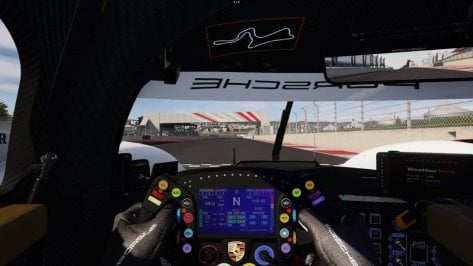
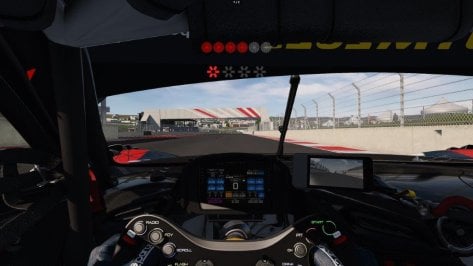
When I race against the AI, I can see the display ,etc. on the steering wheel and it works perfectly - if I switch the view to the other cars, the display is blank for all of them.

It affects all my new models (all with the latest updates from RSS) e.g., Ferrari 296 GT3, Ford Mustang GT3, Porsche 992 GT3, BMW M Hybrid V8, Porsche 963, Formula Hybrid 2024.

It works perfectly on the older models.

I've also tested it with the newer URD models – e.g., the Ferrari 296 GT3 – and it works perfectly there too.

Is this the case for you too or have I missed something?
many thanks in advance

Rob

Pictures: Porsche 963 -Ferrari 296
 

Attachments

  • D1.jpg
    D1.jpg
    72.1 KB · Views: 15
  • D2.jpg
    D2.jpg
    59 KB · Views: 16
  • D3.jpg
    D3.jpg
    68.4 KB · Views: 23
  • D4.jpg
    D4.jpg
    67.6 KB · Views: 16
Sharing a mod? Host it on GTPlanet Downloads. Free, public hosting for files up to 10GB in size.
Back