Assetto Corsa PC Mods General DiscussionPC 

  • Thread starter Thread starter daan
  • 157,283 comments
  • 51,160,308 views
I have a bunch of them i can upload, its just from GTR2 so legion must of only done one of the skins, there are about 5 or 6 in total.
The website altbeirbude has the car and the skins if you wanted to do it sooner than i can as won't be at my PC till late afternoon.
Ok Thanks Iself are Not a Modder or Skinner 🥺😔🫣
For longer Time i hear a De Tomaso Pantera Group 5 gives for Assetto Corsa too But have Not found some over IT.

I know this Pantera Group 5 Modell gives for GTR2 or GT Legends mean ITS from Brickyard Legions Team too.
 
Last edited by a moderator:
Wow it's amazing and it will finally allow me to fully enjoy my ac experience^^
Let's just hope we could combine cm and this one
I agree. I usually set my AC via CM when I don't race, in order to have everything set up when I want to race. Switching from mouse and keyboard to my wheel everytime I want to change my weekend session, or just my car, it's boring after a while (also because I don't have a dedicated setup, it's all tangled up). Now we have the opportunity to do everything using the wheel, like other games. With this new facelift, including the new in game menu (thanks again @MasterFocus for your reply), AC looks so fresh.

I want to talk about another topic, maybe can be helpful. I usually had a lot of stutters even in practice sessions, even after a lot of optimizations (AC and PC). While setting up my bios, I found the option "Sync All Cores" which sets every core of your cpu to the same frequency. This healped a lot, now I have a much smoother experience. Obviously temps and power consumption are higher than before (not too much but still the increase is appreciable).

Here's a quick explanation :)

1750170203332.png
 
24H
Later I can have a look on the previews shown above. The settings have been shared here a while ago...it´s Greenfield?

I think the previews can look as good......


View attachment 1458397
What settings are you using? I'd even be satisfied with just this preview preset if possible
 
Aight, thank you all for the guesses. 😛

It's the TV camera itself. 😊

View attachment 1457439
View attachment 1457434

Full Nordschleife is completed, modelled (most of the cams) on the N24 2024 event. It's not perfect (trees grown a lot!), but like 99% accurate. I've found that I can (not say "easily", but) do TV camera sets that model the real broadcasts more accurately than most AC track mods out there.

The above example is actually one of the least accurate cams in the set (that's because there's a tree interfering on the Kunos track where the 100% correct spot is, a little further up and back). But it's a historic camera spot, used since the 1970s, and quite rare -

...So it's a good example still, because I've also found A TON of archive youtube footage where the middle part of the track is also camera'd up trackside! (Instead of heli, as nowadays) That's from where the last trackside cam currently loses the cars at Aremberg exit all the way to where they pick them up again on the example above, the entry to the Karussell. All pro shot! (except a small part on Kesselchen and Mutkurve)

I'm thinking of releasing the Nordschleife layout (and the Tourist, cause it's almost the same) for free on RaceDepartment, and create a Patreon for the full package, as well as the other tracks I've done, or nearly completed. I feel like it's worth it for their unique level of accuracy. I'll post the RD link (not the paid link) closer to release.

Here are some more shots:

View attachment 1457435
This is the Flugplatz angle used until they graded the track after Mardenborough's crash in 2015, and it beautifully shows the cars getting light there. On the current, graded version, they don't do that anymore and the track, realising this, moved to a full head-on cam nowadays that focuses on the general steepness of the hill instead. (ks track is a 2014 scan, so it still has the jump, and I thought the old angle is more representative for this one!)

View attachment 1457436
I've found this angle from the DTM 1993 race at the full Nurburgring; they had this dramatic camera angle for the Foxhole exit kerb ride. This shot gets more dramatic on replay, the heavier you throw the car in!

View attachment 1457437
This is the standard N24 2024 camera for the Pflanzgarten 1 jump, nothing to comment here - besides the accuracy! :P About 80% of all cams are from the N24 2024/2023 event. Full list of events & year for each camera # will be in the Readme.txt file.

View attachment 1457438
Finally, this Tiergarten angle is from WTCC's 2016 race on the full Nurburgring - it's a bit lower than the angle they use nowadays, and so the small increase in drop towards the very end of the downhill, just before the compression, is more pronounced. The current higher cams hit the entire drop from the same angle, so the increase in steepness is less noticeable.
Releasing this tomorrow, if all goes well! 🤞
 
Is there a way to make the weather transition much slower/smoother? Every now and then I will come back and adjust the Pure's weather settings in for time weather transition. For example 10 minutes of sunny weather before changing to cloudy/overcast. But after ten minutes it would quickly change from sunny to cloudy rather unrealistically.

I did mess around with the slider settings in the Pure's weather settings menu, but it doesn't seem to change anything.
 
Thanks for sharing but I get same error everytime

"Showroom “ult_studio_grey” is missing"

I have the grey studio installed in Assetto's track folder, is this correct?

1750189242939.png
 
Perfect thanks! Been wanting to find a good preset and showroom for CSP as been wanting to standize every preview to account for encrypted or extension content like the WSC cars.
You may also have a look into my dedicated thread here reg. this showroom.

 
In order to "un-sterilize" the cockpit camera feeling I've tried this neckfx, and despite being a little over the top I'm hooked, the past is boring. :indiff:


(brief AI demo with my set-up)

This neck-fx is not tweakable though, no way to decrease head-roll, head-yaw and shaking. There's also a weird decentered feeling, like the head is slightly pointed in the wrong direction...

Do you folks know if there's a valid alternative around?
 
Real Nurburgring Nordschleife TV Cameras - FULL Trackside (No Heli - RARE)

Realistic and accurate TV camera set for Kunos' Nordschleife and Nordschleife Tourist layouts, based on real race broadcasts with close to 100% accuracy.

DOWNLOAD: https://www.overtake.gg/downloads/r...tv-cameras-full-trackside-no-heli-rare.77924/

- 99% accurate TV cameras for Nordschleife and Nordschleife Tourist layouts
- Based on N24 2023/2024 events, except a few angles
- Works in vanilla AC (CamTool not needed)
- Does not overwrite vanilla files

I've also created the Patreon I mentioned earlier, for complete all-layout packs - but I've added a reduced-price membership option as well for an additional surprise next to the Nordschleife (both figuratively, and calendar-wise. ;)), if you want to see.

Finally, I've added an option to basically take custom requests - TV cams for any track, any one layout the member nominates - if you'd like the same quality as this one for some of your tracks.

The Patreon link is on the Overtake download page; this is not the post to advertise it directly.

For the future, I'm planning to continue releasing some TV camera sets free for everyone, some as standalone, and some in all-layout packs - the free ones will be posted here, on Overtake and on my Patreon as well, the paid ones only on Patreon.

(You can join as a free member as well, so you won't miss out on new release notifications.)

3 ks_nordschleife YouTube Corner.jpg
 
Last edited:
Hello guys, since yesterday my game randomly stopped starting, telling me something about CSP stuff I reinstalled already, also checked the game files but it still shows this, can anyone tell what it is a knows a way to fix it?

00007FF8D6FFC30A (fmod64): (filename not available): FMOD::DSPConnection::setUserData
00007FF8D700315D (fmod64): (filename not available): FMOD::DSPConnection::setUserData
00007FF8D700153D (fmod64): (filename not available): FMOD::DSPConnection::setUserData
00007FF8D7021A87 (fmod64): (filename not available): FMOD_File_SetDiskBusy
00007FF8D7021DC0 (fmod64): (filename not available): FMOD_File_SetDiskBusy
00007FF8D7021C79 (fmod64): (filename not available): FMOD_File_SetDiskBusy
00007FF8D702C841 (fmod64): (filename not available): FMOD_File_SetDiskBusy
00007FF8D701EAB1 (fmod64): (filename not available): FMOD_File_SetDiskBusy
00007FF8D707CC8F (fmod64): (filename not available): FMOD::SystemI::createMemoryFile
00007FF8D707CE36 (fmod64): (filename not available): FMOD::SystemI::createMemoryFile
00007FF9180E7374 (KERNEL32): (filename not available): BaseThreadInitThunk
00007FF919CDCC91 (ntdll): (filename not available): RtlUserThreadStart

Edit.. Oh my god why did these two double dots turn to an emoji...

Nvm fixed it somehow, was something WinSound related
 
Last edited:
Hello,

I've run into a strange issue recently on Fenryr's Le Mans track.

It seems that some cars are clipping/falling through the track at the exit of the second Mulsanne chicane.
A lot of cars have no issue at all like the VRC and RSS gt3's and hypercars but others seem to instantly fall through the track surface at that specific place.

I've had the issue come up with VRC Auriel 8 and the Kunos Porsche 962.

If anyone knows why this is happening and how I could fix it, I'd greatly appreciate it.

Thank you ^^
 
Hello,

I've run into a strange issue recently on Fenryr's Le Mans track.

It seems that some cars are clipping/falling through the track at the exit of the second Mulsanne chicane.
A lot of cars have no issue at all like the VRC and RSS gt3's and hypercars but others seem to instantly fall through the track surface at that specific place.

I've had the issue come up with VRC Auriel 8 and the Kunos Porsche 962.

If anyone knows why this is happening and how I could fix it, I'd greatly appreciate it.

Thank you ^^
Same here... same track, same chicane.
 
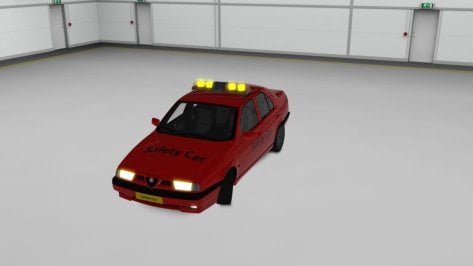
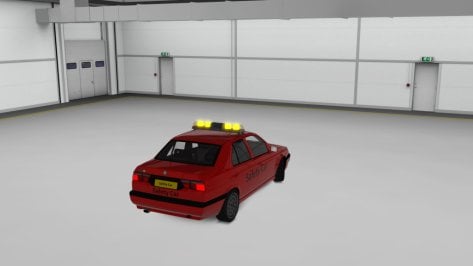
My first "mod". In reality I only modified the Alfa Romeo 155 Q4 "Guardia Civil" by Dani Kiss, with a new livery and a different color of the flashing lights. From a police car to a fake safety car, to be used perhaps with the new dedicated app. The physics are the original ones, I only changed the sound.😀🚨


Attachments

  • __custom_showroom_1750275673.jpg
    __custom_showroom_1750275673.jpg
    45.7 KB · Views: 20
  • __custom_showroom_1750275805.jpg
    __custom_showroom_1750275805.jpg
    42.3 KB · Views: 20
Last edited:
Dear Friends, experiencing an interesting issue with the game recently. Whilst in race mode only, any car experiences throttle pulsating at approx 90mph...kinda like the speed is limited, occurs in 3rd gear and only in race mode (not practice mode or anything else). The pedals app shows the green throttle bar pulsating on and off continuously. Appreciate any insight. Of course, using the latest CSP and pure...Thx Team!
 
Last edited:
Dear Friends, experiencing an interesting issue with the game recently. Whilst in race mode only, any car experiences throttle pulsating at approx 90mph...kinda like the speed is limited, occurs in 3rd gear and only in race mode (not practice mode or anything else). The pedals app shows the green throttle bar pulsating on and off continuously. Appreciate any insight. Of course, using the latest CSP and pure...Thx Team!
Do you mean for any car that you have tried so far? Do you have an auto shift in the settings for yourself?
 
Sharing a mod? Host it on GTPlanet Downloads. Free, public hosting for files up to 10GB in size.
Back