Assetto Corsa PC Mods General DiscussionPC 

  • Thread starter Thread starter daan
  • 157,265 comments
  • 51,145,760 views
In the ingame LUA Debug app you have a memory value:
View attachment 1474400

This will rise constantly until a certain point and then it will go to a low value again. Are the stutters at the time when it lowers?

Maybe also check the other apps you use and which are running. Maybe one is bad coded and causes memory leaks and those will be removed by the LUA system, but this needs a lot of CPU power.

It is not really possible you can prevent those memory leaks in LUA, but it is possible to prevent most of them with good coding.
I see a lot of coders of CSP Lua apps, which don't have a clue of that...

Like in Pure i'm aware of this in every single code snippet and also the CPU occupation with in a frame is extra balanced in Pure so it does not cause those micro stutters.<

but it could also be caused by a background Windows process which is periodically needing more CPU power, like anti virus apps or meta data search things...
@Peter Boese
when I have a normal session, I see Running Update takes up around 0.2 ms
1756035373394.webp


on a "bad" session, it takes around 1.3 ms :
1756035471598.webp

But is it cause or effect ? :) (hoping you are onto something ...)
BTW , this was taken while not using Pure and without using a PP filter...
1756035652711.webp


Thanks already for your input and your everlasting efforts!


______________________________________________
@shi
Something entirely unrelated, ( I would like to put this in a separate post ,but that's against the rules)
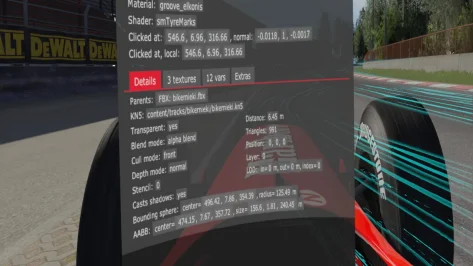
How to fix the position of a floating groove?
1756030487407.webp
1756030398302.webp

would this be feasible for me to change with code in extension\ext_config.ini or would it take some work in Blender (then I can't do this myself unfortunately)
Since Bikernieki High Speed is my #1 go-to track for testing cars, I would love to see those grooves fixed (they are all floating above the tarmac now... :bowdown:
 

Attachments

  • 1756030325261.webp
    1756030325261.webp
    84.9 KB · Views: 13
Last edited:
Download:


Masscot: We need a good XR2!
But we got a XR2 at home...

XR2 at home:
View attachment 1474344View attachment 1474345View attachment 1474346View attachment 1474347
Jokes aside, we could make this to a good mod with decent help, needs many improvments, like a better cockpit etc. etc.

Mod is from BombayS

There are many other cars from him:

1952 Buick Roadmaster
1959 Oldsmobile 88 Coupe
1972 Chevrolet Monte Carlo
1972 Bedford CF
1994 BMW 750i E38
1965 Cadillac Coupe DeVille
Cadillac Escalade
1961 Chevy Impala 1961 Coupe
1987 Dodge Charger
1995 Fiat Croma Turbo
1970 Ford Cortina MK3
1998 Ford Explorer
1984 Ford Fiesta 1.1 MK2
Ford Fiesta Van MK4
1972 Ford Granada Coupe
1967 Ford Mustang GT
1978 Ford Transit MK2
2003 Honda Accord i-CDTi
2007 Jaguar S-Type
Mercedes Benz C180 S202 Estate
1972 Mercedes Benz SL R107
1991 Mitsubishi Pajero Mk2 Wagon 5door
1970 Opel Ascona Voyage
1998 Opel Frontera MK2
1970 Opel Manta
1981 Range Rover
1988 Renault 11 Turbo
1980 Rolls Royce Limo
1979 Toyota Celica
1975 Vauxhall Chevette
1982 Volkswagen Polo Coupe
1980 Volvo 345
...
And some more, sometimes in better quality sometimes in worse.
That’s me! It’s Chongs XR2. I only spent an hour or so on it when I was learning the ropes of modding AC. I could probably make it into a worthy tribute now, I just have so many ongoing projects. Namely our Sierra Sapphire Cosworth, at last a good quality 3D base!

The whole repository there is from when I was practicing, so the workflow wasn’t nailed down and some of those models would be difficult to work with for advanced modders. I got those cars into the game no matter what it took. (Decimate modifier anyone? 🤣). We plan to sift through them eventually and tidy them up!

Regardless, our mission always has and always will be to bring obscure and rare cars into AC. Some free releases often like the Vectra GSi and Rover 220 Turbo, but mostly paid mods due to the 3D’s costing an absolute bomb. No profits involved, all proceeds go back into buying more models.

If you decide to check us out on discord, just remember to head to the ‘verify’ tab to verify your email, as this will unlock all of the channels.
 
Try Max'd out. They have a MK3 Fiesta, last i knew it was unencrypted to! However might've changed since i knew, but if not the XR2i or RS Turbo factory alloys are available on Renderhub, if you're into modding.
That's right!! One of the most popular sports cars from my youth,together with the R5 Turbo and Fiat Punto GT, sadly it seems to have never been released. 😞

1.jpg
 
That's right!! One of the most popular sports cars from my youth,together with the R5 Turbo and Fiat Punto GT, sadly it seems to have never been released. 😞

You put the Fiesta MK3 and the Pinto GT in the same bag as a Renault 5 turbo!
That is hilarious (to me).
8F31798E-5D01-4E8E-9D8E-119A2FA46BD3.webp
 
Last edited:

That's right!! One of the most popular sports cars from my youth,together with the R5 Turbo and Fiat Punto GT, sadly it seems to have never been released. 😞

1.jpg
I must get around to doing something with the MK3 Fez, an interior would be a start. Wouldn’t be accurate to the car though, just period correct. I have plenty of R5 GT Turbos and Fiat Punto GTs. I’ve made an R5 GTT actually, not got around to a Punto yet. I did recently release a Bravo haha
 
@Peter Boese
when I have a normal session, I see Running Update takes up around 0.2 ms
View attachment 1474426

on a "bad" session, it takes around 1.3 ms :
View attachment 1474427
But is it cause or effect ? :) (hoping you are onto something ...)
BTW , this was taken while not using Pure and without using a PP filter...
View attachment 1474428


Thanks already for your input and your everlasting efforts!


______________________________________________
@shi
Something entirely unrelated, ( I would like to put this in a separate post ,but that's against the rules)
How to fix the position of a floating groove?
View attachment 1474410View attachment 1474409
would this be feasible for me to change with code in extension\ext_config.ini or would it take some work in Blender (then I can't do this myself unfortunately)
Since Bikernieki High Speed is my #1 go-to track for testing cars, I would love to see those grooves fixed (they are all floating above the tarmac now... :bowdown:
does this happen with Pure too?

Because a difference of this size is really crazy if this is only caused within the weatherFX script.
So it could be due to the higher CPU occupation the time to update a frame of the weatherFX script is taking so long or it is the script itself. What do you see in the CSP Render stats. Is only the weatherFX script higher or also all other CPU based processes?

Please make the window bigger to see the single processes...
 
Last edited:
You will now have the chance to test a car done by all of the big three, URD, VRC and RSS.

 
Last edited:
does this happen with Pure too?

Because a difference of this size is really crazy if this is only caused within the weatherFX script.
So it could be due to the higher CPU occupation the time to update a frame of the weatherFX script is taking so long or it is the script itself. What do you see in the CSP Render stats. Is only the weatherFX script higher or also all other CPU based processes?

Please make the window bigger to see the single processes...
Peter, is there any chance you could have the default chance of rain set at 0% for any dry weathers?
It's annoying when you're using, say, Windy weather and then your screen suddenly freezes for a second and the framerate subsequently tanks just because a single drop or rain has fallen somewhere on the circuit.
If people want to ADD a chance of rain with dry weathers then fine, but having it as the defaults doesn't really make sense until Ilja fixes the framerate issues that one drop of rain can cause (it never used to be like this) plus the fact that one drop of rain can turn the circuit into an undriveable ice rink.
Might tiny drops of rain (even if you don't notice them actually falling) be also be contributing to these micro stutters?
I keep changing chance of rain to zero in dry weathers but it either doesn't save properly or gets reset when Pure is updated. We're told to reset to defaults with every update, aren't we?
Please at least consider it. As soon as any form of wet weather kicks in our PCs just shrug their shoulders and jump out of the nearest window.
 
Last edited:
Also a Question For Peter: Would it be possible for a 1-button <save-both-Pure-Config-track-specific-AND-Pure-PP-settings> together? I end up having to change the PP settings at almost every track due to over-saturation and brightness issues. A button to save Pure PP settings by track alone (or give-it-a-name-or-directory) would be good too... (I only use the Pure PP filter, it seems to do it all.)
 
Last edited:
Hello car modders, F1 peasant here. There have been an interesting 4 messages discussion in overtake on how the hell do I make backfire audible. Someone was going through a rought time doing a sound mod and trying to get the backfire sample run in game, And it is actually something I tried before getting it to work by using fmod backfire event, but no matter what it just didn't play in game. So ultimately after trying lot of stuff final consensus was that backfire should be triggered in physics. But where?

Stereo answered this
"From what I remember, there's an obvious spot in the data that "should" set backfires and it just doesn't, it's in a non-obvious spot. Like one's flames.ini and the other is audio_sources.ini or something."

So if someone made the backfire audio work through physics does anyone knows where in the physics it's actually related? (And working?)

Thanks
 
Just curious, since I reached 7000 hours in AC yesterday, how many hours do the other AC maniacs in this thread have clocked so far?
I have more time spent SIM racing in AC that in all my other titles put together.(ACC second with 1654 hours).
I anticipate the balance of 2025 and 2026 to be more or less solely dedicated to AC as in my VR setup it is better in most aspect important to me or at least as good as anything else out there.
4491 glorious hrs
 
I had a request for the Shell McLaren skin for the lm_hypercar_mcl_lmdh, so I thought I would share it for those who may be interested. Please note you must have this update by Nuttyboy812 over on Overtake or the skins will not be placed properly. the link is here, https://www.overtake.gg/downloads/sdd-mclaren-lmdh-uv-fix-gridfiller-skins.79369/
Also the mapping on the model is very strange when trying to skin in 2D, so these are a little rough in places.
There is the IMSA, WEC and Lemans skins with crew and driver.
Download
https://mega.nz/file/31ZiRL6R#9MTKl0_jLNoPleHiAMVtOUYQ1CPe52OLz0TtHz06gSM
01 shell mclaren skins.webp
 
Aomori Showroom - new preset for CM available for you.

View attachment 1467874

View attachment 1467875

View attachment 1467877

1. You need the showroom Aomori, available here (paid).


Install the extracted folder into .../content/showroom

2. Download the preset here:

https://acstuff.club/s/QaYO (normal view, for most of all the cars)

https://acstuff.club/s/OYed (wider view, for F1 or bigger cars like SUV etc)

3. Click on save and load the preset with CM (you´ll find it under /loaded).

4. Download the ext-config.ini and the models.ini (attached) and put it into the extension folder resp. the main folder (models.ini), overwriting the exisiting one.

Recommended for csp 0.2.11 or 0.2.12p1. Batch processing of the previews is still bugged but hopefully been solved soon.

Have fun!
Hey is anyone else struggling to get the actually showroom? I've gone to Gumroad and tried paying for it and it says, issue on the other end. Just curious if anyone else is facing this issue?
 
I had a request for the Shell McLaren skin for the lm_hypercar_mcl_lmdh, so I thought I would share it for those who may be interested. Please note you must have this update by Nuttyboy812 over on Overtake or the skins will not be placed properly. the link is here, https://www.overtake.gg/downloads/sdd-mclaren-lmdh-uv-fix-gridfiller-skins.79369/
Also the mapping on the model is very strange when trying to skin in 2D, so these are a little rough in places.
There is the IMSA, WEC and Lemans skins with crew and driver.
Download
https://mega.nz/file/31ZiRL6R#9MTKl0_jLNoPleHiAMVtOUYQ1CPe52OLz0TtHz06gSMView attachment 1474593
I should add, if you don't use my update all you have to do is flip the car_chassis.dds vertically in photoshop or other image editor. I did that with the skins that came out for this car today, and even used the jpg of the decals he included with one of the skins to upgrade my skins. I also swapped the color on his number 4 to white on orange instead of black on orange so it didn't match my 95. I should ask him to see if he would mind me uploading these, with credit of course. I'll go drop some comments on overtake to make sure people know you can just flip the texture if you want to adapt skins to one or the other. Loving those skins, good job Kurt! (I actually tried making a 3d template for this thing and while I was able to do it, I either messed up or can't remember how to place logos on 3d models in photoshop so that needs some more time to cook. Ideally somebody would tell me how to place logos in photoshop 3d but google can't find anything on this, though I know I have done it before.)
__custom_showroom_1756041961.webp
 
Sharing a mod? Host it on GTPlanet Downloads. Free, public hosting for files up to 10GB in size.
Back