Assetto Corsa PC Mods General DiscussionPC 

  • Thread starter Thread starter daan
  • 154,775 comments
  • 48,696,248 views
There's a rather nice Peugeot RCZ GT Line '16 by Stélian available here, but the tacho and speedo needles don't track parallel to the surface of the dials, instead sticking up like sundials. In VR this sticks out like... well, like a sticky-out needle, and looks quite bad. You could have somebody's eye out.
Stélian, if you're reading this... any chance of a fix please?

1756637530856.webp 1756637553827.webp

 
There's a rather nice Peugeot RCZ GT Line '16 by Stélian available here, but the tacho and speedo needles don't track parallel to the surface of the dials, instead sticking up like sundials. In VR this sticks out like... well, like a sticky-out needle, and looks quite bad. You could have somebody's eye out.
Stélian, if you're reading this... any chance of a fix please?

View attachment 1475937 View attachment 1475938

Already converted by 101C a couple of years ago.


God these GT7 modders can't stop rehashing the same ***** lol
 
There's a rather nice Peugeot RCZ GT Line '16 by Stélian available here, but the tacho and speedo needles don't track parallel to the surface of the dials, instead sticking up like sundials. In VR this sticks out like... well, like a sticky-out needle, and looks quite bad. You could have somebody's eye out.
Stélian, if you're reading this... any chance of a fix please?

View attachment 1475937 View attachment 1475938

I would avoid anything made by him, All of his stuff is often if not always stolen from other people. From 3D models down to LUA code & physics and even just porting alone. You are better off just grabbing the one my 101c even if it has worse shaders.
 
Last edited:
I would avoid anything made by him, All of his stuff is often if not always stolen from other people. From 3D models down to LUA code & physics and even just porting alone. You are better off just grabbing the one my 101c even if it has worse shaders.
The 101C version is very good except for the stitching (of which there's a lot in this car), which has been mapped to appear as a solid strip.
I tried taking Stelian's stitching DDS and NM and renaming them to fit the 101C car but all this did was confirm that the texture has ben mapped incorrectly.
Tried the usual different alpha settings as well. Nada.
Shame really, as apart from that it's a lovely car... but the bad stitching really lets it down for cockpit drivers.
 
Anyone else experienced the nasty issue of the game getting completely frozen (black screen) when launching a game session? There is no way of killing the process, I tried so many different things but at the end had to shut down and turn it on again the PC...which is not good. I hope it's not a CSP latest update bug or something, it's not something that it happens to me very often but in the last week happened 2 times...completely random.

Yes, I've had this happen as well, but only with certain race presets. I was thinking maybe something was corrupted, but yes the only way out of it is a cold boot.
 
Anyone else experienced the nasty issue of the game getting completely frozen... There is no way of killing the process... at the end had to shut down and turn it on again the PC...
Yes, I've had this happen as well, but only with certain race presets. I was thinking maybe something was corrupted, but yes the only way out of it is a cold boot.
I don't know if this has anything to do with that (probably not), but just in case: are you aware of the issue with one of the latest Windows 11 updates, which is causing similar errors?

Apparently, it's an incompatibility with the type of controller used by certain SSDs, when trying to move very large files when the hard drive is over 60% full...

 
Last edited:
I don't know if this has anything to do with it (surely not), but just in case: are you aware of the issue with one of the latest Windows 11 updates, which is causing similar errors?

Apparently, it's an incompatibility with the type of controller used by certain SSDs, when trying to move very large files when the hard drive is over 60% full...
I'm an "old school", still on W10 :lol:
 
Does anyone have "strange shadows" on ks Monza (the choosen car no matters) like this? As far i remember i never had it before while using SOL and older CSP patches... This happens in few parts of the circuit and in the "forest" i also have some FPS drop.

Sorry for the sequence of images but i have issue with internet that last from 8 days and i can't record a video since my mobile internet amount is almost over.

1 (1).webp
1 (2).webp
1 (3).webp
1 (4).webp
1 (5).webp
1 (6).webp
1 (7).webp
1 (8).webp
 
I don't know if this has anything to do with that (probably not), but just in case: are you aware of the issue with one of the latest Windows 11 updates, which is causing similar errors?

Apparently, it's an incompatibility with the type of controller used by certain SSDs, when trying to move very large files when the hard drive is over 60% full...


It happened to me too, I have Windows 10...
 
I have a problem with this track: the cars stop in the pits and start bouncing, and they don't come out anymore...😅
 

Attachments

  • IMG_20250831_004242_1.webp
    IMG_20250831_004242_1.webp
    246.4 KB · Views: 5
question, i have a new car installed and it looks very nice but now the gears are messed up. the car shifts too quickly into the higher gears, what can i do?
 
I have a problem with this track: the cars stop in the pits and start bouncing, and they don't come out anymore...😅

Maybe this same issue? Sorry I can't embed the video.


People report this here all the time but nobody has an idea what causes it.

It also happens on 0.1.79 CSP so it's most likely a Content Manager issue. Some crazy AI stuff is checked as a default and it causes that issue. For me it happened on FUJI MTS and Interlagos ACU. Tracks that were perfectly fine for years.
 
Last edited:
I don't know if this has anything to do with that (probably not), but just in case: are you aware of the issue with one of the latest Windows 11 updates, which is causing similar errors?

Apparently, it's an incompatibility with the type of controller used by certain SSDs, when trying to move very large files when the hard drive is over 60% full...


I don't think this is what's going on in my situation, as I also experienced it on my old Win 10 pc as well as my new system running Win 11 from a new 2TB M2 drive which is the only drive in this pc and only has just over 900 gigs used space for everything.
I've had it happen with a specific car or skin loading and the game just stalls at that point and you cant do anything, even task manager won't shut down the game, the only option is to cold boot.
 
I'm on W10 LTSC and this version will receive updates for a long time, even when W10 will end official support. You can give it a try.
It's one of the options I'm considering... On YouTube reviews sounds ideal for its lightness, lack of bloatware, etc, but I'm not entirely sure; we know what happens with certain reviews, they often don't tell the whole story... That's why a firsthand experience, like yours, is important.

What version of LTSC are you using, Enterprise or IoT? The latter is supported until 2032 (good 😁), Enterprise until 2027 (bad 😥, only prolongs the agony for a couple more years...)

And if so, what version of CM, CSP, etc?

Have you noticed any loss of performance or functionality in Assetto Corsa compared to "normal" Windows 10?

Thanks in advance.
 
Last edited:
It's one of the options I'm considering: on YouTube, it sounds ideal for its lightness, lack of bloatware, etc, but I'm not entirely sure; we know what happens with certain reviews, they often don't tell the whole story... That's why a firsthand experience, like yours, is important.

What version of LTSC are you using, Enterprise or IoT? The latter is supported until 2032, Enterprise until 2027, it only prolongs the agony for a couple more years...

And if so, what version of CM, CSP, etc?

Have you noticed any loss of performance or functionality in Assetto Corsa compared to "normal" Windows 10?

Thanks in advance.
It's completely safe, since it's a 100 % official Windows product. I've never encountered any issue with it, it works flawlessly just as W10 Home Edition or Pro Edition (or any other edition) and like you said, it doesn´t add any bloatware that typically comes with the Home Edition.

I'm running the Enterprise version which indeed ends support in 2027, but maybe after this date I will install the IoT version. Or maybe there will be a LTSC version of the W10 22H2 build (the current LTSC is 21H2) and support will be extended even further than 2032. Or maybe I will by that time, and finally, upgrade to W11 :lol: (Or probably just straight to W12)

And AC wise, I'm on the latest CM and CSP versions. Since I've never played AC in a normal W10 Home edition, I really can´t compare the performance between these two editions. I would dare to say that its probably exactly the same, and your actual hardware (CPU & GPU) are more relevant. I have a GTX 1660 SUPER which is by today standards a quite modest graphics card and a Ryzen 3 3300X processor, performance is normally quite good but in some races with many cars with no Lods or high poly count (combined with unoptimized tracks) I have of course bad fps and stuttering. But the one to blame here in my opinion is the weak graphics card and processor I have and not the W10 version/edition.

We can talk in DM (in Spanish of course) if you have any more questions, happy to help!
 
It's one of the options I'm considering: on YouTube, it sounds ideal for its lightness, lack of bloatware, etc, but I'm not entirely sure; we know what happens with certain reviews, they often don't tell the whole story... That's why a firsthand experience, like yours, is important.

What version of LTSC are you using, Enterprise or IoT? The latter is supported until 2032, Enterprise until 2027, it only prolongs the agony for a couple more
Maybe this could also be alternatives to consider.
 
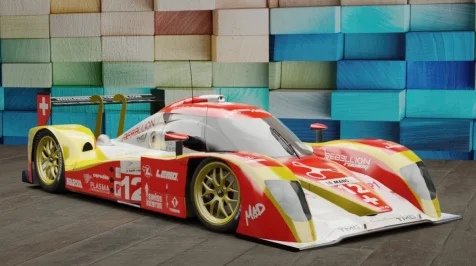
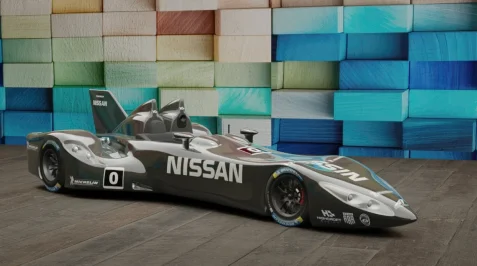
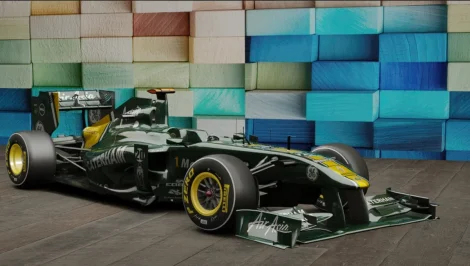
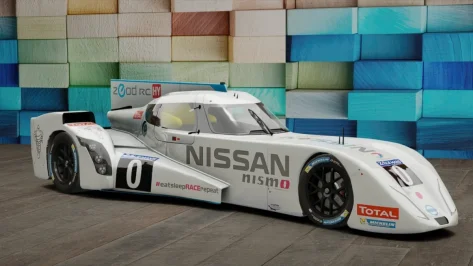
I'm searching these cars:
Lola B10/65
DeltaWing
Pescarolo 03
Lotus T128
Nissan ZEOD RC
CLM P1/01 2015
BR 01 LMP2
Dome S103

Do we have them in Ac?
Lola B10/65
1756660804347.webp

Nissan Deltawing
Screenshot 2025-08-31 121136.webp

Lotus T128 (available on the DL section of this very forum)
1756660974759.webp

Nissan ZEOD RC
Screenshot 2025-08-31 121013.webp

CLM P1/01 / Enso CLM P1/01 (VRC)
Screenshot 2025-08-31 132403.webp

BR Engineering BR01
1756661561068.webp


Pescarolo 03, pretty sure I had it at one time
Dome S103 not sur if it ever appeared in AC...

All the other one are easily obtainable with simple search
 
Last edited:
... We can talk in DM (in Spanish of course) if you have any more questions, happy to help!
Thanks for the info and the offer! I'll keep it in mind, although I think it's worth discussing in public, as I assume we're not the only ones interested in this topic. Thanks again! 😉
Maybe this could also be alternatives to consider...
Thanks to you too, although these computer things are complicated for me; I'm not exactly a computer whiz and you all already know what I'm capable if I start messing around with codes, operating systems and the like...

nuke-press-the-button.gif


(I love having opportunities to sneak the Nuclear Kitty in posts...)
 
Last edited:
question, i have a new car installed and it looks very nice but now the gears are messed up. the car shifts too quickly into the higher gears, what can i do?
Are you using auto shift? If yes, you can review the settings in drivetrain.ini file in data. Unpack the data.acd if needed. Is the upshift target too low?

Example:

[AUTO_SHIFTER]
UP=6000
DOWN=4800
SLIP_THRESHOLD=0.95
GAS_CUTOFF_TIME=0.130
 
Additionally, the AI for the Bayro is awful compared to the rest of the pack. I've tried races at many tracks (VIR, Road Atlanta, Buddh, Sachsenring), and all of them end with the BMWs spinning out over the curbs, while the rest of the cars carry on normally.
Anyone else notice this?
I tried the new Bayro and had no issue. The AI drove the car at its limits (beat me big time) no crash or spinning. Maybe you'll try again your install (do a clean install with CM or a manual overwrite in the cars folder). No need to change anything.
I have another problem with the Bayro: the display is not working and I copied the fonts into content folder, but maybe not the ones who need. Anyone with the display thing?
 
Last edited:
Maybe this same issue? Sorry I can't embed the video.


People report this here all the time but nobody has an idea what causes it.

It also happens on 0.1.79 CSP so it's most likely a Content Manager issue. Some crazy AI stuff is checked as a default and it causes that issue. For me it happened on FUJI MTS and Interlagos ACU. Tracks that were perfectly fine for years.
It's a crazy mess, but what's going on? In the meantime, I discovered another problem with KS_Monza_66: the cars leave the pits, disappear and return to the pits, in a loop... absurd 😅😅
 
Last edited:
Thanks for the suggestion! Unfortunately the data.acd is encrypted, so an AI fix seems impossible, outside of re-recording fast lanes to take less curbing.

Thank you so much, this worked exactly as you described. No more greyed out liveries 😁
You are welcome! 😁

About the people who have problems with the bayro display who don’t show I also gonna explain what happen. Is a mistake of code, they gonna fix it. Meanwhile you just need to press Extra _A button. And the display gonna be showed
 
Last edited:
Lola B10/65
View attachment 1476054

Nissan Deltawing
View attachment 1476056

Lotus T128 (available on the DL section of this very forum)
View attachment 1476057

Nissan ZEOD RC
View attachment 1476058

CLM P1/01 / Enso CLM P1/01 (VRC)
View attachment 1476059

BR Engineering BR01
View attachment 1476061


Pescarolo 03, pretty sure I had it at one time
Dome S103 not sur if it ever appeared in AC...

All the other one are easily obtainable with simple search
(wrong Lotus T128, he was asking for the proto)

ybybe.webp
 
Sharing a mod? Host it on GTPlanet Downloads. Free, public hosting for files up to 10GB in size.
Back