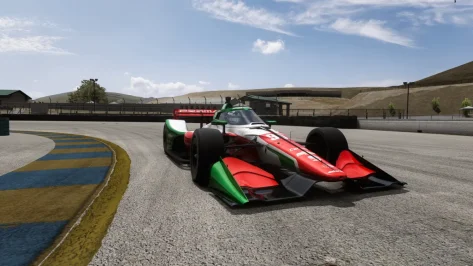
Yes indeed. I am doing this for a 2000 Sebring grid, so initially after the Ford, will be the Ford 2.6 turbo Multimax version.That's looking great! Is that going to have different engine options, eg. Ford V8, Judd V10, etc?
Yes indeed. I am doing this for a 2000 Sebring grid, so initially after the Ford, will be the Ford 2.6 turbo Multimax version.That's looking great! Is that going to have different engine options, eg. Ford V8, Judd V10, etc?


Use Object Inspector to get the coordinates.A little help from all the bright and dedicated people.
I'm trying to add the (goodwood?) trackside announcer to ks_monza66 to add additional immersion.
I've got as far as importing the files from the excellent rouen_f3ct.
The ext_config.ini - the line I'm stuck on (I think) is where AC plays the file, which would be the player pit position, the "POSITION" in the following.
; Track sounds
[SOUNDBANK_0]
BANK = sfx/goodwood.bank
GUIDS = sfx/GUIDs.txt
[EVENT_0]
ID = racetrack/new_announcer
REVERB_RESPONSE = 0
POSITION = 349.36,32.93,-358.14
DIRECTION = 0, 0, 1
VOLUME = 4
CAMERA_INTERIOR_MULT = 1
CAMERA_EXTERIOR_MULT = 1
CAMERA_TRACK_MULT = 1
Q. I can't seem to easily locate the coordinate for this location - is there an easy way to find it?
Always with thanks in advance. If I'm a million miles off, let me know.






An update on this to be fair, I found his discord and on there is help and much more info on each package, i think i'll go for it and get the 30 quid one.Came across this the other day, the superhive place its for sale on offers very little in explanation of what you get and how to use it so it put me off, its about 30 quid and there is a basic for 12 quid and a free one, but don't bother, its not even a demo.
It doesn't say what the 12 quid one gives you compared to the 35 quid one, I'm guessing the 35 quid one is the only one worth getting.
I am so cynical and don't trust anyone enough, but its even worse when there is a section for 'documentation' and its blank, why not mention 'full instructions on purchase', maybe there is, but why would you not say that.


Very interesting, I did give it a try but like you never had any success. Even contacted @Cozy61 by pm for repair his links, but he never did reply 😢A little help from all the bright and dedicated people.
I'm trying to add the (goodwood?) trackside announcer to ks_monza66 to add additional immersion.
I've got as far as importing the files from the excellent rouen_f3ct.
The ext_config.ini - the line I'm stuck on (I think) is where AC plays the file, which would be the player pit position, the "POSITION" in the following.
; Track sounds
[SOUNDBANK_0]
BANK = sfx/goodwood.bank
GUIDS = sfx/GUIDs.txt
[EVENT_0]
ID = racetrack/new_announcer
REVERB_RESPONSE = 0
POSITION = 349.36,32.93,-358.14
DIRECTION = 0, 0, 1
VOLUME = 4
CAMERA_INTERIOR_MULT = 1
CAMERA_EXTERIOR_MULT = 1
CAMERA_TRACK_MULT = 1
Q. I can't seem to easily locate the coordinate for this location - is there an easy way to find it?
Always with thanks in advance. If I'm a million miles off, let me know.


EX-Mods, AKa RTM mods, Aka ScamDream, Aka Anyother known scam group in the Assetto Corsa scene.
yes that is RTM Mods, The guys that wanted to charge $1000 for that Renault F1 minivan decades ago.
No, Their stuff is not worth buying, No their stuff is not worth driving and no their words hold absolutely 0 weight. It's an scam and you are getting scammed if you are even thinking about paying for that.


A little help from all the bright and dedicated people.
I'm trying to add the (goodwood?) trackside announcer to ks_monza66 to add additional immersion.
I've got as far as importing the files from the excellent rouen_f3ct.
The ext_config.ini - the line I'm stuck on (I think) is where AC plays the file, which would be the player pit position, the "POSITION" in the following.
; Track sounds
[SOUNDBANK_0]
BANK = sfx/goodwood.bank
GUIDS = sfx/GUIDs.txt
[EVENT_0]
ID = racetrack/new_announcer
REVERB_RESPONSE = 0
POSITION = 349.36,32.93,-358.14
DIRECTION = 0, 0, 1
VOLUME = 4
CAMERA_INTERIOR_MULT = 1
CAMERA_EXTERIOR_MULT = 1
CAMERA_TRACK_MULT = 1
Q. I can't seem to easily locate the coordinate for this location - is there an easy way to find it?
Always with thanks in advance. If I'm a million miles off, let me know.
Very interesting, I did give it a try but like you never had any success. Even contacted @Cozy61 by pm for repair his links, but he never did reply 😢
. Maybe a member can post a simple DIY manual as whatever I try it does not work. 🤪Not sure if anyone is interested but I like crowd sounds when I'm racing F1 tracks - I know that the driver can't hear them but I think it adds to an immersive experience.
I've attached an example with the 2022 Cota Track plus the separate constitutes that can be adjusted for other tracks
To change the coordinates I used 'CM object inspector' and right-clicked at certain points on the track to get the coordinates for input
YT Video is OOD but for an example of how to use the object inspector see here: 06:48 - Streaming edges and points
2022 F1 Tracks GDrive...


ok, so simdream has a reputation... i just downloaded their free "demo" of the indycar 2025 mod, drove it around Sonoma, did some setup changes, seems pretty decent.. can anyone here check it out to see if it has stolen assets? i have been reading that they are making scratch made mods in last couple years. https://www.assettocorsamods.org/product/assetto-corsa-indy-2025-demo-mod/ or
if you want to skip the useless sign up process for a free mod.
the front wing flops around a bit, but they seem to make a lot of updates these days (ie the 2024/25 1998/99/00 f1 mods they have made in last 2 years, which are decent, and can be found on reddit ofcourse...)


Thank you for the heads up, I was going to try it but it will go now directly to the trash bin.They've stolen the helmets/suits/gloves/crew signage from my pack on RaceDepartment. I've compared the DDS files and they are 100% the same.


ok, so simdream has a reputation... i just downloaded their free "demo" of the indycar 2025 mod, drove it around Sonoma, did some setup changes, seems pretty decent.. can anyone here check it out to see if it has stolen assets? i have been reading that they are making scratch made mods in last couple years. https://www.assettocorsamods.org/product/assetto-corsa-indy-2025-demo-mod/ or
if you want to skip the useless sign up process for a free mod.
the front wing flops around a bit, but they seem to make a lot of updates these days (ie the 2024/25 1998/99/00 f1 mods they have made in last 2 years, which are decent, and can be found on reddit ofcourse...)
Thank you my friend, I will try again, maybe now I have more luck.Just tried doing same (as an experiment), and all works OK.
Here's my take on the needed process - basically in three steps - refer diagram.
View attachment 1482189
If you're not that familiar with the 'object inspector' tool - then here's a copy of the edited sound-ini file.
Note: remove '.txt' and place file in ...\ks_monza66\extension
They've stolen the helmets/suits/gloves/crew signage from my pack on RaceDepartment. I've compared the DDS files and they are 100% the same.
As everything seems to be stolen, does a member here know what is the original source of the moving pit and starting grid crew?They are stolen Forza models, Just like their Nascar pack is just the Forza models stolen again.
To put it simply, ANYTHING by simdream is stolen, They have NEVER made a single piece of content themselves. All their stuff is stolen from other games or bought 3D models from CGTrader that are meant for RENDERING and not for video games.
Thank you my friend, I will try again, maybe now I have more luck.
As everything seems to be stolen, does a member here know what is the original source of the moving pit and starting grid crew?


Another update coming in!


 www.overtake.gg


ok, so simdream has a reputation... i just downloaded their free "demo" of the indycar 2025 mod, drove it around Sonoma, did some setup changes, seems pretty decent.. can anyone here check it out to see if it has stolen assets? i have been reading that they are making scratch made mods in last couple years. https://www.assettocorsamods.org/product/assetto-corsa-indy-2025-demo-mod/ or
if you want to skip the useless sign up process for a free mod.


Can you actually make Indycar seasons work on AC?



Testing is quite easyIt's not possible, it's not possible, sorry, but I'm angry...🤬🤬🤬
Shin's Monza88, for me, also has the exact same problem (a problem with no explanation or solution) as Ks_Monza_66: the cars enter the pits and can't exit because they disappear upon exiting and reappear in the pits again, in a loop.
CSP 0.2.9p1 and Nuzzi Pit App: in my opinion, the app isn't the problem. 🤬🤬

This worked! Well done sir. It definately adds something to make it feel like an event.Just tried doing same (as an experiment), and all works OK.
Here's my take on the needed process - basically in three steps - refer diagram.
If you're not that familiar with the 'object inspector' tool - then here's a copy of the edited sound-ini file.
Note: remove '.txt' and place file in ...\ks_monza66\extension

VAO snacks for all 4 layoutsRouen les Essarts Update (MadBrain version)
Updates for Rouen les Essarts tracks by @MadBrain To install, you just have to extract the main folder rouenlesessarts in your assetto corsa track folder or load the zip file in Content Manager. If you already installed a former version, it is...
Finally a 0.2 update for Rouen les Essarts
Added the new layout as mentionned earlier (72-73 configuration which is the modern configuration but without the "Chicane des Roches" at "Six Frères")
The update is maybe not spectacular but to add trees and the new layout, I had to import / export the fbx from MadBrain in Blender, and it was a mess, I had to make many shaders replacement in the ext-config.ini, otherwise, the trees would not show up. I took advantage of this to learn more about shadows, ksDiffuse, ksAmbient etc... Still have some reflexions to tweak however... I tested the tracks with a rtx4090 so I'm not sure everything is optimised as it should be. Just let me know.
If an experimented driver wants to try the 74-94 layout and tell me how he feels the chicane, that would help me! I find it too bumpy and slippy, not sure it was like that in reality. I saw that the chicane road mesh has a small threshold at the beginning of it, maybe that would help to polish it but it is maybe me that is a too poor driver :-) The same for the junction between the common layout and the modern S in the north of the track that replaced the part 55-71 with the Scierie turn when the motorway was built.
I created new AI lines for each layout. I play with a controller, so they are produced in this way, either with Porsche RSR 2017 or with Ferrari 488 GT3. I made them with CSP 0.12.1 preview , with new AI behaviour disabled and tested them with the same option enabled. I tested every layout in races of 5 laps with AI strength at 90 and 0% aggression and with Nuzzi FIA flag and AI Pit Strategy apps activated. I made also some tests under rainy weathers.
The AIs were polished so that I did not experiment any strange starts or crazy behaviours during straights or while braking, in any conditions. I even enjoyed good fights with the top 3, overtaking each others correctly with sometimes some late braking resulting in a crash :-) But here as well, a test by experimented drivers with wheels would help a lot I'm sure. I believe the AI lacks of speed in the fast turn of "Six Frères" and the overtaking is quite easy at the "Nouveau Monde" pin but I could not do better when registering the lines :-D
I'm a beginner at Blender so I was not able to merge all 3 fbx inside 1. Aside from the mess of IDs between fbx, the problem is that the fbx for the larger 55-71 layout has different altitudes where the other layouts should pass. So I'd have to do a lot of mesh adjustements in Blender and my first tries resulted in small gaps everywhere, far beyond my capacities and available time ^^
So still stuck with the editing of 3 fbx for one modification... And also I was not able to recreate the AC_POBJECT hierarchy structure provided by MadBrain so I replaced them with common objects until I understand how to recreate them with Blender and export them correctly.
Next step would be also to add track lights in the modern layouts "72-73" and "74-94" . I saw how to do it but must find time.
I found the experience really amazing, but very time consuming: I gained a lot of respect for all the track builders / editors and saw wonderful works in many mods while opening them to learn "how they did that ?"
Anyway, I downloaded so much content from the community that I'm happy to have at least tried to produce something in return ;-)
Can almost guarantee you its the Nuzzi app. That app messed up all my races.It's not possible, it's not possible, sorry, but I'm angry...🤬🤬🤬
Shin's Monza88, for me, also has the exact same problem (a problem with no explanation or solution) as Ks_Monza_66: the cars enter the pits and can't exit because they disappear upon exiting and reappear in the pits again, in a loop.
CSP 0.2.9p1 and Nuzzi Pit App: in my opinion, the app isn't the problem. 🤬🤬
Testing is quite easy
- remove the Nuzzi app and see if happens again
if so
- downgrade CSP and see again if happens or not.
There's no other solutions...
many thanks ! Didn't know it would enhance the things like this ! another thing to learn ;-)VAO snacks for all 4 layouts
You are welcome, and yes you can add.many thanks ! Didn't know it would enhance the things like this ! another thing to learn ;-)
Is it ok to add them in the next update (with your name of course) ?
Looks good, an app that add code-lines and destroy things without a backup, such a great thing...You can't just remove the Nuzzi app, you have to go into each track's surface.ini file and delete the last section that the app adds, only then does it stop working.


Looks good, an app that add code-lines and destroy things without a backup, such a great thing...
If you look at the part of the Nuzzi Pit app code where decision to go to the pit is computed (line 401 of NuzziPitApp.lua), you'll find:It's not possible, it's not possible, sorry, but I'm angry...🤬🤬🤬
Shin's Monza88, for me, also has the exact same problem (a problem with no explanation or solution) as Ks_Monza_66: the cars enter the pits and can't exit because they disappear upon exiting and reappear in the pits again, in a loop.
CSP 0.2.9p1 and Nuzzi Pit App: in my opinion, the app isn't the problem. 🤬🤬
-- Loop through all ai drivers
for i = 1, ac.getSim().carsCount - 1, 1
do
-- Loop through the drivers pit stop laps array (pit stops strategy)
for a = 1, #aiDriversArray.pitStopsLapsStratArray, 1
do
-- Ai request scheduled tyre stop when:
-- 1) On lap they want to pit
-- 2) They haven't already requested (to stop spam)
-- 3) When they are not in pitlane & more than 25% round a lap to stop teleport to pit on exit bug
if ac.getCar(i).lapCount + 1 == aiDriversArray.pitStopsLapsStratArray[a] and aiDriversArray.pitStopRequested == false and ac.getCar(i).isInPitlane == false and ac.getCar(i).splinePosition >= 0.25 then
There is readme file with Nuzzis apps:Looks good, an app that add code-lines and destroy things without a backup, such a great thing...