Assetto Corsa PC Mods General DiscussionPC 

  • Thread starter Thread starter daan
  • 154,882 comments
  • 48,746,334 views
Just want to say, the latest CSP with Pure 3.0 is a big step up for me in every way.

Looks better, runs much better, weather transitions are seamless for me now. Rain performance has much increased. It's amazing how this has progressed for a game nearly 13 years old. AC Evo is gonna have a tough task ahead!

Thank you Ilja and Peter.

One minor thing I noticed with the latest CSP build is HDR isn't working for me now? When I select it, the screen is black and the UI doesn't work properly either. Does this either fullscreen or windowed borderless. I use HDR in lots of games so know how to set it up in Windows
 
X90
Latest CSP hotfix. Manually installed.

Lines are not commented out.

No change.

I may just clean install (again) and see if it returns.
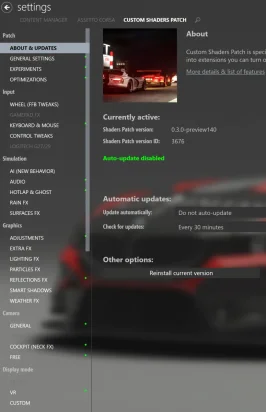
This is not the latest CSP, the left column you showed is the "old" one
It SHOULD looks like that:
1762003363744.webp

Might be why your's blacked out if you have an older (2.xx) with a 3.x fix over it
 
Maybe it's just me and I have some CSP setting wrong, but I never got crowds in the stands on the base Monza track. Some stands had them, but even those ones were limited. So last night I threw together a quick mod to fill up all the seats. I also had to shift some trees around to expose some of the stands.

Does anyone know if someone has already done a mod like this and if not, would anyone be interested in it?

1.webp

2.webp

3.webp

4.webp

5.webp
 
Last edited:
Maybe it's just me and I have some CSP setting wrong, but I never got crowds in the stands on the base Monza track. Some stands had them, but even those ones were limited. So last night I threw together a quick mod to fill up all the seats. I also had to shift some trees around to expose some of the stands.

Does anyone know if someone has already done a mod like this and if not, would anyone be interested in it?

View attachment 1489015
View attachment 1489016
View attachment 1489017
View attachment 1489018
View attachment 1489019
Great to see you around, sir.
I would absolutely be interested. :cheers:
 
Just want to say, the latest CSP with Pure 3.0 is a big step up for me in every way.

Looks better, runs much better, weather transitions are seamless for me now. Rain performance has much increased. It's amazing how this has progressed for a game nearly 13 years old. AC Evo is gonna have a tough task ahead!

Thank you Ilja and Peter.

One minor thing I noticed with the latest CSP build is HDR isn't working for me now? When I select it, the screen is black and the UI doesn't work properly either. Does this either fullscreen or windowed borderless. I use HDR in lots of games so know how to set it up in Windows
HDR shows also a black screen the first time you run it with Pure. But the second time you start should work.

For Pure Gamma use the pureHDR ppfilter for Pure LCS use the normal "pure" ppfilter, it will manage everything itself.

Did you already check the HDR tutorial.pdf in the Pure zip? YOu will see all settings there.
Also maybe deactivate this:
1762017391987.webp


Where do you see "true borderless" In the new CM and CSP 0.3.xxx it shouldn't be there...
 
Last edited:
Maybe it's just me and I have some CSP setting wrong, but I never got crowds in the stands on the base Monza track. Some stands had them, but even those ones were limited. So last night I threw together a quick mod to fill up all the seats. I also had to shift some trees around to expose some of the stands.

Does anyone know if someone has already done a mod like this and if not, would anyone be interested in it?

View attachment 1489015
View attachment 1489016
View attachment 1489017
View attachment 1489018
View attachment 1489019
Any chance of swapping the default crowd textures for the much better knicker97 ones while you're at it? They look an awful lot nicer than the dead-eyed Kunos zombies.
 
Thanks but no thanks :lol:
HDR shows also a black screen the first time you run it with Pure. But the second time you start should work.

For Pure Gamma use the pureHDR ppfilter for Pure LCS use the normal "pure" ppfilter, it will manage everything itself.

Did you already check the HDR tutorial.pdf in the Pure zip? YOu will see all settings there.
Also maybe deactivate this:
View attachment 1489055

Where do you see "true borderless" In the new CM and CSP 0.3.xxx it shouldn't be there...
He's not on 3.0+, his left menu are the old one. Another case of user error I guess 🤷‍♂️
 
This is not the latest CSP, the left column you showed is the "old" one
It SHOULD looks like that:
View attachment 1489008

Might be why your's blacked out if you have an older (2.xx) with a 3.x fix over it


No, you misunderstand, and misread...

That is the old menu. That is merely highlighting what I wanted from my old reference screenshots from 0.2.12... and it was late.


I will post the new menu and what it looks like. I didn't think it was necessary...


EDIT: 0.3.140 UI menu:

Screenshot (54).webp


Will be clean installing again... sigh...
 
Last edited:
X90
No, you misunderstand, and misread...

That is the old menu. That is merely highlighting what I wanted... and it was late.


I will post the new menu, as apparently reading comprehension is a struggle...
Yeah it might be because a lot of us members where not born speaking english! :gtpflag:
 
Hi mate, thanks for the car but - seventh gear is broken?
Easy peasy already made "his" version addressing that issue as well fixing the engine damage for no reason.

But the rear headlights look weird, and the car is supposed to be manual but I can only drive it on sequential mode, won´t let me use the H-shifter.

Screenshot_polo_gti_11_track_ks_nordschleife_1-10-125-15-57-26.webp
 
Last edited:
HDR shows also a black screen the first time you run it with Pure. But the second time you start should work.

For Pure Gamma use the pureHDR ppfilter for Pure LCS use the normal "pure" ppfilter, it will manage everything itself.

Did you already check the HDR tutorial.pdf in the Pure zip? YOu will see all settings there.
Also maybe deactivate this:
View attachment 1489055

Where do you see "true borderless" In the new CM and CSP 0.3.xxx it shouldn't be there...
Yeah sorry, should have said I used borderless in previous CM versions with HDR, obviously gone in latest version. I forgot about the HDR pdf in the Pure zip file. Ill have a look.

Still no luck, It's strange the UI in game doesnt work at all when I enable HDR in CM, and the red triangles for other cars close to you leave trails in the pits, but I can exit out with the Escape key menu. I'm still on Windows 10 btw.

Thanks but no thanks :lol:

He's not on 3.0+, his left menu are the old one. Another case of user error I guess 🤷‍♂️
Think you're mixing me up with someone else. I am on 0.3.0
 
Easy peasy already made "his" version addressing that issue as well fixing the engine damage for no reason.

But the rear headlights look weird, and the car is supposed to be manual but I can only drive it on sequential mode, won´t let me use the H-shifter.

View attachment 1489061
Regarding the transmission, its DSG so yeah, paddle shifting only but you can change it in drivetrain.ini, there is a section SUPPORT_SHIFTER=0, change the 0 to 1
 
$3 for an livery for an car that costs £4.19 to buy is kinda wild. This thing better be pixel perfect down to the millimeter, and also give me an handy under the table for that price lol.
 
Last edited:
wierd, i wanna change some controller bindings but somehow i cant. i try to allign the button and press it on my gamepad but it wont connect and recognize that i want to that button for that control. but its recognizing my controller
 
I had this issue yesterday where my game drops to 60fps on the latest csp . Thankyou for pointing out the issue . Did the nvidia driver reimstall fix the issue?
I've tried to fiddle with the profils in Nvidia Inspector but no luck. A reinstall of the driver solve this odd issue for me (no need to clean install).
 
Last edited:
wierd, i wanna change some controller bindings but somehow i cant. i try to allign the button and press it on my gamepad but it wont connect and recognize that i want to that button for that control. but its recognizing my controller
Same here, my pause button suddenly stops working recently after updating, but I realize you have to open the Extended Controls app and change your button layout in-game, not from the CM menu.
 
Sharing a mod? Host it on GTPlanet Downloads. Free, public hosting for files up to 10GB in size.
Back